
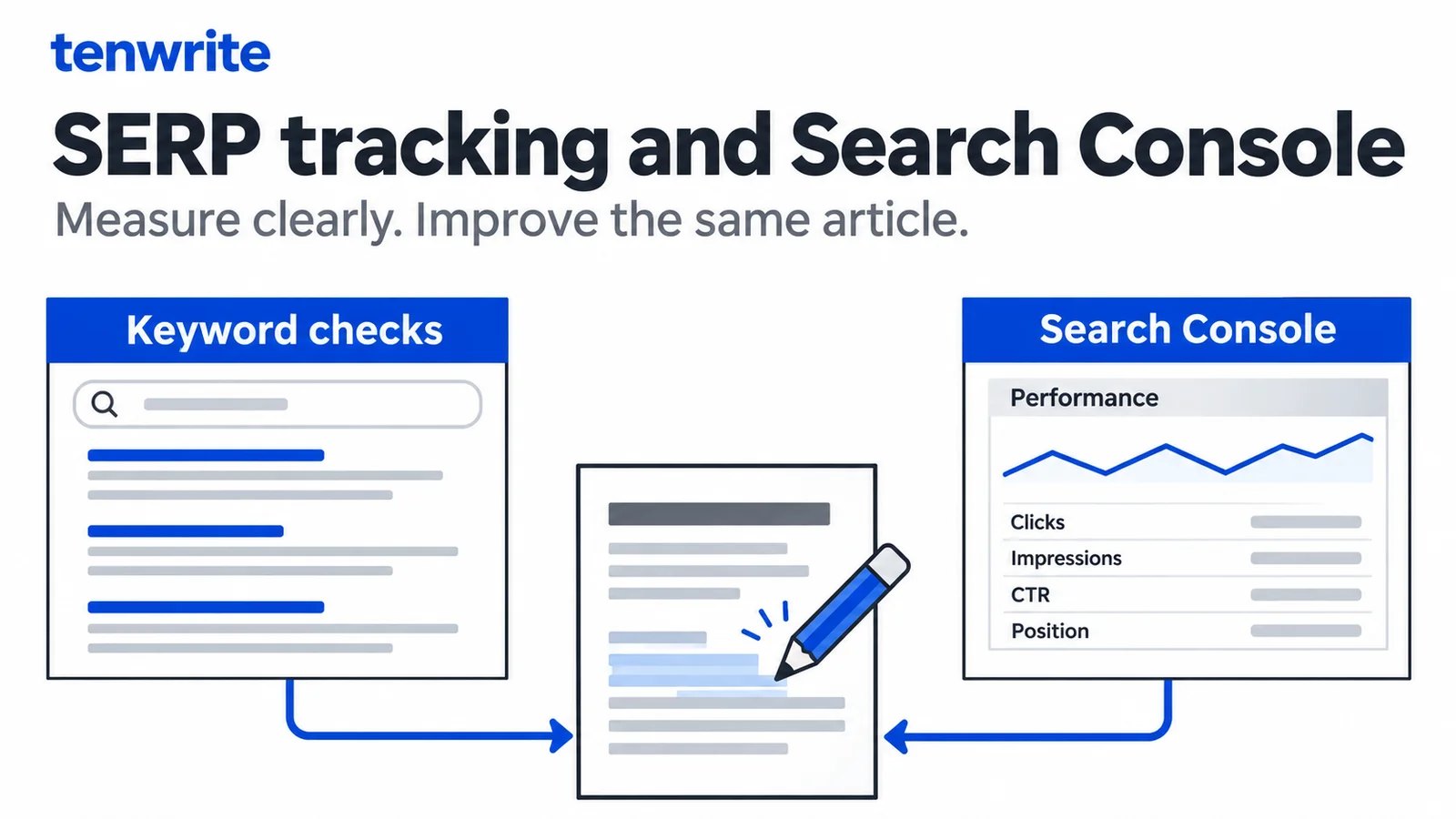
An SEO SERP tracker and Google Search Console answer different questions. A keyword rank tracker checks search results under specified conditions. Search Console reports how your site appeared and received clicks in Google’s results over a reporting period. Use the first when you need repeatable keyword observations; use the second when you need evidence about your own pages’ search performance.
Tenwrite’s SEO Tracker uses Search Console data for tracked WordPress and Blogger posts and pages. It is not an independent keyword rank tracker. Its useful publishing workflow is to identify an article worth investigating, inspect the saved page and metadata, revise the source, update the existing post and review later performance without confusing those different measurements.
This guide demonstrates that workflow with the live Tenwrite interface and an actual upload and same-post update test. It also explains when a separate SERP tracker remains necessary. The examples are observations of our owned site, not promises of rankings, traffic or customers.
Choose the measurement before choosing a tracker
Start with the question you need answered. “Where does this URL appear for this keyword in this market on mobile?” calls for a controlled search-results observation. “Which published articles received impressions and clicks during the last completed reporting period?” calls for performance reporting. Neither question becomes clearer merely because both tools display a number called position.
A useful independent tracking record identifies the query, intended page, observed URL, engine, location, device and observation time. The tool’s checked range and treatment of different result types also matter. Keep those conditions consistent before interpreting a change between checks. We did not run a new independent rank-tracker benchmark for this guide.
Search Console is based on Google’s reporting of your site’s search appearances. Its performance report overview explains the core measures, including average position. That reporting is not a simulation of one selected person’s next search. A page-level average can summarize many different appearances rather than one stable rank for one keyword.
Choose both sources when the decision needs both. A team may monitor a defined keyword set in an independent tracker and use Search Console to understand the site’s resulting visibility and clicks. Preserve each source’s identity in the review record instead of placing unlike position values in a single unlabeled ranking column.
What Tenwrite’s SEO Tracker actually provides
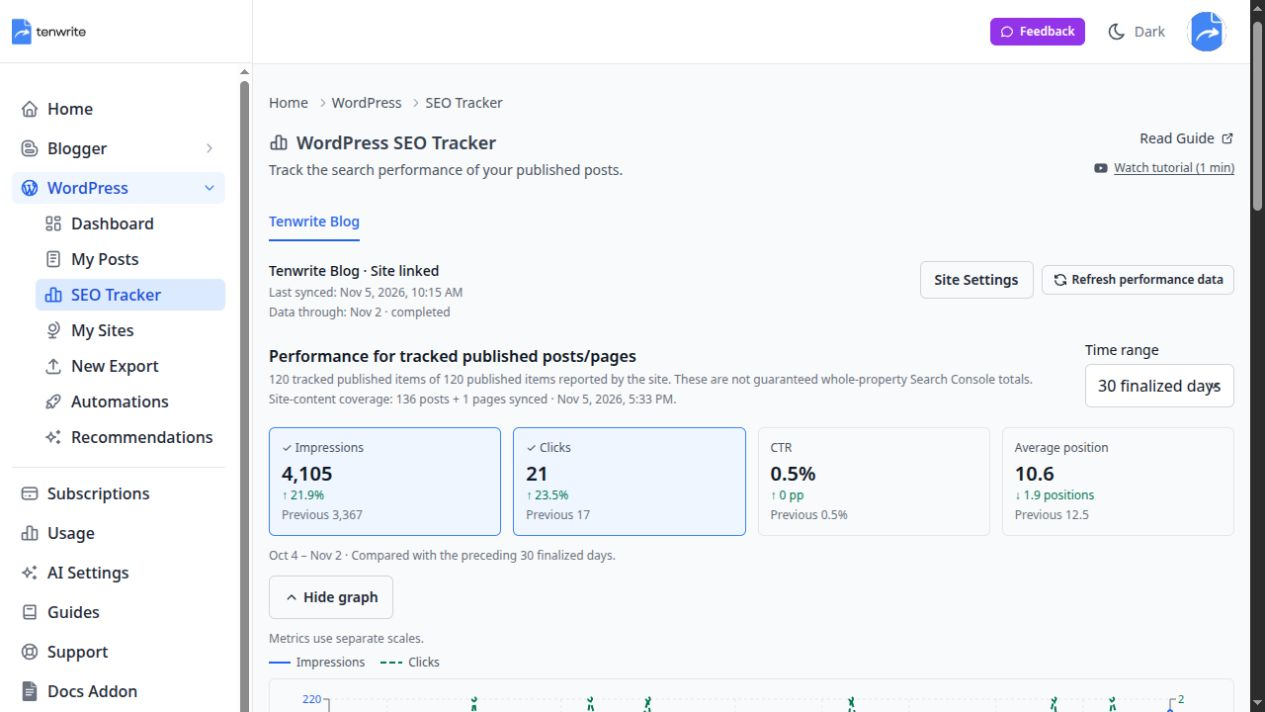
In the Tenwrite dashboard, expand WordPress or Blogger and choose SEO Tracker. Select the connected site, then choose 7, 30 or 90 finalized days. The workspace brings search performance beside the published content that editors can investigate and maintain.
The metric choices are impressions, clicks, CTR and average position. The overview graph can display selected metrics, and the published-item list can be searched, filtered and sorted. Open a post’s Inspect view for its performance, daily history and available metadata. For the full setup, see the SEO Tracker documentation.
This is Search Console reporting for tracked published content. The workspace explicitly warns that its totals are not guaranteed whole-property Search Console totals. Drafts, untracked URLs and other parts of a property should not quietly become assumptions about the site’s complete search audience.
The tool also does not turn an impression into a visit or a customer. Clicks are search clicks; a signup or purchase requires separate evidence. Google’s explanation of Search Console and Analytics data is useful when a team is trying to reconcile search reporting with on-site behavior. Keep those measurement systems distinct.
Check access and collection status first
Tenwrite’s SEO Tracker is available on paid base plans, based on the connected site’s owner. Accepted members can read shared reporting, while owner controls govern connection and refresh. A standalone add-on should not be assumed to unlock the paid analytics workspace. Check the current Tenwrite plans and your account’s effective access.
A connected WordPress site and a linked Search Console property are separate requirements. Confirm that the property and selected site correspond to the public content you intend to inspect. An origin hostname and a public blog hostname may differ, so read the page identity rather than assuming that matching article titles establish the correct mapping.
Read the data-through date and last-sync information before interpreting the graph. Tenwrite collects daily with a three-day finalized-data cutoff. The date you open the application is therefore not the end date of a live search-results feed. If recent collection is incomplete, keep that limitation attached to the numbers.
Performance refresh and site-content sync also serve different purposes. A performance refresh concerns search reporting. Site-content sync refreshes the content inventory and metadata read from the CMS. Neither should be described as importing WordPress body edits into a Google Doc.
Read a real page record without inventing a trend
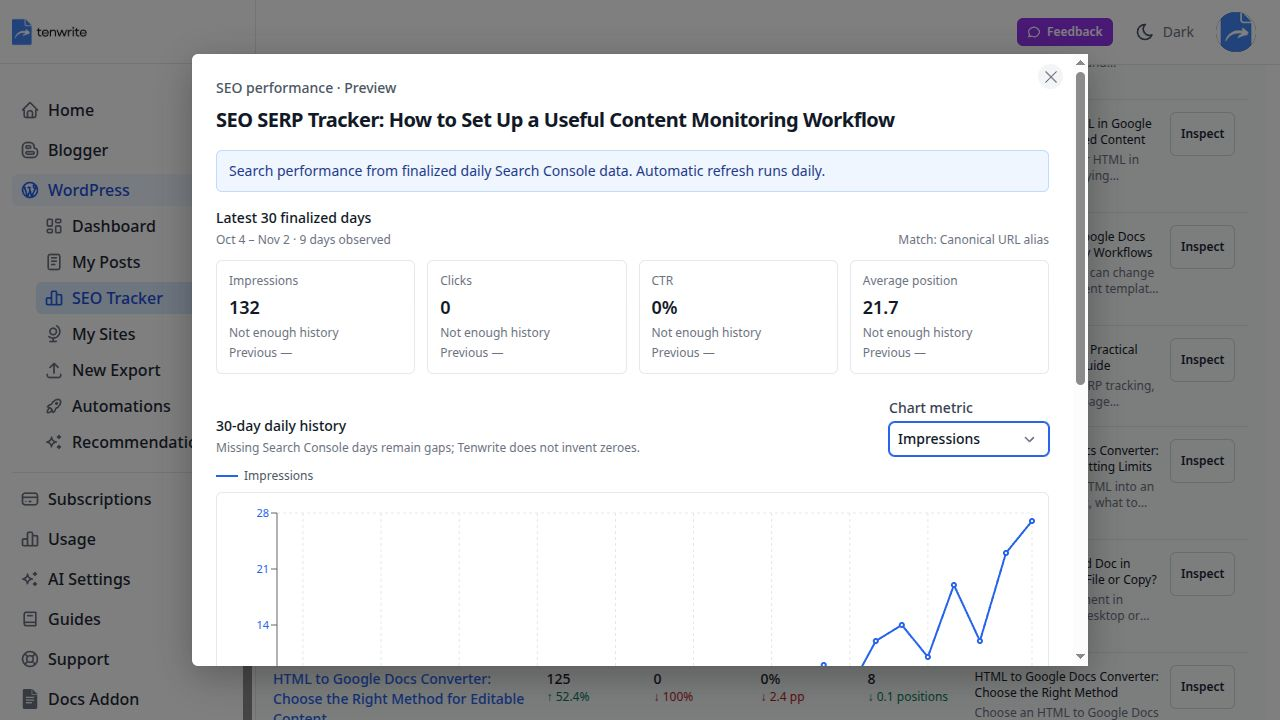
We opened Tenwrite’s WordPress SEO Tracker on November 6, 2026. The selected 30-day view covered October 4–November 2. This guide’s existing page showed 132 impressions, zero clicks, 0% CTR and average position 21.7. Its Inspect view reported nine days observed and marked the comparison as “Not enough history.”
Those labels are part of the result. This was a recently published page within a longer selected window, not a complete before-and-after experiment. Zero clicks did not tell us why nobody clicked, and the average position did not establish where the page ranked for an individual commercial keyword.
We did not refresh the collection to manufacture a newer reading. The visible record was sufficient to demonstrate how to inspect a dated report and recognize insufficient history. Keep the exact reporting period when you share a screenshot; otherwise a teammate may mistake an older collected window for today’s results.
Our earlier research used a different date window and returned different page totals. That is not, by itself, a contradiction. Compare the source, range, coverage and filters before treating different totals as a product defect or a performance change. Do not combine a 28-day page export, a 30-day application view and a property-wide query table as though they were one dataset.
Inspect queries before treating impressions as demand
An impression count tells you that content appeared in reported search activity. It does not establish that every appearance came from someone evaluating your product. Open Search Console when you need to inspect the queries behind a potential editorial decision, keeping the page and date filters explicit.
Our earlier property research included unusual number-prefixed SERP phrases. That made us cautious about interpreting the impression count as buyer demand. It did not prove that all impressions for this page came from those phrases, or that the traffic was automated. A property-level query observation requires a page-level check before attribution.
Google’s dimensions and data-grouping guidance explains that some query information is omitted for privacy. Treat disclosed query rows as partial evidence. If the visible rows do not account for the page’s full impression count, preserve that gap rather than assigning the missing activity to a convenient keyword.
For a practical review, group the disclosed phrases by meaning: relevant publishing questions, branded navigation, unrelated intent and terms you cannot interpret confidently. Then check which page appears for the relevant queries. Keep uncertain phrases in an investigation note instead of rewriting the article around them merely because they have impressions.
The Tenwrite performance list is useful for identifying a page to investigate. It should not be described as a complete query-analysis or independent keyword-location tracking interface. Use the appropriate source for that deeper question and bring a clear conclusion back into the article review.
Interpret CTR and average position together
CTR is clicks divided by impressions for the selected reporting context. A page with zero clicks can have zero CTR even when it has impressions, but that alone does not identify the best repair. Search intent, the queries involved, the result’s presentation and the article’s actual usefulness all deserve investigation.
Average position is also context-dependent. A change in the mix of queries or appearances can move the average without every keyword moving in the same direction. Compare like periods and inspect the relevant page and query context before writing “we lost three positions” in an editorial brief.
Google’s discussion of Search Console data filtering and limits helps explain why reported tables and totals can differ. A reviewer should preserve filters and coverage alongside a conclusion, particularly when the sample is small. Do not add averages from unrelated rows or average percentages without considering their underlying counts.
Missing history needs its own interpretation. Tenwrite’s chart explains that missing observations remain gaps. “Not enough history” should remain an unavailable comparison, not become a zero baseline or an infinite percentage increase. For the page in our example, the responsible conclusion was to inspect its usefulness and measurement fit, not announce a growth or decline trend.
Turn the observation into a specific editorial task
A useful brief identifies the page, the reader’s task, the evidence and one concrete change. For this guide, the main issue was conceptual clarity: readers looking for a SERP tracker needed an immediate explanation of independent keyword checks versus Search Console performance. Tenwrite’s role needed an actual demonstration rather than a generic handoff lesson.
Open Inspect in the published-item list and read the available metadata with its synchronization date. In our record, Tenwrite showed the saved SEO title, description, focus keyword and indexing settings. The panel also explained that refreshing performance does not refresh CMS metadata. That prevented an older content snapshot from being mistaken for newly verified page output.
A review note should say what the editor will change and what would count as completion. “Clarify the tool distinction in the introduction, add current screenshots, preserve the URL and verify a same-post update” is actionable. “Improve SEO because impressions are low” does not tell a writer what readers are missing.
Keep ranking evidence and editorial judgment separate in the brief. The data can identify an opportunity without proving that one wording change will cause more clicks. For a newly published page or a small query sample, a useful correction may be justified by reader clarity even while its commercial impact remains uncertain.
Test the publishing step with an owned draft
Before relying on the update workflow, we ran a real local-file test through Tenwrite. The source was an owned, reviewed DOCX checklist previously exported from Google Docs. It contained headings, bullets, a table, a descriptive link and an illustration. No customer document or new Google Docs Sync operation was used.
In WordPress → New Export, we selected the owned site, uploaded trial-v1.docx, set the title to “SERP review publishing trial” and kept Draft selected. We used WordPress Blocks and Balanced cleanup, removed inline styles and enabled copying images to the Media Library with the first used as the cover.
Tenwrite’s resolved confirmation said the sample would remain a draft. After confirmation, it created WordPress draft 1677. We opened the authenticated preview and checked the saved article, including its headings, list, table, link and featured image. A separate WordPress sign-in may be needed to inspect a draft preview.
The sample table rendered all cells as headers. That limitation is worth recording: a successful transfer does not certify body accessibility. A search-performance workspace can point you toward a page, but it cannot replace a content and formatting review on the actual destination.
Revise the same post instead of exporting a duplicate
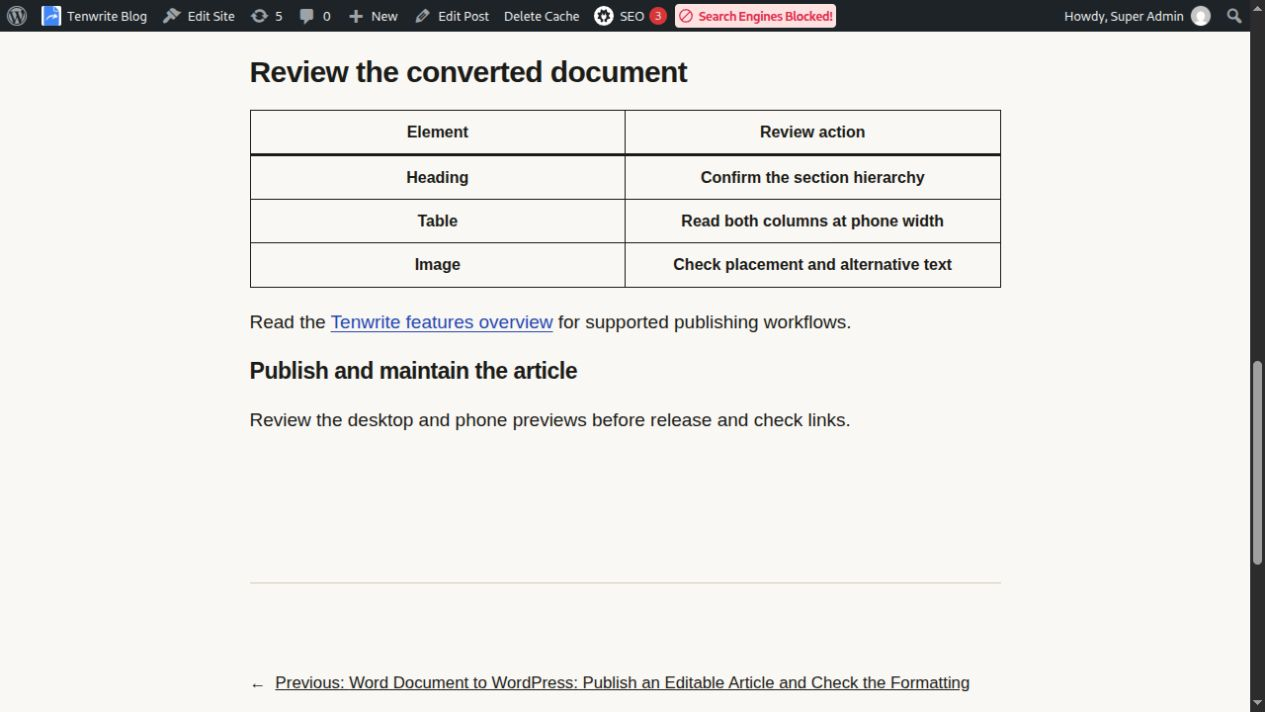
We changed the final sentence from “Review the desktop and phone previews before release.” to “Review the desktop and phone previews before release and check links.” We saved trial-v2.docx and opened the existing draft’s Tenwrite record to upload it there.
For an uploaded source, select the revised file and wait for its prepared filename before choosing Update Post. Starting another New Export would create another article rather than maintain the existing one. The Word to WordPress guide covers the broader direct-upload workflow.
The resolved update confirmation again said the sample would remain a draft. We then checked the same preview identity and the revised sentence against the initial saved version. The other paragraphs and document structure were checked separately from the changed line. The sample remains unpublished; it is evidence of an update operation, not a ranking experiment.
A linked Google Doc uses a different source relationship. For that case, follow the same-post Google Docs update guide. Local computer files are not continuously watched, and refreshing the site’s content index does not push a revised source into WordPress.
Verify the published article before assessing search impact
When the real article is ready, preserve its existing URL and review the publication outcome before confirming the update. Then open the public URL, check the introduction and revised sections, follow the links and confirm that the cover and screenshots load. Inspect the page on a phone-sized viewport as well as desktop.
Check metadata at the output layer too. A saved custom SEO field is not proof that the site’s active plugin renders it. Our AI SEO metadata walkthrough demonstrates that distinction with actual generated, reviewed and saved values. Read the title, description, canonical and indexing output that the public page serves.
Keep a dated release note containing the URL, the substantive changes and the successful publication checks. That gives the next performance review a real reference point. It is more useful than treating the time you clicked Update as proof that every cache, image and public route is already correct.
If upload preparation fails, stop and check the error before submitting an update. Prepared copies expire after 24 hours, and account capacity can temporarily block another upload. An old filename still visible in a form should not be mistaken for a successfully prepared revision. Resolve the preparation issue, then confirm the intended file and destination.
What to check when a page has no reported impressions
No reported impressions is not the same conclusion as “not indexed.” First check that you selected the right site, that the page is published and tracked, and that the reporting window includes a period when it could have appeared. Read collection coverage before treating an empty chart as a complete measurement. A new draft should not be expected to have a published-page search history.
For an indexing question, use Google’s URL Inspection tool. Its indexed-page information and live test answer different questions; the live test does not guarantee indexing or search appearances. Compare the inspected URL and canonical carefully, especially when the public blog route differs from the CMS origin.
Record what you actually established: no observations in a selected period, insufficient collection, a URL mapping to investigate, or a specific indexing finding. Those outcomes lead to different next actions. Rewriting the headline is not a substitute for resolving a wrong property or an uncollected reporting period.
Recheck performance with a comparable window
After publication, allow the finalized reporting window to include the revised period. Choose a consistent interval and compare like dates, while accounting for any earlier collection gaps or limited history. Do not expect today’s edit to appear immediately in a report whose data-through date precedes it.
Use impressions, clicks and CTR to describe what changed in the selected reporting context, then inspect the relevant queries and pages before proposing a cause. If you maintain an independent keyword tracker, retain its location, device and observation settings and report its results separately. A change after an edit is an observation, not automatic proof of attribution.
For customer acquisition, continue the measurement beyond search clicks. A publishing team may find that a helpful comparison attracts fewer impressions but more relevant visits than a broad definition page. That decision needs appropriate conversion evidence; Tenwrite’s Search Console metrics alone do not establish it.
Try one article in Tenwrite when your task is to connect content review, publishing and subsequent search-performance checks. Use an independent tracker alongside it when you need controlled keyword observations. Keeping those roles clear makes the workflow more useful and the conclusions easier to trust.