
A CMS approval workflow is the controlled path a piece of content follows from an approved source to a checked WordPress draft, an authorized release, and a confirmed live result. It is more than changing a post from Draft to Published and more than adding comments to a document.
For a content team, the workflow should answer four questions at every handoff:
- Which version is being handled?
- What state is the content in now?
- Who owns the next decision or action?
- What evidence allows the item to move forward?
This model is useful whether the team uses native WordPress statuses, an external tracker, a plugin, or a combination of tools. The tool can record or route work, but it does not automatically prove that the right source was used, that the destination draft is complete, or that the live page released correctly.
What a CMS approval workflow controls—and what it does not
A CMS workflow controls the movement of content through defined states. Each state should have an entry condition, an accountable owner, required evidence, and an exit condition. If one of those is missing, a status can become a label without operational meaning.
For example, a writer may mark a source document complete after editorial review. That decision can authorize someone to prepare a WordPress draft. It does not prove that the WordPress draft contains the correct heading hierarchy, links, images, metadata, taxonomy, or schedule.
A practical cms workflow and approvals model therefore separates:
- Content decisions: Is the wording, structure, and message approved?
- Destination preparation: Has the approved material been entered into the intended WordPress item?
- Destination QA: Does the draft satisfy the site’s publishing requirements?
- Release control: Is someone authorized to publish or schedule this specific item?
- Outcome verification: Did the public page appear with the intended status and content?
A comment thread may help reviewers discuss changes. A notification may tell someone that work is waiting. A permission setting may limit who can publish. None of these, alone, defines the full path or records why a particular item was allowed to move forward.
The useful boundary is this: approval authorizes a defined next action; verification confirms what actually happened.
Separate source approval from WordPress draft approval
An approved source document and an approved WordPress draft are different records. They may contain the same article, but they represent different decisions and different risks.
Source approval answers: “Is this version of the content approved for CMS preparation?” WordPress draft approval answers: “Does the content in this destination item meet the requirements for release?”
The distinction matters because the transfer into WordPress can introduce work that was not visible in the source. A heading can become the wrong block level. A linked phrase can point to the wrong URL. An image can be missing, incorrectly sized, or awaiting rights confirmation. A scheduled date can use the wrong time zone. Metadata and taxonomy may not be part of the source document at all.
| Approval record | What it covers | Evidence to retain | What it does not prove |
|---|---|---|---|
| Source approval | A specific source version and its editorial content | Source URL or file, version reference, approver, decision date, and exceptions | That WordPress fields and rendering are correct |
| CMS draft approval | A specific WordPress item prepared for release | Site, post ID or draft URL, QA result, reviewer, and unresolved exceptions | That the public page released successfully |
| Release authorization | Permission to publish now or schedule the item | Release owner, intended status, date, time, and time zone | That the scheduled or manual release worked |
| Release verification | The observed public result | Live URL, verifier, timestamp, and pass or fail result | That future changes will not affect the page |
A source approval should not be silently reused as CMS approval. If the source changes after approval, the team should either record a new approved version or return the item to the appropriate earlier state.
For destination preparation details, the related CMS publishing workflow from approved content to verified release provides a companion model for moving content into a CMS.
Use four states with clear entry and exit conditions
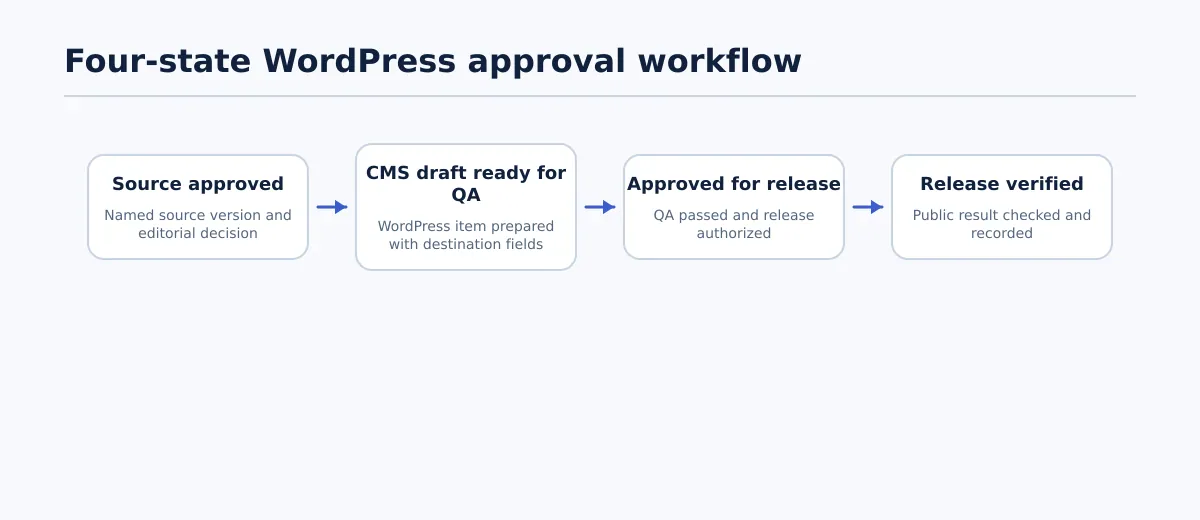 A WordPress approval workflow separates source approval, draft QA, release authorization, and live verification.
The following four-state model keeps the workflow understandable without prescribing a universal set of WordPress statuses. A team can represent these states with labels, custom fields, a project tracker, or documented transitions between people.
| State | Entry criteria | Accountable owner | Required evidence | Exit condition | Typical blocker |
|---|---|---|---|---|---|
| Source approved | Editorial review is complete for a named source version | Editor, client approver, or other designated content approver | Source location, version or date, approver, scope of approval, and exceptions | The approved source and destination requirements are available to the CMS owner | Open comments, conflicting versions, missing asset decision, or unresolved client change |
| CMS draft ready for QA | The approved source has been entered into the intended WordPress item | WordPress publisher or CMS owner | Site and post reference, source reference, populated destination fields, and handoff notes | A QA owner can inspect the draft using the agreed checklist | Missing image, uncertain link target, empty required field, unclear taxonomy, or incomplete transfer |
| Approved for release | Draft QA is complete and exceptions have an accepted disposition | Release approver or publishing owner | QA result, approver, release decision, schedule details, and exception record | The authorized publisher can release or schedule the exact item | Failed QA check, missing approval, unresolved rights issue, or unconfirmed schedule |
| Release verified | A manual or scheduled release action has occurred | Publishing owner or designated verifier | Public URL, verification time, checks performed, and final result | The live outcome passes or a named corrective action is opened | URL fails, wrong visibility, missing media, broken key link, or failed scheduled release |
The exit condition is the practical part of the table. “Reviewed” is not enough unless the team can state what was reviewed and what decision followed. If a blocker remains, keep the item in its current state or move it to a clearly named blocked status. Do not use a general “in progress” label to conceal who must act next.
A useful rule is that every transition should answer: who changed the state, based on which evidence, and what is now authorized?
Assign responsibilities and keep publishing authority separate
The names of roles will vary by team. The responsibility should not be left implicit. A writer, editor, CMS publisher, QA reviewer, and release owner may be different people, or one person may perform several functions on a small team. Even when roles are combined, record the separate decisions.
| Responsibility | Writer or source owner | Editor or client approver | WordPress publisher | QA or release owner |
|---|---|---|---|---|
| Prepare and revise source content | Owns | Reviews or requests changes | Consulted when destination constraints matter | Consulted when requirements are unclear |
| Approve source version | Provides revision | Approves or rejects | Uses approved version | Records exceptions if assigned |
| Build CMS draft | Supplies clarifications | Consulted for content questions | Owns | May inspect the handoff |
| Check destination result | Answers source questions | Confirms approved content scope | Fixes implementation issues | Owns pass or fail decision |
| Authorize release | Informed | May retain final approval | Publishes only when authorized | Confirms release conditions |
| Verify live outcome | Informed | Informed when required | Provides release details | Records the result and opens corrective work |
Publishing permission should follow release responsibility, not merely editing access. A contributor who can edit a post does not necessarily need permission to publish it. Conversely, a person with technical access should not be treated as the approver unless the team has assigned that responsibility.
Set an escalation route for disagreements. For example, a missing image-rights confirmation can return to the asset owner, while a wording dispute can return to the editorial approver. The point is not to create more statuses; it is to prevent the CMS publisher from making an undocumented decision simply because the draft is waiting.
Build the WordPress draft QA gate
The draft QA gate is where an approval workflow WordPress process becomes specific to the destination. It should inspect the actual WordPress item, not only the source document or a preview generated elsewhere.
Adapt the checks to the site, post type, and documented requirements. A useful pass rule is:
The draft passes when every required item is verified, or when each exception has a named owner, an agreed disposition, and explicit approval to proceed.
Content structure
Check the title, introduction, headings, paragraphs, lists, tables, embeds, and callouts against the approved source. Confirm that heading levels represent the intended hierarchy rather than using visual formatting as a substitute for structure.
For a long article, compare the complete body when the transfer method is uncertain. For a stable and low-risk route, a team may use a representative opening, middle section, and conclusion check alongside targeted checks for headings, lists, links, and media. Document which approach was used.
Links and media
Open key internal and external links from the draft. Confirm that the anchor text points to the intended destination and that links have not been truncated or changed during transfer.
Check each required image or media item for presence, placement, caption or alternative text requirements, and ownership or rights confirmation where applicable. “Image supplied” is not the same as “image approved for this destination.” If an asset is missing or its use is unresolved, the draft remains blocked unless the responsible owner has explicitly accepted the exception.
Metadata and taxonomy
Review the fields that WordPress stores separately from the article body, such as slug, excerpt, SEO fields, author, category, tags, featured media, and any required custom fields. Mark a field not applicable with a reason when appropriate; do not leave it blank and assume someone else will decide later.
Check that the selected taxonomy matches the content and the site’s documented rules. A technically complete draft can still be unready if its category, author, or visibility setting is wrong.
Layout and rendering
Inspect the editor view and, where the team’s requirements call for it, the rendered page or preview. Look for unexpected spacing, broken list nesting, missing embeds, oversized media, malformed tables, and formatting that changes the meaning of the content.
A preview is evidence of the checked state at that time. It is not a guarantee that a later edit, theme change, or release action will produce the same result.
Release settings
Confirm the intended status, publication date, schedule, time zone, visibility, and destination site. For a scheduled post, record the planned time in an unambiguous format and identify who will verify the result afterward.
The gate fails if a required setting is unknown. It does not pass merely because the post can technically be saved.
Record approval evidence and resolve blocked work
A minimal approval record should make the decision understandable to someone who was not present during the review. Store it in the workflow tracker, CMS record, or another location the responsible team can access.
Record at least:
- The approved source URL, file, or version reference.
- The WordPress site and post ID or draft URL.
- The approver and approval date.
- The scope of the decision: source approval, draft QA, release authorization, or another defined action.
- The QA result and any unresolved exceptions.
- The person responsible for the next action.
- The intended release date, time, and time zone when applicable.
A plain-language handoff might read:
Source revision 7 was approved by the client editor on 14 September. The WordPress draft on the client site was prepared by the CMS publisher and checked by the QA owner. The featured image is approved. The scheduled release is 18 September at 09:00 Eastern Time. Release authorization is held by the client editor. The publishing owner must verify the public URL after release.
Blocked work should describe the obstacle and the next decision, not just use a red label. Examples include:
- Missing image-rights confirmation: asset owner must confirm permitted use or supply a replacement.
- Unresolved client comment: client approver must accept the proposed revision or return the source for editing.
- Unverified scheduled time: publishing owner must confirm the time zone and intended visibility before release authorization.
If a correction changes the approved wording, structure, asset, or release decision, record whether the item needs to return to source approval, draft QA, or both. This prevents a small implementation edit from quietly changing the approved content.
Verify the live release and close the handoff
Pressing Publish or reaching a scheduled time is an event, not proof of a correct release. The final step checks the public destination and records the outcome.
Use a short verification procedure:
- Open the intended live URL or confirm the public URL after the scheduled release.
- Confirm that the page resolves and shows the intended title and featured media.
- Check the opening content, headings, key links, lists, and any required embeds.
- Confirm the intended visibility and publication status.
- Compare the displayed result with the release decision and record the verifier, timestamp, and result.
The release passes when the URL resolves, the expected content and media are present, key links work, and the status and visibility match the authorization. A failure should create a named corrective action rather than an informal request to “check it again.”
For example, if a scheduled post remains in Draft at the planned time, return it to a blocked release state with the scheduled time, site, post ID, and owner recorded. Investigate before retrying. Silent retries can create duplicate or mistimed releases and make the original failure difficult to reconstruct.
Close the handoff only when the verification record is complete or an approved exception has a named owner and next action.
Adapt the model for small teams, agencies, and higher-volume publishing
The four states do not require four people or a large workflow platform. They define decisions that should remain visible as the team changes size.
| Operating pattern | Lightweight implementation | Minimum record | Where automation should stop |
|---|---|---|---|
| Small internal team | WordPress statuses plus a shared checklist or tracker | Source reference, approver, draft owner, QA result, release decision, and live URL | Before the final QA and release decision, even if routine field entry is automated |
| Agency with client approval | Client approval record linked to the agency’s CMS draft and release tracker | Client-approved version, site, post ID, exception list, client decision, and verification result | At client approval, destination QA, and any exception affecting release |
| Recurring or high-volume publishing | Structured records with consistent fields, queues, and scheduled verification | Item ID, source version, state, owner, QA result, schedule, and outcome | When a required field is uncertain, an exception is unresolved, or a scheduled release fails |
A small team may use a single person as writer, publisher, and verifier. Record the transitions separately anyway. An agency may let a client approve the source while retaining CMS preparation and technical QA. A high-volume operation may automate intake, draft creation, reminders, or routine field checks, but the system should route uncertainty to a person instead of guessing.
Start by mapping one common WordPress content type. Write down the four states, the owner for each transition, the required evidence, and the pass condition for the draft and live checks. Run the model on the next release, then adjust only the fields and checks that exposed a real ambiguity.
A workflow is lightweight when it makes decisions easier to see—not when it removes the records needed to understand them.
Apply the model to your next WordPress release
For the next post, begin with the approved source reference and name the person who owns the CMS handoff. Do not treat the source approval as draft approval. Move the item through the four states only when the relevant evidence and exit condition are present, and keep unresolved work assigned to a named owner.
After release, verify the public destination and record the result. That final check turns a publishing action into a completed handoff. For related guidance on applying this model across client work, see the CMS approval workflow for agency content teams.