
A calendar can record when an agency expects an article to publish. A task board can show who has been assigned the work. Neither record, by itself, defines the evidence needed for a controlled CMS handoff.
That is the buying question behind editorial workflow management software: can the system carry an approved piece of content, its destination rules, required fields, ownership, and release decision to the point where a publisher can act without guessing?
This guide focuses on that last-mile boundary. It gives agency owners, editors, and content operations leads a way to define software requirements, test candidate workflows, and compare coordination tools with publishing-connected systems without relying on a generic feature list.
The agency publishing problem: why task visibility alone does not control content delivery
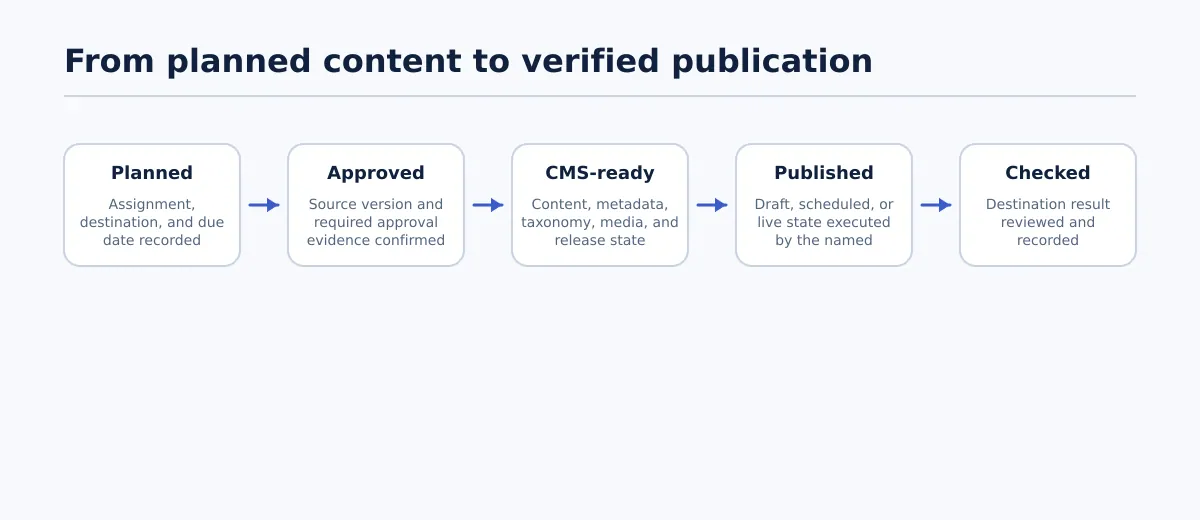 A publishing workflow should continue beyond task completion to a verified destination result.
A status such as Ready can mean several different things:
- The draft is ready for editorial review.
- The client has approved the copy.
- The SEO fields are complete.
- The publisher can create a CMS draft.
- The item is ready to be scheduled or released.
Those are different states with different owners. If they are represented by one status, the next person has to interpret what remains to be done.
Compare these records:
| Record | Operational meaning |
|---|---|
Client A blog post — Ready — Friday | The item has a deadline, but its approval, destination, required fields, and release state are unclear |
Client A — example.com — approved source v4 — publisher: Jordan — draft required — title, slug, category, tags, image, and meta description checked | The destination, source version, owner, release state, and field requirements are explicit |
The second record is more useful for software evaluation because it defines observable controls. A candidate should be able to represent the information the publishing operator needs, show who is accountable for the next step, and preserve the evidence behind the handoff.
This is narrower than building a complete multi-client operating model. For broader guidance on account-level ownership, client rules, and recurring handoffs, see How to Build a Multi-Client Content Workflow for Agency Publishing. Here, the focus is whether software can support and verify those requirements.
What editorial workflow management software should manage—and what it should not
In an agency publishing context, editorial workflow management software coordinates the states, people, approvals, source versions, required fields, and handoffs that lead to a controlled release. It may sit alongside the CMS, document tools, SEO tools, asset storage, and client-approval process rather than replacing all of them.
Use this boundary when reviewing a product:
| The workflow software should manage | It should not automatically replace |
|---|---|
| Assignments, due dates, and stage transitions | Editorial judgment and substantive editing |
| Named owners, roles, and permissions | Client brand, legal, or compliance policy |
| Source versions and approval evidence | SEO decisions that have not been approved |
| Required fields and handoff status | The CMS’s configuration and access model |
| Rework routes and exception ownership | Destination-specific taxonomy rules unless they are configured and validated |
| Draft, scheduled, or release state | Human review where the client requires it |
| Post-publish verification records | The public CMS page and its actual rendered result |
The most useful test is whether every important stage has four properties:
- Owner: Who is accountable for accepting or returning the item?
- Input: What approved material or decision allows the stage to begin?
- Output: What record, field set, or destination state does it produce?
- Progression rule: What must be true before the item can advance?
If a platform cannot make those properties visible, treat that limitation as a selection concern even if the platform offers calendars, comments, automation, or integrations.
Map the workflow before evaluating software
Do not begin by copying a vendor’s feature list into a spreadsheet. First, choose one recurring content type and document the minimum information the software must preserve. This keeps the evaluation focused on requirements instead of duplicating the agency’s entire operating manual.
Use a requirements map like this:
| Workflow point | Required owner | Input to preserve | Output to test | Approval or progression rule |
|---|---|---|---|---|
| Assignment | Content or account lead | Client, destination, content type, due date | Unambiguous work item | Destination and brief are accepted |
| Editorial acceptance | Editor | Source document and version | Approved source reference | Editor records approval or return reason |
| Client approval | Account lead or client approver | Reviewed source version | Decision and decision-maker | Required client decision is recorded |
| Publishing preparation | SEO owner or publisher | Approved source and destination profile | CMS field package | Required title, URL, metadata, taxonomy, media, and links are complete or marked not required |
| CMS handoff | Publishing operator | Approved package and release state | Draft, scheduled item, or controlled release | Field mapping and destination test pass |
| Verification | QA owner | Preview or public URL | Verification result and defect record | Required destination checks pass |
For each row, add two more fields: system of record and rework trigger. The first identifies where the authoritative value lives. The second explains what sends the item backward. For example, “missing featured-image approval” should return the item to the asset owner or editor, not create an informal message for the publisher to resolve.
A completed example workflow record might look like this:
| Field | Example value |
|---|---|
| Client and destination | Client A — example.com — WordPress post |
| Source reference | Google Doc, approved version 4 |
| Current owner | Jordan, publishing operator |
| Approval evidence | Client approval recorded by account lead on version 4 |
| Required release state | Save as CMS draft for final client review |
| Required fields | Title, slug, excerpt, category, tags, featured image, meta description |
| Exception status | None |
| Progression rule | Create the CMS draft only after every required field is pass or not required |
| Next evidence | CMS draft identifier and preview review record |
This record is not a replacement for a complete agency workflow. It is a test case. Give the same record to each candidate and see whether the system can store, enforce, and report the information without forcing the team to reconstruct it from separate tools.
Define stage owners, approval gates, and ready-to-publish criteria
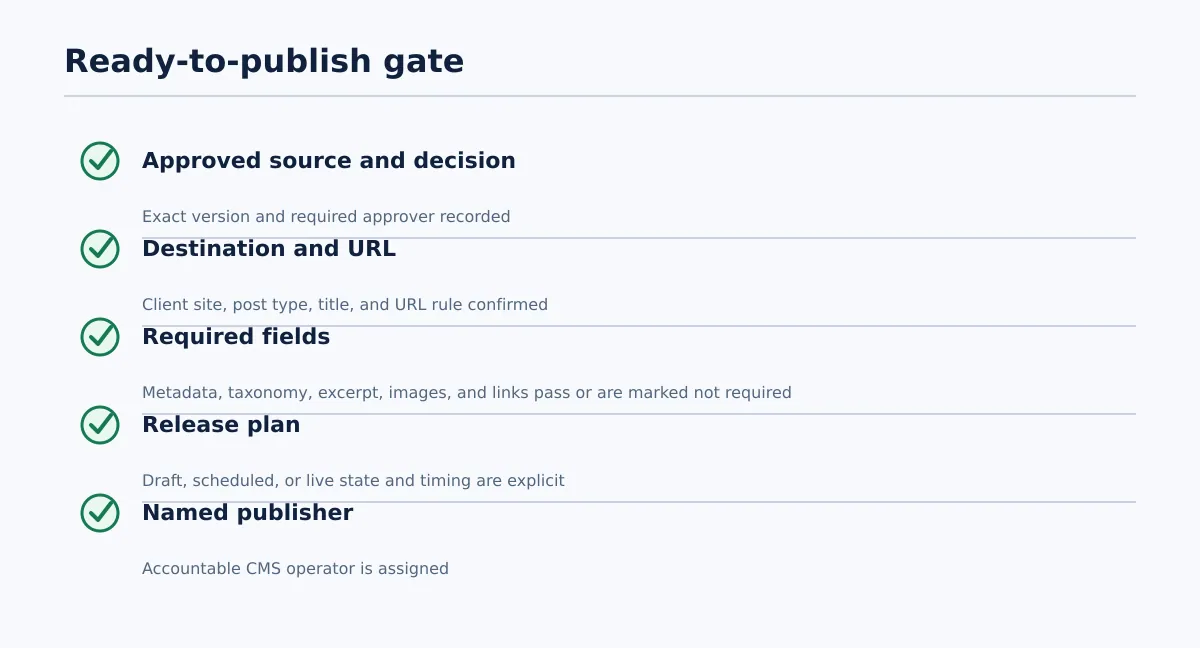 Every required check should pass, while exceptions must be assigned and reapproved.
A stage may have several contributors, but the evaluation should identify one accountable owner. The owner does not need to perform every task; they need to accept the result or return it with a reason.
Approval requirements should remain conditional. A client may require named approval for every post, while another may authorize an agency editor to approve routine content. A destination may require categories and tags; another may require only a category. Configure the gate around the client policy, content type, and CMS destination.
Use this pass/fail checklist for a typical article:
| Check | Pass condition | Fail condition | Owner |
|---|---|---|---|
| Approved source | Exact approved document or version is identified | Publisher cannot identify the authorized version | Editor or approver |
| Destination | Client, site, post type, and destination are recorded | Publisher must infer the site or post type | Account lead or publisher |
| Approval evidence | Required approver, decision, and version are recorded | Approval is missing or tied to another version | Account lead |
| Title and URL | Approved title and slug or URL rule are present | Publisher must invent an unapproved value | Editor or SEO owner |
| Metadata | Required SEO fields are complete or explicitly not required | A required field is blank or ownerless | SEO owner |
| Taxonomy | Category and tags match the destination profile | Values are missing or uncontrolled | SEO owner or publisher |
| Images | Featured and inline images are available and approved | Placement, ownership, or approval is unresolved | Asset owner or editor |
| Links | Required links have been reviewed | Link targets are provisional, broken, or unchecked | Editor or SEO owner |
| Release state | Draft, scheduled, or live state is selected | Publisher must infer the intended state | Publisher or approver |
| Timing | Date, time, and timezone rule are recorded when scheduling | Timing is missing or conflicts with the release plan | Account lead or publisher |
| Publisher | One named person owns the CMS action | Shared queue has no accountable operator | Publishing lead |
Set each row to Pass, Fail, or Not required. Do not use Not required unless the client or destination profile explicitly allows it. A candidate should be able to show which failed condition blocks progression and who receives the correction.
If a title, metadata value, publish date, or source version changes after approval, record the exception and route it back to the relevant approver. The original approval should not silently cover a materially changed release package.
Evaluate publishing handoff requirements: content, metadata, taxonomy, and destination rules
An integration label is not enough for a buyer. Test one representative article from its approved source to the destination and record the result for every field.
| Source or workflow field | Destination field | Required? | Test result | Owner if failed |
|---|---|---|---|---|
| Approved document title | CMS title | Yes | Pass / Fail | Publisher |
| Heading structure and body | Post content | Yes | Pass / Fail | Publishing operator |
| Links and anchor text | Linked content in body | Usually | Pass / Fail | Editor |
| Image files and placement notes | Featured or inline media | Client-specific | Pass / Fail | Asset owner |
| Alt-text instruction | Image alt text | Policy-dependent | Pass / Fail / N/A | Publisher |
| Excerpt | CMS excerpt | Destination-specific | Pass / Fail / N/A | SEO owner |
| Meta description | SEO field | Destination-specific | Pass / Fail / N/A | SEO owner |
| Category and tags | CMS taxonomy | Destination-specific | Pass / Fail / N/A | Publisher or SEO owner |
| Client and site identifier | Destination selection | Yes | Pass / Fail | Account lead |
| Intended release state | Draft, scheduled, or live | Yes | Pass / Fail | Publisher |
| Scheduled date and time | CMS schedule | If scheduled | Pass / Fail / N/A | Publisher |
The test has three parts:
- Source fidelity: Compare headings, lists, links, images, and approved copy with the source version.
- Field placement: Confirm that each value reaches the intended CMS field rather than remaining in body text or a note.
- Release review: Confirm that the result can be inspected as a draft, scheduled item, or approved release according to policy.
Record the actual destination identifier, preview result, reviewer, and failed fields. A field should not be marked successful merely because a product description says it is supported.
For a document-led WordPress handoff, Tenwrite lets users review, revise, schedule, or save generated content as a CMS draft before it goes live. That capability is relevant only if the agency can pair it with the approval gate, field map, permissions, and post-publish checks required by the client.
For recurring structured content, compare this test with a Google Sheets to WordPress publishing workflow. For individual documents, a Google Docs to WordPress publishing tool comparison may help evaluate the transfer portion of the stack.
Decide between a general workflow platform and a publishing-connected workflow
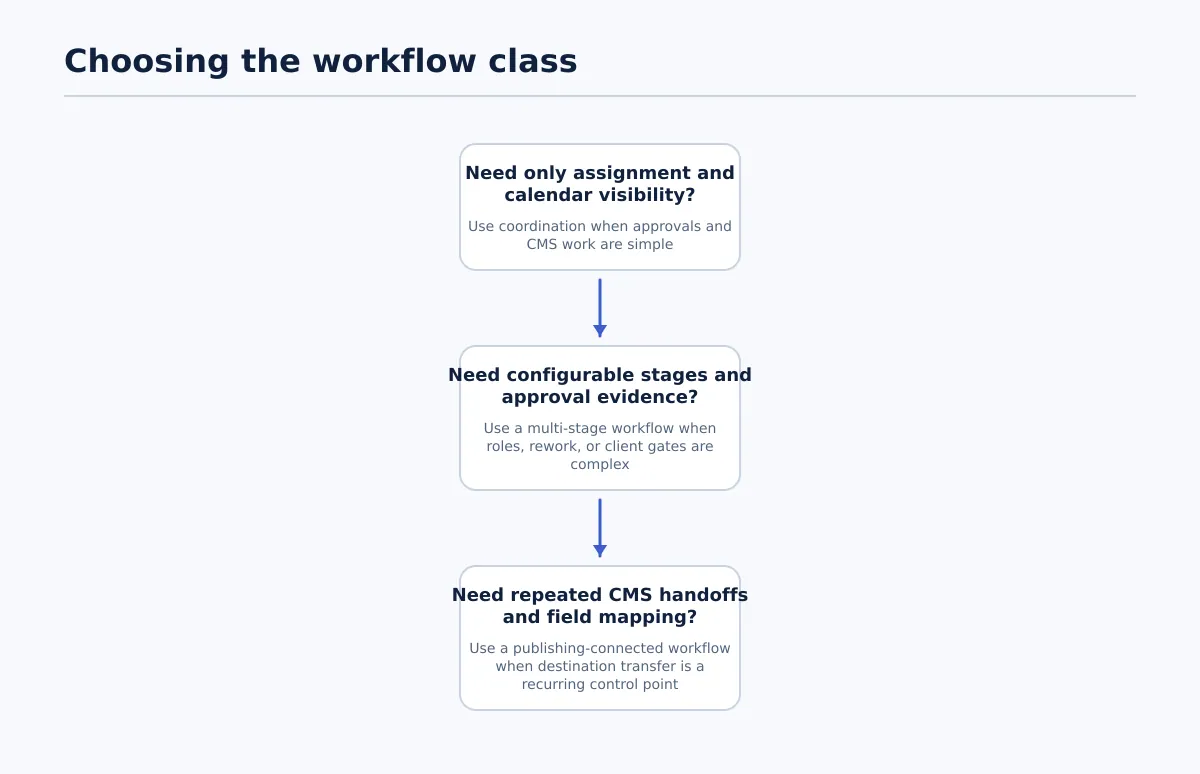 Choose the least complex workflow class that still controls the agency’s real publishing risks.
Use the requirements map to choose among three needs-based paths:
| Workflow class | Operating conditions | Trade-off | Underpowered-path risk |
|---|---|---|---|
| Calendar and task coordination | Few destinations, simple approvals, and an infrequent manual CMS handoff | Low setup burden, but field validation remains a separate procedure | Closing the task can be mistaken for completing the publication |
| Configurable approval workflow | Multiple contributors, recurring rework, client-specific gates, permissions, and version decisions | Better control of editorial states, but CMS entry may remain manual | Approval evidence can be complete while destination fields remain disconnected |
| Publishing-connected workflow | Repeated CMS handoffs, stable field mappings, multiple destinations, and a need for reviewable drafts or scheduled items | Requires integration testing, access controls, exception handling, and destination configuration | An incorrect mapping or premature release can be repeated at publishing volume |
Choose the first path when the main requirement is coordination and a separate, documented CMS checklist is sufficient. Choose the second when approval complexity and ownership are the main constraints. Choose the third when approved content repeatedly crosses into CMS fields and the handoff itself is a recurring control point.
Before selecting the third path, document the source-to-destination map. For every transferred value, identify the source, destination field, approver, missing-value behavior, and release state. If those decisions are unresolved, connectivity will not resolve the underlying workflow ambiguity.
Use a practical evaluation matrix for agency teams
Score candidates against the requirements map and the representative article test rather than against a generic feature checklist.
Use a 0–3 scale:
- 0: Does not meet the requirement.
- 1: Requires an untested workaround or manual interpretation.
- 2: Meets the requirement through a repeatable tested process.
- 3: Meets it with clear evidence, permissions, or controls that support the agency’s operating model.
Multiply the score by the weight. Set non-negotiable criteria separately so a strong collaboration score cannot compensate for a failed destination or release-state requirement.
| Criterion | Suggested weight | Score 0–3 | Weighted score | Evidence to collect |
|---|---|---|---|---|
| Configurable workflow stages | 10 | Can the requirements map and rework routes be represented? | ||
| Roles and permissions | 8 | Can contributors, approvers, clients, and publishers have appropriate access? | ||
| Approval evidence | 10 | Are approver, decision, version, and date recorded? | ||
| Version and source control | 8 | Can the publisher identify the approved source? | ||
| Client and site separation | 10 | Are destination records and rules kept distinct? | ||
| Required-field validation | 12 | Can missing title, metadata, taxonomy, image, or timing fields block progression? | ||
| CMS integration and field mapping | 14 | Do tested values reach the intended destination fields? | ||
| Draft and scheduling controls | 10 | Can the workflow distinguish draft, scheduled, and live states? | ||
| Bulk workflow support, where needed | 6 | Can repeated items retain ownership and exceptions? | ||
| Reporting and export | 4 | Can the team identify blocked, approved, released, and failed items? | ||
| Post-publish verification | 8 | Can URL, reviewer, checks, and defects be recorded? |
Adjust the weights by client and content type. Keep criteria such as destination selection, required-field validation, and release state as hard gates when a failure would make the handoff unusable. Ask each candidate to run the representative article, reject one field, change the publish date, and show how the correction and approval history are retained.
Implement the selected workflow with a controlled pilot and post-publish checks
Pilot the software with one client, one content type, and a limited group of users. Select a real article that includes the fields and approval conditions the agency expects to repeat.
During the pilot:
- Enter the client, destination, source version, owner, due date, and release state.
- Confirm that the intended approval evidence is recorded against that source version.
- Run the field-mapping test for title, body, headings, links, images, excerpt, metadata, taxonomy, and timing.
- Create the destination item as a draft or scheduled post according to policy.
- Introduce one controlled exception, such as rejected metadata, a changed date, or missing image approval.
- Confirm that the exception reaches the correct owner and that the affected approval is reconsidered.
- Release only after the required gate is accepted.
- Review the preview or public URL and record the result, reviewer, date, and defects.
Post-publish verification should compare the destination with the approved source and check the fields relevant to that content type. For a WordPress article, this may include title, headings, links, images, taxonomy, excerpt or SEO metadata, URL, and release state. Record the result rather than marking the workflow complete from the CMS action alone.
Expand only after the pilot produces a documented result for each required field, exception, owner, and progression rule. If the test exposes repeated manual re-entry between approved Google Docs or structured rows and WordPress, assess a controlled Google Docs or Google Sheets-to-CMS handoff using the same field map and approval gates.
Editorial workflow management software is worth evaluating when the agency needs more than assignment visibility: it needs evidence that approved work is mapped to the right destination, carries the required fields, and reaches the intended release state. Start with one real client record, test the candidate against the final CMS handoff, and choose the simplest software class that passes the non-negotiable checks.