
A Google Docs to HTML converter can produce markup from an approved document, but the conversion itself does not decide whether that markup is ready for a client CMS. The practical question for an agency is narrower: does this conversion package contain enough verified information for the next publishing owner to act without guessing?
This guide focuses on that converter-boundary decision. It does not replace a full WordPress or Blogger publishing playbook, client profile, or post-publication QA process. Instead, it gives content operations teams a reusable way to prepare one approved Google Doc, inspect its HTML output, record pass/fail results, and decide whether the job is suitable for a one-off handoff or needs a more controlled workflow.
The result is a reviewable package: an approved source version, converted HTML, checked links and media, documented publishing fields, named owners, and a clear next state.
Why Google Docs-to-HTML conversion creates a CMS handoff problem
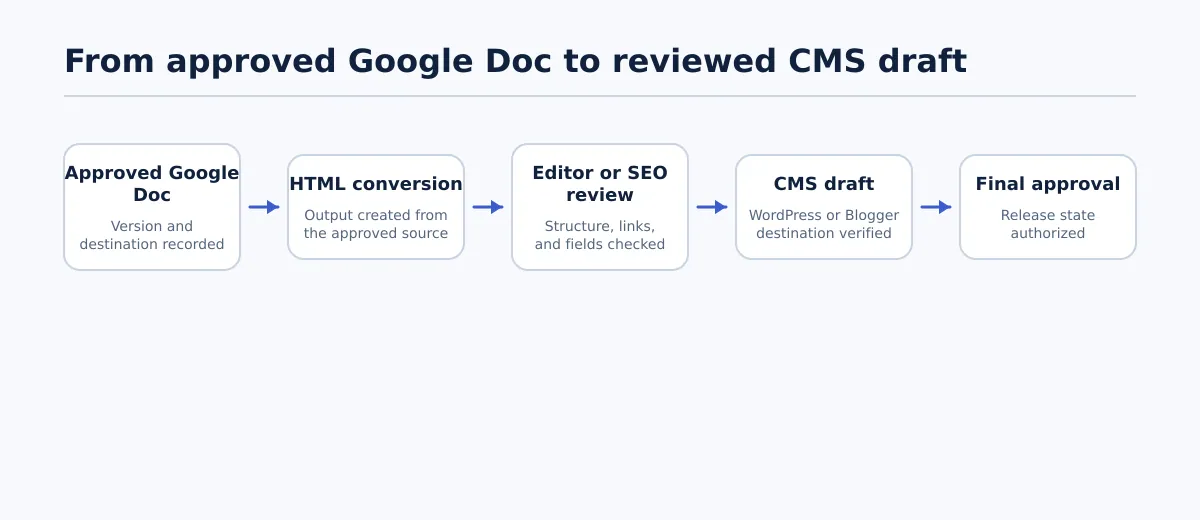 A Google Docs-to-HTML conversion is one stage in a controlled handoff to a CMS draft.
The conversion boundary sits between editorial approval and CMS entry. A typical handoff has five distinct states:
- Approved source: The client-approved Google Doc and its version are identified.
- Converted output: The document is turned into HTML or transferred through a supported publishing route.
- Conversion review: An editor, SEO reviewer, or publishing operator checks whether the output preserves the intended structure.
- CMS-ready package: Required links, images, taxonomy, excerpt, and metadata have an owner and a result.
- Destination handoff: A publisher knows whether to create a draft, return the item for correction, or pass it to the next approval stage.
A converter can address the second state. It does not determine the client’s category rules, decide whether an image should be featured or inline, or establish who has authority to approve SEO metadata. Those are workflow and site-policy decisions that should be recorded separately from the conversion tool.
This is the unique boundary for this article: accept or reject the conversion package before it becomes CMS work. If you need a complete multi-client publishing system, treat this checklist as one control inside that larger process rather than as a replacement for it.
For the conversion step, use the Tenwrite Google Docs-to-HTML converter. After the output is created, keep the source version, output location, reviewer, and result together so the next owner can understand what was checked.
Decide whether the task needs a one-off converter or a repeatable publishing workflow
Choose the smallest process that gives the team clear ownership and a verifiable result. The decision is not based only on document count. It also depends on the number of destinations, recurring fields, reviewers, and release states involved.
| One-off converter and manual review | Repeatable publishing workflow |
|---|---|
| One approved document | Recurring client content |
| One known WordPress or Blogger destination | Multiple sites or destination profiles |
| One publisher can inspect the complete output | Several roles share conversion and CMS duties |
| Manual correction is acceptable for this item | The same taxonomy and metadata fields recur |
| The result can be held for a named review | Draft, scheduled, or approved release states must be tracked |
Use the one-off path when the job has a defined source, destination, reviewer, and correction route. A simple record can include the document link, approved version, converter output, reviewer, and pass/fail result.
Use a repeatable workflow when the same conversion boundary appears across client accounts or when a publisher cannot safely infer the next step. Standardize the stages—such as Approved, Converted, Conversion QA, CMS handoff, and Correction required—while keeping each site’s taxonomy, metadata, media policy, and release rules configurable.
A practical decision test is this: if a new publisher can answer “Which source, which destination, which fields, and who approves the result?” from the job record, a one-off process may be sufficient. If those answers must be retrieved from several people or repeated from memory, document the workflow before increasing volume.
Prepare the approved Google Doc before conversion
The converter should receive a source that is already editorially settled. Source preparation is not an attempt to impose one universal document style; it is a way to make the intended structure and publishing decisions visible before markup is generated.
Use this pre-conversion checklist:
- Document identity: Record the client, destination site, post type, approved version, and intended release state.
- Heading hierarchy: Use heading styles for sections and subsections. Do not represent a heading only with larger or bold body text.
- Link destinations: Use descriptive link text and confirm that important destinations are intentional. Mark unresolved links as a blocking issue.
- Image placement: Put each image near the text it supports and identify whether it is inline, featured, or handled separately by the CMS.
- Lists: Use the document’s ordered-list and unordered-list controls rather than manually typing numbers or hyphens.
- Separators and callouts: Use a consistent convention and note whether the destination should retain, simplify, or remove the treatment.
- Publishing fields: Place the excerpt, category, tags, slug, and SEO metadata in a clearly labeled area when the workflow includes them. Keep site-specific rules separate from the article body.
- Approval state: Resolve comments and suggestions, then identify the exact version authorized for conversion.
A source passes this stage when another team member can identify the intended structure and destination without interpreting unfinished editorial decisions. If the category is undecided, an image is missing, or a link still needs client approval, set the item to Correction required before conversion.
A compact document header might look like this:
Client: Example client
Destination: example.com WordPress
Post type: Blog post
Source status: Approved for CMS
Source version: 2026-08-09-v3
Release state: Draft for client review
Required fields: Category, tags, excerpt, SEO title, meta description
These are workflow fields, not universal Google Docs or CMS requirements. Keep only the fields that the client and destination actually require.
Convert the document and review the HTML structure
Once the source passes the checklist, convert the document with the Tenwrite Google Docs-to-HTML converter. Use the result as an inspectable handoff artifact. Do not treat successful generation as a pass condition.
A representative structure review maps the approved document to the HTML concepts the next owner needs to understand:
| Approved document element | HTML concept to look for | Pass condition |
|---|---|---|
| Section heading | h2 or another appropriate heading element | The level matches the document outline |
| Body copy | p element | Paragraph breaks remain intentional |
| Numbered instructions | ol with li items | The sequence is preserved |
| Bulleted points | ul with li items | Separate points remain separate |
| Linked phrase | a element | The destination and anchor text are retained |
| Inline image | img or supported media reference | The asset and its position can be identified |
For example, this small source structure:
Prepare the approved document        [Heading]
Confirm the destination.              [Paragraph]
Resolve comments before conversion.   [Paragraph]
1. Check the headings.                 [Ordered list]
2. Open the important links.
3. Record the approved version.
Should correspond to an output conceptually similar to:
<h2>Prepare the approved document</h2>
<p>Confirm the destination.</p>
<p>Resolve comments before conversion.</p>
<ol>
  <li>Check the headings.</li>
  <li>Open the important links.</li>
  <li>Record the approved version.</li>
</ol>
The point of this example is not to teach hand-coded web pages. It gives the reviewer a concrete comparison between source intent and exported structure. Reject or return the output when a section heading has become ordinary body text, ordered steps have become plain lines, or paragraph boundaries no longer communicate the approved content clearly.
Review the rendered result as well as the markup. Use markup review to identify structural surprises, then use a CMS preview or equivalent rendering surface to check visible spacing, image placement, and list presentation. Record the failed element and the required correction instead of broadly editing unrelated content.
In this workflow, “clean HTML” means that the structure is understandable, the visible content matches the approved source, and the output is suitable for the receiving system’s documented requirements. It does not mean that every destination will render identical markup or styling.
Validate links, images, and publishing fields before CMS entry
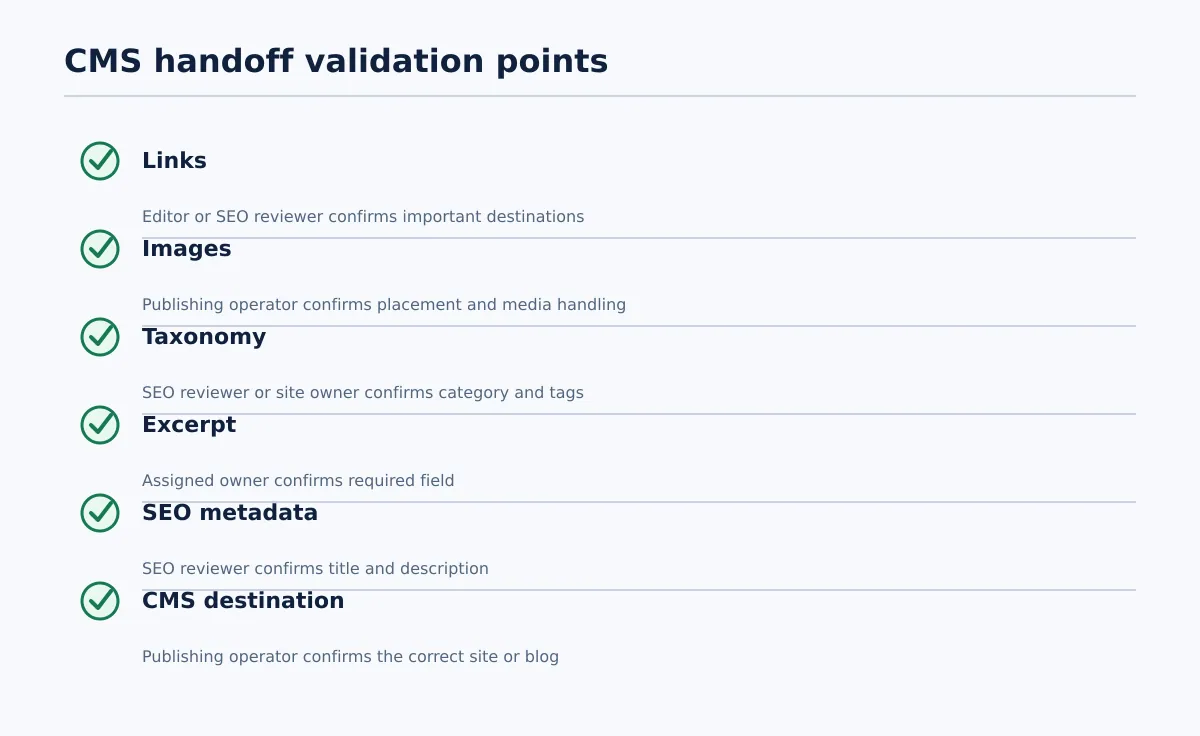 Assign an owner and approval state to each CMS handoff check.
Before handing the package to a CMS publisher, run a field-level check. Each item needs an owner, a pass condition, and an approval state.
| Check | Named owner | Pass condition | Approval state |
|---|---|---|---|
| Important links | Editor or SEO reviewer | Required links open the intended destinations and use approved anchor text | Link QA passed |
| Images | Publishing operator | Image count, position, and required media handling match the source and site policy | Media QA passed |
| Categories and tags | SEO reviewer or site owner | Values exist in the client taxonomy and match the approved brief | Taxonomy approved |
| Excerpt | Editor or publishing operator | The required excerpt is present and assigned to the correct destination field | Excerpt approved |
| SEO metadata | SEO reviewer | Required title and description values are present and ownership is clear | Metadata approved |
| CMS destination | Publishing operator | The selected WordPress site or Blogger blog is the intended destination | Routing passed |
For links, open the important destinations rather than checking only for an href. For images, compare the source count and placement, then confirm whether the destination requires an upload, hosted asset, alt text, or a separate featured-image field. An inline image should not be assumed to satisfy a featured-image requirement.
For categories, tags, excerpts, and SEO metadata, compare the values with the client’s publishing profile. These fields are policy decisions, not universal requirements. If the client has not specified who owns a field, mark it Owner needed rather than allowing the publisher to guess.
The package is ready for CMS handoff only when all required checks pass and the destination owner is recorded. Otherwise, mark it correction required and include the failed field, responsible person, and next action. This is the acceptance decision this article is designed to support.
Hand off the converted content to WordPress or Blogger with clear ownership
The handoff record should tell the publisher exactly what is being delivered and what remains outside the converter’s responsibility.
Use this sequence:
- The publishing operator confirms the approved source version and destination.
- The operator attaches or stores the converted HTML with the source record.
- The conversion reviewer records structure, link, and media results.
- The field owners confirm taxonomy, excerpt, and SEO metadata requirements.
- The package is marked
Ready for CMS handofforCorrection required. - The publisher creates the WordPress or Blogger draft according to the client’s release policy.
- The CMS owner receives the draft URL or identifier and the unresolved-item record, if one exists.
The person who converts the document does not automatically own every downstream approval. Assign the review of links, images, taxonomy, excerpt, and metadata explicitly. If a material change is requested after approval, return it to the client’s agreed approval path instead of silently altering the source.
Tenwrite supports Google Docs publishing workflows for WordPress and Blogger, including supported formatting, links, images, categories, tags, excerpts, and SEO metadata. Verify each transferred field in the destination; a supported field mapping is not the same as a completed QA result.
Use a repeatable checklist for multi-client publishing teams
For recurring work, maintain a lightweight conversion acceptance record for each job:
- Client and destination site
- Source Google Doc link and approved version
- Post type and intended release state
- Converter output location or selected publishing route
- Conversion reviewer
- Link, media, taxonomy, excerpt, and metadata owners
- Structure review result
- CMS handoff state
- Failed checks and unresolved items
- CMS draft URL or identifier, once created
- Final approval state and approver
Use explicit statuses rather than a blank field or a general “in progress” label:
Approved source → Converted → Conversion QA → Ready for CMS handoff → CMS draft created → Correction required or Ready for final approval
Move from an ad hoc checklist to a documented multi-site workflow when several publishers repeat the same conversion, the agency handles recurring content for multiple destinations, the same metadata and taxonomy fields recur, or scheduled release states need to be controlled. Keep the acceptance stages consistent, but store client-specific rules in the relevant site profile.
Start with one approved client document and record every question that required human interpretation. If the same question appears again—such as who supplies the excerpt or whether an image is featured—turn it into a required field or ownership rule before scaling.
To test the process, run one approved document through Tenwrite’s Google Docs-to-HTML converter, complete the acceptance record, and hand the result to the intended CMS owner. If the team can identify what passed, what failed, and who acts next, you have a useful foundation for a repeatable publishing workflow.