
Managing content for several clients is not mainly a calendar problem. It is a handoff problem.
An agency may have approved copy, a publishing schedule, and a connected WordPress site for every client, yet still lose time to unanswered questions: Which site is the destination? Who approved the metadata? Is this post meant to be a draft or scheduled? Did the published page match the source document?
A multi-client content workflow answers those questions before they become publishing errors. The scalable model is not one universal template imposed on every account. It is a shared operating process with client-specific publishing rules, explicit ownership, controlled release, and a recorded verification step.
This guide focuses on the editorial-to-CMS portion of agency delivery: from an accepted brief or approved draft through a verified post. It covers the fields, statuses, approval gates, and exception paths that keep separate client requirements visible without creating a separate process from scratch for every site.
Define the workflow boundary: from accepted brief through verified publication
A multi-client content workflow should begin at a clear readiness point. Depending on the agency, that point may be an accepted brief or a draft that has completed substantive editing. It should not begin with an unconfirmed idea, and it should not end when someone clicks Publish.
The boundary for this guide is:
- Accepted brief or approved source — the content request and destination are clear enough to enter production.
- Production — the writer or editor creates and refines the content.
- Internal QA — the agency checks content, links, metadata, assets, and destination requirements.
- Client approval — the authorized client reviewer accepts the specified version.
- CMS handoff — the approved source is mapped into the correct site and post fields.
- Scheduled or live release — the item follows the client’s agreed publication policy.
- Verification — a person checks the result and records the outcome.
The workflow record should make these control points visible:
- Source document or source row
- Client and destination site
- Current status
- Current owner
- Required approver
- Title, body, links, and media
- Taxonomy and author fields
- Excerpt and SEO fields where applicable
- Intended publication date and time zone
- CMS result, such as draft ID or published URL
- Verification result, verifier, and timestamp
- Exception or remediation notes
The final status is not “published.” It is Verified. A successful transfer does not prove that the correct site, fields, links, formatting, or publication state were used.
[Diagram: flow]
Keep the stages consistent; keep client rules separate
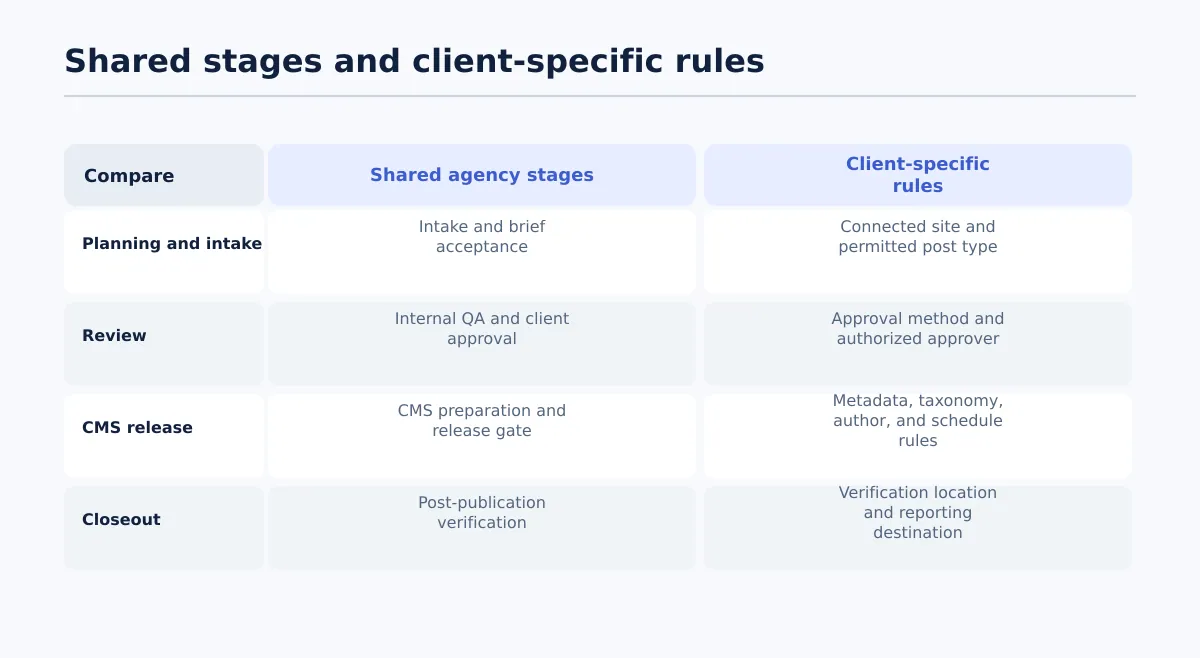 Standardize the workflow sequence while configuring destination-specific publishing requirements separately.
The agency should standardize the workflow stages, status vocabulary, ownership model, and release gate. It should not assume that every client uses the same WordPress site structure, metadata requirements, approval method, or scheduling policy.
This is the central design principle: standardize the sequence; configure the destination.
| Shared agency stage | Client-specific publishing rules |
|---|---|
| Intake and brief acceptance | Connected site and permitted post type |
| Production and editing | Author or byline requirements |
| Internal QA | Category and tag conventions |
| Client approval | Approval method and authorized approver |
| CMS preparation | SEO-field ownership and required fields |
| Schedule or publish | Publication date, time, and time zone |
| Post-publication verification | Verification location and reporting destination |
For example, every client item may pass through Internal QA → Client approval → Approved for CMS → CMS draft ready → Scheduled/live → Verified. One client may require a draft for review before scheduling, while another may authorize the publishing operator to schedule an already approved post. Those are different rules inside the same stage model.
Do not encode client differences in informal habits such as folder names, tab colors, or someone’s memory. Store them in a client publishing profile and make the profile part of the handoff record.
A shared workflow also makes cross-client reporting possible without pretending the clients are identical. An operations lead can ask how many items are waiting for approval or verification because those statuses mean the same thing across accounts. The underlying category names, authors, metadata fields, and schedules can still remain client-specific.
Build the client publishing profile before content enters production
A client publishing profile is the configuration layer between the agency workflow and a particular site. Create it during onboarding or workflow setup, then review it when the client’s site rules change.
The profile should contain confirmed values or an explicit “not applicable” entry. A blank field should not silently mean that the publisher may decide.
| Profile field | What to record | Example value or decision |
|---|---|---|
| Client and site identifier | The agency’s exact client name and destination identifier | Client North / north.example.com |
| Connected CMS site | The connected WordPress destination | WordPress site A |
| Content owner | Person responsible for moving the item through the workflow | Agency content manager |
| Client approver | Authorized person or role for final content approval | Client marketing lead |
| Required source format | Where the approved source lives | Google Doc URL or approved Sheet row |
| Post type | Allowed destination content type | Post; page not permitted for this workflow |
| Author and byline | Permitted author values and display rules | Use the client-approved author only |
| Categories and tags | Existing taxonomy rules and prohibited substitutions | Use approved categories; do not create during a batch |
| Excerpt | Whether an excerpt is required and who supplies it | Required; editor owns it |
| SEO fields | Required slug, title, description, or other fields | SEO lead reviews slug and description |
| Image ownership | Who supplies, approves, and places media | Client supplies approved featured image |
| Release policy | Draft, scheduled, or direct publication options | Create draft; client reviews in WordPress |
| Schedule rules | Date, time, recurrence, and time zone | Schedule only after approval; use client time zone |
| Verification location | Where the outcome is recorded | Content tracker with URL and QA fields |
| Exception route | Where blocked or changed items are logged | Exception queue linked to the content item |
The example values are placeholders, not universal WordPress requirements. A client may not require tags, excerpts, or a featured image. The important control is that the agency records the decision rather than asking a publisher to rediscover it for every post.
Before production begins, validate three profile questions:
- Does the connected destination match the client and content type?
- Does every required field have an owner?
- Does the release policy say whether the result should be a draft, scheduled post, or live post?
If any answer is unclear, hold the item at intake instead of resolving the ambiguity during the publishing run.
Make status and ownership unambiguous
A status should describe both where the item is and what evidence allows it to move. Avoid statuses such as Almost ready, With client, or Done unless the agency has defined exactly what they mean.
| Status | Primary owner | Entry criterion | Exit evidence |
|---|---|---|---|
| Brief accepted | Content manager | Scope, destination, source requirements, and due date are recorded | Assigned producer and complete brief |
| In production | Writer or editor | The accepted brief is assigned | Draft source linked and required content fields present |
| Internal QA | Editor or SEO lead | Production work is complete | QA checks pass or logged issues are assigned |
| Client approval required | Client approver | Agency-approved version is ready for review | Approval recorded against the specific version |
| Approved for CMS | Publishing coordinator | Client approval is confirmed and required fields are present | Release instruction and client profile confirmed |
| CMS draft ready | Publishing coordinator | Content has been transferred to the correct destination | CMS draft reviewed against the approved source |
| Scheduled/live | Publishing coordinator or CMS owner | Required release sign-off is complete | CMS status and intended timing confirmed |
| Verified | QA verifier | The post is available in its intended state | URL or CMS result, checks, verifier, and timestamp recorded |
Ownership does not mean that one person performs every task. It means one person is accountable for the next decision and for providing the exit evidence.
For example, an editor may finish the copy and mark it Internal QA, but cannot mark it Approved for CMS without the approved source version, required metadata, destination site, and recorded client approval. A publishing coordinator may create the WordPress draft, but cannot change a material claim or replace an approved image without routing that change back to the appropriate approver.
A useful status record includes status, owner, updated_at, source_version, approver, approval_timestamp, and next_action. If a status changes without evidence, the workflow has a label but not a control.
Use a controlled editorial-to-CMS publishing handoff
The handoff from an approved source to a CMS draft is where a multi-client content workflow needs its strongest gate. The goal is to preserve the approved content while making the transfer repeatable and reviewable.
Follow this procedure for each item or approved batch:
Confirm the final approved source. Open the source document or row named in the workflow record. Confirm that the version being transferred is the version the client approved. Do not publish from a similarly named local copy.
Confirm the client publishing profile. Check the destination site, post type, author, taxonomy rules, required metadata, image policy, release mode, and time zone. If the profile is missing a required decision, stop the handoff.
Map source fields to CMS fields. At minimum, map the title, body, links, images, category, tags, author, excerpt, slug, SEO fields, status, and schedule. Record fields that are intentionally left empty because the client profile says they are not applicable.
Create or update the CMS draft. Transfer the content into the specified destination and use the client’s agreed release state. A draft is the safer default when the client requires a WordPress review, but the policy in the profile controls the decision.
Compare the CMS result with the approved source. Check headings, paragraphs, lists, links, images, captions, embeds where supported, taxonomy, excerpt, and SEO fields. Confirm that the destination is the intended site, not merely a connected site.
Route material changes back for approval. If the transfer reveals a broken link, unsupported element, missing asset, changed claim, or other material difference, return the item to the appropriate status. Do not silently repair approved content when the repair changes meaning or release requirements.
Schedule or publish only after the required sign-off. Confirm the final status, publication time, and time zone. If the client requires a draft review, leave the item as a draft until that review is recorded. If direct release is authorized, the publishing operator still completes the same pre-publish checks.
Record the CMS result. Save the draft identifier, scheduled state, or live URL in the workflow record. This is the handoff between publishing and verification; it should never be represented by a blank result field.
Draft creation and predictable field transfer are good candidates for automation. Approval, interpretation of a material change, and final release remain human-controlled decisions. Automation can move known values; it cannot decide whether an unexpected change is acceptable for a client.
For a more detailed single-site procedure, see WordPress Publishing Workflow for Agencies: From Approved Draft to QA. Teams with structured, recurring rows can also review this Google Sheets to WordPress bulk publishing workflow.
Verify publication and record the outcome before closing the item
Post-publication verification is a required workflow stage, not an informal spot check. The verifier should inspect the actual CMS result at the intended destination and compare it with the approved record.
Use a pass/fail result for each applicable check:
- Destination: Does the URL belong to the correct client site and intended post type?
- Publication state: Is the item actually live or scheduled as required?
- Timing: If scheduled, is the date, time, and time zone correct? If live, does the visible publication time match the approved instruction where relevant?
- Title and formatting: Does the visible title match the approved source, and do headings, lists, paragraphs, and emphasis render as intended?
- Links: Do internal and external links point to the approved destinations and behave as expected?
- Media: Are the featured image and embedded or in-body media present, correctly placed, and owned or approved according to the profile?
- Taxonomy and author: Are the category, tags, author, and byline correct for this client site?
- Excerpt and SEO fields: Where applicable, are the excerpt, slug, SEO title, and meta description present and correct?
- Result record: Are the final URL or CMS identifier, verifier, timestamp, and follow-up notes recorded?
A verification log might use these fields:
| Content item | Check | Result | Follow-up | Verifier | Timestamp |
|---|---|---|---|---|---|
| Client North guide | Correct destination | Pass | — | Publishing QA | 2026-08-12 14:20 UTC |
| Client North guide | Featured image | Fail | Add approved asset; repeat media checks | Publishing QA | 2026-08-12 14:21 UTC |
| Client North guide | Publication state | Pass | — | Publishing QA | 2026-08-12 14:22 UTC |
The item should remain Verification failed or return to the remediation status your agency uses until the failed check has been corrected and repeated. Record the final live URL even when an issue is found; the URL identifies the result that needs attention.
This check confirms the publishing result. It does not guarantee indexing, rankings, traffic, or performance.
Manage exceptions without breaking the shared process
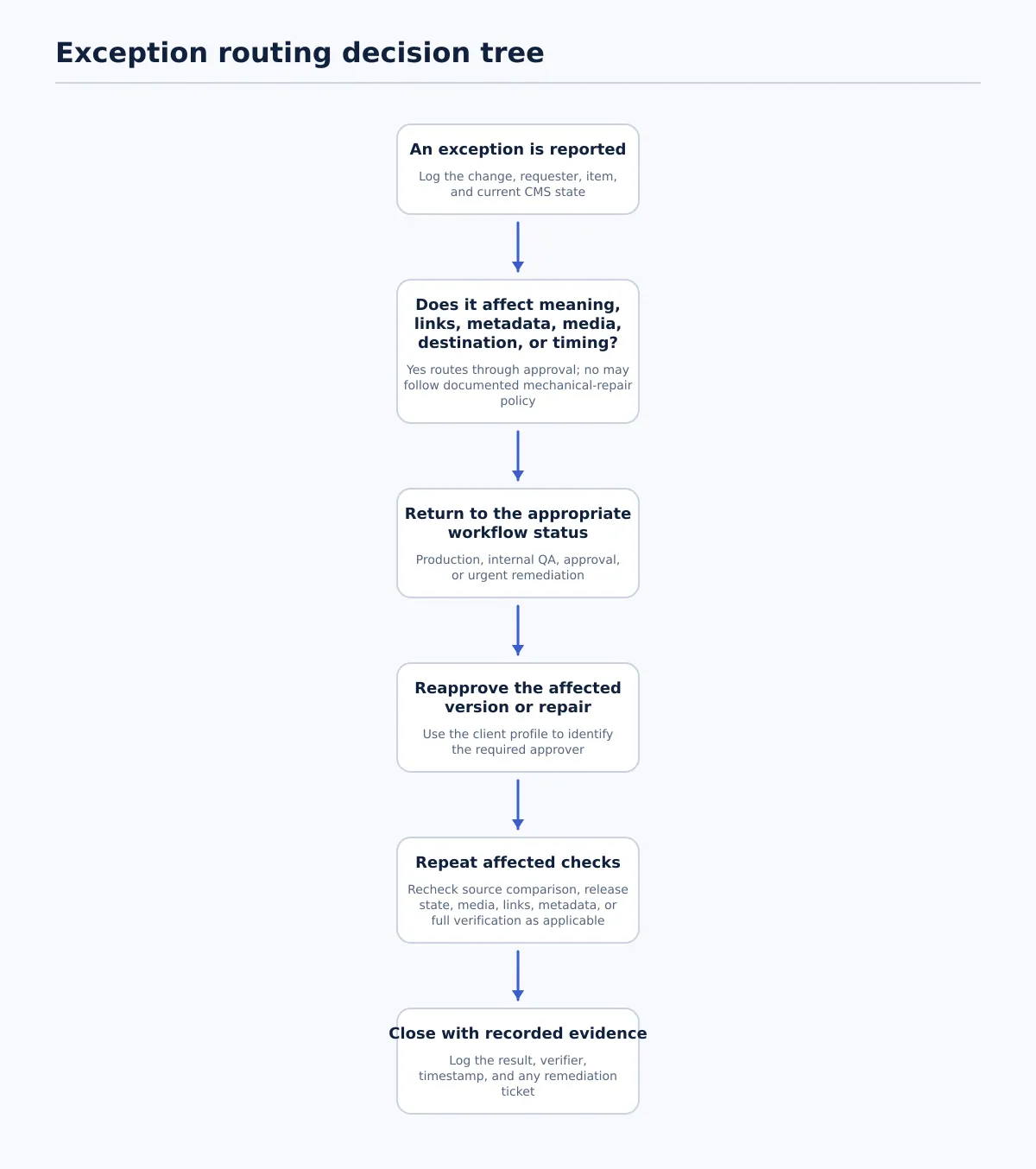 Material changes return through the appropriate approval path; every affected publication check is repeated before closure.
Late changes and urgent requests are normal. The failure is allowing them to bypass the record, approval gate, or verification step.
Use an exception lane with four required details: what changed, who logged it, which status the item returns to, and which checks must be repeated.
| Exception | Log and status route | Required reapproval | Repeat before closure |
|---|---|---|---|
| Late copy change after client approval | Publishing coordinator logs the change and returns the item to In production or Internal QA, depending on scope | Client approver reapproves the changed version; internal QA repeats for affected fields | Source comparison, links, metadata, and any changed content checks |
| Missing asset before scheduled publication | Publisher logs the missing asset and moves the item to Blocked or Client approval required according to the profile | Asset owner or client approver confirms the replacement | Media, formatting, release timing, and final URL/state checks |
| Urgent correction to a live post | Content manager logs the correction, identifies the live URL, and routes it to In production or an urgent remediation status | Appropriate editor and client approver reapprove unless the client policy specifies another emergency route | Full post-publication verification, including the corrected field and publication state |
For an urgent correction, do not create a second untracked version and assume the original workflow no longer applies. Attach the request to the live item, preserve the previous URL and status, and record who authorized the correction.
A simple decision rule is:
- If the change affects meaning, claims, links, metadata, media, destination, or release timing, route it through approval again.
- If the change is a clearly defined mechanical repair, apply the client’s documented policy and record the repair.
- If the policy is unclear, pause and obtain a decision before release.
Use a weekly operating rhythm and rollout checklist
A weekly rhythm keeps the workflow maintained instead of turning it into a document that is ignored after onboarding. The cadence can be adapted to the agency’s publishing volume, but each review should inspect both upcoming work and recently completed work.
A practical weekly sequence is:
- Review upcoming client approvals, scheduled posts, and items approaching a release deadline.
- Resolve missing or outdated client-profile fields before the affected content reaches CMS preparation.
- Batch CMS draft preparation by destination when the field mappings are stable, while keeping each item’s client, owner, and approval evidence visible.
- Run verification for scheduled or recently published items and record pass/fail outcomes.
- Review exceptions, identify repeated failure points, and update the workflow template or client profile where a rule has changed.
Pilot the process with one or two active clients before applying it across the agency. Choose clients with different publishing requirements so the team can test the boundary between shared stages and client-specific rules.
Pilot checklist
- [ ] Select one or two client sites and one recurring content type.
- [ ] Create a publishing profile for each site.
- [ ] Define the shared statuses and assign one owner per handoff.
- [ ] Record the source document or row for every pilot item.
- [ ] Capture approval evidence against the approved version.
- [ ] Map the required fields into a CMS draft.
- [ ] Compare the draft with the approved source before scheduling or publishing.
- [ ] Run and record the post-publication pass/fail checks.
- [ ] Test at least one late change or missing-asset exception.
- [ ] Update the profile and workflow instructions based on what the pilot exposed.
The workflow is ready to expand when another trained team member can follow an item from approved source to verified CMS result without guessing the destination, owner, approval state, release policy, or next action.
Start with one client publishing profile
A useful multi-client content workflow is built by making decisions visible, not by adding more status labels or automating every handoff. Keep the stages shared, store publishing differences in a client profile, require evidence before status changes, and treat verification as the final operational step.
To put the model into practice, map one active client against the profile template and handoff checklist. If the team repeatedly moves approved Google Docs or Google Sheets content into WordPress, a controlled Tenwrite workflow can be evaluated for draft creation and field transfer while the agency keeps approval and final release under human control. Start with a small test batch, record the results, and expand only after the destination rules and QA checks are clear.