
An approved draft is not the same thing as a publish-ready WordPress post.
For an agency, the last stretch of the process includes several separate handoffs: preparing the source document, transferring the content, checking the WordPress layout, applying site-specific metadata, confirming the schedule, and verifying the live URL. If ownership is unclear, small errors become client-facing errors.
A reliable WordPress publishing workflow treats that stretch as a controlled operational process. The goal is not to remove every human step. It is to make every step visible, assign one accountable owner, and automate only the work that produces a predictable result.
This guide maps the workflow from an approved Google Doc to a verified WordPress post across one or more client sites.
WordPress publishing workflow: define the boundary from approved draft to verified post
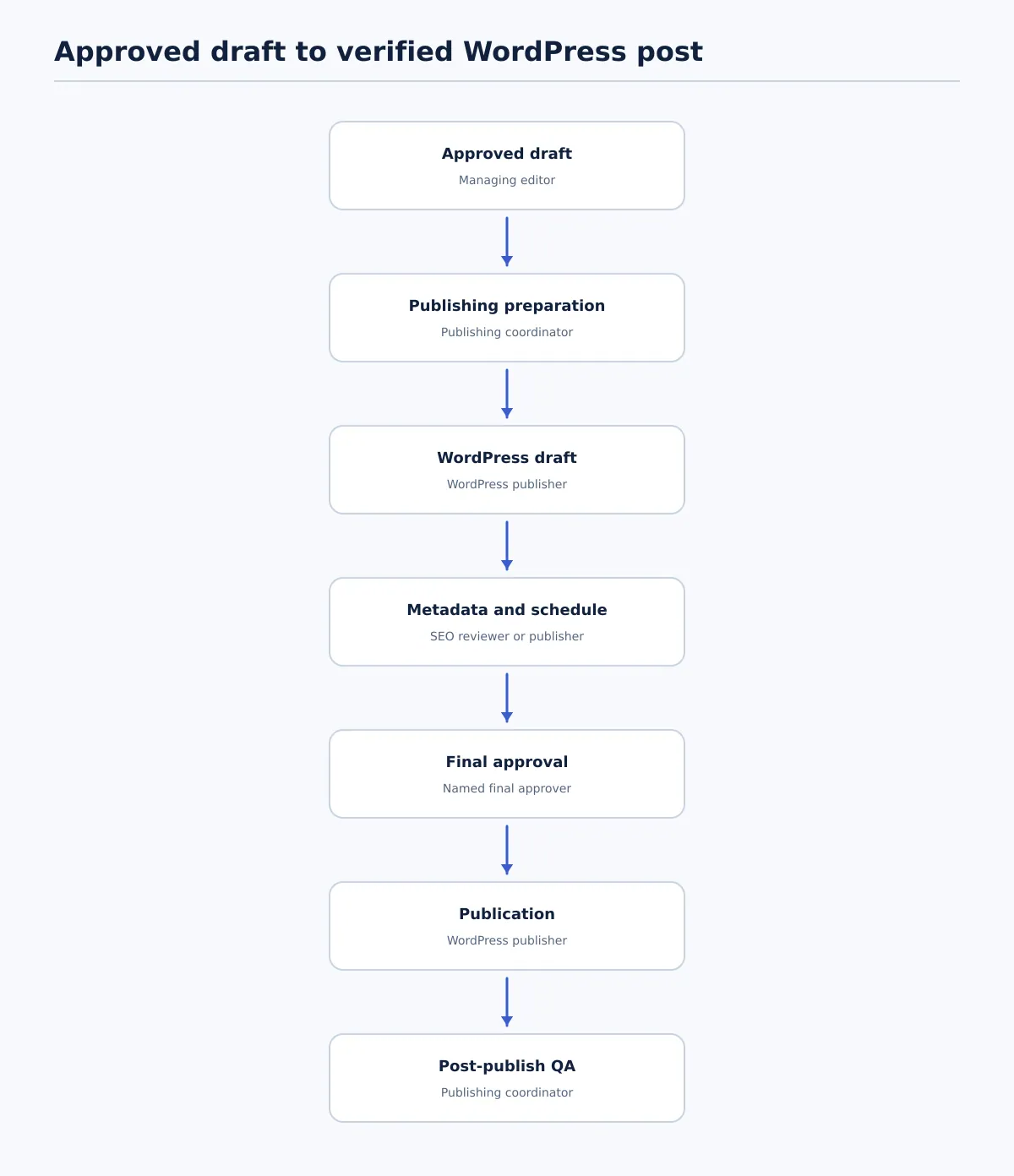 A controlled agency publishing workflow from approved Google Doc to verified live WordPress post.
The workflow begins when the content has received editorial approval. It does not include topic selection, drafting, substantive editing, or strategy review. Those activities may connect to the process, but they should not be silently reintroduced during publishing.
The workflow ends when the post is live, checked at its public URL, and recorded as complete. A post sitting in WordPress as a draft or scheduled item is not yet a completed handoff.
Use this sequence as the baseline:
| Stage | Output | Accountable owner |
|---|---|---|
| Approved draft | Locked Google Doc and publishing brief | Managing editor |
| Publishing preparation | Ready document, assets, and field instructions | Publishing coordinator |
| WordPress draft | Content transferred into the correct site and post type | WordPress publisher |
| Metadata and schedule | Completed site-specific fields and proposed date | SEO reviewer or publisher |
| Final approval | Pass decision recorded in WordPress or the team tracker | Named final approver |
| Publication | Post available at its intended URL | WordPress publisher |
| Post-publish QA | Live checks and completion record | Publishing coordinator |
The important control is the approval boundary. Once the draft is approved, the publisher should not rewrite paragraphs, change the search intent, or replace approved links without returning the item to the appropriate editor.
For detailed transfer mechanics, see How to Publish Google Docs to WordPress without losing formatting. The rest of this guide focuses on the operational controls around that transfer.
Map the agency publishing roles, access, and handoff rules
A shared publishing queue is useful only when each item has a clear owner. “The content team” is not an accountable person, especially when several client sites are involved.
Assign one named publishing owner and one named final approver to every post. They may be the same person on a small account, but the assignment should still be explicit.
| Role | Main responsibility | Access and handoff rule |
|---|---|---|
| Writer or editor | Delivers the approved source document and resolves editorial questions | Does not make untracked changes after approval |
| Publishing coordinator | Confirms readiness, routes the item, and maintains the handoff record | Owns the queue status and exception log |
| SEO reviewer | Checks search-facing fields, links, index settings, and taxonomy requirements | Approves SEO fields, not necessarily the full visual layout |
| Client approver | Confirms client-specific requirements where approval is required | Receives a preview or review link, not shared administrator credentials |
| WordPress publisher | Creates the draft, applies fields, schedules or publishes, and fixes CMS issues | Uses the least access necessary for the assigned site |
| Final approver | Confirms the complete WordPress preview before scheduling or publishing | Must be named before the post enters final review |
Keep access separated by site wherever practical. A publisher working on Client A should not need broad administrator access to every client installation. Use the client’s existing role and access policy rather than assuming one WordPress role configuration fits every site.
A useful handoff record contains:
- Client and destination site
- Source document URL
- Post owner and final approver
- Target post type and category
- Requested publication date and time zone
- Current status
- Exceptions or unresolved questions
- Final live URL after publication
When a check fails, the person who found the issue should assign it to the owner who can correct it. The item should not remain in “ready” status while a question is being resolved. Move it back to a named status such as Needs editor, Needs SEO review, or Needs client approval.
Prepare the approved Google Doc for clean WordPress transfer
The publisher should receive a document that is complete enough to transfer without interpretation. A document marked approved should not receive silent editorial changes during the CMS handoff.
Before transfer, the publishing coordinator checks the following:
Approved-draft readiness checklist
- [ ] The final document is clearly identified as the approved version.
- [ ] The title matches the approved content brief.
- [ ] Heading levels are intentional: one page title, followed by the required H2 and H3 structure.
- [ ] Links point to approved destinations and use the approved anchor text.
- [ ] Image files are available, named clearly, and associated with their intended placements.
- [ ] Alt-text, caption, credit, or image-placement instructions are present where required by the client.
- [ ] Author attribution is confirmed.
- [ ] The call to action and any required linked-post updates are final.
- [ ] A separate metadata brief includes the slug, SEO title, meta description, canonical or indexing instructions, taxonomy, and schedule.
- [ ] Comments, suggestions, tracked alternatives, and internal notes are removed or clearly excluded.
Do not use formatting inside the document as a substitute for publishing instructions. A bold line may look like a heading but still transfer incorrectly. If a client requires a special block, table, embed, or shortcode, record that requirement separately so the publisher can verify the result in WordPress.
The handoff is ready when another team member can identify the intended structure, assets, metadata, destination, and approval path without asking the original writer to interpret the document.
For teams using Tenwrite for the Google Docs-to-WordPress handoff, confirm the correct destination and transfer mode before sending content into the CMS. Treat the transfer as a draft-creation step, followed by the same source and destination checks described here.
Create the WordPress draft and verify formatting, media, and links
Create a draft first. Do not publish directly from the transfer step, even when the source document has already been approved. The WordPress draft is a separate representation that needs its own verification.
Use this draft-only procedure:
- Confirm the client site, post type, and destination account before transferring anything.
- Transfer the approved content into a new WordPress draft.
- Compare the title and heading hierarchy with the source document.
- Place images in the intended sections and confirm that each image is the correct file.
- Check internal and external links in the editor and preview.
- Inspect blocks, lists, tables, quotes, buttons, embeds, and spacing for layout changes.
- Remove any unintended draft text, comments, source notes, or placeholder copy.
- Save the item in the agreed review status and record the draft URL.
A quick comparison should answer three questions:
- Structure: Are the same sections present in the same order?
- Assets: Does every required image appear in the intended location?
- Meaning: Did the transfer change a link, heading, list, caption, or sentence in a way that affects the approved content?
Common failures include a missing image, an H2 becoming plain text, a nested list losing its indentation, a link pointing to an old URL, or an internal note being carried into the post. These are publishing defects, not reasons to ask the client to discover the problem after publication.
If a transfer changes the approved meaning, return the draft to the editor. If the content is correct but the block layout is wrong, return it to the WordPress publisher. Record the distinction so the same failure can be prevented in the client profile.
Apply SEO metadata, taxonomy, author, and scheduling requirements
A post is not ready because the body content looks correct. The operational fields determine where the post appears, how it is attributed, and when it becomes public.
Each client should have a publishing field map. Do not assume that every site uses the same categories, SEO plugin, author rules, or indexing settings.
Per-client publishing field map
| Field | Client-specific instruction | Verification |
|---|---|---|
| Post title | Use the approved visible title | Compare with the approved brief and preview |
| URL slug | Use the approved, stable slug | Check spelling, redirects, and date conventions where relevant |
| SEO title | Enter only when the client workflow uses a separate SEO title | Compare character and wording requirements in the brief |
| Meta description | Use the approved description when required | Check the relevant SEO field, not just the body excerpt |
| Category | Select the approved primary category | Confirm it matches the client taxonomy |
| Tags | Add only required, approved tags | Avoid creating near-duplicate terms |
| Featured image | Use the approved asset and crop rules | Check the editor and public preview |
| Author | Assign the approved author account | Confirm the byline is correct on the preview |
| Canonical URL | Add only when specified by the SEO brief | Confirm the intended canonical, not an assumed one |
| Indexing settings | Apply noindex or follow rules only when specified | Verify in the site’s relevant SEO controls |
| Publish date and time | Use the approved time zone and schedule | Compare WordPress’s displayed time with the brief |
If the site uses supported SEO metadata syncing, Tenwrite’s documented Google Docs-to-WordPress SEO workflow can carry supported values into WordPress. The publisher should still verify the resulting fields in the destination site. A mapped field is not a verified field until its value is visible and correct.
For a deeper explanation of the SEO handoff, see SEO with Tenwrite: Publish Google Docs to WordPress. Keep the metadata brief separate from the body document so a publisher can check both without guessing.
Use a final approval gate before publication
Final approval is a decision about the WordPress version of the content. It is not a repeat of the original editorial approval.
The final approver should review the preview or scheduled draft against the approved source and the client profile. The post passes only when every required check is either confirmed or explicitly waived by the accountable owner.
Final approval checklist
- [ ] Correct client site and post type
- [ ] Correct title, slug, and author
- [ ] Complete body structure with no unintended text
- [ ] Images present, correctly placed, and loading in preview
- [ ] Priority internal and external links tested
- [ ] Category, tags, and featured image applied according to the client profile
- [ ] SEO title and meta description checked where used
- [ ] Canonical and indexing settings checked where specified
- [ ] Preview reviewed on the layouts required by the client
- [ ] Publication date, time, and time zone confirmed
- [ ] Client approval recorded where applicable
- [ ] Final approver named and decision logged
Use a simple pass/fail rule. If one required item fails, the post does not move to scheduled or published status.
The fix path should be explicit:
- The final approver records the failed check and assigns it to the relevant owner.
- The owner changes only the necessary item or explains why a broader change is required.
- The publishing coordinator updates the status and records the change.
- The final approver rechecks the changed item and any dependent fields.
- The post returns to the queue only after the approval decision is recorded again.
For example, if the slug is wrong, the publisher fixes the slug and checks the canonical and internal links that may depend on it. If the client changes a paragraph, the editor owns the change and the final approver reviews the updated content again.
Run post-publish QA and record the completed handoff
Publication is an event to verify, not the end of accountability. The WordPress dashboard confirms an intended status, but only the public URL confirms what readers can access and see.
Run the live check soon after the expected publication time, using the public URL rather than relying only on the WordPress dashboard.
Post-publish verification record
Client/site:
Post title:
Source document:
Live URL:
Published date and time:
Publisher:
Final approver:

Checks:
[ ] URL opens and matches the approved slug
[ ] Published date is correct
[ ] Desktop presentation checked
[ ] Mobile presentation checked
[ ] Priority links tested
[ ] Images load and appear in the intended positions
[ ] Byline and taxonomy are correct
[ ] Metadata and indexing settings checked in the relevant site tools
[ ] Client or internal owner notified

Exceptions:
Owner for exceptions:
Status:
Date closed:
At minimum, verify the URL, date, desktop and mobile presentation, priority links, images, byline, taxonomy, and relevant metadata. If the site has a special requirement—such as a related-post link, disclosure, or conversion block—add it to the client profile rather than relying on memory.
If a live check fails, record the public URL and the exact problem, then assign the fix. A broken priority link belongs with the publisher or editor depending on whether the destination or anchor text is wrong. A missing image belongs with the publisher unless the source asset itself was incorrect. After the correction, repeat the affected live check and update the completion record.
Decide which publishing steps to automate and which must stay reviewed
WordPress publishing automation is most useful when it removes repetition without hiding decisions. A workflow may automate draft creation, structured field mapping, status notifications, or scheduled transfers, but those actions do not establish that the output is correct.
Use this boundary when evaluating an automation step:
| Task | Automation may help with | Human review remains necessary because |
|---|---|---|
| Draft creation | Create a WordPress draft from a standardized source | The destination, post type, and source version still need confirmation |
| Field mapping | Carry title, slug, taxonomy, schedule, or approved metadata | A mapped value may be missing, stale, or wrong for a particular client |
| Status notifications | Alert the next owner when an item changes state | The team still needs a clear response and exception path |
| Folder or sheet routing | Send standardized items to the intended site | A row or folder can contain incomplete instructions or the wrong destination |
| Scheduling | Apply a requested date and time | Final approval and time-zone confirmation should not be inferred |
| Link and media checks | Flag missing values or obvious failures | Visual layout, link relevance, and asset suitability need review |
| Client approval | Notify an approver and store a response | Approval must come from the designated person, not from a successful automation run |
A practical decision rule is: automate a step only when its inputs are standardized, its failure can be detected, and a named owner can validate the output.
Keep client approval, factual updates, visual layout review, ambiguous metadata, and final scheduling confirmation under human control. Do not allow a successful transfer event to equal editorial approval.
Tenwrite can be relevant when an agency already works in Google Docs and needs a repeatable route into WordPress, including the structured publishing and automation workflows described in its existing documentation. Test the process on one approved document and one client site first. Confirm what transfers, what remains site-specific, and how the team sees failures before expanding the automation.
Standardize the workflow across multiple client sites
One agency workflow can cover many WordPress sites without pretending that the sites are identical. Keep the stages, statuses, ownership rules, and approval gate consistent. Store the differences in a per-client publishing profile.
Each profile should record:
- Destination site and access owner
- Approved publisher accounts and access boundaries
- Required post types and statuses
- Category and tag conventions
- Author and byline rules
- Featured-image dimensions or crop requirements, where documented
- SEO fields and indexing rules used by the client
- Schedule conventions and time zone
- Client approver and backup approver
- Required live checks
- Known exceptions, custom blocks, or linked-post updates
The master process might use statuses such as Approved, Preparing, WordPress draft, SEO review, Client approval, Ready to schedule, Published, and QA complete. The client profile then tells the team what each status requires on that site.
Review the profile whenever a post fails for a site-specific reason. If three clients require the same additional check, promote it into the master workflow. If only one site requires it, keep it in that site’s profile.
This approach makes access boundaries visible: the team can see who owns each destination and what permissions are needed instead of passing shared credentials through every handoff.
A good next step is to map one current client publishing process from approved Google Doc to live URL. Assign one owner and one final approver at every stage, document the client’s field map, and run the workflow on a single approved draft. Record every failed check. Once the process works end to end, turn the stable steps into your agency template and keep the client-specific rules in the profile.