

A content team may say it needs SEO tracking when it actually needs one of several different things: a view of how published pages are performing, a record of selected keyword positions, or a comparison with competitors. Those jobs use different units and answer different questions, so a tool that reports a position change may not tell an editor whether a page needs attention.
Choose SEO tracker software by starting with the decision your team must make after publication. Then compare a small shortlist against the same URLs, queries, reporting needs, and handoff process. The goal is not to find the tool with the longest feature list; it is to find one that supplies usable evidence for your recurring content review.
Choose the monitoring job before choosing software
Begin by naming the unit you want to monitor and the decision the result should support. Page-performance monitoring, keyword rank tracking, and competitor tracking can overlap in a product, but their measurements are not interchangeable.
| Monitoring job | Unit tracked | Question it helps answer | Intended decision |
|---|---|---|---|
| Review published-page performance | A live page and its search performance over a defined period | Is this page receiving the search exposure or visits we want to investigate? | Inspect the page, compare periods, or leave it alone pending more evidence. |
| Monitor selected queries | A keyword or query in a defined search context | Where does the tracked page appear for this selected query, and has its observed position changed? | Check whether the change merits investigation against the page and other evidence. |
| Compare competitor visibility | A selected query set and the competitors appearing for it | Which other sites are visible for the searches relevant to our content? | Investigate a content or search-result difference; do not assume a competitor change explains your own results. |
A position for one sampled query is not a page-wide performance measure. It does not, by itself, tell you how many searchers saw or clicked a page, whether the page met a business goal, or why a change occurred. Likewise, a page-level performance report may not provide the location-, device-, or query-specific comparison needed for a rank-tracking task.
A team responsible for a small portfolio of existing articles may begin with page-performance review. Add fixed-query tracking when editors need to follow specific searches over time. Competitor tracking is most useful when the team has a defined comparison question—for example, whether another site is appearing for a query set the team has chosen to monitor. If nobody will review or act on that comparison, it may add reporting without improving the editorial decision.
Compare a focused SEO tracker software shortlist
The options below are starting points, not rankings or claims about current product specifications. The research descriptions place them in different roles: Google Search Console appears as a free option in a rank-tracker comparison; Semrush is discussed for agencies and professional users; Ahrefs is associated with competitor rank tracking; and SE Ranking is described as a dedicated rank-tracking candidate. Those descriptions do not establish whether any option meets your particular reporting scope. Verify the current capabilities and purchasing terms that matter to your team.
| Option | Research-supported role to investigate | Need it may address | Verify before purchase or adoption |
|---|---|---|---|
| Google Search Console | A first-party search-performance option included in a rank-tracker comparison as a free option. | Reviewing search performance for your own site and pages. | Does its available page and query reporting answer your review questions, and can your team use the required periods, filters, and reporting format? |
| Semrush | Included in comparisons aimed at agencies and professional users. | A broader SEO tracking shortlist where the team wants to investigate keyword and competitor monitoring together. | Can the specific views, query scope, location and device settings, and reports you need be configured for your workflow? |
| Ahrefs | Associated in the supplied comparison with competitor rank tracking. | Comparing visibility for selected queries when competitor context matters to editorial decisions. | Which competitor and query comparisons are available for your use case, and how can the team review or share the results? |
| SE Ranking | Described in the supplied comparisons as a dedicated rank-tracking candidate. | Teams whose primary requirement is monitoring a selected set of keyword positions. | Can it cover your required query set and search context, and does the resulting report include enough page and competitor context for follow-up? |
The role descriptions are based on the supplied rank-tracker comparison and the supplied SEO tracker roundup. They are not hands-on test results, endorsements, or a substitute for checking each vendor’s current product details. Treat every question in the last column as an evaluation item, not an assumed capability.
Match tracking requirements to your publishing workflow
Translate “we need SEO tracking” into a short requirements worksheet before booking demos or comparing plans. Complete one row for each monitoring job; a multi-site agency may need separate rows for different clients if their reporting needs differ.
| Requirement | Record for each monitoring job | Mark essential or optional |
|---|---|---|
| Monitoring job | Page-performance review, selected-query tracking, competitor comparison, or a defined combination | Essential: name the main decision first. |
| Sites or clients | The sites, client accounts, and people who need access to each view | Essential if your team reports across multiple sites; verify how separation and navigation work. |
| URLs or queries | The published pages, target queries, or competitor/query set the team will review | Essential: define a manageable initial sample and how it will be maintained. |
| Location and device | The geographic and device context needed for a meaningful comparison | Essential only when editorial decisions depend on those distinctions; otherwise optional. |
| Reporting audience | Editors, SEO leads, clients, or other stakeholders, plus what each needs to understand | Essential: specify the decision and level of detail for each audience. |
| Review cadence | How often a person will review the output and the period they will compare | Essential: choose a cadence the team can sustain. |
| Responsible owner | Who checks a change, records context, and routes any follow-up | Essential: a report without an owner is unlikely to become editorial work. |
| Purchasing constraints | Budget approval process, required contract or security checks, and any other verified constraints | Essential before commitment; confirm current terms directly. |
For an agency, do not treat “multi-site reporting” as a single checkbox. Write down how many sites or clients are in scope, who needs to see each report, what the client should receive, and whether the review needs to combine or separate site results. Ask the vendor to demonstrate the exact reporting path using a representative setup. If a requirement cannot be demonstrated or confirmed from current documentation, leave it unverified rather than marking it as passed.
If the central requirement is monitoring SEO performance for posts and pages across several sites, Tenwrite is one option to assess. Its fit should be checked against the same site, page, reporting-audience, and review-cadence requirements you use for other candidates; do not infer a particular report or workflow feature without verifying it. For a deeper discussion of the multi-site reporting problem, see SEO performance monitoring for multi-site publishing teams. If your core task is deciding what content to audit or revise rather than monitoring changes over time, choosing content auditing software for a WordPress team addresses a related but distinct job.
Evaluate shortlisted tools with the same URLs and queries
Run one controlled evaluation for every candidate. Use a hypothetical sample of five published URLs and five relevant target queries from the same site. The example below is a test-plan illustration, not a benchmark or a report of product testing.
| Sample | Published URL | Target query |
|---|---|---|
| 1 | https://example.com/guide-a/ | wordpress editorial workflow |
| 2 | https://example.com/guide-b/ | content review checklist |
| 3 | https://example.com/guide-c/ | google docs to wordpress |
| 4 | https://example.com/guide-d/ | multi-site content reporting |
| 5 | https://example.com/guide-e/ | content performance review |
Replace these illustrative entries with live pages and queries that your team actually owns or intends to monitor. Record one evaluation row per URL-query pair, and include the same site, location, device, and observation period wherever those settings apply. If a candidate does not support a required setting or uses a different measurement scope, record that difference; do not quietly change the test to make the outputs look comparable.
Use a scorecard with these fields:
| Field | What to record |
|---|---|
| Site and URL | The site and exact published page under review. |
| Target query | The query paired with that page, if the tool supports query-level tracking. |
| Location and device | The selected context, or “not available” if it cannot be set or reported. |
| Observation period | The dates or comparison windows used, recorded consistently across candidates where possible. |
| Available output | The actual page, query, position, competitor, or performance information the candidate returns. |
| Missing information | Any required field, context, export, or explanation that is absent or unclear. |
| Decision supported | The editorial or reporting question the output can answer—and the question it cannot answer. |
Do not judge a candidate’s accuracy solely by whether its numbers match another tool. Different data sources, sampling, and measurement scopes can produce different results. Instead, check whether the candidate is transparent enough about its scope for your team to interpret the output and answer its stated question. For example, if a rank view shows a position change but not the page-level context your editors require, record that gap. If a page-performance view provides useful page evidence but not the fixed-query comparison the team needs, record that too.
After the run, review the scorecard with the people who will use the report. Ask each person to identify the page or query, the observation period, what changed, what remains unknown, and what decision they would make next. If they cannot distinguish the measured signal from an explanation for it, the reporting needs clarification before adoption.
Turn tracking results into a recurring content-review queue
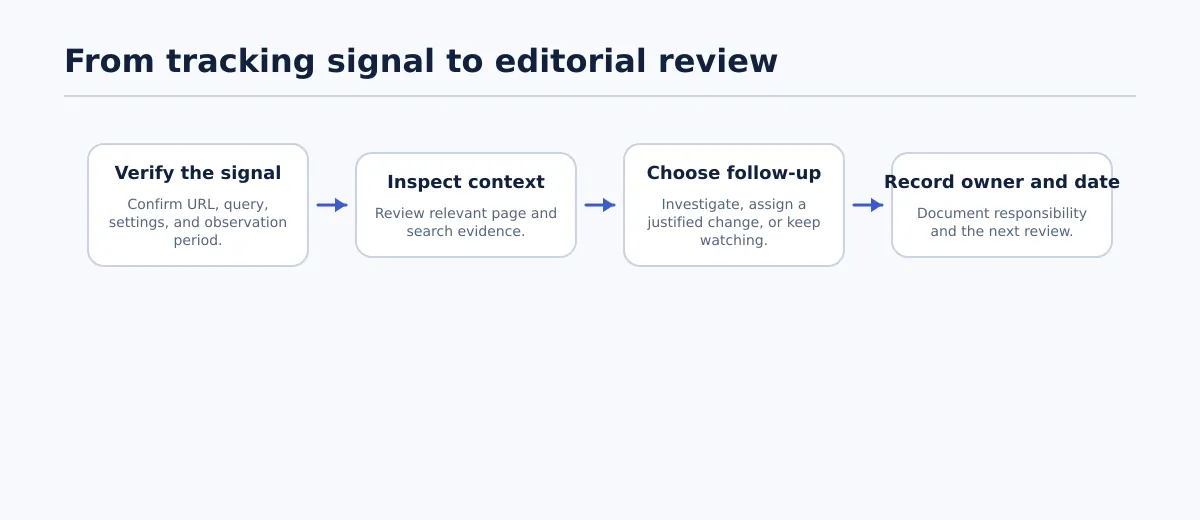 A tracking change prompts verification and context review before the team assigns an editorial action.
A tracking report should create an investigation task, not an automatic rewrite. First confirm the live URL and comparison period; then inspect relevant context, such as the page’s search-performance history, the query being tracked, or a change to the page or search results. A movement in a measured signal does not establish what caused it.
Use a review record with seven fields: URL, observation period, signal, context to inspect, proposed action, owner, and next review date. The following two hypothetical records show how a team can distinguish a decline worth investigating from an observation that is not yet conclusive.
| URL | Observation period and signal | Context to inspect | Proposed action | Owner | Next review |
|---|---|---|---|---|---|
https://example.com/guide-a/ | Hypothetical: a selected query’s observed position declined across the team’s chosen comparison window. | Confirm the query and location/device settings; check whether the page’s broader search-performance view changed in the same period; review recent page edits and the current search results. | Investigate and document what the evidence supports. Assign a content update only if the review identifies a specific, justified change. | SEO editor | Set a date after the review window is recorded. |
https://example.com/guide-b/ | Hypothetical: one observation shows a small movement, while the available period or context is insufficient to interpret it. | Check whether the comparison period is like-for-like and whether the query, page, and measurement settings stayed consistent. | Keep the item on watch; do not rewrite based on this observation alone. | Managing editor | Recheck at the next scheduled review. |
The owner should close the loop by recording what was checked, what remains uncertain, and why the item was updated, left unchanged, or scheduled for another review. This keeps later comparisons useful: a teammate can see whether a new signal followed an editorial change or whether the team simply continued monitoring. It still does not prove that the change caused the result.
Make the purchase decision using explicit acceptance criteria
Before adopting a candidate, agree on pass/fail criteria tied to the requirements worksheet and evaluation scorecard. A candidate passes only when the team can verify the essentials—not merely because its feature list is broad.
- Primary question: Can the tool answer the monitoring question the team named, using an output the responsible person can interpret?
- Required scope: Can it cover the required sites, pages or queries, and any essential location or device context? Are any scope differences documented?
- Understandable reporting: Can the intended editor, SEO lead, or client identify the measured item, time period, and limits of the result without guessing?
- Workable handoff: Can the team record a follow-up with an owner and next review date, using the report and its existing editorial process? Verify any export or workflow capability rather than assuming it exists.
- Purchasing constraints: Have current pricing, plan scope, contract terms, and other relevant constraints been checked directly and approved by the appropriate person?
If a candidate fails an essential criterion, keep it off the adoption shortlist or resolve the gap before committing. If two candidates pass, choose based on the trade-offs your team documented—such as which output is easier for the actual reporting audience to use—not on an unverified claim of overall superiority.
To start, choose one monitoring job, select five representative published URLs and five relevant queries, and use the worksheet and scorecard to evaluate a small shortlist. That gives your team a defensible basis for selecting SEO tracker software and a clear routine for turning tracking output into considered editorial follow-up.