

A content audit can uncover a technical issue, a page that merits editorial review, or a metadata value to correct. Those are different jobs, and software that helps with one may not answer the others—or manage the approved WordPress update that follows.
For a WordPress team or agency, shortlist content auditing software by the decision you need to make and the evidence you expect to receive. Then use a small, repeatable test to see whether the findings are specific enough to support that decision and whether the completed change can be verified. The tool comparisons below are based on published roundups and use-case descriptions, not hands-on product testing; treat unconfirmed capabilities as questions for a vendor demo.
Choose the content auditing software job before choosing a tool
Start by naming the question the audit needs to answer. Crawl-oriented tools are discussed in technical and search-focused contexts; content evaluation tools are presented around reviewing or prioritizing content. Publishing coordination is a separate editorial process: it begins with a human decision and covers assignment, approval, and the WordPress update.
For example, Zipdo’s content auditing software roundup names crawl-oriented tools, while BlogSync’s use-case guide separates technical and search work from content evaluation and optimization. Those categories help frame a shortlist, but they do not establish which current product will meet your requirements.
| Audit job | Question it answers | Evidence to ask a candidate to show | Decision that remains with your team |
|---|---|---|---|
| Technical inspection | What technical issue should someone investigate on a particular URL? | A URL-specific finding and the supporting detail needed to review it | Fix the issue, investigate further, or dismiss it with a recorded reason |
| Editorial evaluation | Which page needs a human content decision, and what prompted the review? | A page-level content signal or priority, with an explanation the editor can assess | Revise, retain, consolidate, or investigate the page; a tool signal is not an editorial decision |
| Update coordination | How will an approved change be assigned and checked in WordPress? | A task record connecting the source URL, decision, owner, and verification | Approve the change, prepare the WordPress update, and confirm the result |
If your main problem is deciding what content to revise, begin with an editorial-evaluation candidate. If you need to investigate technical issues, start with crawl-oriented candidates. If findings already exist but disappear during assignment or publishing, first identify what reporting or tracking output is missing; adding another audit product may not address that gap.
Compare a focused shortlist by use case and output
The table is a starting point, not a ranking. Zipdo, Worldmetrics, Wifitalents, and BlogSync include some of the named products in their roundups or use-case coverage. Those pages are secondary descriptions, not current product specifications. In particular, the available descriptions do not establish a meaningful feature difference between Screaming Frog SEO Spider and Sitebulb, or settle whether Semrush Site Audit fits a particular team’s reporting needs. Use the same sample URLs and demo questions for each candidate.
| Tool to investigate | Why it may merit a shortlist | Ask the vendor to demonstrate | Eliminate it for this job if… |
|---|---|---|---|
| Screaming Frog SEO Spider | It appears in technical and search-focused audit coverage, including Zipdo’s roundup and BlogSync’s use-case guide. | Show a finding for one of your URLs and the source detail a second person would need to review it. | The demo cannot connect the finding to the relevant URL or show the evidence your reviewer requires. |
| Sitebulb | It is also named in crawl-oriented audit coverage. The supplied descriptions do not establish how it differs from Screaming Frog for your use case. | Run the same URL and issue scenario you use with other crawl candidates. Ask the vendor to explain the finding and show what a reviewer can inspect. | It cannot meet your required evidence threshold—or it offers no practical advantage over another candidate in your own comparison. |
| MarketMuse | BlogSync includes it in content evaluation and optimization coverage, making it a candidate to investigate when the job is editorial rather than technical inspection. | Ask for a page-level example: what signal or priority is presented, what informs it, and what an editor must assess before acting. | The output does not help your editors make the specific decision you need, or the reasoning cannot be reviewed by your team. |
| Semrush Site Audit | It is included in comparison coverage, but the available descriptions do not establish its fit for your specific audit job. | Request a demonstration of the exact issue, URL-level detail, and report output your team needs. | The vendor cannot demonstrate the required finding and evidence on a representative page. |
A candidate earns a place on the shortlist only if it can demonstrate the output for your actual job. For technical candidates, that means a finding your reviewer can trace and interpret. For an editorial candidate, it means a signal an editor can evaluate—not an unexplained score treated as a decision. If two products meet the same requirement and the supplied descriptions do not distinguish them, compare their results on your sample rather than assuming one is superior.
Check whether audit exports support editorial handoff
A useful report needs enough information for someone who did not run the audit to understand the finding and make the next decision. Worldmetrics’ comparison coverage discusses URL-level evidence and exportable reporting as selection considerations. Whether a particular tool preserves the details you need is a demo question.
Use this as a recommended handoff template, not a list of fields every product provides:
| Field | What the record should contain |
|---|---|
| Site and URL | The client or WordPress site and the exact page reviewed |
| Finding | The tool observation or reviewer note, identified by who or what produced it |
| Evidence reference | A report location or captured detail that lets another person inspect the basis for the finding |
| Proposed action | The correction or editorial review being considered, separate from the finding itself |
| Owner and reviewer | The person responsible for the next step and the person who checks the proposed result |
| Decision and status | The human decision, such as approved, intentionally unchanged, or still unresolved |
| Verification result | What was checked, where, and whether the result passed |
During a demo, take one finding from the report and put it into the place your team actually assigns work. Check that a colleague can identify the correct site and URL, open or understand the evidence, and distinguish the observation from the proposed action. If the audit product does not hold the owner, decision, or verification result, note which tracking sheet or workflow will. Do not treat a useful report as proof that the rest of the handoff is covered.
Run a sample audit-to-WordPress acceptance test
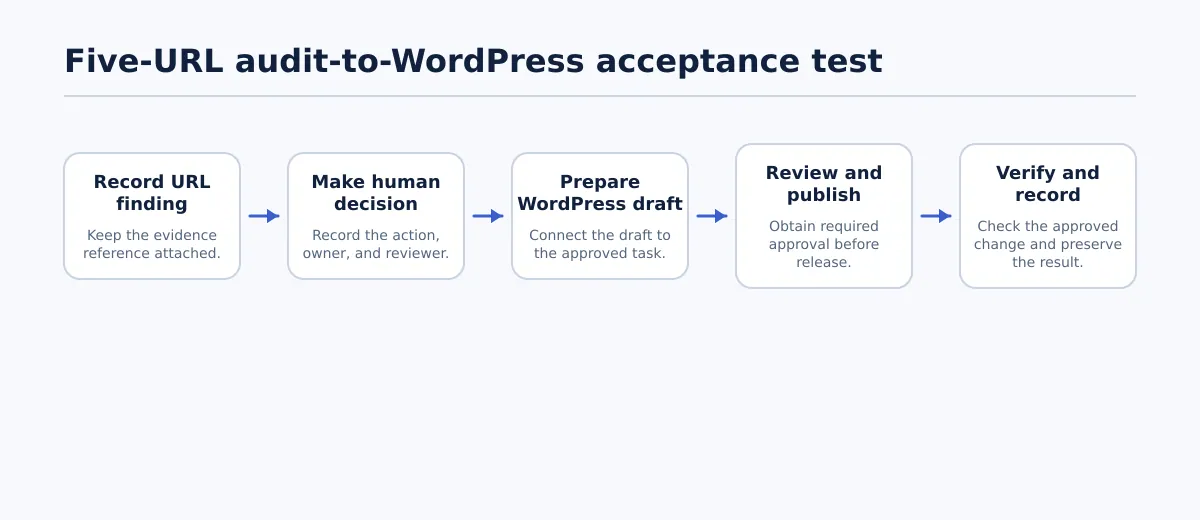 Test each sample URL from evidence capture through human decision, WordPress review, and recorded verification.
Use five representative URLs from one site to assess whether a candidate’s output will work in your publishing process. Include one page with a proposed metadata correction, one page where an editor recommends a specific content change, one page the editor decides to leave unchanged, and two pages reflecting other findings your team commonly handles. This is a proposed buyer test, not a benchmark of the named products.
For every URL, record the site, URL, tool finding and evidence reference, human decision, owner, reviewer, WordPress location if an update is approved, and verification result. Keep tool-generated observations separate from editorial judgments and publishing checks.
- Capture the finding. Save the finding and its evidence against the exact URL. If another reviewer cannot identify the page or inspect the stated basis for action, mark that URL as failed.
- Resolve the editorial decision. The editor records an action, an intentional no-change decision with a reason, or an unresolved decision. Assign an owner and reviewer for any approved change. An unresolved decision remains pending; it is not a completed sample.
- Make the metadata correction in WordPress. For the metadata test, record the original value and the approved replacement. In the WordPress editing interface or the SEO field used by that site, confirm the saved title tag or meta description matches the approved replacement. After publishing, inspect the live page’s rendered metadata and record the observed value, page URL, and check result. If your site uses a different metadata field or process, define that field before the test and apply the same before-and-after check.
- Check the editorial update. Record the exact approved content change—for example, the paragraph or statement to replace. Compare the WordPress draft with that decision, obtain the required review, and then check the published page to confirm the approved wording appears at the intended URL. Record the reviewer, final URL, and result. If the editor’s decision is to retain the page, record the reason and mark it intentionally unchanged; do not describe it as a completed update.
- Reconcile all five records. Confirm each URL has a resolved disposition: a verified update or a documented intentional no-change decision. Keep the original evidence, decision, owner, and result connected in the audit output or supporting tracker.
Pass only when all five URLs have a resolved decision and the record connects the URL and evidence to an owner and a verifiable result. For the metadata case, the approved value must be confirmed in the WordPress field and checked on the published page. For the editorial case, the approved change must be present on the intended published page and its review recorded. An intentionally unchanged page passes only when the decision and reason are recorded. Fail if any URL is unresolved, the evidence is lost, a change cannot be matched to its approval, or the published result cannot be checked.
This test separates three possible gaps: the candidate may not provide adequate evidence, the team may lack a place to record decisions, or the WordPress update may not be checked reliably. Note which gap occurred. A different audit product is relevant only if it addresses the first; tracking and publishing responsibilities may need a separate solution.
Match the tool combination to your team
Choose the smallest combination that supplies the evidence your audit job requires. The scenarios below are hypothetical decision aids; they do not imply that a product includes approvals, assignments, or WordPress publishing controls.
| Team situation | First job to shortlist for | Output to require | Work that may remain elsewhere |
|---|---|---|---|
| Small editorial team reviewing a limited page set | Editorial evaluation, unless a defined technical question calls for crawl-oriented inspection | A manageable list of pages and a review signal editors can assess | Decide whether to revise or retain each page, assign approved edits, and check WordPress changes |
| Agency reviewing several client sites | The audit job that matches the client brief; test site and URL clarity across the sample | Findings that identify the correct client site and page, with evidence a reviewer can inspect | Coordinate client decisions, ownership, approval, and verification for each WordPress site |
| Team with substantial technical findings | Crawl-oriented technical inspection | URL-specific findings with reviewable supporting detail | Prioritize which issues merit action, assign corrections, and verify implementation; do not treat a technical report as editorial approval |
If no candidate demonstrates a required output, record that as a gap instead of stretching a product’s stated category into a capability claim. For a broader discussion of how agencies can combine audit and coordination tools, see our guide to choosing an agency audit stack.
Use a buying checklist before committing
Before paying for a tool or expanding its use, confirm these points with your own pages and team requirements:
- Coverage: Can it assess the page types and URL set in scope? Ask for a demonstration using representative pages.
- Evidence: Can a second reviewer understand and trace the finding to its URL and supporting detail?
- Export or tracking: Can the needed information move into your actual work tracker without losing its context? Which fields will need to be added elsewhere?
- Repeat audits: Can the team compare later results with a baseline in a way that answers a real reporting question? Ask to see the process rather than assuming it exists.
- Access: Can the people who need to review findings access the relevant information under your organization’s requirements?
- Current price and limits: Confirm current pricing, usage limits, and any constraints that matter to your sites directly with the vendor.
- Approval and publishing: Who makes the editorial decision, approves a change, and checks the WordPress result? Name those responsibilities even if the audit product does not manage them.
Shortlist by audit job, then run the five-URL acceptance test before a broader rollout. If the remaining need is transferring approved Google Docs or Google Drive DOCX content into WordPress, Tenwrite may be relevant as a transfer route. Test that specific handoff by confirming the approved source and destination, checking the resulting WordPress draft against the source, and recording the result. That transfer role does not replace audit evidence, editorial approval, or verification of the published update.