
A content tracker is not primarily a calendar or a performance dashboard. For a WordPress publishing team, it is the record that answers a more immediate question: what must happen next before this item can move forward?
A useful record connects the approved source, the matching WordPress draft, the person responsible for the next handoff, and the decision to release. That connection can live in a spreadsheet, a project system, or a more connected workflow. The format matters less than whether a teammate can verify the record without searching through folders, messages, and WordPress revisions.
This content tracker guide gives you a minimum record, a fictional approval-to-release example, and a practical test for evaluating your current tracker or a prospective tool.
Content tracker questions at each WordPress handoff
Before opening a document or logging into WordPress, a teammate should be able to answer four questions from one content record:
- Which source was approved? The record should identify the exact document, content package, or revision that may be transferred. A topic title alone is not enough when drafts have been revised.
- Which WordPress draft corresponds to that source? The CMS link should lead to the actual draft in the intended site, not merely to a WordPress dashboard or a general content folder.
- Who owns the next action? “In review” is not an owner. Name the person expected to create, check, approve, schedule, or publish the item.
- Is release authorized? A planned date and a scheduled WordPress status are not proof that someone approved the release. Record the release decision separately.
These questions keep the tracker focused on publishing control. Metrics such as traffic, rankings, or engagement can belong in a later reporting process, but they do not resolve whether the right source became the right draft or whether anyone authorized it to go live.
Use statuses that represent observable conditions rather than vague progress labels. For example, Source approved, CMS draft created, Draft checked, Release approved, and Published each describe a different completed condition. Do not use one label, such as “ready,” for both source approval and permission to release.
The minimum fields for a usable tracking record
A content tracker template does not need dozens of columns. It does need fields that make the important links, decisions, exceptions, and owners unambiguous. The following is a proposed editorial framework, not a required product configuration.
| Field | What to enter | When to update it | Entry rule |
|---|---|---|---|
| Site | The WordPress site that will receive the item | At intake | Use the specific destination site name, especially when one team manages multiple sites. |
| Working title or content ID | A recognizable working title plus an internal ID where titles can change | At intake | Keep the ID stable even if the headline changes. |
| Approved-source link | Link to the exact approved document or source package | When source approval is recorded | Do not enter a folder link when the approval applies to one document. |
| CMS-draft link | Direct link to the WordPress edit screen for the current valid draft | When the draft exists | One active record holds one active draft link. Do not place two draft links in this field. |
| Draft exception or related record | A linked exception record when another draft is found for the same content ID | Immediately when a duplicate is found | Create a second record with the same content ID, its own draft link, and status Duplicate draft — do not publish. Link it to the canonical record and state which draft is valid before work continues. |
| Current status | The current verified workflow state | At every completed handoff | Change status only when its stated condition has been met. |
| Publisher owner | The person responsible for the next WordPress-side action | Whenever responsibility changes | One named person owns the next action, even when several people contribute. |
| Approval owner | The person able to approve the applicable decision | At intake or when approval responsibility is assigned | Record separately from the publisher when those roles differ. |
| Release date or decision | Release date, or an explicit decision such as Not approved, Approved for 18 October, or Published | At release review and after publication | A date without an approval decision is a plan, not release authorization. |
| Live URL | The public URL after release | After publication is verified | Do not fill this from an expected permalink before checking the public page. |
The three links in the canonical record have different jobs. The approved-source link identifies what the team is allowed to use. The CMS-draft link identifies the WordPress item under review. The live URL identifies what readers can access. A duplicate draft is not a second value to hide in the same cell: it becomes an exception record that can be assigned, resolved, and retained as an audit trail.
The same field definitions can sit inside a wider editorial process. Whatever system you use, keep source approval, draft review, and release approval as separate recorded decisions.
A worked approved-source-to-release example
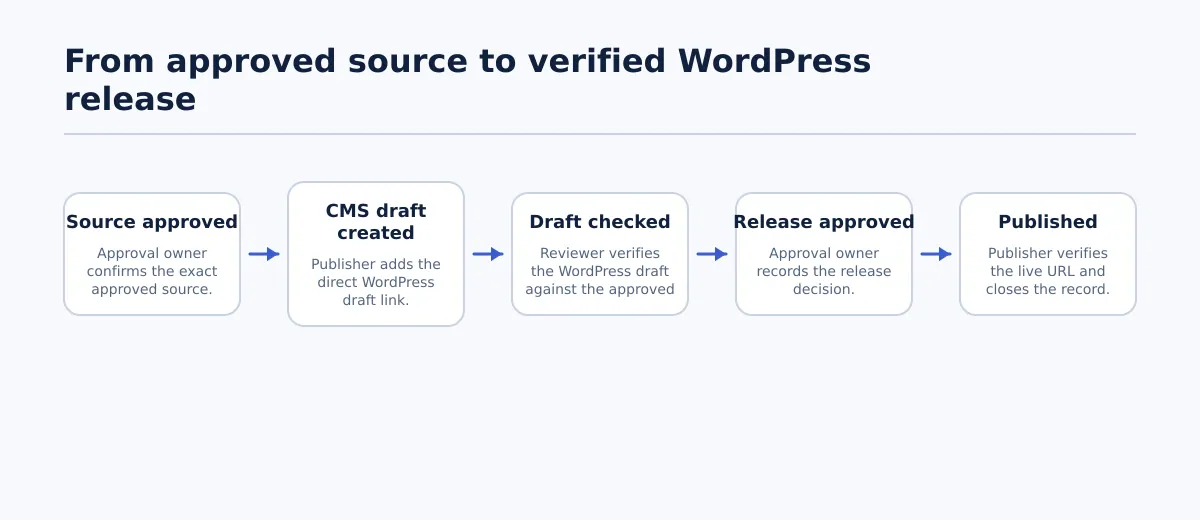 A content record changes owner and status as it moves from approved source to verified public page.
Consider a fictional agency record for an article being prepared for a client site.
| Field | Initial record |
|---|---|
| Site | Northstar Outdoor Journal |
| Working title or content ID | NSO-184 — Winter Trail Packing List |
| Approved-source link | Drive: NSO-184 approved copy v3 |
| CMS-draft link | Blank |
| Draft exception or related record | None |
| Current status | Source approved |
| Publisher owner | Priya Shah — create the WordPress draft |
| Approval owner | Morgan Lee |
| Release date or decision | 18 October planned; release not approved |
| Live URL | Blank |
The record changes as the article moves forward:
Source approved. Morgan confirms that
approved copy v3is the version to use. Morgan updates the approved-source link and sets the status toSource approved; Priya is already named as the next owner. The blocking check is simple: if the record points to an unapproved version or no exact source, Priya does not create a CMS draft.CMS draft created. Priya creates the article in the Northstar Outdoor Journal WordPress site and enters the direct edit-screen link in the CMS-draft field. Priya changes the status to
CMS draft created, then changes the publisher owner to Diego Ramos — check the draft. The blocking check is that the draft link must lead to an item for NSO-184 on the stated site. If Priya finds another draft claiming NSO-184, she creates a related exception record for that second draft, marks itDuplicate draft — do not publish, and assigns its resolution to Morgan. The canonical record retains only the draft Diego will review.Draft checked. Diego compares the canonical WordPress draft with the approved source and checks the destination-specific items the team requires, such as title, headings, links, categories, excerpt, image, and metadata. Diego records the check by changing the status to
Draft checked, noting any required correction in the team’s normal review field or task, and changing the publisher owner to Morgan — make the release decision. A draft that merely exists in WordPress has not passed this handoff.Release approved. Morgan reviews the completed draft and enters
Approved for 18 Octoberin the release-decision field. Morgan changes the status toRelease approvedand assigns Priya as publisher owner — release and verify the public page. A calendar booking or a scheduled post does not replace this decision; if the decision field is blank, the item fails the release check.Published. Priya releases the post, opens the public page, enters the actual live URL, and changes the status to
Published. Priya also updates the release decision toPublished and verifiedand changes the publisher owner toRecord closed. The final check is that the URL resolves to the intended article and represents the version that Morgan approved.
steps that can be automated and the checks that still need people
Transfer and reminder activities may be useful in a Content Automation process, but they do not remove the need to name the updater, the next owner, and the decision that permits release.
How to test a tracker against real handoff scenarios
A tracker is worth testing with real exceptions, not just a clean sample record. Take a few active articles, enter them using the proposed fields, and ask a reviewer to find or flag the problems below without relying on private knowledge or message history.
| Handoff problem | Pass condition | Fail condition |
|---|---|---|
| Approved source with no CMS draft | The reviewer can see the approved-source link, a blank CMS-draft field, and a named publisher owner responsible for creating it. | The record suggests the item is progressing, but no one can identify whether a WordPress draft exists or who should create it. |
| Two CMS drafts claim one source | The reviewer finds one canonical record with one active CMS-draft link and a related duplicate record carrying the second draft link, the same content ID, Duplicate draft — do not publish status, a resolution owner, and the decision identifying the valid draft. | Two links are placed in one CMS-draft field, or the second draft exists only in comments, messages, or an individual’s notes. |
| Draft with no publisher | The record shows the current status and one named person responsible for the next action. | The item sits in a shared “review” or “draft” column with no accountable owner. |
| Scheduled release without recorded approval | The reviewer can find an explicit release decision and approval owner before the item is treated as ready to publish. | A scheduled date or WordPress status is the only evidence that release is permitted. |
Run the test as a short walkthrough. Give a teammate a content ID and ask them to locate the approved source, canonical CMS draft, next owner, and release decision. Then give them one of the four exceptions. For the duplicate test, require them to identify both draft records, the one marked not for publication, the person resolving it, and the chosen canonical draft. If they cannot do that quickly, the tracker needs a clearer field, status rule, or review practice.
For agencies, this same method can also show whether audit recommendations become completed updates rather than remaining a list of findings.
Do not compensate for an unclear record with more feature labels. A calendar view, dashboard, or notification may be helpful, but it should make these checks easier to perform rather than hide where the authoritative link and decision live.
Choosing between a simple tracker and a more connected workflow
A shared spreadsheet or lightweight tracker is often sufficient when a small team publishes to one site, the same people perform most handoffs, and the team can reliably keep links and statuses current. Start with one canonical row per content item, use a separate related record for any duplicate draft, and assign one person to update the row at each completed handoff.
A more connected workflow becomes worth assessing when the process has more opportunities for ambiguity: several WordPress sites, separate approval and publishing roles, many concurrent drafts, or frequent duplicate and outdated links. The reason is not that a team needs more dashboards. It is that ownership, exception handling, and status checks need to remain consistent when a person cannot hold the entire process in their head.
Evaluate the workflow against the work it must control:
- Can one canonical record identify the approved source, the correct site, and the active WordPress draft?
- Can the team create and resolve a separate duplicate record without losing either draft link?
- Can the team assign one next owner at every stage, including post-publication verification?
- Can a reviewer distinguish source approval, draft QA, and release approval?
- Can missing links, unowned releases, and duplicate drafts be found before publication?
- Can the process retain the actual live URL after the release check?
A two-item trial before committing
Before changing tools or adding more structure, trial the record with two active items: one routine article and one item with an expected complication, such as a late revision, a different publisher, or a second site. Ask the people who approve, build, check, and release the items to update the record themselves.
The trial passes when each person can see the right source, draft, owner, and decision at their handoff, and when the team can flag an exception without a separate investigation. If those checks are difficult, fix the field definitions and status rules first. Then assess a broader approach to selecting publishing systems.
Test one active article this week. Build its record, verify every handoff, and deliberately check for a missing draft link, duplicate draft, owner, or release decision. That small exercise will show whether your current content tracker supports controlled WordPress publishing—or only records plans after the fact.