

An agency can have an approved article ready to publish and still lose control at the client handoff. The source version may be correct while the destination site requires different categories, tags, authors, metadata, or release permissions.
Content workflow automation for agencies is most useful when it standardizes that handoff without turning approval into an unattended CMS action. The practical goal is to move a known source package, apply the correct client-site rules, validate the resulting draft, and leave scheduling or publication with an authorized owner.
This guide focuses on the agency operating model around approved content: how to define the publishing boundary, map the fields and owners, create client-specific destination profiles, choose safe automation candidates, validate drafts, and handle a failed item across multiple sites. It does not cover broad AI content production or a general marketing automation stack.
Define the publishing workflow automation boundary
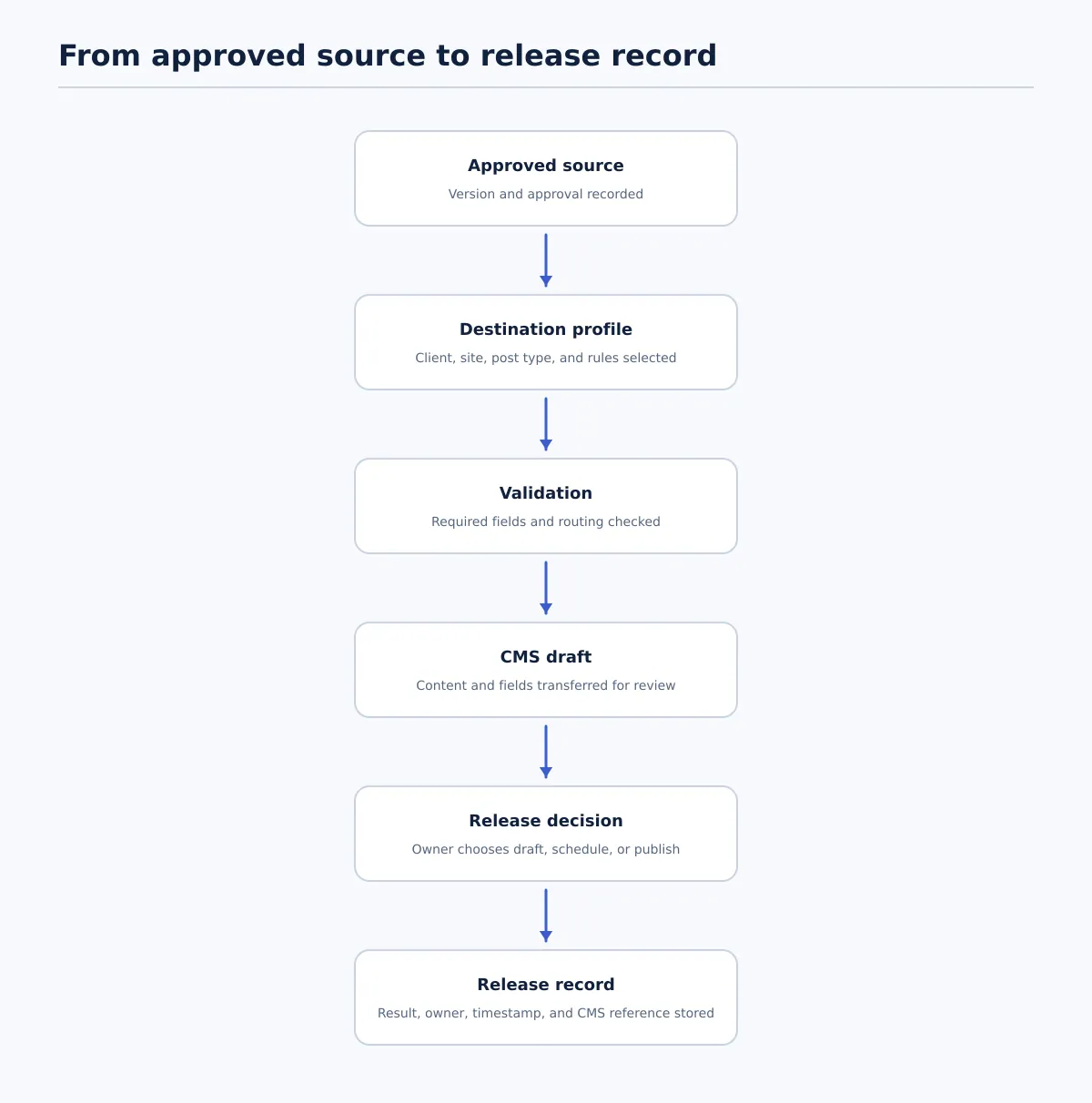 A controlled publishing workflow moves approved content through destination checks, CMS validation, release authorization, and outcome recording.
In a publishing context, content workflow automation means connecting repeatable handoffs between an approved source and a destination CMS. The workflow can prepare and route known information, but the agency still needs explicit decisions for source approval, corrections, exceptions, and release.
Use this sequence as the boundary for the workflow:
- Source document: The article exists in the agency’s approved working system, such as Google Docs.
- Approved version: The responsible editor or client approver identifies the exact version permitted for CMS preparation.
- Destination profile: The handoff identifies the client, site, environment, post type, and applicable site rules.
- Package validation: The workflow checks that the source and required destination fields are complete.
- CMS preparation: The approved package is transferred into the permitted CMS state, normally a draft.
- CMS review: An editor or publishing owner checks the destination representation against the source and client profile.
- Release decision: An authorized owner chooses whether to keep the item as a draft, schedule it, or publish it.
- Release record: The agency records the resulting CMS state, identifier or URL, timestamp, owner, and any exception.
This boundary separates two decisions that are often confused:
- Content approval: Is this source version complete and authorized for publishing preparation?
- CMS release: Has the destination item passed its checks, and is an authorized person permitting it to go live?
A source can be approved without being ready for CMS transfer. A CMS draft can exist without being ready for scheduling. Treating those as separate states makes it possible to automate predictable movement while preserving review and release ownership.
Tenwrite’s documented capability supports this controlled-draft model: users can review, revise, schedule, or save generated content as a CMS draft before it goes live. The agency still defines the required fields, permitted state, reviewer, and release owner for each workflow.
Map the agency workflow from source to release record
Map the workflow before connecting tools. The map should show what information travels with each item, who owns the next action, and what must be true before a status changes.
A useful status model for this agency process is:
- Intake pending: The source, destination, and publishing package are being assembled.
- Approved for transfer: The approved source version and permitted next step are recorded.
- Transfer blocked: A required source or destination field has failed before CMS preparation.
- CMS draft created: The package exists in the intended CMS, but CMS review is incomplete.
- Ready for release: CMS checks have passed and the release owner is authorized to act.
- Scheduled or published: The permitted CMS action has occurred.
- Release recorded: The result, owner, timestamp, and CMS reference are stored.
Do not use one status such as Approved for all of these conditions. The word should describe source approval only, or the workflow should use a more specific value such as Approved for transfer.
Build a minimum publishing field map
Use one record per content item in a spreadsheet, project system, or publishing queue. The record should remain attached to the source and CMS result.
| Field | Purpose | Pass condition before the next handoff |
|---|---|---|
source_url | Identifies the approved document or source record | The URL resolves to the intended source |
source_version | Prevents an older draft from being transferred | The version or approval timestamp matches the approved record |
client and site | Routes the item to the correct destination | Both match a known client-site profile |
post_type | Defines whether the item is a post, page, or another type | The type is permitted on the selected site |
title and body | Supplies the primary CMS content | Both are present and match the approved source |
owner | Identifies responsibility for the current handoff | One named owner is assigned |
reviewer | Identifies who checks the CMS result | A reviewer is assigned before draft creation |
due_date | Makes the next action visible | A date is present when the item is time-bound |
required_fields | Lists the destination-specific contract | The applicable profile is selected and readable |
target_status | Defines the permitted CMS state | Draft, scheduled, or published is explicitly selected |
release_record | Captures the result | The record has space for CMS ID or URL, action, timestamp, and owner |
Give every status an exit condition. For example, Approved for transfer passes only when the source version, client, site, post type, approver, and approval time are recorded. CMS draft created passes only when a draft exists on the intended site and its identifier is saved. Ready for release passes only when the destination checks have passed and the release owner is named.
For a document-led implementation, see the WordPress Google Docs integration workflow. That guide covers the source-to-WordPress handoff; this article focuses on the agency-wide rules that determine whether each client item is eligible for that handoff.
Set client-specific publishing requirements before automation
A multi-client agency should not assume that two WordPress sites accept the same publishing package. Create a destination profile for each client site before connecting automated transfers.
Each profile should state what is required, which values are allowed, what the default CMS state is, and who resolves an exception. A profile is not complete if a publisher still has to search through messages to find the correct taxonomy or scheduling rule.
Here is a hypothetical comparison for two client sites:
| Requirement | Client North site | Client Harbor site |
|---|---|---|
| Required category | One category from the approved service taxonomy | One category from the approved industry taxonomy |
| Tag rules | Tags are optional; use existing tags only | Two to four existing topic tags are required |
| Excerpt | Required for every post | Optional unless supplied in the publishing package |
| Featured image | Required, with alt text and credit details | Required from the approved asset library |
| Author assignment | Named subject-matter author | Site’s documented editorial author |
| SEO metadata | SEO title and meta description required | SEO title required; description follows the site profile |
| Default post status | Save as draft for editor review | Save as draft after package validation |
| Scheduling owner | Publishing coordinator | Client account editor |
The difference matters operationally. A workflow that treats the two sites alike could reject a valid Client Harbor item because its excerpt is empty, or send a Client North category into Client Harbor’s taxonomy. The profile determines which checks run and who receives a failure.
Define the profile fields
Record these items for every destination:
- domain, environment, and site identifier;
- permitted post types and authors;
- category and tag rules, including allowed values;
- excerpt and featured-image requirements;
- SEO title and meta description requirements;
- formatting, embed, and link restrictions;
- default CMS status;
- scheduling permissions and time zone;
- reviewer, publishing owner, and exception owner.
Test the profile with four cases before using it on a live queue: an ordinary article, an article with images and links, an item missing a required field, and an item containing an invalid taxonomy value. The profile passes its test when valid items proceed to the intended CMS state and invalid items stop with a named correction owner.
For higher-volume rows and batches, the Google Sheets to WordPress bulk publishing workflow provides a useful companion model. A spreadsheet can organize the queue, while the client profile determines whether each row is eligible for its destination.
Automate the repeatable handoffs without automating approval
Choose automation candidates by examining their inputs, outputs, rules, and pass conditions. Transfer and preparation are usually easier to specify than editorial interpretation or release authorization.
| Publishing step | Automate when… | Keep human control when… |
|---|---|---|
| Transfer title, body, links, and supplied fields | The approved source and field mapping are known | The source version or destination is unclear |
| Prepare formatting | Content elements have defined CMS mappings | The conversion changes meaning or intended layout |
| Populate metadata | The client profile defines the field and its source | The value requires editorial judgment or conflicts with the brief |
| Map categories and tags | Values exist in an approved destination list | The correct taxonomy is ambiguous or missing |
| Validate the package | Required fields and allowed values can be checked | A person must decide whether an exception is acceptable |
| Create a CMS draft | Destination, post type, and draft state are confirmed | The site or environment cannot be verified |
| Notify the next owner | A status change and owner are recorded | The notification could be mistaken for approval |
| Schedule or publish | Permission, checks, date, time, and time zone are recorded | The authorized owner has not confirmed the final action |
Use this decision rule: automate movement and repeatable checks; retain judgment over meaning, exceptions, and release.
A controlled handoff can work as follows:
- The content lead records the approved source version and permitted next step.
- The workflow selects the client-site profile.
- Package validation checks routing, required fields, and allowed values.
- If validation passes, the workflow creates a CMS draft and records its ID.
- The editor compares the draft with the approved source and profile.
- A failed CMS check changes the item to
ReviseorBlockedand assigns an owner. - A passing item changes to
Ready for release. - The release owner chooses draft, schedule, or publish and records the result.
This sequence removes repeated copying and field entry without making the transfer itself proof that an article is approved or ready to go live.
Validate the CMS draft before scheduling or publishing
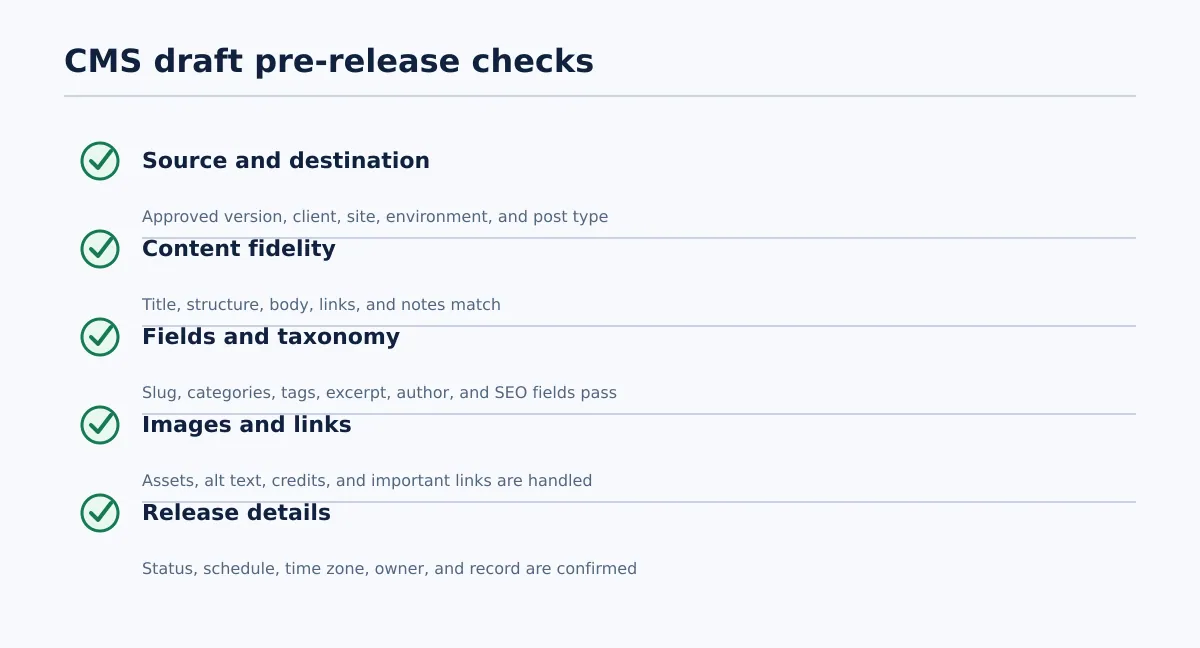 Pre-release validation covers identity, content, destination fields, assets, and release authorization.
The CMS draft is the inspection point between automated preparation and release. Validation should produce a recorded Passed, Revise, or Blocked result rather than an informal “looks good.”
Use a pre-release validation checklist
Source and destination
- [ ] The source URL and approved version are recorded.
- [ ] The client, domain, environment, and post type are correct.
- [ ] The CMS draft ID points to the intended destination.
- [ ] The reviewer and release owner are assigned.
Content fidelity
- [ ] The title matches the approved source.
- [ ] Headings, body copy, lists, tables, links, calls to action, and approved notes are present.
- [ ] Comments, placeholders, internal instructions, and unresolved drafting notes are removed or assigned.
- [ ] CMS formatting preserves the intended structure.
Fields and taxonomy
- [ ] The permalink or slug follows the client rule.
- [ ] Categories and tags exist on the destination site and match the profile.
- [ ] The excerpt is present when required.
- [ ] The author maps to an allowed CMS user.
- [ ] SEO title and meta description are present when required.
Images and links
- [ ] Required images are attached or available to the publishing owner.
- [ ] Image placement, alt text, captions, credits, and usage requirements are handled.
- [ ] Important links resolve to approved destinations.
- [ ] No placeholder asset or broken embed remains.
Release details
- [ ] The target state is explicit: draft, scheduled, or published.
- [ ] The schedule date, time, and time zone are confirmed when applicable.
- [ ] The authorized release owner has approved the next action.
- [ ] The action, CMS ID or URL, owner, timestamp, and result will be recorded.
A check passes when the field or condition is present and matches the relevant source or client profile. If a required category does not exist on the site, the item fails even when the article body is correct. If a schedule has no time zone, the item is not ready for scheduling.
Use a defined failure path
When a check fails, record the failed condition and route it to the owner who can correct it. Do not silently change the CMS item while leaving the source package and release record unchanged.
Use this path:
- Set the item to
BlockedorRevise. - Record the failed field, expected value, and actual value.
- Assign the correction to the source owner, profile owner, or editor.
- Correct the source, client profile, or CMS field, and record the new version where applicable.
- Rerun the failed check and any dependent checks.
- Return the item to
Ready for releaseonly after all required checks pass. - Let the release owner make the schedule or publication decision.
- Store the final result and exception history in the release record.
If nobody can be assigned responsibility for a failure, hold the item and pause expansion of that automation rule. An unowned exception should be treated as a workflow defect.
Work through a multi-client publishing example
Assume an agency has two approved Google Docs for different WordPress sites. The content lead owns intake and source corrections. The editor owns CMS comparison and QA. The publishing owner controls scheduling and release.
Item 1: Client North passes validation
The content lead records the approved document URL and version, Client North’s site, post type, proposed schedule, reviewer, and release owner. The package contains the title, article body, category, excerpt, featured-image reference, author, SEO title, and meta description.
The workflow selects the Client North profile. The category exists, the excerpt is present, the author is allowed, and the destination is correct. Package validation passes, so the workflow creates a WordPress draft and records the draft ID.
The editor compares the draft with the approved document. The title, headings, links, image details, excerpt, taxonomy, and SEO fields match the profile. The editor marks CMS QA Passed. The publishing owner confirms the date, time zone, and permitted scheduled state, then schedules the post.
The status transitions are:
Approved for transfer → CMS draft created → Ready for release → Scheduled → Release recorded
Item 2: Client Harbor is blocked before draft creation
The second approved Google Doc is assigned to Client Harbor. Its profile requires two to four existing topic tags and a featured image. The package includes the approved image but contains no valid topic tags.
For this workflow, incomplete required destination fields block CMS draft creation. The agency has chosen not to create a partial draft because the missing tags are part of the required publishing package. This is the fixed handling rule; the workflow does not branch between creating a draft and stopping.
The record changes as follows:
Approved for transfer → Transfer blocked
The exception record contains:
- Failed check: Required Client Harbor topic tags are missing.
- Status:
Transfer blocked. - Correction owner: Content lead, because the approved source package is incomplete.
- Reviewer: Editor, assigned before the item can proceed.
- Release owner: Publishing owner, unchanged.
- Next action: Add approved tags, record the corrected package, and rerun package validation.
The content lead adds two allowed tags and updates the publishing record. If adding the tags changes the approved content package or requires client confirmation, that approval is recorded before the item continues. Package validation then passes, and the workflow creates the CMS draft.
The deterministic continuation is:
Transfer blocked → Source corrected → Approved for transfer → CMS draft created → Ready for release → Scheduled → Release recorded
The editor now checks the newly created draft, confirms that both tags exist in Client Harbor’s taxonomy, and marks CMS QA Passed. The publishing owner confirms the schedule only after that check. If the editor finds another failure, the item returns to Blocked with the new failed field and its responsible owner.
This example makes the agency’s chosen control explicit: source approval permits validation, but missing destination requirements prevent CMS preparation. Other agencies may choose to create an informational draft earlier, but that is a separate documented rule and should not be mixed into the same status model.
Use a rollout checklist and failure path for exceptions
Introduce the workflow one client site at a time. Each phase should prove that the process can identify a correct item, stop an incorrect one, and assign every exception.
Phase 1: Document one current workflow
Choose one recurring content type for one client. Record its source, approval status, destination, required fields, owners, CMS states, and release record.
Completion condition: Another team member can identify the owner and pass condition for every handoff without searching message threads.
Phase 2: Define the client profile
Record permitted post types, taxonomies, authors, metadata requirements, image rules, default status, scheduling permissions, and time zone.
Completion condition: Every required field has a pass condition and every exception has a named owner.
Phase 3: Test package validation and draft creation
Run a normal article, an article with images and links, a missing-field case, and an invalid-taxonomy case. Use the documented rule for whether each failure blocks draft creation.
Completion condition: Valid items reach the intended CMS state, while invalid items stop at the defined boundary with an actionable error.
Phase 4: Compare the CMS result with the approved source
Have the editor check content fidelity, formatting, fields, taxonomy, links, images, and metadata. Record Passed, Revise, or Blocked for every test item.
Completion condition: No test item is left without a reviewer, correction owner, and next action.
Phase 5: Add controlled scheduling
Allow scheduling only after CMS QA passes and the release owner confirms the target state, date, time, and time zone.
Completion condition: The workflow distinguishes Ready for release from Scheduled and records who authorized the transition.
Phase 6: Expand to the next site
Reuse the workflow structure, but create a separate client profile and test its rules. Do not assume that identical post types mean identical metadata, taxonomy, or release permissions.
Completion condition: The new site passes its own normal and failure cases, with no exception left without a source, owner, or next action.
Pause rollout when a validation failure cannot be assigned to a source, profile, or owner. Also pause when the team is correcting CMS content without updating the approved source or release record. Those conditions show that the agency’s handoff rules need clarification before expansion.
Start by auditing one approved-source-to-CMS handoff. List the source version, destination profile, required fields, owners, status transitions, validation checks, and release record. If repetitive transfer work is the bottleneck, evaluate Tenwrite against that defined process. Its documented review, revision, scheduling, and CMS-draft options are relevant when the agency wants controlled preparation before release, while the agency’s own approval and release rules remain the authority.