
An approved Google Doc is not automatically a release-ready WordPress package. It may contain final copy while still leaving the body structure, image assets, categories, excerpt, SEO fields, destination site, and release authority unresolved.
That distinction matters when an agency manages content for several clients or sites. If the publishing team treats the document as the complete handoff, the missing decisions are often made informally during CMS entry. That creates avoidable rework and makes it difficult to tell whether a change came from the approved source, the conversion process, or the WordPress draft.
A controlled Google Doc to HTML workflow puts conversion between editorial approval and CMS release. The team defines what may become body HTML, what belongs in WordPress fields, who owns each decision, and which checks must pass before the package moves forward.
This guide focuses on that boundary. It is not a tutorial on writing a Google Doc or HTML from scratch. It is an operational standard for preparing a source document, inspecting converted HTML, mapping the remaining fields, and deciding whether the handoff is ready for CMS QA.
Why a Google Doc is not automatically a release-ready HTML package
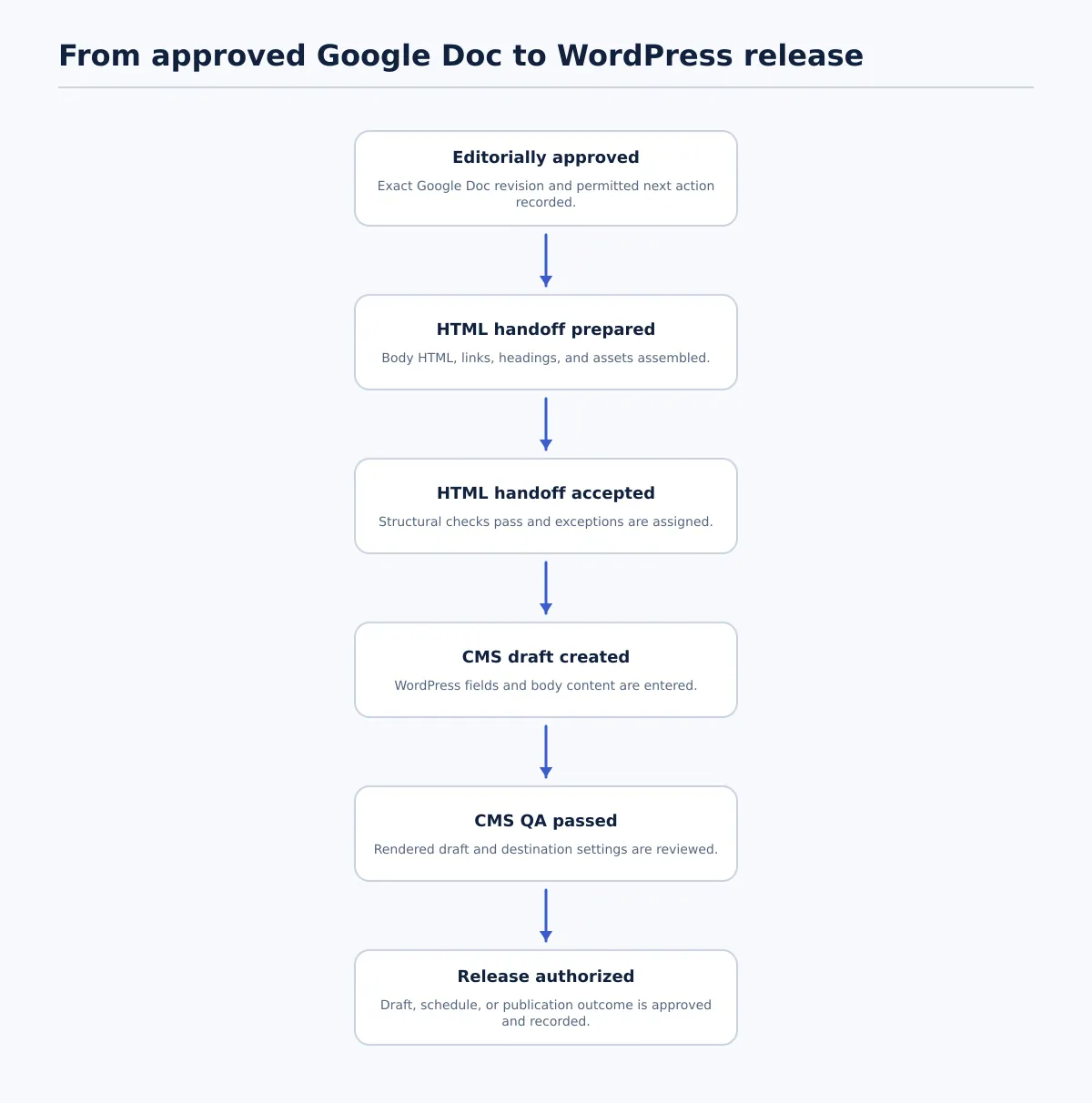 A Google Doc-to-WordPress handoff moves through separate approval, conversion, QA, and release states.
A Google Doc is primarily an editorial workspace. HTML is a web-content representation. A WordPress post is a CMS record with body content, metadata, media, taxonomy, permissions, and a release state. Those three things overlap, but they are not interchangeable.
A document can be approved for wording and still fail the handoff because its headings were manually styled, an image has no confirmed source, or the intended WordPress site is unclear. Conversion can preserve supported formatting and links, but preservation is not the same as acceptance. Every converter has its own behavior, and the resulting markup still needs review.
Use four separate deliverables in the handoff record:
| Deliverable | Typical owner | Completion condition |
|---|---|---|
| Approved copy | Editor or client approver | The source URL and approved revision are identified, and editorial approval is recorded. |
| Body HTML | Publishing or conversion owner | The converted body is available, tied to the approved source, and passes structural and formatting checks. |
| CMS field values | SEO lead, editor, or publishing owner | Required WordPress fields are supplied for the destination site and their status is clear. |
| Release authorization | Authorized publishing owner | CMS QA is complete and an approved next state—draft, scheduled, or published—is recorded. |
The practical consequence is simple: document approval authorizes the content, not necessarily the conversion, CMS entry, scheduling, or publication.
For the broader distinction between a Google Doc’s web-published version and a controlled WordPress release, see Google Docs Publish to Web: When It Works—and When to Publish to WordPress Instead.
A useful status sequence is:
Editorially approved → HTML handoff prepared → HTML handoff accepted → CMS draft created → CMS QA passed → Release authorized
Each transition should have an owner and a recorded result. “The document is ready” is not a sufficient status for the whole sequence.
Define the handoff contract: source document, HTML body, assets, and CMS fields
Before conversion begins, agree on what the publisher will receive. A handoff contract can live in a spreadsheet, project record, or publishing queue, but it should remain attached to the source and the resulting CMS item.
A realistic contract separates document-owned decisions from CMS-owned decisions. Some fields are shared because the document may propose them while the destination owner confirms them.
| Handoff item | Ownership | Required handoff detail |
|---|---|---|
| Canonical source URL | Document-owned | The exact Google Doc URL and approved revision or version label. |
| Approved version status | Shared | Approval owner, approval date, and permitted next action. |
| Post title | Shared | Approved working title, with any CMS title limit or convention noted. |
| Body HTML | Conversion-owned, then shared | Converted article body, including reviewed headings, paragraphs, lists, links, and images. |
| Category and tags | CMS-owned | Destination-specific terms confirmed to exist on the target site. |
| Excerpt | Shared | Approved excerpt or an explicit instruction for the CMS owner to create one. |
| SEO title and description | Shared | Values supplied by the SEO owner and checked against the destination’s requirements. |
| Image files or URLs | Document-owned, then CMS-owned | Asset location, usage permission, intended placement, and whether an image is featured or in-body. |
| Alt text | Shared | Text associated with each meaningful image, reviewed independently of the caption. |
| Internal links | Shared | Target URLs or approved anchor destinations, with unresolved links flagged. |
| Intended status or schedule | CMS-owned | Draft, scheduled, or publish permission; date, time, and time zone when relevant. |
| Destination site and post type | CMS-owned | Client, domain, environment, post type, and any site-specific profile. |
The contract should also identify the editor, approver, HTML reviewer, CMS publisher, SEO reviewer, and release owner when those roles are separate. On a small team, one person may hold several roles, but the decisions should still be recorded separately.
For example, a title in the Google Doc can be the proposed WordPress title, while the slug, excerpt, SEO title, and meta description remain separate fields. The publisher should not infer that those fields are complete merely because similar text appears in the document.
The linked Google Doc to HTML Converter: How Agency Teams Create Clean, Publishable HTML provides a closer look at the conversion stage. This workflow adds the field, ownership, and release boundaries around it.
Prepare the Google Doc so it converts predictably
Source-document discipline reduces ambiguity before anyone generates HTML. The goal is not to force every document into an artificial template. It is to use formatting that communicates structure rather than appearance.
Apply these preparation rules before marking the document ready for conversion:
- Use heading styles for hierarchy. Apply Heading 2 or Heading 3 instead of making text larger, bold, or centered to imitate a heading. The conversion process can only reliably interpret structure that the source represents as structure.
- Use real list controls. Create bulleted and numbered lists with the document’s list tools. Do not build a list from hyphens, manually typed numbers, or repeated spaces.
- Use descriptive anchor text. Link meaningful words such as “review the destination-site checklist” rather than pasting a long URL into a sentence or using “click here.”
- Remove empty spacer paragraphs. Use normal paragraph spacing in the destination style where possible. Blank blocks often become unnecessary markup that reviewers must remove.
- Place images intentionally. Put each image near the relevant paragraph, identify whether it is an in-body image or a proposed featured image, and supply the asset source and alt text separately.
- Flag complex elements. Mark tables, embeds, callouts, footnotes, custom layouts, charts, and interactive elements for manual treatment. Do not assume a visually complex document element has a direct WordPress equivalent.
- Resolve comments and suggestions. The conversion source should be the approved reading view, not a document containing unresolved alternatives or reviewer-only notes.
Here is the difference between visual formatting and structural formatting:
Risky pseudo-heading
MANUAL FORMATTING: THIS LOOKS LIKE A SECTION TITLE
The editor may have enlarged the text, applied bold formatting, and added spacing, but the source does not explicitly identify it as a heading.
Structured source heading
Heading 2 style: Prepare the source document
The visible text can look similar, but the style communicates that it belongs in the document hierarchy. The HTML reviewer can then check whether it became an appropriate heading element rather than guessing from appearance.
Before conversion, record the source state as something like Approved for conversion — Google Doc revision 12. If the editor continues changing the document after that point, the conversion owner needs a new version decision rather than silently using whichever revision is open.
Convert the document and inspect the HTML structure
“Clean HTML” should mean HTML that represents the approved content with a small, understandable set of semantic elements and no unresolved transfer artifacts. It does not mean that every converter produces identical markup or that a conversion can skip review.
Inspect the output in a code view, HTML editor, or other review method that exposes the actual structure. Then compare it with the rendered result. Both views are necessary: source inspection catches markup problems, while rendered inspection catches visible spacing, link, and image problems.
Use this compact pass/fail standard:
| Check | Pass condition | Fail action |
|---|---|---|
| Title and H1 | The CMS title and body heading plan are intentional; there is no accidental duplicate title heading. | Remove or remap the duplicate, then recheck the hierarchy. |
| Heading order | Sections follow a logical H2/H3 sequence without jumps created by visual styling. | Return the structure to the editor or conversion owner for correction. |
| Paragraphs and lists | Text blocks, unordered lists, and ordered lists use the semantic elements expected by the team. | Replace pseudo-lists or merged blocks before CMS entry. |
| Links | Each link has a destination, descriptive anchor text, and no accidental duplicate or placeholder URL. | Resolve the destination or flag it as an exception; do not pass it as-is. |
| Spacing | Empty blocks are not being used to create layout spacing. | Remove them and rely on the site’s content styles. |
| Styling | Inline styling is absent or limited to what the site policy allows. | Strip or manually review prohibited styling. |
| Embeds | Embed code is identified, approved, and supported by the destination site. | Hold it for technical review; never paste unreviewed code into production content. |
| Media | Images have the intended placement and a known asset source. | Stop the handoff until ownership, file, and placement are confirmed. |
A simplified comparison illustrates the review principle. The exact output will vary by conversion route, so these are examples of acceptable and risky structure rather than claims about any particular tool.
Risky markup
<div style="font-size: 22px; font-weight: bold;">Prepare the source</div>
<p> </p>
<p>1. Use heading styles</p>
<p>2. Use real lists</p>
<a href="">read more</a>
More reviewable markup
<h2>Prepare the source</h2>
<ol>
  <li>Use heading styles.</li>
  <li>Use real lists.</li>
</ol>
<a href="https://example.com/source-check">Review the source checklist</a>
The second example is not automatically release-ready either. The reviewer still needs to confirm that the heading belongs at that level, the link is the intended destination, and the list matches the approved copy.
If the output contains unexpected wrappers, duplicated content, malformed links, or complex elements that cannot be validated confidently, return it to the conversion owner or route it as a technical exception. Do not make invisible repairs directly in the CMS and then treat the source package as unchanged.
Map non-body content into WordPress fields
The body HTML is only one part of a WordPress post. Keep fields outside the body where WordPress or the site’s publishing process expects them. This makes the CMS record easier to review and prevents metadata from being mistaken for article copy.
| Source or decision | WordPress destination | Owner and completion test |
|---|---|---|
| Approved document title | Post title | Editor and CMS owner confirm the title matches the approved version and site convention. |
| Proposed URL wording | Slug | CMS owner confirms the slug is unique, readable, and appropriate for the destination. |
| Summary or approved excerpt | Excerpt field | Editor or SEO owner confirms the excerpt is supplied or marks it intentionally empty. |
| Category assignment | Category field | CMS owner confirms the category exists on the target site and is the intended primary classification. |
| Supporting topics | Tags field | CMS owner confirms tags are useful, valid, and not being created accidentally through import. |
| Proposed lead image | Featured image | CMS owner confirms the correct asset, placement, permission, and crop or display requirements. |
| Image description | Alt-text field | Editor or accessibility reviewer confirms the text describes the image’s purpose, not just its file name. |
| Search-facing title | SEO title field | SEO owner confirms the value is deliberately supplied for the site, not copied automatically from the post title without review. |
| Search-facing summary | Meta description field | SEO owner confirms the value is supplied and matches the approved page intent. |
| Author instruction | Author field | CMS owner confirms the author is an allowed account on the destination site. |
| Release instruction | Publish date and status | Release owner confirms draft, schedule, or publish authority, plus date and time zone when applicable. |
| Canonical instruction | Canonical URL field or SEO setting | SEO owner confirms whether the page should be canonical to itself or another approved URL. |
A worked example might begin with a Google Doc containing the title “A Practical Guide to Content Handoffs,” a proposed excerpt, two images, and a note saying “publish next Tuesday.” The conversion owner places the article text, headings, links, and image references in the body package. The CMS owner separately enters the title, slug, category, tags, featured image, author, and schedule. The SEO owner reviews the SEO title, meta description, and canonical instruction. The phrase “publish next Tuesday” is not enough by itself: the team must confirm the date, time, time zone, destination site, and authorized release owner.
For recurring work, maintain a destination profile for each client site. Two WordPress sites may use different required fields, taxonomies, authors, image rules, and release permissions. A reusable mapping method is safer than assuming one universal WordPress package.
Run the pre-CMS validation checklist
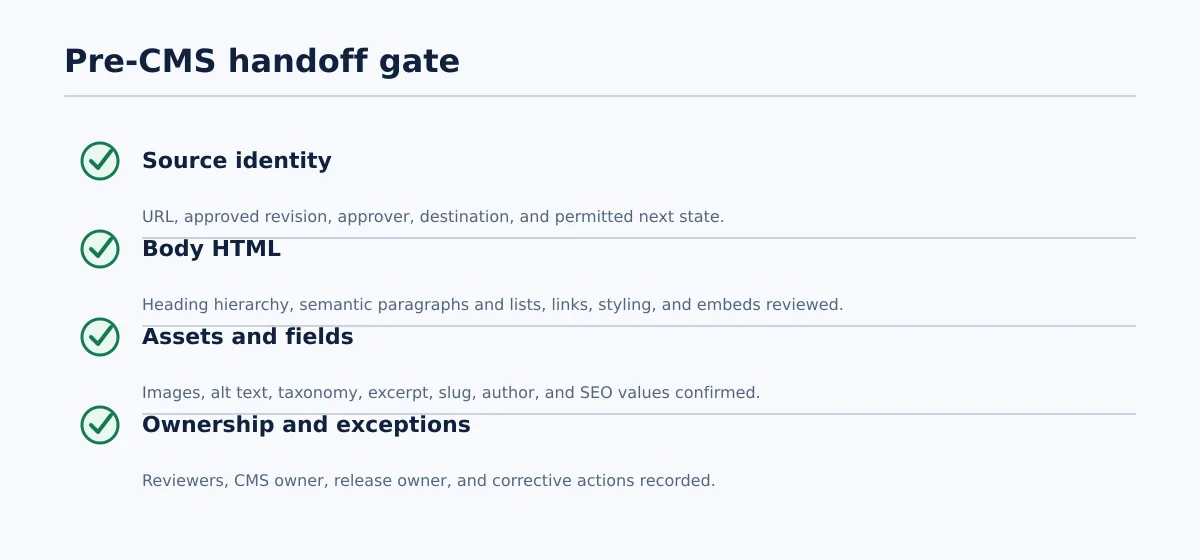 A pre-CMS handoff must pass source, structure, field, asset, destination, and ownership checks.
The pre-CMS gate answers one question: Can the publishing owner begin CMS work without making unresolved editorial or routing decisions? It is not the same as final WordPress QA.
Mark each item Pass, Revise, or Blocked and assign failed items to an owner.
Source and identity
- [ ] The Google Doc URL is recorded.
- [ ] The approved revision or version is identified.
- [ ] Editorial approval is recorded with the approver and date.
- [ ] The client, destination domain, environment, and post type are named.
- [ ] The permitted next state is clear: CMS draft, scheduled post, or another approved state.
Body HTML
- [ ] The title and body-heading plan do not create an accidental duplicate H1.
- [ ] Heading levels follow a logical order.
- [ ] Paragraphs and lists are represented consistently.
- [ ] Links resolve to intended destinations and have descriptive anchor text.
- [ ] No placeholder URLs, duplicate links, empty spacing blocks, or prohibited inline styles remain.
- [ ] Embeds, tables, callouts, and custom layouts have a documented treatment.
Assets and fields
- [ ] Each image has a confirmed file or URL, intended placement, and usage status.
- [ ] Alt text is supplied or intentionally assigned to the CMS owner.
- [ ] Category, tags, excerpt, author, slug, and SEO fields are supplied when required.
- [ ] Internal links have been checked against the intended destination.
- [ ] Canonical instructions and release timing are explicit.
Ownership and exceptions
- [ ] The HTML reviewer is named.
- [ ] The CMS owner is named.
- [ ] The release owner is authorized for the destination site.
- [ ] Exceptions are logged with an owner and next action.
- [ ] The conversion method and output version are recorded.
Use a strict rule: a failed item returns to the responsible editor, SEO owner, conversion owner, or site-profile owner rather than being silently repaired in WordPress. A publisher may correct an agreed CMS field during entry, but an unresolved source or approval issue should stop the handoff.
The handoff is accepted only when all required checks pass or an explicitly approved exception exists. “Mostly complete” is not a safe state for a multi-client queue.
Manage late document changes without losing control
Late edits are normal. The risk comes from applying them without knowing whether the HTML package, CMS draft, metadata, or release decision has already moved forward.
When the Google Doc changes after conversion starts, create a change record with these fields:
| Change-record field | Example |
|---|---|
| Change requester | Client approver |
| Affected section or field | H2 heading and SEO title |
| Previous source version | Revision 12 |
| New source version | Revision 13 |
| Destination status | HTML prepared; CMS draft not yet created |
| Responsible owner | Editor for copy; SEO lead for SEO title |
| Required revalidation | Heading hierarchy, internal links, SEO title, excerpt, and final approval |
| Outcome | Reconverted, reviewed, and accepted for CMS QA |
Suppose the editor changes “How to Prepare a Content Handoff” to “How to Prepare a Google Doc-to-WordPress Handoff.” The visible change affects the body HTML, but it may also affect the SEO title, meta description, internal-link anchor text, excerpt, and search intent. The editor owns the copy revision; the conversion owner regenerates or updates the affected HTML; the SEO owner checks the search-facing fields; and the approver confirms the new source version.
The required action depends on the destination status:
- Before conversion: update the source, record the new approved revision, and convert that revision.
- After HTML preparation but before CMS entry: invalidate the old HTML package, identify the new source version, and rerun the HTML checks.
- After a CMS draft exists: compare the revised source with the draft, update affected fields, and repeat CMS QA.
- After scheduling or release authorization: stop the release if permitted by the team’s controls, record the change, and obtain a new release decision.
Never overwrite the source URL or package without recording which revision was used. The goal is not to prevent edits; it is to prevent an old HTML handoff from being treated as a current approval.
Decide when the handoff is ready for CMS QA and release
Conversion completion and CMS QA are separate milestones. A clean HTML package can be ready for WordPress entry while the WordPress draft still needs checks for rendering, fields, permissions, links, media, and release settings.
Use this sequence:
- Editorial approval: The approver confirms the exact Google Doc revision and permitted next action.
- HTML handoff accepted: The converted body passes structural review, assets are identified, and exceptions are assigned.
- CMS entry: The publisher creates or updates the WordPress draft and maps the approved fields.
- CMS preview and QA: The reviewer checks the rendered draft, metadata, taxonomy, images, links, author, destination, and status.
- Scheduling or publication authorization: The release owner confirms the final action, date, time, and time zone where relevant.
- Outcome recorded: The team stores the CMS identifier or URL, final status, owners, timestamp, and any follow-up.
Use the following decision table to keep the next action explicit:
| Decision | Conditions | Next action |
|---|---|---|
| Ready for CMS QA | Approved source and revision are identified; body HTML passes; required fields and assets are supplied; destination and owners are confirmed. | Transfer or prepare the CMS draft, then begin CMS QA. |
| Return for editorial correction | Copy, heading structure, link intent, image instructions, or approval status is incomplete or changed. | Return the item to the editor or approver, record the required correction, and revalidate the new revision. |
| Needs a technical exception | The package contains an unsupported embed, complex layout, malformed output, unavailable asset, or site-specific issue outside the normal workflow. | Block normal release, assign a technical owner, document the decision, and define the revalidation required after resolution. |
A useful minimum release record includes the source URL, source revision, destination site, post or draft ID, status, QA result, release owner, date and time, and any exceptions. That record is what lets a team distinguish an accepted handoff from a published post.
If your team repeatedly moves approved Google Docs into WordPress, a controlled Docs-to-CMS workflow can reduce repetitive transfer work while preserving the draft and review boundary. Tenwrite supports Google Docs publishing workflows for WordPress and Blogger, including supported formatting, links, images, categories, tags, excerpts, and SEO metadata. Those capabilities should support—not replace—the source, field, QA, and release decisions defined by your team.
Standardize the handoff around one approved source, one reviewed HTML package, one explicit field map, and one recorded release decision. That is the difference between converting a Google Doc to HTML and handing a WordPress team a package it can safely review.