
Google Docs is often where an agency writes, reviews, and approves a client article. WordPress is where that article becomes a draft, scheduled post, or public page. The connection between them is useful only when the handoff preserves the decisions around ownership, metadata, destination, and release status.
A practical WordPress Google Docs integration should therefore do more than convert a document. It should fit inside a controlled publishing workflow:
Approved Google Doc → WordPress draft → CMS QA → Scheduled or published post → Release record
The integration prepares content for WordPress. A named editor or publisher still decides whether the content is ready to move forward. This distinction helps agencies avoid the most common failure in document-to-CMS automation: treating a successful conversion as proof that the post is ready to publish.
What a WordPress Google Docs integration should control for an agency team
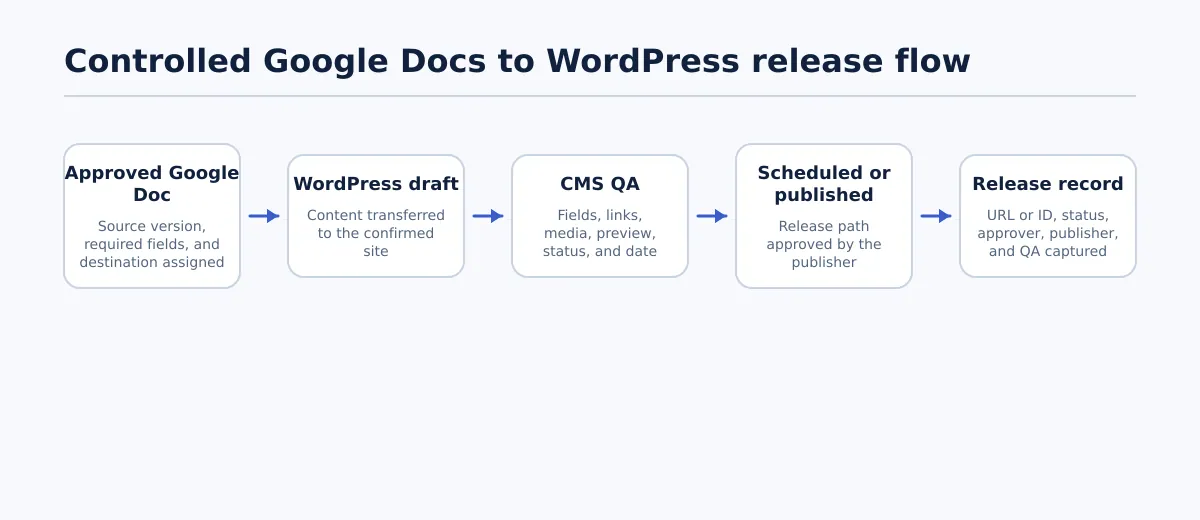 A controlled agency workflow separates document approval, WordPress draft creation, CMS QA, release, and outcome recording.
A useful integration should control the handoff points that are easy to lose when several people manage several client sites. At minimum, the workflow should make these items visible:
- Source identity: Which Google Doc is the approved source, and which version was reviewed?
- Destination identity: Which client site, post type, and WordPress environment should receive it?
- Ownership: Who writes, edits, reviews SEO, creates the CMS draft, and releases the post?
- Required fields: Which title, slug, taxonomy, excerpt, image, and SEO fields must be complete?
- Workflow state: Is the item drafting, under review, ready for CMS, a WordPress draft, scheduled, published, or returned?
- Release authority: Who can approve scheduling or immediate publication?
- Outcome: What happened after transfer, and where can the team find the resulting post?
A simple copy-and-paste process usually leaves these decisions in chat messages, comments, or individual memory. A controlled process puts them next to the content record. That makes it possible to stop a post before the wrong site, incomplete metadata, or an unapproved revision reaches the CMS.
The integration-selection question is not only “Can this Google docs to WordPress plugin create a post?” Ask instead:
- Can the team identify the destination before transfer?
- Can the connection create a WordPress draft rather than require immediate publication?
- Which fields does it actually support, and where do those fields land?
- Can the team test formatting, links, images, taxonomy, excerpts, and SEO fields on a representative post?
- Can someone record the post ID, URL, status, approver, and final release time?
- What is the recovery path when the document changes or the conversion is incomplete?
Documented WordPress–Google Docs connections exist through marketplace listings, WordPress plugins, and automation services. Their supported fields and release controls differ, so treat the selected tool’s documented export scope as the boundary of what can be prepared automatically. Tenwrite, for example, supports exporting Google Docs to WordPress with supported formatting, links, images, categories, tags, excerpts, and SEO metadata. The receiving site and the team’s WordPress configuration still need to be tested before the workflow is expanded.
Define the workflow owners and handoff states before connecting tools
Connect the tools only after the agency agrees on who owns each decision. A plugin or automation can move content; it cannot resolve an unclear approval or destination rule.
Use the following state model as a starting point:
| State | Owner | Entry condition | Exit condition | If the condition fails |
|---|---|---|---|---|
| Drafting | Writer | Brief and source requirements are available | Required content is complete and self-checked | Writer revises the document |
| Editorial review | Editor | Writer marks the document ready | Accuracy, structure, voice, and links pass review | Editor returns the document with specific changes |
| SEO review | SEO lead | Editorial review is approved | Search intent, slug, taxonomy, excerpt, and SEO fields pass | SEO lead returns missing or conflicting fields |
| Ready for CMS | Editor or content lead | Editorial and SEO approvals are recorded | Correct source version and destination are confirmed | Item returns to the responsible reviewer |
| CMS draft | Publisher or integration | Approved document is transferred | WordPress fields and rendered content pass QA | Publisher holds the draft and records the issue |
| Scheduled | Publisher | QA passes and release time is approved | Scheduled post is verified in the correct site | Publisher removes or pauses scheduling if a release detail is wrong |
| Published | Publisher | Immediate release is permitted and final QA passes | Live URL and status are recorded | Publisher reports the exception and begins correction |
| Returned | Assigned owner | Any required check fails | Corrected source or CMS draft re-enters the relevant review | Keep the item blocked until the failed condition is resolved |
The owner should be a person or explicitly assigned team role, not a general label such as “content team.” For a multi-client agency, add the client site and post type to the workflow record. A post can be editorially approved and still fail the destination check if the publisher has not confirmed the correct WordPress connection.
Set one rule before enabling a google docs wordpress integration: no item may move from Ready for CMS to a release state without a recorded destination and release owner. This rule prevents a successful transfer from becoming an accidental publication.
Set the Google Docs content standard and required WordPress fields
Reliable conversion begins with a consistent source document. Writers should not be expected to remember different handoff requirements for every client at the end of the assignment.
Create a Google Docs handoff template containing the content and publishing fields the agency actually uses. The exact mapping depends on the integration and the client’s WordPress setup, so label unsupported or manually completed fields clearly rather than assuming they will transfer.
| Google Docs handoff item | WordPress destination or decision | Owner | Pass condition |
|---|---|---|---|
| Final headline | Post title | Editor | Approved title matches the intended post |
| Heading hierarchy | Post body headings | Editor | Headings use the agreed structure without skipped levels that affect clarity |
| Body content | Editor content area | Writer and editor | Complete source is the approved version |
| Working links | Linked text and URLs | Editor | Each required link opens the intended destination |
| Image source and placement | Media or content image placement | Writer and publisher | Source, placement, and alt-text instruction are present |
| Category | WordPress category | SEO lead or editor | One approved category is selected where required |
| Tags | WordPress tags | SEO lead or editor | Tags follow the client’s controlled vocabulary |
| Excerpt | Excerpt field | SEO lead or editor | Excerpt is present when the site requires one |
| Intended slug | Permalink or slug field | SEO lead | Slug is approved and checked for conflicts |
| SEO title and description | SEO plugin or supported custom fields | SEO lead | Fields are approved and supported by the chosen connection |
| Release status and time | Draft, scheduled, or publish decision | Publisher | Status and time match the approval record |
The document standard should also define how images are marked. For example, use a consistent instruction such as Image 1: place after the introduction; use approved source; alt text: ... rather than leaving the publisher to infer placement from a comment.
Apply a simple pass/fail rule before transfer:
- Pass: every required field has an approved value, the document version is clear, and the destination site is assigned.
- Fail: any required field is blank, marked “TBD,” contradictory, or unsupported without a manual completion owner.
A failed preflight returns the document to the assigned owner before CMS transfer. It should not become a WordPress draft simply because the body copy is finished. For teams that need a separate conversion check, a Google Docs to HTML export and QA workflow can help define the boundary between document formatting and CMS readiness.
Choose the right release path: draft, scheduled post, or publish after approval
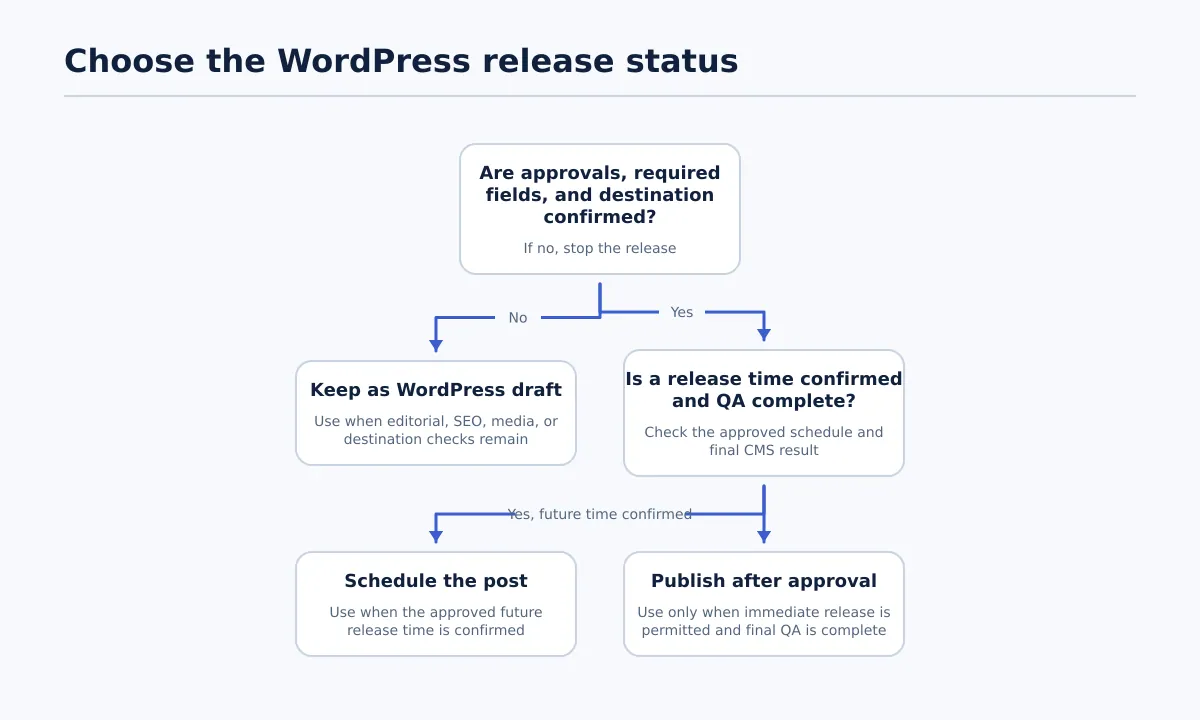 Use approval and QA status—not conversion success alone—to choose the release path.
A converted post can be structurally complete and still require review. Decide the release path from approval status, not from whether the integration reports a successful export.
| Create as a draft | Create as scheduled | Publish after approval |
|---|---|---|
| Editorial, SEO, media, or destination checks remain | Required fields and approvals are complete, and a release time is confirmed | A named publisher has completed final QA and the client’s process permits immediate release |
| Use when the WordPress rendering must be inspected | Use when the post is approved for a specific future time | Use only when no unresolved review or destination question remains |
| Next action: assign the failed or incomplete check | Next action: verify the scheduled status and time | Next action: record the live URL and release outcome |
Use a stop rule: unresolved approval, incomplete required fields, or uncertainty about the destination always results in a draft or a return—not a scheduled or published post.
The decision is operational even when the selected connection offers direct publishing. Marketplace and plugin listings demonstrate that WordPress and Google Docs can be connected, but they do not replace the agency’s release policy. A google docs to wordpress plugin should be evaluated against that policy with a test document, not adopted solely because it offers one-click transfer.
Run a pre-publish WordPress QA gate
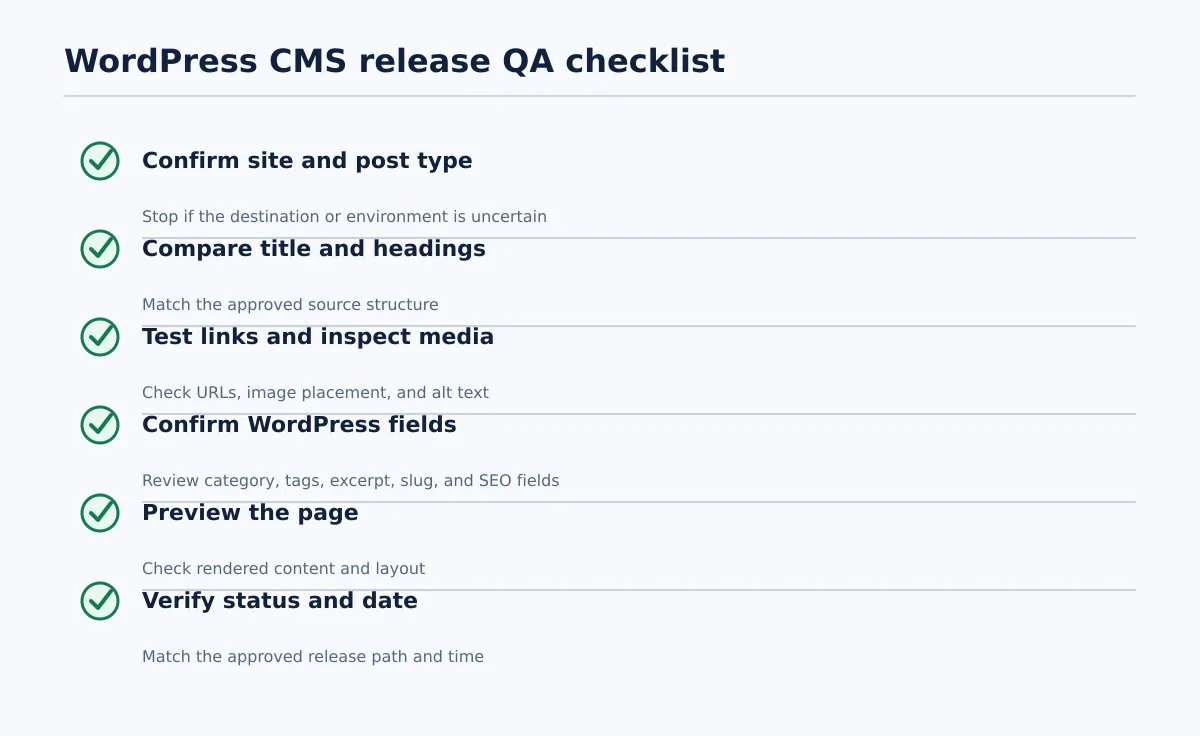 Complete the CMS-level checks before a converted post advances to scheduling or publication.
After conversion, the publisher should inspect the actual WordPress draft. Formatting preservation is useful, but it does not remove the need to check the receiving site, theme behavior, metadata fields, media, and status.
Run the checks in this order so a wrong destination is caught before detailed editing:
- Confirm the client site and post type. Compare the WordPress site, environment, and post or page type with the release record. Fail if the site, environment, or content type is uncertain; stop the release and correct the destination.
- Compare title and headings. Place the approved Google Doc beside the WordPress editor or preview. Pass when the title and heading hierarchy match the approved source. Fail when text is missing, headings have changed meaning, or hierarchy is unclear; return the draft for correction.
- Open every required link. Test links in preview or the editor according to the agency’s procedure. Fail when a URL is broken, redirected unexpectedly, or points to the wrong client destination; assign the link correction before release.
- Inspect images and alt text. Confirm that expected images are present, placed correctly, and labeled according to the client standard. Fail when media is absent, misplaced, inaccessible, or missing required alt text; hold the post.
- Confirm post fields. Check category, tags, excerpt, slug, SEO title, description, and any supported custom fields. Fail when a required field is blank, duplicated, conflicts with the approved value, or did not map as expected.
- Preview the page. Inspect the rendered layout, links, images, headings, and visible metadata or sharing elements that the team normally verifies. Fail when the page needs CMS or theme-specific correction.
- Verify status and date. Confirm draft, scheduled, or published status and the intended date and time. Fail when the status or time does not match the release authorization.
Do not mark QA complete because the content appears in the editor. Record each check as passed, failed, or not applicable, with a short note for any exception. If the conversion produces clean body content but misses a required SEO field, the correct result is a held WordPress draft—not an immediate publication.
Manage exceptions: failed conversion, missing fields, wrong destination, and late edits
Exceptions should return to an owner with a defined stop condition. Avoid fixing every issue silently in WordPress; silent changes make it difficult to know whether the approved source and released content still match.
| Issue | Owner | Stop condition | Resolution |
|---|---|---|---|
| Required metadata is missing | SEO lead | Slug, taxonomy, excerpt, or SEO field is incomplete | Update the approved source or assigned CMS field, then repeat the affected review |
| Document changes after approval | Editor | The source version no longer matches the reviewed version | Move the item back to editorial review; identify changed sections and repeat SEO review when the change affects search or metadata |
| Content reaches the wrong client site | Publisher or content operations lead | Destination cannot be confirmed or the post is in the wrong environment | Stop release, correct the connection or destination, and record whether the incorrect draft was deleted, held, or corrected |
| Formatting or media differs from the source | Publisher and editor | Preview does not meet the approved structure or media standard | Compare source and preview, correct the WordPress draft, and repeat the relevant QA checks |
If a wrong-destination post has already been published, treat correction as an incident rather than quietly continuing the workflow. The publisher should document the affected site, post status, corrective action, and final verification. Do not claim that an integration will automatically recover or synchronize every later edit; confirm the specific tool’s behavior and use the agency’s change-control rule.
A late document edit should create a new review event even when the change looks small. A changed headline can affect the slug, SEO title, internal links, or client approval. The minimum safe action is to identify the revised source version, assign the editor, and rerun the checks affected by the change.
Use a repeatable release record across client sites
The final handoff is not complete until the team can answer what was released, where it went, who approved it, and what was checked. Keep one release record for every client post, whether the outcome is scheduled, published, returned, or held.
Use this compact template:
| Field | Example value or instruction |
|---|---|
| Client site | Approved client name and WordPress site or environment |
| Google Doc | Link to the approved source document and version or approval date |
| WordPress post URL or ID | Add after draft creation or publication |
| Final status | Draft, scheduled, published, returned, or held |
| Scheduled or published time | Record the CMS time and relevant timezone |
| Approver | Named editor, SEO lead, or client approver according to policy |
| Publisher | Named person who created, scheduled, or published the post |
| QA completion | Date, checks completed, and any not-applicable items |
| Exception note | Brief description of a failure, correction, or late change |
For a larger queue, this record can live in the agency’s existing project system or a structured publishing log. Keep the document link, client identifier, WordPress destination, status, and outcome together so a later correction does not require searching across unrelated messages.
Worked workflow: one client blog post from approval to release
Consider a client blog post that has completed writing and client review. The team uses Google Docs for the source and WordPress for the client site.
- Writer — drafting. The writer completes the article, heading hierarchy, links, image instructions, and handoff fields. Required input: approved brief and document template. Pass: all required fields are populated and the writer marks the document ready. Fail: missing fields return to the writer.
- Editor — editorial review. The editor checks accuracy, structure, voice, links, and the source version. Required input: completed Google Doc. Pass: the editor records approval and identifies the exact document version. Fail: the document returns to the writer with requested changes.
- SEO lead — SEO review. The SEO lead confirms search intent, slug, category, tags, excerpt, and supported SEO fields. Required input: editorially approved document. Pass: every required SEO value is approved and compatible with the intended WordPress setup. Fail: the item returns to the SEO lead’s correction queue.
- Content lead — CMS readiness. The content lead confirms the client site, WordPress environment, post type, and release path. Required input: approvals, destination, and release authority. Pass: the item moves to
Ready for CMS. Fail: it remains blocked until the destination or approval is clear. - Publisher or integration — CMS draft. The approved Google Doc is transferred to the confirmed WordPress site as a draft. Required input: approved source and supported field mapping. Pass: the draft exists in the correct site and contains the expected content and fields. Fail: the publisher holds the draft and records missing or mismatched content.
- Publisher — CMS QA. The publisher checks site, post type, title, headings, links, images, alt text, taxonomy, excerpt, slug, SEO fields, preview, status, and date. Required input: approved source and WordPress draft. Pass: all required checks pass. Fail: the draft returns to the relevant owner; it does not advance to scheduling.
- Publisher — scheduling. The publisher schedules the post for the approved release time. Required input: passed QA record and confirmed release time. Pass: WordPress shows the correct scheduled status and date. Fail: scheduling is corrected or paused before release.
- Content operations lead — release record. The team records the document link, post ID or URL, status, time, approver, publisher, QA completion, and any exception. Required input: CMS result and QA record. Pass: another team member can reconstruct the handoff. Fail: the item remains incomplete in the release log until the missing outcome is added.
This workflow uses the integration to remove repetitive transfer work while keeping approval and release decisions with named people. It also gives the agency a consistent way to compare results across client sites without assuming that every WordPress installation maps Google Docs fields in the same way.
Review your current handoff against three controls: draft-state rules, required-field completion, and the WordPress QA gate. Then test a representative client post from approved Google Doc to recorded release outcome. Where the supported export scope fits your process, explore Tenwrite’s Google Docs publishing workflow as a way to connect that controlled handoff to WordPress without treating document conversion as unattended publishing.