
A SERP check records where a page appeared for a query under the conditions used for that check. An SEO SERP tracker makes the observation useful to a content team by connecting it to the page the team intended to monitor, preserving the measurement context, and recording what happens next.
This guide follows one hypothetical WordPress article from its baseline through two review dates and an editorial handoff. The worksheet is a proposed working format, not an industry standard. Its purpose is to help teams verify a change before turning it into a publishing task.
What an SEO SERP tracker measures—and what a one-time check cannot show
A SERP checker returns an observation of search results for a query. The measurement unit is specific: one query, a selected search engine and location, a device setting, a check date, and the range examined. Record the URL that appeared and its position within that check. If the intended page does not appear in the range examined, record not found in checked range. That describes the observation; it is not an indexing diagnosis.
A one-time SERP position checker gives you a snapshot. A tracking workflow adds repeated, dated observations for the same intended page and query, with the conditions recorded so the team can judge whether two checks are comparable. A snapshot cannot provide that history on its own; a series can show what was observed on different review dates, but it does not explain why a position changed.
A position observation is not a measure of site or page performance across search activity. It records a result for a particular check. Keep it distinct from reporting that summarizes performance for selected pages or queries over a reporting period. Those measurements may inform the same editorial discussion, but they do not represent the same unit.
Build a keyword-to-page baseline with consistent search settings
Choose one published article and the query it is meant to address. Enter the intended page URL separately from the URL observed in the results. If a different URL appears, the record will make that difference visible for review rather than quietly attributing the position to the intended page.
Copy this worksheet into a spreadsheet or shared review document. Each row represents one observation of one query for one intended page. Add a row for each check; do not overwrite the earlier position. The fields below are a practical way to preserve context, especially when a teammate takes over the review.
| Field | What to record |
|---|---|
| Site | Site or client name |
| Intended page URL | Published URL the team plans to monitor |
| Query | Exact query being checked |
| Search engine | Engine selected for the check |
| Location | Selected market or location, using a consistent level of detail |
| Device | Device setting used |
| Observation date | Date the check was made |
| Observed ranking URL | URL that appeared, if one did |
| Position or status | Observed position, or “not found in checked range” |
| Checked range | Range examined in the check |
| Publish/update date | Publication date or most recent relevant content change date |
| Owner | Person responsible for reviewing or routing the observation |
| Notes | Context, settings differences, and links to relevant evidence |
A hypothetical baseline for this guide is: Northwind Demo | https://example.test/guides/wordpress-editorial-qa/ | wordpress editorial QA | Google | Boston, MA | desktop | 2026-10-05 | https://example.test/guides/wordpress-editorial-qa/ | 8 | first 20 results | published 2026-08-12 | Maya | baseline. The site, page, query, date, and position are illustrative.
For later checks, keep the query and selected search conditions consistent when you want to compare observations. Record a changed setting rather than silently treating it as equivalent. If the intended page URL changes, preserve the previous URL and note when the new one became the target. A “not found” status is limited to the range examined; do not turn it into a claim that the page is absent from search altogether.
Choose between a free spot check, ongoing tracking, and site performance reporting
A free SERP checker or manual spot check can suit an occasional question about one query. If the team needs a history for a repeatable set of queries, it needs a process that saves each dated observation—whether that record is maintained by a person or a tracking service. If the question is how selected pages or queries performed across reported search activity, use site performance reporting as a separate source of evidence.
| Approach | Choose it when the question is… | History and settings to consider | URL and handoff considerations |
|---|---|---|---|
| One-time check | Where did this query’s result appear in this check? | Save the date, selected search conditions, and examined range with the observation | Note the URL that appeared; a one-off check may require a manual record for later review |
| Ongoing SERP tracking | What did we observe for this query and intended page on successive review dates? | Confirm that the workflow can preserve observations and the conditions used for each check | Keep intended and observed URLs distinct; decide how the record will reach the reviewer |
| Site performance reporting | What does the available reporting show for selected pages or queries over a reporting period? | Understand the report’s period and scope before comparing it with a SERP observation | Keep the report’s measures separate from a position recorded in a sampled check |
This is a choice among measurement jobs, not a ranking of tools. Before relying on a free check or a paid service, verify its current settings, history, URL display, and export options against your team’s needs. A SERP position and a site performance report can differ because they describe different observations and scopes. Label each source and compare only what the records establish; do not force the results into one shared position number.
Run a weekly review that separates measurement changes from content issues
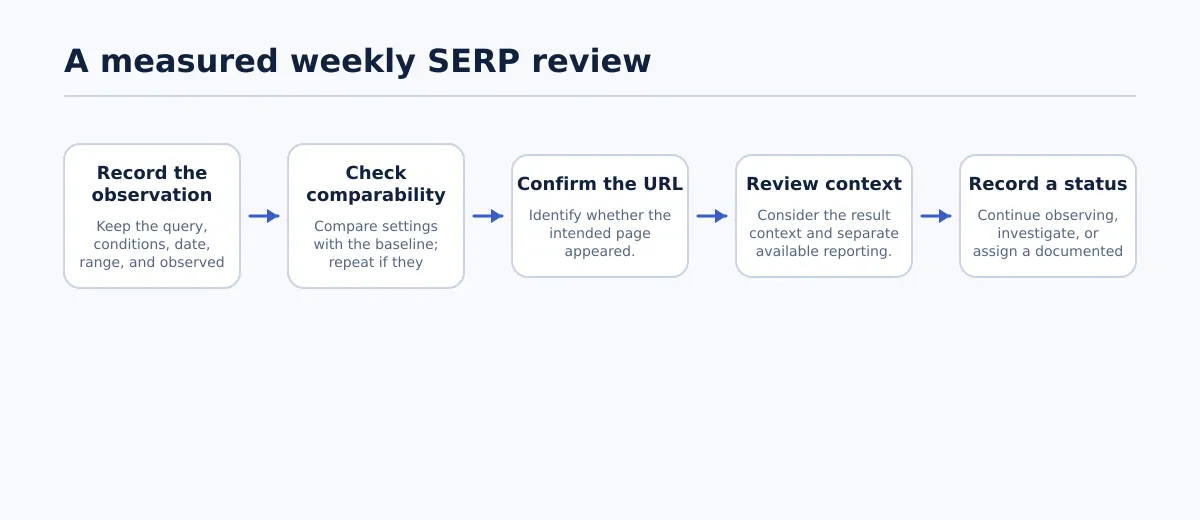 Record the observation, verify its comparability and URL, review context, then document the next status.
A weekly review is a useful team routine, not a claim about how often a ranking changes. Review new observations in a consistent sequence:
- Check comparability. Match the query, search engine, location, device, and checked range against the baseline. Note the observation dates. If a setting differs, label the comparison non-comparable and repeat the check using the baseline settings before treating it as a change.
- Confirm page identity. Compare the observed URL with the intended page URL. If another URL appears, record it and add URL identity to the investigation; do not assume the intended page earned that position.
- Review the result context. Record relevant observations about the results around the listing. Context may help shape a question for further review, but it does not establish a cause by itself.
- Consult other evidence separately. If available, review relevant page or query reporting for the dates in question and note recent publishing changes. Keep each source’s period and scope visible in the record.
- Choose and document a status. Use continue observing when the comparison is incomplete or the evidence does not support a task; investigate when a comparable observation or URL difference warrants more review; or assign a documented change when the review identifies a specific action and reason.
The key decision is not whether a number moved, but whether the team has a comparable observation and a defensible next step. A changed position is a signal to review, not a diagnosis of what happened to the page.
Worked example: investigate a ranking drop before assigning a rewrite
The dates, URLs, positions, findings, and actions below are hypothetical. The team tracks wordpress editorial QA for https://example.test/guides/wordpress-editorial-qa/. Its baseline is the Oct 5 row above: desktop, Google, Boston, first 20 results, intended URL observed at position 8.
| Review | Observation | Settings | Record decision |
|---|---|---|---|
| Baseline, Oct 5 | Intended URL at position 8 | Google, Boston, desktop; first 20 results | Save as the comparison row |
| First review, Oct 12 | Intended URL at position 15 | Google, Boston, mobile; first 20 results | Non-comparable: device differs; repeat using desktop |
| Matching-settings check, Oct 12 | Intended URL at position 14 | Google, Boston, desktop; first 20 results | Comparable check records position 14; investigate rather than assign a rewrite |
| Second review, Oct 19 | Intended URL at position 14 | Google, Boston, desktop; first 20 results | Repeated observation; complete page and query review before assigning work |
The first apparent drop—from 8 to 15—cannot be compared directly because the device setting changed. The team repeats the check under the baseline conditions and records position 14. On Oct 19, the same conditions again return position 14, with the intended URL present. That gives the team a repeated observation to investigate; it still does not establish why the position differs from the baseline.
For this hypothetical review, Maya compares the query with the article and records a specific editorial finding: the page explains general WordPress publishing QA, but its opening does not make clear that it covers a repeatable pre-publication checklist. The team chooses a focused clarification rather than a full rewrite. It records the finding and action as a task, then checks the revised article before publishing. If the repeat check had returned position 8 instead, the team would have kept the Oct 12 mobile observation marked non-comparable and continued observing without assigning this task.
| Handoff field | Hypothetical record |
|---|---|
| Affected URL | https://example.test/guides/wordpress-editorial-qa/ |
| Query | wordpress editorial QA |
| Comparable observations | Oct 5: position 8; Oct 12 retest: position 14; Oct 19: position 14. All Google, Boston, desktop, first 20 results; intended URL observed. |
| Non-comparable observation | Oct 12 mobile check: position 15; device differs from baseline, so not used as a like-for-like comparison. |
| Issue hypothesis | The opening may not make the page’s pre-publication checklist focus clear for this query. This is an editorial hypothesis, not a confirmed cause of the observed positions. |
| Proposed and recorded change | Clarify the opening and add a concise pre-publication checklist section; do not rewrite unrelated material. |
| Owner | Maya, editor |
| QA status | Revision checked against the task; WordPress preview and links checked; ready to publish. |
| Publication/change date | Oct 23, hypothetical |
| Planned recheck | Nov 6, using the same query, engine, location, device, and checked range; record the observed URL and position. |
| Recheck interpretation | Record the observation and any other available evidence. A later movement would be subsequent to the edit, not proof that the edit caused it. |
The two review dates turn a suspected change into a documented editorial decision without treating the ranking observation as an explanation. If the team’s review had not identified a concrete, relevant issue, the correct handoff would have been to continue observing—not to invent an edit to justify the tracking process.
Turn verified findings into an editorial handoff and recheck plan
For another article or client, copy this shorter task record and complete it before assigning work:
Affected URL:
Query:
Comparable observations (dates, settings, position/status, observed URL):
Non-comparable observations and reason:
Issue hypothesis:
Proposed change:
Owner:
QA status:
Publication/change date:
Planned recheck conditions and date:
Recheck result and interpretation:
Keep the observation, editorial hypothesis, and approved change in separate fields. That lets the next reviewer see what the team measured, what it suspected, what it actually changed, and when it plans to check again. A later result belongs in the record, but timing alone cannot establish that an edit caused it.
If the work begins with an approved document that must move into WordPress, SEO with Tenwrite: Publish Google Docs to WordPress is relevant to that publishing step. Keep SERP observation and editorial review as distinct parts of the wider process; do not assume a publishing workflow supplies rank-tracking measurements.
Start with a small set of published pages. Give each query an intended URL, record the conditions for its baseline, and name the person who owns the next review. That is enough to begin a useful monitoring routine without turning every observed movement into a rewrite.