
A google docs to html converter can produce a useful representation of an approved document, but it cannot decide whether the result is ready for a specific website. Conversion changes the format. Publishing also requires destination fields, media decisions, ownership, review, and a release outcome.
A reliable handoff separates four artifacts:
- Approved source: the Google Doc and version authorized for transfer.
- Converted HTML: the exported markup and any associated media or notes.
- CMS-ready draft: the destination content with its required fields and preview checks completed.
- Verified live page: the published URL checked in the rendered destination.
The practical completion condition is not “HTML generated.” It is “the intended content reached the intended destination, each required check has an owner, and the outcome is recorded.” That distinction matters whether you convert a Google Doc to HTML for a developer, prepare a WordPress draft, or pass a publishing package to another team.
Define the handoff: conversion is not the same as publishing
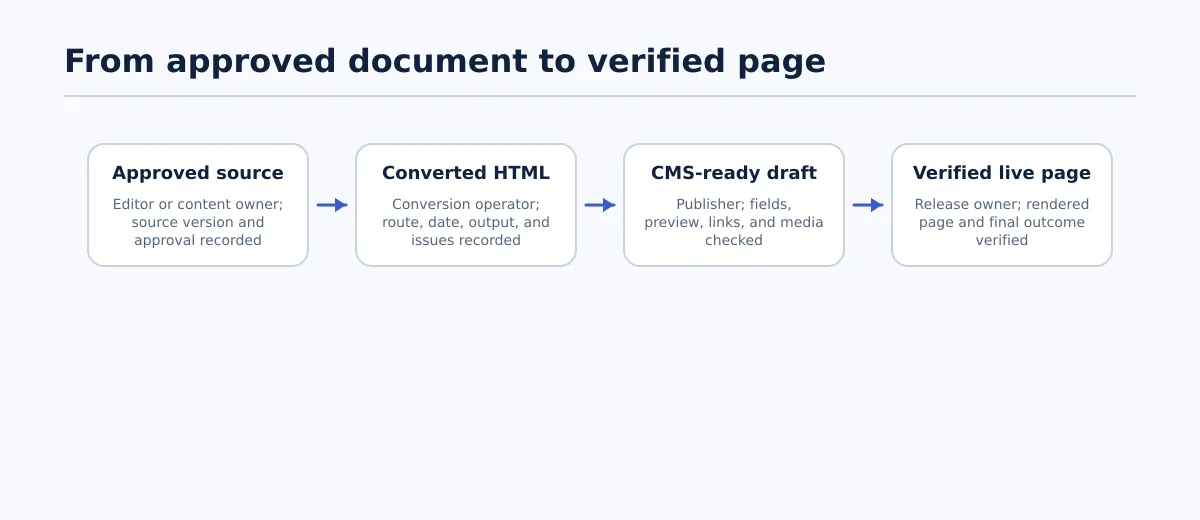 A Google Docs-to-HTML handoff moves through four distinct artifacts, each with an owner and recorded outcome.
A converter handles a transformation between representations. It may preserve some headings, paragraphs, lists, links, images, or inline formatting, depending on the source and the route. It does not inherently confirm that those elements fit the destination’s rules.
Publishing adds work outside the body markup. A WordPress post may need a title, slug, taxonomy, featured image, excerpt, metadata, author, status, schedule, and release approval. A developer receiving an HTML fragment may need different information. A live page must be checked after the CMS, theme, media handling, and links have acted on the submitted content.
Use this four-stage handoff to define the boundary:
| Stage | Main artifact | Accountable owner | Completion condition | Recorded outcome |
|---|---|---|---|---|
| Approved source | Google Doc, version, and approval record | Editor or content owner | The source is final enough to transfer and unresolved questions are assigned | Source URL, version or date, and approval status |
| Converted HTML | Markup plus media and conversion notes | Conversion operator or technical owner | The selected route has produced an inspectable output | Route, tool or method, date, output location, and known issues |
| CMS-ready draft | Draft with body and destination fields | Publisher | Body, fields, preview, and required links or media pass review | Draft URL, QA result, corrections, and release owner |
| Verified live page | Public destination URL | Publisher or release owner | The rendered page matches the approved intent and release checks pass | Final URL, verification date, reviewer, and exceptions |
This model prevents a common handoff error: one person assumes that “converted” means “published,” while the next person assumes that “published” means “verified.” Keep those statuses separate in a project record, ticket, or content operations sheet.
Choose the right Google Docs-to-HTML route for the destination
There is no single best way to convert Google Doc to HTML. The appropriate route depends on what the recipient needs, how often the work occurs, and who will prepare the destination. Decide the output before choosing the method.
| Publishing scenario | Suitable route at a high level | Expected output | Remaining QA | Route is unsuitable when |
|---|---|---|---|---|
| One-off HTML fragment for a developer, email template, or reusable content block | Export or use a standalone converter, then deliver the markup as a reviewable file or fragment | HTML that can be inspected and inserted into a known context | Structure, links, image references, special characters, and context-specific restrictions | The recipient expects a complete CMS post, or the destination rules are unknown |
| Repeatable cleanup before CMS handoff | Use a consistent conversion method with a named reviewer and a stored handoff record | Cleaned HTML package with source reference, media notes, and issue status | Full HTML acceptance review plus mapping of items that HTML does not contain | The team cannot assign review ownership or the source contains frequent unsupported elements |
| Structured transfer into a CMS draft | Use a route that supports the team’s CMS preparation process, whether that involves conversion, an integration, or controlled manual transfer | CMS draft with body content and separately completed destination fields | Draft preview, metadata, taxonomy, media, links, and release checks | The route hides unresolved decisions or creates drafts without a reliable correction and approval path |
For a one-off request, a simple route can be appropriate when the destination is known and a person can inspect the result. For repeated agency work, the important feature is not the claim that a method is clean by default. It is the ability to identify the source, reproduce the handoff, assign defects, and record the final outcome.
A route-selection decision can be made with three questions:
- What is the destination? A fragment, an email or template context, a CMS draft, or a public page?
- Who owns preparation after conversion? The person exporting the document, a developer, a publisher, or a client?
- What must be preserved? Meaning and structure only, or also media, destination fields, and a particular CMS presentation?
If the answer to any of these is unclear, pause before conversion. An ambiguous destination produces an ambiguous acceptance standard.
Prepare the approved Google Doc before conversion
Source preparation reduces avoidable cleanup, but it does not guarantee a particular converter’s output. Treat the Google Doc as an approved content source rather than as a visual mock-up of the final web page.
Before transferring it, check the following:
- Approval and version: Record the source URL and the revision, approval date, or other identifier that distinguishes the authorized document from a working copy.
- Heading hierarchy: Confirm that headings represent document structure rather than merely larger or bold text. Check for a single intended top-level article heading and consistent lower levels according to the destination’s rules.
- Links: Use meaningful anchor text and open each important link to confirm that it leads to the intended destination. Separate editorial links from comments or instructions to the publisher.
- Images: Identify the approved image file for each image. Record the intended alt-text handoff, caption, credit, and placement where those details are required by the destination.
- Lists: Confirm whether each group is ordered or unordered. Remove manually typed numbers or bullets that imitate a list without carrying list structure.
- Tables and complex layouts: Mark tables, columns, text boxes, side-by-side content, and other layouts that may need a destination-specific decision. Do not assume that visual similarity means usable HTML.
- Inline styling: Remove decorative formatting that has no content purpose. Flag emphasis, colors, highlights, and spacing that are necessary to interpret the material.
- Editorial residue: Resolve comments, suggestions, placeholders, tracked requests, and instructions that should not travel into the public body.
- Metadata placeholders: Record the intended page title, slug, excerpt, taxonomy, featured image, author, and metadata owner separately from the body where the destination requires them.
The rule for uncertain content is simple: flag it for the responsible owner rather than silently interpreting it. A publisher should not decide that a two-column layout is a normal paragraph, turn an unlabeled image into decorative media, or discard a table merely because the conversion route does not represent it clearly.
A realistic source-readiness example
Suppose an approved guide contains three headings, two links, one product screenshot, an unordered list of steps, and a two-column comparison that the editor has not labeled as a table. The editor can approve the headings, confirm the links, identify the image file and alt-text owner, and verify the list structure. The comparison is different: it becomes an exception before conversion because its intended web structure is unclear.
The source is ready only when that comparison has a decision owner. The team may keep it as a table, rewrite it as a list, or remove it. The conversion operator should not choose among those options without approval.
Inspect the exported HTML before CMS handoff
“Clean HTML” should mean more than markup that can be copied into an editor. It should preserve the approved content structure, avoid unnecessary conversion residue, and make unresolved items visible to the next owner.
Review the output as a publishing artifact. Compare it with the approved source, inspect the actual markup where necessary, and record an outcome for each check.
| Area | Pass condition | Fail or escalation condition | Required outcome |
|---|---|---|---|
| Headings | Heading tags reflect the approved hierarchy and do not skip levels without a documented reason | Visual size has replaced structure, or a heading has the wrong level | Correct the HTML or return the source to the editor; record who made the change |
| Paragraphs and lists | Paragraphs are separate elements, and ordered or unordered lists retain their intended structure | Empty paragraphs, manual bullets, duplicated list markers, or merged paragraphs affect meaning | Remove residue or return the affected section for source correction |
| Links | Anchor text and URLs match the approved source, and required link behavior or attributes are applied according to destination rules | URL, text, protocol, target, or destination is unclear or incorrect | Correct only when the intended value is known; otherwise assign the source or approver |
| Images | Each image has an identified asset reference and the required alt-text or caption handoff | The image is missing, represented by an inaccessible reference, or has disputed descriptive information | Attach the correct asset or create an owned media exception |
| Empty and unnecessary formatting | The fragment contains no meaningless spacer paragraphs, repeated styles, or copied editor residue | Styling obscures structure or creates markup the destination does not accept | Clean the output and record the accepted scope of cleanup |
| Special characters | Apostrophes, quotation marks, symbols, and encoded characters display as intended in the target context | Characters appear as entities, replacement symbols, or altered text during inspection | Correct and retest in the intended destination context |
| Unsupported content | Embeds, complex tables, drawings, and other elements have an explicit destination treatment | The output silently drops or flattens content that still affects the article | Escalate to the technical owner or source approver before handoff |
Use three outcomes consistently:
- Corrected: The reviewer fixed a known defect and retested the result.
- Accepted: The difference is understood, allowed for the destination, and recorded as a deliberate decision.
- Returned: The issue requires a source owner, technical owner, or approver and cannot move forward by assumption.
A conversion review passes when the HTML represents the approved content and every known difference has one of those outcomes. “Looks mostly right” is not a sufficient status for a handoff that another person must complete.
Store the output with enough context to reproduce the check: source URL and version, conversion route, conversion date, output location, reviewer, and open exceptions. This is especially useful when a later CMS preview differs from the original HTML.
Prepare the CMS draft and verify the live page
HTML acceptance does not complete the destination work. The CMS draft and the public page have different responsibilities, so check them separately.
CMS-draft checks
Before requesting release, verify:
- the title matches the approved page title;
- the body contains the accepted HTML structure;
- the slug or permalink is assigned and reviewed;
- categories and tags are completed where applicable;
- the featured image is assigned to the correct destination field;
- excerpt and metadata fields have an identified owner and required values;
- internal links point to the intended destinations;
- images display in the editor or preview and have the required accompanying information;
- the author, status, schedule, and release owner are correct where those fields apply; and
- the preview has been inspected rather than relying only on the code or editor view.
A draft passes when the publisher can identify what will be released, who may release it, and which fields remain intentionally empty. If a required field is unknown, the draft is blocked rather than treated as complete.
For the WordPress-specific destination stage, continue with How to Publish Google Docs to WordPress (Without Messing Up Formatting). The conversion handoff should arrive there with its structural review and exceptions already documented.
Live-page checks
After publication, inspect the actual destination URL. Verify:
- the final URL resolves to the intended page;
- headings and lists render with the expected hierarchy and order;
- links are clickable and lead to the approved destinations;
- images display, appear in the intended locations, and are not missing from the public response;
- the page is readable at the relevant mobile view; and
- the public result matches the approved content and any accepted exceptions.
Record the release outcome as verified, verified with documented exception, or blocked for correction. A successful CMS save is not itself evidence that the live page is correct.
Assign owners, record outcomes, and handle exceptions
Ownership should follow the team’s actual structure rather than a universal job-title model. A compact responsibility example looks like this:
- Editor or content owner: corrects source wording, heading intent, links, image descriptions, and unresolved editorial meaning.
- Conversion operator: selects the agreed route, stores the output, and records conversion details.
- Publisher: prepares CMS fields, checks the draft, previews the destination, and coordinates release.
- Technical owner: resolves unsupported markup, media references, embeds, or destination restrictions.
- Approver: decides what an ambiguous element is intended to become when the answer affects meaning or presentation.
One person may hold several roles on a small team. The important requirement is that each decision has a named owner.
Use an exception record such as this for the ambiguous comparison in the example document:
| Field | Example entry |
|---|---|
| Source link and version | Approved Google Doc, revision dated 2026-09-12 |
| Issue | Two-column comparison has no defined web structure in the source |
| Proposed resolution | Preserve as a table, rewrite as a list, or remove the comparison |
| Owner | Editor for intent; technical owner for destination treatment |
| Status | Awaiting approver decision |
| Final outcome | Record the selected treatment, correction date, and reviewer |
Do not close an exception with a vague note such as “fixed formatting.” State what changed and why. If the correction happened in the source, preserve the new source version. If it happened in the HTML or CMS, record the destination artifact and reviewer.
The same approach applies to missing images, unsupported embeds, incorrect links, and metadata that was never supplied. Return the item to the appropriate owner, define the next action, and keep the handoff blocked when the unresolved issue could change the published result.
Apply the checklist before assigning the next handoff
For your next approved document, begin by writing down the destination and accountable owner. Confirm the source version, choose the route that matches the intended output, and inspect the HTML before it reaches the CMS. Then complete the CMS-draft and live-page checks as separate records.
A google docs to clean html workflow is useful when it gives the next person a dependable artifact and a clear correction path. The final measure is not how quickly markup was generated. It is whether the team can show what was approved, what was converted, what was checked, who resolved exceptions, and what ultimately reached the live page.