
A CMS publishing workflow is the controlled path that moves approved content into a content management system, through destination-side checks, and onto a verified live page. It is not the same as writing the article, receiving editorial approval, creating a CMS draft, or clicking Publish.
Those milestones answer different questions:
- Has the source content been approved?
- Has the destination draft been assembled correctly?
- Has the draft passed the required checks?
- Has someone authorized the release time and status?
- Does the live page match the intended result?
When a team treats these questions as one status—usually Ready or Approved—small omissions become difficult to trace. A missing featured image may be discovered after scheduling. A CMS draft may use an older source version. A successful publish action may produce a page with a broken link or incorrect metadata.
This guide presents a reusable CMS workflow for content teams, editors, and WordPress agencies. It focuses on ownership, handoffs, completion conditions, blocked states, and records that prove what happened. The exact fields and approval rules should vary by destination, client, post type, and publishing policy.
Start with the release states, not the CMS button
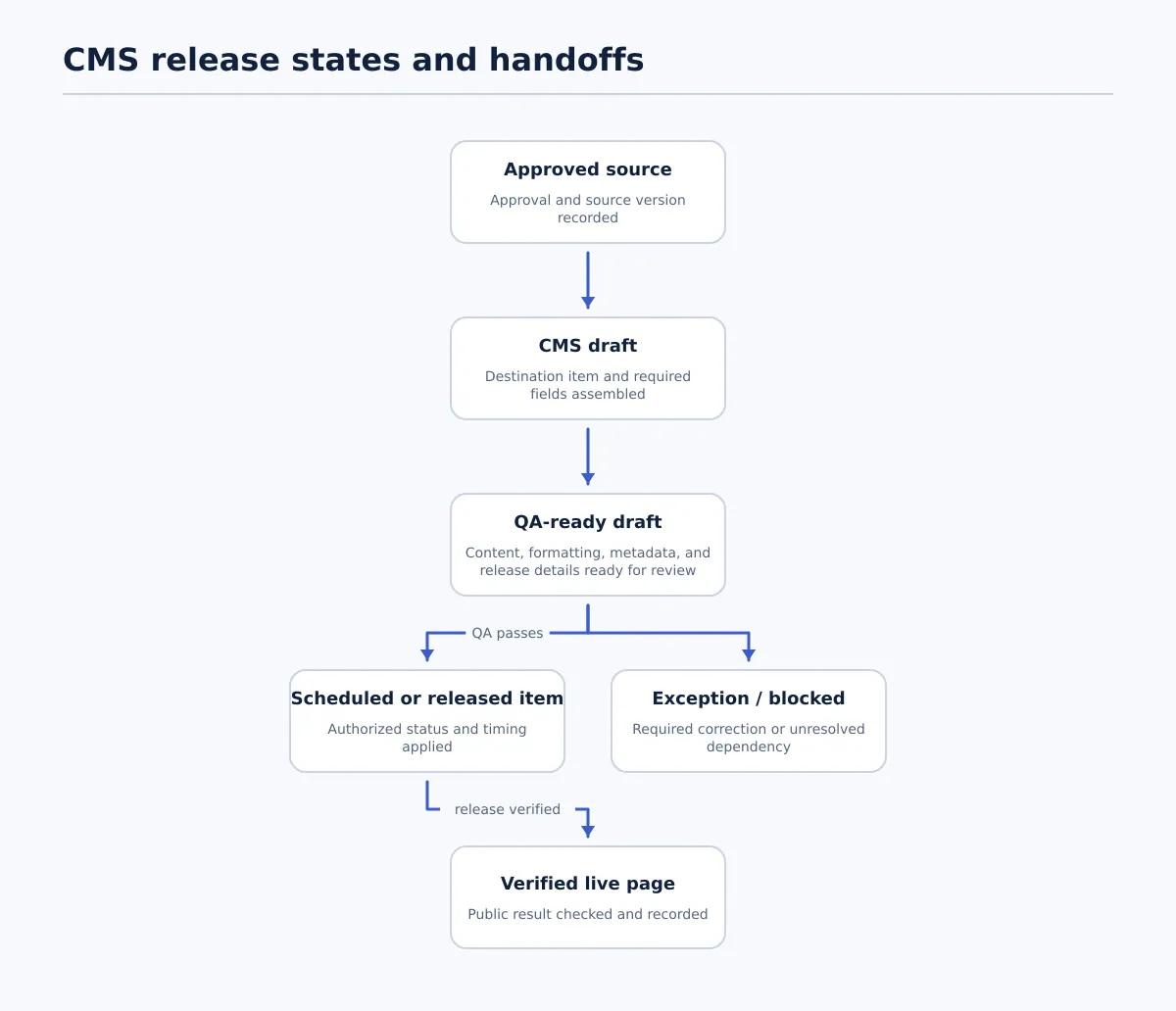 A CMS publishing workflow separates source approval, CMS preparation, QA, release, and live-page verification; failed required checks create a blocked state.
A practical workflow begins with distinct states. Each state should describe a condition that can be checked, not a general feeling that the item is nearly finished.
| State | Accountable owner | Required input | Completion condition | Next status | If blocked |
|---|---|---|---|---|---|
| Approved source | Editorial approver | Identified source version, approval decision, destination, and required assets or instructions | The approved source and approval evidence are recorded | CMS draft | Keep the source out of production and assign the missing approval or asset decision |
| CMS draft | CMS publisher | Approved source plus destination field map | The intended CMS item exists on the correct site and contains the source content and destination fields | QA-ready draft | Stop the handoff, record the missing or incorrect field, and return it to the publisher or source owner |
| QA-ready draft | CMS publisher | Complete draft and known destination requirements | Required fields, formatting, links, media, metadata, and release details are ready for review | Scheduled or released item | Record the failed requirement and route the correction to its named owner |
| Scheduled or released item | Release owner | Passed QA, approval evidence, and release decision | The item is scheduled or published with the authorized status, date, time, and timezone | Verified live page | Keep the item in its current safe state and investigate the release or dependency issue |
| Verified live page | QA reviewer or verifier | Public URL or other destination result | The live result passes the agreed post-publication checks and the completion record is saved | Complete | Open a corrective action if the live result differs from the intended release |
| Exception / blocked | Exception owner | Failure reason, affected item, next action, and due point | The exception is resolved and the item is returned to the correct workflow state | Depends on the correction | Do not schedule or publish while a required exception remains unresolved |
The distinction between approved source, CMS draft, scheduled post, and live post is the foundation of the process. An approved Google Doc proves that an editorial decision was made. It does not prove that WordPress received the right content. A CMS draft proves that an item exists in the destination. It does not prove that the draft passed QA. A scheduled post proves that a future release was configured. It does not prove that the page will render correctly after that time.
A team can manage these states in a spreadsheet, project system, CMS status field, or publishing tool. The location matters less than the rules: each item needs one current state, one next owner, and one record of why it may advance.
Assign owners and make every handoff explicit
A workflow becomes operational when responsibility moves with the item. “The team” can collaborate, but it should not be the accountable owner of a transition.
A small team may assign several roles to one person. For example, an editor may also prepare the WordPress draft, while a second person performs QA and authorizes release. Combining roles is acceptable when the separation between decisions remains visible.
| Stage | Accountable owner | Input | Required decision | Output | Record to retain |
|---|---|---|---|---|---|
| Editorial approval | Editorial approver | Final source document and review comments | Is this specific version approved for CMS preparation? | Approved source | Source URL, version or approval date, approver, and exceptions |
| CMS preparation | CMS publisher | Approved source and destination requirements | Which content, assets, and values belong in each CMS field? | CMS draft | Site, post or item ID, source reference, and field completion status |
| QA review | QA reviewer | CMS draft and checklist | Does the draft match the source and satisfy destination requirements? | QA pass or recorded failures | Checklist result, reviewer, timestamp, and correction owner |
| Release authorization | Release owner | QA result, schedule details, and dependency status | Publish now, schedule, or hold? | Scheduled or released item | Decision, date, time, timezone, and authorizing owner |
| Live verification | QA reviewer or verifier | Public URL and intended release details | Did the live page render and release as expected? | Verified live page or corrective action | URL, timestamp, verifier, result, and exception reference |
The handoff should contain more than a link to the document. At minimum, include:
- the source reference and approved version;
- the destination site and content type;
- the CMS item or post identifier once created;
- the next owner;
- the required field set for that destination;
- the intended release status;
- the release date, time, and timezone when applicable; and
- the location of the exception record.
The single source of truth is not necessarily one application. The source document may remain authoritative for approved wording, while a structured workflow record controls destination, ownership, status, scheduling, and verification. Define which system answers which question. Otherwise, a change in the source can be mistaken for a change in the CMS draft, or a CMS status can be mistaken for editorial approval.
For larger teams, this same model supports a controlled publishing path for agency CMS workflows without requiring every contributor to edit the same record.
Build the CMS draft from a field-level handoff
The CMS draft is where approved content becomes destination-ready content. This is a preparation step, not an informal copy-and-paste task.
Before the draft enters QA, map the approved source to the fields that the destination actually requires. A WordPress article may need a title and body, but the site’s publishing profile may also require an author, slug, category, featured image, image alt text, metadata, or a particular post type.
Use a checklist like this one, then adjust it for each site:
- Title: Matches the approved source or has a recorded destination-specific variation.
- Body structure: Paragraphs, headings, lists, tables, quotes, and other intentional structures are present and in the expected order.
- Links: Each required link is present, has the intended destination, and uses the approved visible text.
- Images and media: Required assets are present, placed correctly, and have alt text or other fields required by the destination.
- Taxonomy: Categories, tags, authors, or custom taxonomies are selected according to the site profile.
- Slug or URL decision: The slug is recorded, approved, or generated according to a documented rule.
- Metadata: Required excerpt, search description, social fields, or other destination metadata is complete where the site owns those fields.
- Featured media: A featured image or equivalent is assigned when the template requires one.
- Source reference: The draft record points to the approved source and identifies the source version or approval date.
- Release details: Intended status, date, time, timezone, and release owner are known when scheduling or publishing is part of the request.
Classify each field as required, optional, or client-specific. A required field that is missing is a blocker, not a note for someone to notice later. For example, if a site requires a featured image, “image pending” should produce Blocked: required media missing, with an asset owner assigned. It should not produce a QA-ready draft.
The draft is ready for QA only when another person can review the item without reconstructing the publishing request from scattered messages. The source may remain the authority for article wording, but the CMS draft must contain enough destination information to be evaluated on its own.
This is also where teams should distinguish source-side and destination-side corrections. Return the item to the source owner when the approved document has a missing section, incorrect claim, unclear instruction, or unapproved link. Correct it in the CMS when the source is sound but the destination field, formatting, taxonomy, or media placement is wrong. Record the decision so the same issue is not reintroduced during a later update.
For field-level preparation details, the related guide to moving approved content into a WordPress draft provides a useful destination-focused companion.
Use QA as a release gate
QA should answer whether the item may advance, not merely whether someone looked at it. Separate the checks into groups so a reviewer can identify the failure and route it correctly.
1. Content fidelity
Compare the CMS draft with the approved source. Check the title, section order, headings, paragraph sequence, lists, tables, links, and intentional notes. The pass condition is not that the two systems look identical. The pass condition is that the approved meaning and required structure have been transferred intentionally.
If a section is missing, a heading level changes the intended structure, or an approved link points somewhere else, mark the check as failed. Identify whether the correction belongs in the source or CMS draft.
2. Destination formatting
Review the rendered draft or preview rather than only the editor fields. Check heading hierarchy, list behavior, paragraph spacing, tables, embeds, image placement, and any destination-specific blocks. Confirm that internal instructions or conversion artifacts have not entered the public body.
A formatting issue is release-blocking when it changes meaning, hides content, breaks a required component, or violates a documented site requirement. Minor visual differences caused by the theme may not be blockers, but the reviewer should record the decision when the distinction could be questioned later.
3. Metadata and discoverability fields
Check the fields the team controls: slug, excerpt, metadata, author, taxonomy, featured media, and any index or visibility setting included in the site’s publishing checklist. Do not assume that a value exists because a plugin, template, or integration may supply a default. If the site has a documented default, record that it was intentionally applied.
This check is about completeness and agreed configuration, not a promise about rankings or indexing. A post can pass the team’s metadata check while external search behavior remains outside the publishing workflow.
4. Release readiness
Confirm that approval evidence is attached, the intended status is known, the release owner is identified, and dependencies are resolved. Dependencies may include a required image, a linked landing page, a coordinated campaign asset, or a client-confirmed release window.
Use a strict rule:
If a required check fails, the item does not advance to scheduled or live status. The failure is recorded, an owner is assigned, and the item returns to the appropriate correction state.
A useful QA record contains the check, result, evidence or note, owner of any correction, and next permitted status. “Looks good” is not enough to reconstruct a release decision.
For more detail on preserving control during higher-volume releases, see bulk publishing QA and scheduling controls.
Choose immediate publication or a scheduled release
A technically complete draft still needs a release decision. QA answers whether the item may advance; the release owner decides when and how it should advance.
Publish immediately only when all of the following are true:
- the release owner has confirmed that the item should go live now;
- required approval and QA records are present;
- required destination fields and assets are complete; and
- no dependency or exception remains open.
Schedule the item when timing matters and the workflow record contains:
- the confirmed release date;
- the release time;
- the timezone;
- the release owner; and
- any dependency that must be ready at or before that time.
A schedule is not a substitute for QA. The scheduled item should already be complete; scheduling only controls when the release action occurs.
Use this decision rule when the request is ambiguous:
- Is the source approved for this destination? If not, hold the item.
- Has the CMS draft passed required QA? If not, return it for correction.
- Is the release time authorized and unambiguous? If yes, schedule or publish according to the decision. If no, keep the item in a safe draft state.
- Are dependencies resolved? If no, record the dependency and assign an owner rather than guessing.
For a scheduled post, confirm the CMS timezone and the workflow record’s timezone. A date without a timezone is incomplete. Also record whether the CMS displayed the intended future status after scheduling. A successful save is not enough if the wrong date, time, site, or post type was selected.
Follow one item from approved source to verified release
Consider a team preparing a client article from an approved Google Doc for WordPress.
The editorial approver records the Google Doc link, approval date, source version, destination site, and required featured image. The item enters Approved source. The CMS publisher creates a WordPress draft, transfers the title, body, headings, lists, links, and images, then fills the author, category, slug, excerpt, and metadata fields. The WordPress post ID is added to the workflow record, moving the item to CMS draft.
During the first review, the QA reviewer finds that one image is present but has no required alt text and that the excerpt is empty. The item does not move forward. The reviewer records both failures, assigns the alt-text correction to the CMS publisher, and routes the excerpt decision to the source or metadata owner according to the site profile. The status becomes Exception / blocked.
After the fields are corrected, the publisher updates the draft and marks it QA-ready draft. The reviewer reruns the affected checks and confirms that the title, headings, links, images, taxonomy, metadata, and source reference are complete. The release owner has already confirmed a Friday release at 09:00 in the client’s timezone, so the item is scheduled rather than published immediately.
The workflow record now contains the scheduled status, date, time, timezone, WordPress post ID, QA result, and release owner. After the release window, the verifier opens the public URL and checks the page title, rendered headings, images, key links, metadata or index settings owned by the team, and actual release timing. The verifier records the URL, timestamp, result, and any corrective action. Only then does the item become Verified live page.
This example shows why the statuses should not be collapsed. The source was approved before WordPress preparation. The draft existed before QA passed. The scheduled post existed before the public page was verified. Each transition had a different owner and a different completion condition.
Verify the live page and close the record
The CMS action is an event to validate, not proof that the release succeeded. Post-publication verification should be proportionate to the destination and content type, but it should always confirm that the intended result exists.
Check the live URL and record the result for:
- page title and visible content;
- rendered headings and key sections;
- images, featured media, and required alt text;
- important links and their destinations;
- visible author, category, or other required taxonomy;
- metadata or index settings that the team owns;
- actual publication time compared with the intended schedule; and
- the absence of an unintended draft, duplicate, or wrong-destination release when the workflow requires that check.
A completion record should include:
| Field | Example value |
|---|---|
| Source reference | Approved Google Doc URL and approval date |
| Destination | Client WordPress site, post type, and post ID |
| Release result | Scheduled for 09:00, then publicly available at the intended release window |
| Public URL | Verified live-page URL |
| Verifier | Named QA reviewer |
| Verification time | Timestamp with timezone |
| Result | Pass, or specific failed check |
| Exception reference | Ticket or task ID if corrective action is required |
If the live page fails a required check, do not quietly edit the page and erase the history. Record what failed, decide whether the correction belongs in the source or destination, assign the owner, and note whether the page should remain live, be returned to draft, or receive a corrective update under the site’s policy.
A post-publication check may reveal a problem that was not visible in the editor. For example, an image can appear in the draft but fail to render publicly, or a scheduled time can differ from the intended time because the destination uses another timezone. The record should make that discrepancy visible and show how it was resolved.
Adapt the workflow for agencies and bulk releases
An agency can use the same state model across clients, but it should not assume that every client has the same required fields, approval path, or release rules. Add destination-specific information to each workflow record:
- client or site identifier;
- destination URL and post type;
- assigned CMS publisher;
- required field set and site-profile version;
- editorial approver and release owner;
- intended release window and timezone;
- source reference and approval evidence; and
- exception owner and rerun or correction rule.
Batch preparation and QA can be efficient without becoming anonymous. An agency might prepare ten drafts together, then review them in a batch. It should still retain an item-level status, source reference, post ID, QA outcome, release decision, and live-verification result for every post.
Use batching for repeatable work such as field mapping, draft creation, or initial preflight. Keep these decisions item-specific:
- whether the source version is approved;
- whether required assets exist;
- whether a client-specific field is complete;
- whether the item may be scheduled or published; and
- whether the live page passed verification.
If one item in a batch is blocked, do not let the batch status imply that every item is ready. Mark the affected item as blocked, retain the reason, and define whether it can be corrected independently or must wait for a shared dependency.
For example, a shared client campaign landing page may block several posts, while one missing image should block only the affected post. The workflow record should distinguish those cases so the team can release unaffected items without losing the dependency trail.
When a tool or integration transfers content between systems, treat the transfer as a controlled handoff. Automation can create drafts, populate known fields, or reduce re-entry. It does not replace source approval, interpretation of exceptions, QA, release authorization, or live verification. Teams building a broader controlled publishing stack for agency operations should preserve those human decision points in the system design.
Document the first unclear handoff
A workable CMS publishing workflow does not need every edge case resolved before a team begins. Start with one representative content type and document its path:
Approved source → CMS draft → QA-ready draft → Scheduled or released → Verified live page
Add Exception / blocked wherever a required check can fail. Then ask five questions at every transition:
- Who owns the item now?
- What input must be present?
- What condition allows it to advance?
- What record proves that condition was met?
- What happens when the condition fails?
The first handoff that cannot answer those questions is the best place to improve the workflow. Define its owner, required fields, completion condition, and exception route before adding more automation or publishing volume.
Once the path works for one article, apply it to recurring WordPress work, client-specific field sets, and bulk releases. The objective is not to force every destination into one universal process. It is to make each release understandable: which approved source was used, what the CMS received, who authorized the release, and whether the live page was verified.