
A workflow can look efficient in a product demo and still break down the first time an agency publisher asks, “Which client site is this going to, and who approved this version?” That is why content management for agencies should be evaluated as a chain of accountable handoffs rather than a collection of features.
Use one ordinary upcoming article as the test case. In this guide, the example is a post called “Spring Patio Maintenance Guide” for Northshore Landscapes. Maya writes the draft, Jordan is the client approver, the destination is the Northshore Landscapes WordPress site, and Priya owns final publishing QA. The same model works whether the source is a document, a content platform, or a shared editorial workspace.
The goal is not to find a tool that claims to do everything. It is to find a workflow where the team can identify the approved source, the intended client site, the person responsible for the next action, and the result after publishing.
Begin with the handoff record, not the software demo
Before comparing a prospective workflow, create a small record for one post. This record is the control point between the people, documents, and WordPress sites involved in the work. It should be easy to update, but specific enough that a colleague can take over without guessing.
Use these fields:
| Field | Example for the test post | Why it is needed |
|---|---|---|
| Client | Northshore Landscapes | Keeps client work identifiable when several accounts are active. |
| Target site | Northshore Landscapes WordPress site | Makes the destination explicit before a draft is created. |
| Post name | Spring Patio Maintenance Guide | Gives the team a stable working reference. |
| Draft link | Link to the designated source document | Lets reviewers and publishers open the intended version. |
| Current stage | Client approval | Shows where the work is now, not where someone assumes it is. |
| Responsible person | Jordan, client approver | Identifies the person expected to act next. |
| Approval evidence | Email dated May 8 confirming the linked version | Connects acceptance to a specific source and date. |
| Next action | Priya creates the WordPress draft | States the next operational task. |
| Due date | May 10 | Makes an overdue handoff visible. |
| QA owner | Priya | Establishes who checks the result after the WordPress work is complete. |
The record does not need to live inside the publishing tool. A tracker, project system, or connected workflow can hold it. What matters is that the fields remain available while the post moves from writing to review, approval, WordPress preparation, and release.
For example, Maya should not simply message Jordan that the article is “ready.” She should change the stage to client approval, link the version Jordan is reviewing, name Jordan as the responsible person, and state the requested response. When Jordan approves, the record should identify the evidence and assign Priya the next action. A comment such as “looks good” without a clear source version may be useful context, but it is a weak release record.
Define the agency publishing job before comparing tools
Content management covers more than storing drafts. For a WordPress agency, it can include organizing work by client, maintaining the active source, routing editorial and client feedback, recording approval, preparing destination fields, creating a WordPress draft, checking the rendered page, and confirming the post’s final state.
This is narrower than a complete agency operations system and different from a content audit. An audit helps a team decide which existing pages need action. The publishing workflow begins when there is an approved plan for a specific new or updated post and ends when the destination result has been checked. If your team is still deciding what to update, read our guide to choosing content audit tools and turning findings into updates first.
For the Northshore example, the workflow boundary is clear:
- The input is Maya’s completed article and its required assets.
- The approval checkpoint is Jordan’s acceptance of the named source version.
- The destination is the Northshore Landscapes WordPress site, not another client installation.
- The output is a checked WordPress draft or published post, with Priya’s QA result recorded.
This boundary prevents a common comparison mistake: treating a system that organizes ideas or assignments as though it also controls destination selection, approval evidence, and publishing verification. A tool can be valuable without covering every stage. The agency needs to know which stage it covers and where the remaining responsibility sits.
Put one owner on every transition
A single person may fill several roles on a small account. That is fine. The important point is that each transition has a named owner and a condition for moving forward.
| Transition | Owner who moves it forward | What they must receive | Pass condition |
|---|---|---|---|
| Brief to draft | Writer | Client brief, intended topic, due date, required assets | A complete source draft is linked in the record. |
| Draft to editorial review | Editor | Draft link and any known source questions | Editorial changes are resolved or returned to the writer. |
| Editorial review to client approval | Account lead or editor | Review-ready source version and client context | The client is sent the version they are expected to approve. |
| Client approval to WordPress preparation | Client approver or account lead | Approval evidence tied to the source version | The publisher can identify the approved version and any limits on changes. |
| WordPress preparation to release decision | Publisher | Target site, post type, assets, fields, and timing | A draft exists on the intended site and required setup is complete. |
| Release to final QA | QA owner | Draft or public URL and the expected state | The result passes the agreed WordPress checks. |
The distinction between responsibility and authority matters. A publisher can create a WordPress draft without being authorized to change approved copy. An editor can request changes without being the client approver. Record those limits where the work happens instead of expecting them to survive in memory or chat history.
If an approval arrives after the source changes, stop and resolve the mismatch. Either restore the approved version, obtain approval for the revised version, or record an accepted exception from the authorized person. Do not let a publisher decide whether a material edit is harmless simply because a deadline is close.
Compare workflow capabilities against the handoffs
A feature checklist becomes more useful when every line maps to a real handoff. Rather than asking whether a platform has “collaboration,” ask the vendor, implementation team, or internal owner to demonstrate how the Northshore post is separated from other clients, how Jordan’s approval is associated with the source, and how Priya can confirm the WordPress destination.
Mark each row according to your agency’s operating model: Required, Optional, or Not applicable. Then record whether the prospective workflow passes, fails, or needs an outside process.
| Capability to test | Agency requirement behind it | Mark for your team | What a useful demonstration looks like |
|---|---|---|---|
| Client and site separation | A publisher must not confuse Northshore with another client site. | Required / Optional / N/A | Open the post record and identify the client and WordPress destination without relying on a filename. |
| Designated draft location | Reviewers need one source to inspect. | Required / Optional / N/A | Show the exact draft link or source identifier that the team will treat as current. |
| Approval trace | The publisher needs evidence of who accepted which version. | Required / Optional / N/A | Associate an approval note, comment, or external record with a named source version. |
| Publishing destination | A draft must be created in the intended WordPress installation and post type. | Required / Optional / N/A | Show how the destination is selected, displayed, and checked before release. |
| Status visibility | The team needs to see whether work is waiting, blocked, drafted, or checked. | Required / Optional / N/A | Display the current stage and responsible person for the test post. |
| QA ownership | A completed transfer is not automatically a checked result. | Required / Optional / N/A | Assign Priya, or another named person, a post-publishing check and record the outcome. |
This is not a vendor ranking. A prospective tool may pass some requirements while the agency handles the rest through a tracker or an established procedure. The gap becomes a problem only when nobody can explain how the handoff will work in practice.
Tenwrite can fit the content-location and destination-management part of this exercise where that matches your process. Its Content Index lets users view and manage content across multiple sites, and it supports exporting Google Drive DOCX files as well as Google Docs to WordPress and Blogger. Those capabilities do not replace the agency’s approval record, assignment of publishing authority, or final QA decision. Test the surrounding process alongside the transfer.
Run the trial from approval backwards
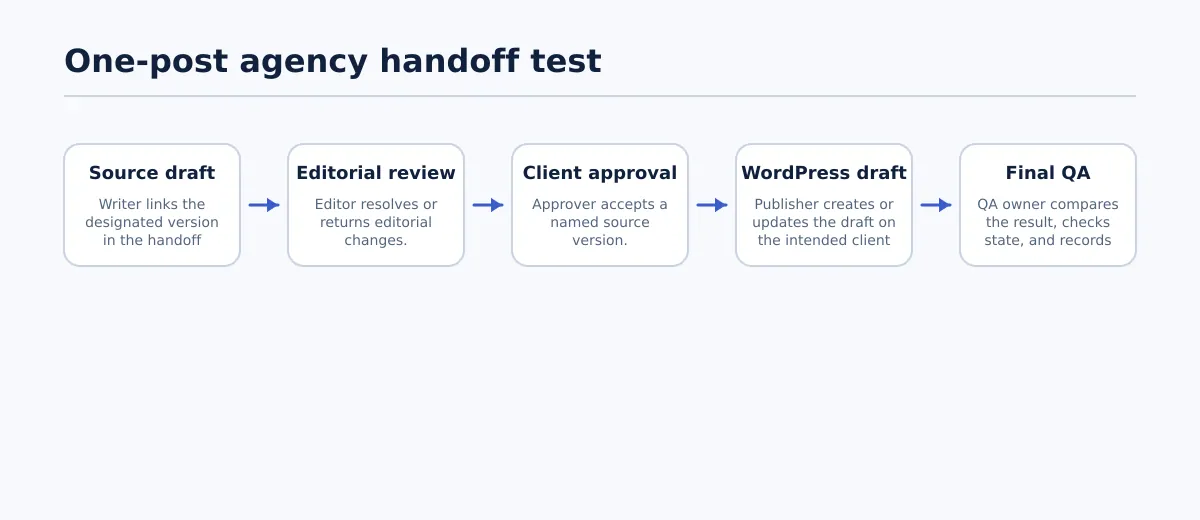 A one-post trial follows a named source, approval, WordPress destination, and QA owner.
Instead of starting with an import button, begin with the outcome you need: a WordPress result that Priya can verify and trace back to Jordan’s approval. Then run the one-post trial in reverse order of risk.
Choose a non-urgent article with normal complexity. It should include a meaningful title, several headings, at least two links, an in-body image, and any fields the client normally expects, such as a slug, category, excerpt, featured image, or metadata. Avoid a placeholder post; it hides the formatting and ownership problems that matter on routine work.
- Set the expected result. In the handoff record, enter the client, target WordPress site, post type, intended status, planned date, approver, and QA owner. If any of these are unknown, the test has already exposed a process gap.
- Route the draft through normal review. Maya sends the designated source to the editor and Jordan using the same method the agency would use after adoption. Update the record at each stage rather than reconstructing it later.
- Capture approval evidence. When Jordan approves, attach or reference the approval evidence and note the approved source version. If Jordan asks for a change, route it back to Maya and repeat approval after the revision.
- Create or update the WordPress draft. Priya uses the proposed workflow to create the draft on the Northshore site. At this point, confirm the site and post type before spending time on cleanup.
- Log friction as it occurs. Record every manual clarification, misplaced asset, unclear status, missing field, or destination question. Do not silently fix a problem and call the test a pass; the correction is evidence about the workflow’s real operating cost.
- Complete QA before release. Compare the WordPress result with the approved source and check the final state in the editor and preview or public page, as appropriate.
The trial fails when the team cannot establish any of these three facts at the moment they need it:
- the intended WordPress destination;
- the authorized approver and the version they accepted; or
- the person responsible for the next action.
It should also be treated as a failure if content or assets are placed on the wrong client site, an essential source element is missing and no owner can resolve it, or Priya cannot tell whether the WordPress result is a draft, scheduled item, or live post. A failure does not necessarily mean the tool is unsuitable. It may show that the implementation needs a field, permission rule, integration, or documented handoff rule before the agency expands it.
Verify the WordPress result before making the decision
The final check should answer two separate questions: did the content arrive as intended, and is WordPress in the intended state? A clean-looking editor is not enough, because layout, links, media, and visibility can behave differently in a preview or public view.
Use this recommended QA checklist for the test post:
- Correct destination: Confirm the WordPress site, post type, and post identifier belong to Northshore Landscapes.
- Correct status: Confirm whether the item is a draft, scheduled post, or published post, and compare that state with the handoff record.
- Title and structure: Compare the title, headings, paragraphs, lists, and emphasis with the approved source. Investigate unexpected omissions rather than assuming they are cosmetic.
- Links: Open important internal and external links from the preview or published page. Check both the link text and destination.
- Images: Confirm required in-body and featured images are present, placed sensibly, and associated with the intended article.
- Required WordPress fields: Check the slug, excerpt, taxonomy, author, and metadata when the client’s publishing requirements call for them.
- Rendered result: Inspect the preview or public URL for visible spacing, layout, and media issues that are not obvious in the editor.
- Named QA result: Priya records pass, needed cleanup, or failed, plus the owner and due date for every unresolved item.
Then make a deliberate decision: adopt, revise, or reject the workflow. Adopt it when the representative post reached the right site with a clear approval trace and a completed QA result. Revise it when the basic path worked but the team needed predictable manual fixes or missing ownership rules. Reject it when the trial could not reliably establish destination, approval, or next ownership.
For a broader set of editorial checks around drafts and release readiness, use the team’s existing draft review and publishing quality checks. Keep the one-post record with the decision so that future client rollouts begin with evidence rather than a remembered demo.
On your next suitable client post, create the handoff record before work begins. Run it through your current method first, then repeat the same test with the workflow you are considering. The comparison will reveal whether the process can survive the everyday questions that arise between an approved draft and a checked WordPress result.