
Choosing content audit tools for an agency is not mainly a matter of finding the longest feature list. The practical question is whether the stack can help your team move from a multi-client content inventory to a consistent decision, an assigned action, an approval record, and a verified update.
That usually requires more than one data source. A crawler, search data, analytics, SEO research, and editorial review each answer different questions. The agency still needs a shared record that connects those answers to a client site, page, owner, decision, and release status.
This guide compares content audit tool categories and named examples by the job they can support. It also shows how to define the audit record, score findings consistently, and hand approved updates into a controlled publishing workflow without treating any single platform as the whole process.
Why agencies need a content audit stack, not a single all-purpose tool
A tool can provide evidence for an audit. The agency operating model determines what that evidence means, who decides what happens next, and whether the approved change reaches the correct client site.
Compare two possible records:
- A URL export with a column labelled “update.”
- A review record containing the client, site, URL, audit date, evidence sources, recommendation, action owner, approver, target date, and release status.
The second record is more useful because another team member can interpret it without reopening several dashboards or searching through messages. It separates evidence from the decision made from that evidence.
Use the audit as six connected jobs:
- Inventory: identify the pages and client properties in scope.
- Evaluate: collect crawl, search, analytics, research, and quality evidence.
- Decide: select a defined action for each reviewed page.
- Assign: give the action an owner, due date, and dependency status.
- Approve: record the accepted recommendation or source version.
- Update and validate: move the approved work through the client’s publishing process and record the result.
A useful pass condition is that every page entering the work queue has a URL, evidence trail, action state, accountable owner, approval requirement, and next status. If one of those fields is missing, the issue belongs in the process design before the agency adds another subscription.
For the broader systems context, see Content Agency Software: How to Build a Controlled Publishing Stack.
The audit jobs to cover before comparing tools
Start with the jobs your agency must perform repeatedly. Then evaluate whether a tool produces the minimum output for that job.
| Audit job | Question it answers | Minimum useful output | Typical owner |
|---|---|---|---|
| Content inventory | Which pages exist, and which client site does each belong to? | Exportable URL inventory with title, content type, status, and audit date | Content operations lead |
| Crawl and technical checks | Which address, linking, indexability, or response conditions need review? | URL-level issue records with crawl date and source | SEO lead |
| Search performance | What search evidence is associated with each page? | Page-level query, click, impression, position, property, and date-range fields where available | SEO lead |
| Analytics and engagement | How is the page being reached or used during the selected period? | Page-level metrics with definitions, property, source, and date range | Analytics or SEO lead |
| SEO research | What topic, query, competitor, or content-gap evidence should inform the recommendation? | Research notes tied to a URL, topic, or content group | SEO strategist |
| Content-quality review | Is the page accurate, useful, clear, current, and aligned with the client brief? | Rubric result, issue notes, reviewer, and requested change | Editor or subject reviewer |
| Action tracking | What happens next, and has the action been completed? | Recommendation, priority, owner, approver, due date, status, and result | Content operations lead |
These outputs are complementary. A URL list supports inventory but does not determine the right editorial action. Search and analytics evidence can inform a review but does not replace a quality standard or a client decision. A quality review can identify a structural or factual problem that performance data does not explain.
Define the output before you compare products. For each category, ask whether the agency can export page-level records, preserve the relevant date range and property, keep client data separated, and attach the result to a shared audit record.
Content audit tools: comparison matrix for agency workflows
The matrix below is organized by audit responsibility rather than by popularity. Named examples are products appearing in the supplied research set. They are candidates for evaluation, not universal recommendations. Confirm current access requirements, exports, fields, and permissions in a pilot before standardizing a stack.
| Tool category | Named examples to evaluate | Audit question answered | Typical output | Strongest agency use case | Limitation to plan for | Export or handoff need | Accountable owner |
|---|---|---|---|---|---|---|---|
| Crawler | Screaming Frog | Which URLs and crawl-visible conditions require review? | URL inventory, page attributes, and issue records | Establishing a repeatable starting inventory for a client site | Crawl findings still require interpretation and an editorial or technical action | URL, issue, crawl date, client site, and source export | SEO lead |
| Search data | Google Search Console | What queries and search measurements are associated with each page? | Page and query records with clicks, impressions, position or visibility fields, property, and date range where available | Adding search evidence to keep, refresh, consolidation, or investigation decisions | Search data does not by itself explain quality, intent, or business importance | Preserve property, URL, query context, filters, and date range | SEO lead |
| Analytics | Google Analytics | How did users reach and interact with the page during the selected period? | Selected page metrics, source information, property, and date range | Adding audience or engagement context to a page review | Metrics need defined names, windows, and interpretation before comparison | Export metric definitions, URL, property, and date range | Analytics or SEO lead |
| SEO research | Semrush; Ahrefs | What query, topic, competitor, or gap evidence should shape the recommendation? | Keyword, topic, competitor, link, or research notes | Planning a refresh, consolidation, or supporting-content decision | Research is directional evidence, not a promise of a particular outcome | Attach query set, research date, URL or topic, and interpretation | SEO strategist |
| Content-quality review | Grammarly; Hemingway; CoSchedule Headline Studio | What language, readability, headline, or editorial issues merit human review? | Suggestions, scores, or review notes depending on the selected product and workflow | Providing a repeatable quality-review input alongside an agency rubric | Automated or tool-assisted suggestions do not replace client standards or editorial judgment | Store the reviewed version, rubric result, reviewer, and accepted changes | Editor |
| Audit or content workspace | Analytify; SuiteJar; ContentLook | Which audit or content-review records can be gathered into a review process? | Product-dependent audit, content, or reporting records | Testing whether a more consolidated review surface fits a client portfolio | Verify page-level export, source context, client separation, and assignment fields | Map output into the agency’s shared decision record | Content operations lead |
| Audit tracker | Google Sheets or an equivalent controlled tracker | Which finding becomes assigned work, and what is its current state? | Consolidated inventory, decision, owner, priority, status, and release result | Joining outputs from several tools without confusing evidence with action | A tracker only reflects the quality and discipline of its inputs | Require stable IDs, source links, controlled values, and status history | Content operations lead |
Use the matrix to compare a product against the job it must perform. For example, if the team is assessing Screaming Frog, the acceptance test is not “does it have many settings?” It is “can the SEO lead export an identifiable inventory and issue set that another owner can join to the client’s audit record?” For Google Search Console, test whether the chosen property, URL, query context, and date range remain visible in the handoff. For Semrush or Ahrefs, define which research decision the output will support before treating the research as required.
A named tool is a candidate only when its output survives the handoff. Record the source, date, property or client site, URL, finding, interpretation, and recommendation together.
How to choose tools based on portfolio size, data access, and team ownership
Choose the smallest stack that covers the audit jobs your agency actually performs. Expand it when a missing output creates a repeatable decision or ownership problem.
Use this selection path:
- Count the operating scope. For a small number of sites, a crawler, available first-party data, quality review, and a structured tracker may cover the required jobs. For a larger portfolio, require stable site identifiers, reusable field mappings, client separation, and repeatable exports.
- Check data access. List the search and analytics properties the team can access. If a property is unavailable, record the limitation and do not convert missing evidence into a zero value.
- Identify the export owner. Name the person who can retrieve each dataset and a backup owner who can interpret its fields. A report that only one person can produce is an operational dependency.
- Set the cadence. Recurring audits need stable URLs, a comparison method between audit dates, and a way to carry forward unresolved actions. One-time audits still need an audit date and evidence window.
- Test assignment and approval. Confirm that each finding can be connected to an owner, approver, due date, and release status outside the source dashboard.
A lean stack is appropriate when the team can complete those jobs with a small number of sources and a shared record. An expanded stack is justified when additional research, monitoring, workspaces, or reporting changes a decision or removes a documented bottleneck. Do not add a category merely because it appears on a generic tool list.
Run a pilot with three pages: an ordinary page, a page with a known issue, and a page likely to receive a non-rewrite action. The pilot passes when the team can export evidence, keep the client context attached, make a decision, assign it, and preserve the result for review.
Build a client-ready content audit inventory and decision record
Create one reviewable record per page and keep client and site identity explicit. Even when a source platform separates properties, exports may later be merged into a workbook, ticket queue, or reporting system.
| Field group | Required fields | Practical purpose | Owner or source |
|---|---|---|---|
| Identity | Client, site, URL, page ID if available, content type | Prevents cross-site mix-ups | Content operations |
| Timing | Audit date, evidence date range, last reviewed date | Shows whether evidence is current and comparable | Tool export or SEO lead |
| Topic | Target query or topic, intent, content group | Gives the recommendation a subject and purpose | SEO strategist |
| Evidence | Search data, analytics data, crawl issue, quality notes, source links | Separates observations from interpretation | Relevant tool owner |
| Decision | Recommendation, confidence, priority, dependency | Makes the choice reviewable | SEO lead or editor |
| Action | Action state, brief or document link, required change, action owner | Turns the decision into assigned work | Content operations |
| Review | Editor, client approver, approval date, approved source version | Identifies the authority for the update | Editor or account lead |
| Release | Due date, CMS status, publisher, release date, live URL, validation result | Records the destination and outcome | Publishing owner |
Keep the action state separate from workflow status. Use controlled action values such as keep, refresh, consolidate, redirect, remove, and investigate. Use separate workflow values such as needs review, recommended, approved, in progress, ready to publish, published, validated, and blocked.
A record passes intake when a second team member can identify the page, understand the evidence, see the recommended action, locate the assigned owner, and determine whether approval is required. No page should enter the work queue with only a note such as “improve SEO.”
For larger batches, Google Sheets to WordPress: A Safer Bulk Publishing Workflow for Agencies provides a useful model for separating destination, content, SEO, scheduling, ownership, and result fields.
Prioritize pages and assign a defined next action
Do not treat every flagged page as a rewrite. Use a consistent score to sequence review, then use action rules to decide what kind of work belongs in the queue.
Score each factor from 0 to 3:
- Business importance: 0 for no identified client priority; 3 for a page supporting a defined service, conversion path, or strategic topic.
- Evidence strength: 0 for no usable evidence; 3 when multiple relevant sources point to a clear issue or opportunity.
- Risk or opportunity: 0 for no material concern; 3 for a clear quality, technical, compliance, or strategic concern.
- Effort: 0 for a small controlled correction; 3 for substantial research, rewriting, design, development, or coordination.
- Dependency: 0 when the team can act now; 3 when another page, client decision, technical change, or unresolved source issue is required.
Use this formula:
Priority score = business importance + evidence strength + risk or opportunity - effort - dependency
The possible range is -6 to 9. Apply routing bands consistently:
| Score | Routing rule | Required next step |
|---|---|---|
| 6–9 | Immediate queue | Confirm the action and owner within the current planning cycle; escalate blockers rather than leaving the item unassigned |
| 3–5 | Planned work | Add to the next scheduled content or SEO cycle with a due date and dependency check |
| 0–2 | Monitor or investigate | Resolve missing evidence or set a review date before committing production time |
| Below 0 | Defer | Record the reason, dependency, or effort concern and revisit when the condition changes |
Example: Page A scores business importance 3, evidence strength 3, risk or opportunity 2, effort 1, and dependency 0. Its score is 3 + 3 + 2 - 1 - 0 = 7, so it enters the immediate queue. If it remains relevant but contains outdated material, select refresh.
Page B scores 1, 2, 1, 2, and 2. Its score is 1 + 2 + 1 - 2 - 2 = 0, so it is monitored or investigated rather than automatically rewritten. If it duplicates another page, the next action may be consolidate; if the preferred destination is not yet approved, use investigate first.
| Action | Use when | Completion condition |
|---|---|---|
| Keep | Review supports retaining the page without material change | Decision is recorded and any next review date is set |
| Refresh | The page remains relevant but needs substantive changes | Approved revision is released and the result is validated |
| Consolidate | Overlapping pages should resolve into one approved destination | Destination, source handling, and approval are recorded |
| Redirect | An old URL should resolve to an approved replacement | Target is approved, implemented, and tested |
| Remove | Retention is not approved and no replacement is required | Removal decision and resulting URL behavior are recorded |
| Investigate | Evidence conflicts or the correct action is unclear | Named owner resolves the question and records a new decision |
Connect changes to Client Content Approval Workflow for Agencies: From Draft Review to CMS Release when the action affects client-facing copy, URL behavior, taxonomy, or release timing.
Move approved audit actions into a controlled publishing workflow
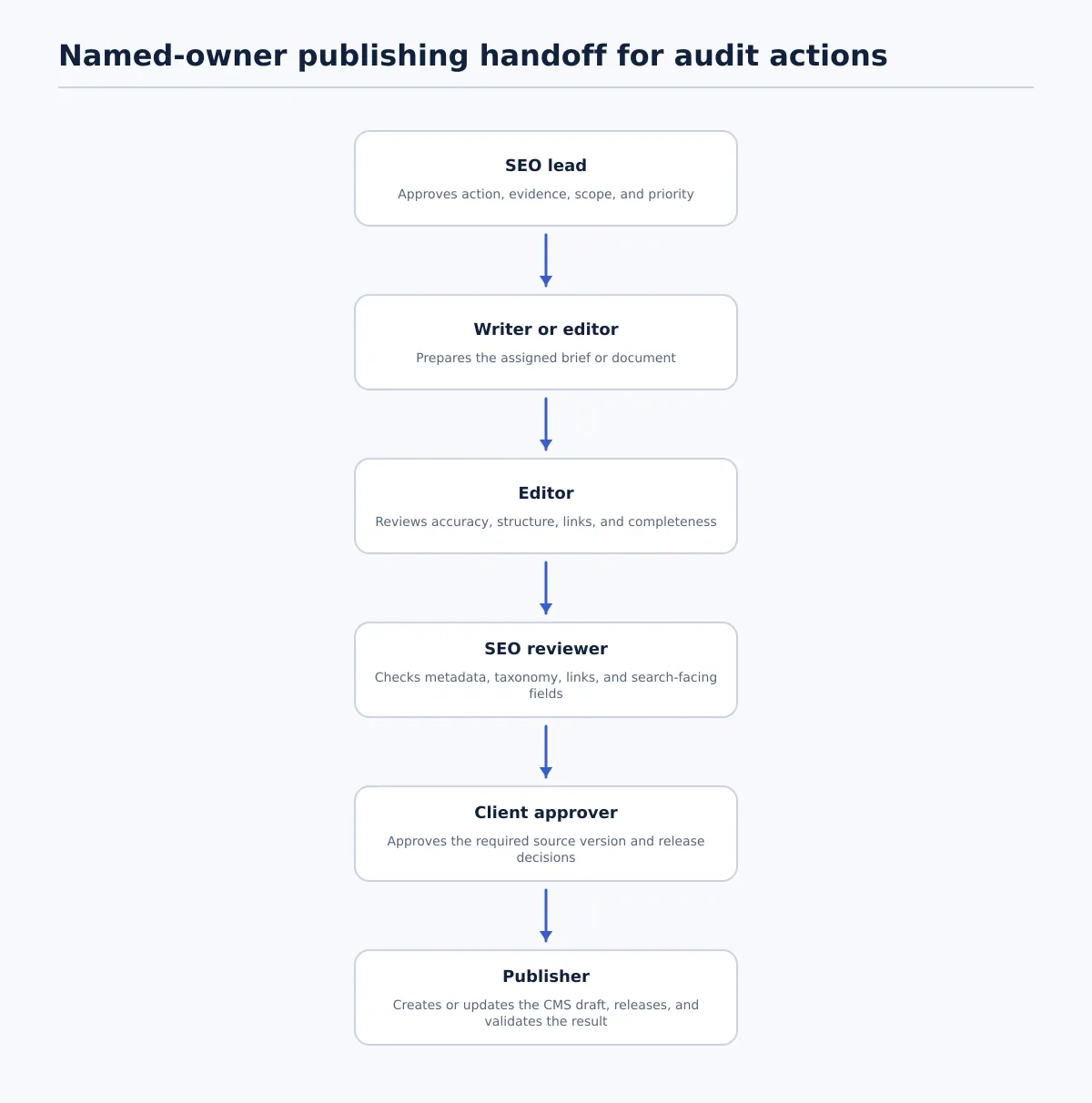 Approved audit actions move through assignment, editorial and SEO QA, client approval where required, CMS release, and validation.
Keep this stage focused on the audit-to-publishing boundary. The audit record should not become a second copy of the agency’s complete editorial approval procedure.
Before production starts, the approved record should identify:
- the client site, URL, and post or page type;
- the selected action and scope of change;
- the approved evidence and decision owner;
- the assigned writer, editor, SEO reviewer, and publisher;
- the approved source or brief version;
- required CMS fields, assets, and URL handling;
- the permitted release state: draft, scheduled, published, or held.
The handoff is complete when the publisher can create or update the intended CMS record without guessing which site, page, source version, or action is in scope. If a required value is missing, return the item to the owner recorded in the audit record rather than filling the gap by assumption.
After the update enters the client’s established approval and publishing process, record the outcome back on the audit item: CMS status, release date, live URL, validation result, and any exception. A page is not marked complete merely because a brief was assigned or a draft was created.
For the broader review, approval, field mapping, and CMS-release sequence, use Client Content Approval Workflow for Agencies: From Draft Review to CMS Release. For content preparation and format conversion before that handoff, see Google Doc to HTML: A Practical Conversion Workflow for Content Teams.
Tenwrite can be evaluated at this boundary when the agency needs a reviewable route from approved Google Docs content to a WordPress draft or controlled release. The audit tools remain responsible for their evidence and decisions; the publishing workflow remains responsible for destination mapping, review status, and release ownership.
Common tool-stack mistakes and a pre-purchase checklist
Avoid these recurring design errors:
- Choosing by feature count: Require a defined audit output and acceptance test for every category.
- Using one dashboard as the system of record: Keep source evidence and operational decisions connected in a shared record.
- Merging client exports without identifiers: Require client, site, property, URL, and audit-date fields in every import.
- Treating every issue as a rewrite: Use controlled actions such as keep, consolidate, redirect, remove, and investigate.
- Ignoring access dependencies: Record required properties, permissions, exports, and reviewer roles before scheduling work.
- Losing evidence dates: Preserve the measurement window so later audits are interpretable.
- Publishing from a recommendation alone: Require an approved source or brief, destination mapping, and a recorded release result.
- Leaving ownership implicit: Assign a named role or person to every decision and handoff.
Before adopting or expanding a content audit stack, confirm:
- [ ] Each tool has a defined audit job and accountable owner.
- [ ] The tool exports page-level records rather than only a dashboard summary.
- [ ] URLs, dates, filters, properties, and source context survive export.
- [ ] Client sites and data properties remain separate.
- [ ] The agency can repeat the audit on its intended cadence.
- [ ] Outputs can join the shared content inventory.
- [ ] The record supports recommendation, score, action owner, approver, and status.
- [ ] Access dependencies and backup owners are documented.
- [ ] A reviewer who did not create the export can understand it.
- [ ] Approved findings have a documented route to a brief or CMS draft.
- [ ] The team can record the release URL, status, validation result, and exception.
The commercial test is straightforward: select one representative client site, run the proposed stack, and follow three pages through evidence collection, decision, assignment, approval, and result recording. Keep the tools that produce usable evidence and fit the agency’s ownership controls. Leave out tools whose output cannot be separated by client, exported at page level, or connected to an approved update.
When the audit is complete, connect the approved actions to a controlled Google Docs-to-WordPress publishing workflow with drafts, QA, and release ownership defined before publishing. That is the point where audit findings become accountable client-site updates rather than another unfinished report.