
An agency can have excellent editorial work and still lack a reliable publishing operation. The problem is often not the writing itself. It is the control record around the handoff: which source version is approved, which client site is the destination, which fields are required, who can release the post, and how the result will be checked.
This guide focuses on that control layer. Content workflow automation for agencies should move known information between approved sources and WordPress without turning a successful transfer into an automatic publishing decision.
The practical model is a draft-first workflow with explicit status gates, client-specific rules, assigned exception owners, and post-publish verification. The worked example below follows three posts across two client sites, including a failed validation, correction, renewed approval, scheduling, and QA closure.
Define the publishing workflow problem agencies should automate
A typical agency handoff may involve a Google Doc, a publishing row in Google Sheets, messages in a team channel, and manual entry into WordPress. That arrangement can leave important information distributed across several places:
- the approved source version;
- the intended client site and post type;
- the category, author, slug, and SEO fields;
- the planned date and release status; and
- the person responsible for resolving a failed check.
The first automation task is therefore not to publish more content. It is to create a reliable handoff record.
For each item, record at least:
- Source identity: document or record, approved version, and content owner.
- Destination: client, site, post type, and intended URL pattern if relevant.
- Publishing package: body, metadata, taxonomy, assets, links, author, and schedule.
- Control state: current status, next owner, approval evidence, and exception reason if blocked.
- Completion evidence: CMS draft identifier, scheduled status, public URL, QA result, and reviewer.
An informal “approved—please publish” message does not provide all of this information. A structured record does not replace editorial judgment, but it gives automation a defined input and gives people a visible place to make decisions.
The boundary for this article is the operational control layer between an approved source and a verified CMS result. Topic research, creative strategy, and substantive drafting may connect to it, but they are outside the automation design described here.
Content workflow automation for agencies: choose the right boundary
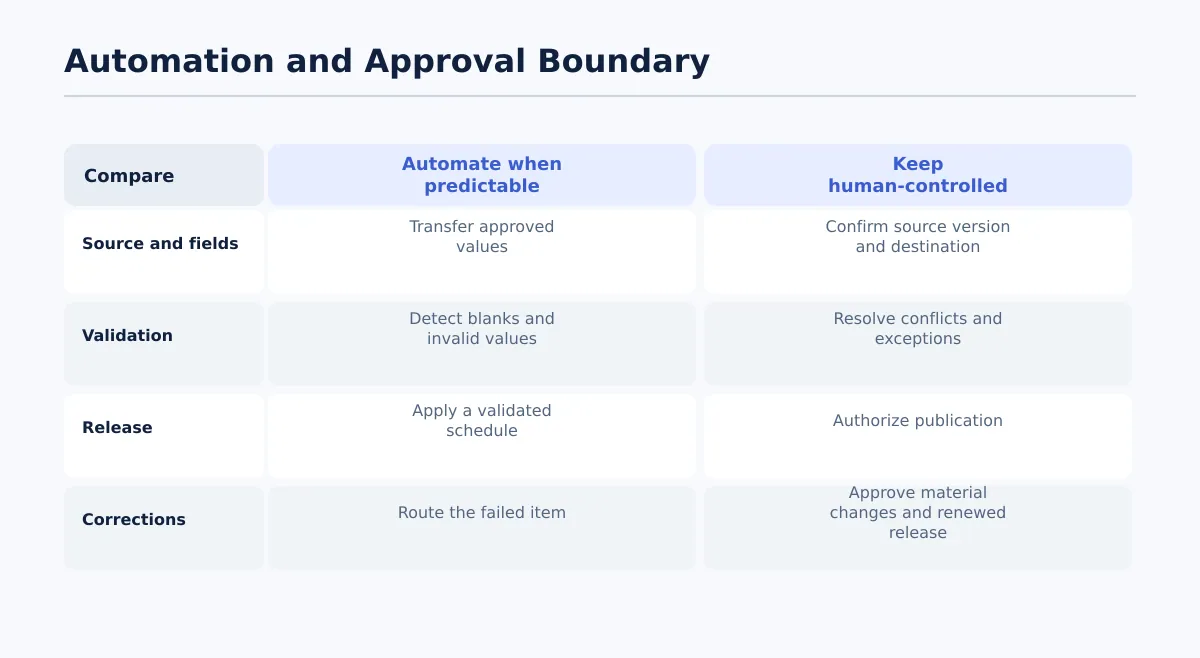 Automate known transfers and checks; retain human control over interpretation, approval, correction, and release.
Automate a step when its input, output, and pass condition can be specified in advance. Keep a person responsible when the step requires interpretation, approval, or acceptance of a material change.
| Publishing action | Suitable automation task | Human-controlled decision |
|---|---|---|
| Source transfer | Copy the approved title, body, links, and supplied fields | Confirm that the source version and destination are correct |
| Field validation | Detect blank, invalid, or disallowed values | Decide how to resolve conflicting instructions |
| Draft creation | Create a WordPress item with draft status | Inspect the mapped result in the CMS |
| Notifications | Alert the next assigned owner when a status changes | Accept, reject, or return the handoff |
| Scheduling | Apply a validated date and time after approval | Confirm release authorization and time zone |
| Taxonomy mapping | Transfer a value from an allowed client list | Choose a category when the brief is ambiguous |
| Exception handling | Stop the item and route the failure | Interpret the problem and approve the correction |
| Publication | Enforce a release condition where supported | Retain final responsibility for going live |
A useful decision test is: Can the instruction be expressed as “copy this known value when condition X is true”? If yes, it may be a candidate for automation. If the instruction is “decide whether this unexpected change is acceptable,” assign it to an editor, SEO lead, account lead, client approver, or release owner.
Do not treat a complete draft as proof of release approval. Those are separate states with different owners and evidence.
Map the controlled workflow stages and owners
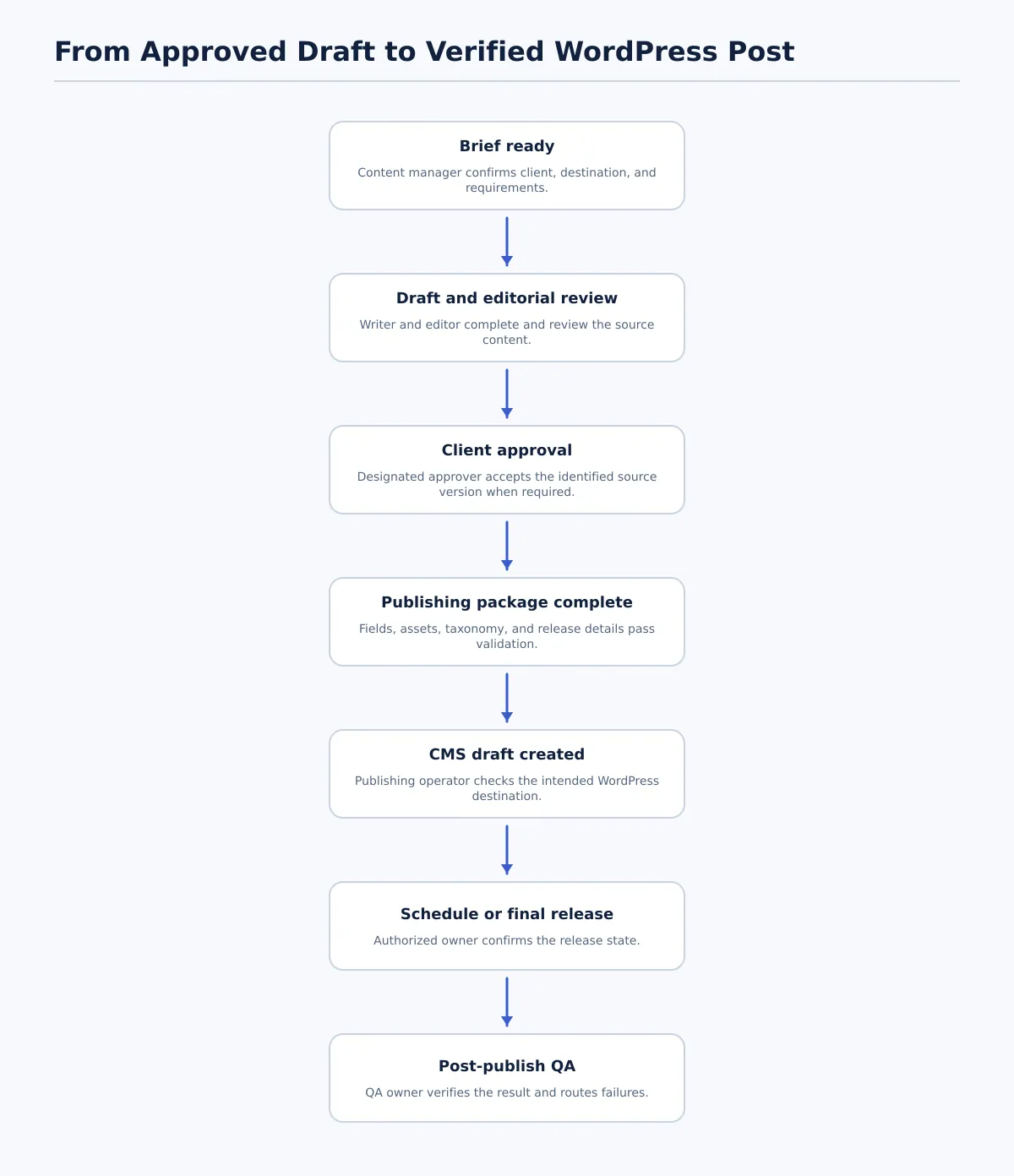 A controlled agency publishing workflow separates source approval, CMS draft creation, release authorization, and post-publish verification.
Use shared stages across clients, but give each stage one accountable owner and one exit condition. The owner may delegate the work, but remains responsible for the pass or fail decision.
| Stage | Accountable owner | Pass condition | If it fails |
|---|---|---|---|
| Brief ready | Content manager | Client, destination, content type, requirements, and due date are recorded | Return to account or content management |
| Draft complete | Writer | The intended article and required source assets are present | Return to writer |
| Editorial review | Editor | Copy, structure, links, and comments meet the editorial brief | Return to writer or editor |
| Client approval | Client approver or account lead | The identified source version is accepted where the client requires approval | Return for revision or clarification |
| Publishing package complete | SEO lead or publishing operator | Required fields, assets, taxonomy, and release details pass the client profile | Route each missing field to its owner |
| CMS draft created | Publishing operator or automation | A draft exists on the intended site and its identifier is recorded | Stop and investigate destination or transfer failure |
| Final release decision | Authorized release owner | Required approval is present and status, date, time, and time zone are confirmed | Keep as draft and route to the approver |
| Post-publish QA | QA owner | Public or scheduled result passes the agreed checks | Return to the responsible owner and repeat affected checks |
Keep statuses specific. For example, Client approved, Package complete, and CMS draft created describe different facts. A single Ready status makes it difficult to tell whether the content is ready for editorial review, CMS transfer, scheduling, or publication.
A simple swimlane assignment is enough for a pilot: the writer owns source completion, the editor owns editorial review, the client approver owns client acceptance where required, the publishing operator owns the CMS handoff, and the QA owner owns completion evidence.
Standardize the publishing package before CMS handoff
Automation should receive a defined publishing package rather than a document link and an unstructured request. Mark each field as required, optional, or client-specific in the relevant site profile.
| Field | Example pass condition | Typical owner |
|---|---|---|
| Destination site | Client and WordPress site identifier match the approved record | Content manager |
| Post title | Approved display title is present | Editor |
| Body | Approved source content is identified and complete | Writer or editor |
| Slug decision | Approved slug is supplied or explicitly marked for review | Editor or SEO lead |
| Category and tags | Values are allowed for the client site | SEO lead or publisher |
| Excerpt | Required excerpt is present, or the profile records that it is not needed | Editor or SEO lead |
| SEO title and meta description | Required values are present and approved | SEO lead |
| Featured image | Required asset is attached or its absence is explicitly permitted | Asset owner |
| Image alt text | Required text is present for relevant images | Editor or SEO lead |
| Internal links | Required links and destinations are recorded and checked | Editor |
| Author | Required author is named or a documented site default applies | Publishing operator |
| Planned publish date | Date, time, time zone, and intended status are recorded | Release owner |
| Approval status | Editorial, client, and package approvals show the required states | Workflow owner |
The list is a control template, not a universal WordPress configuration. A client may not require every field, while another may require a particular author, category, image, or SEO value. Do not leave a field blank when the real decision is “not required”; record that profile decision explicitly.
A document can hold the rich article content while a sheet or structured record holds destination, status, metadata, ownership, and scheduling information. For agencies testing this pattern, Tenwrite’s documented capability to let users review, revise, schedule, or save generated content as a CMS draft supports a draft-first checkpoint rather than treating source completion as automatic publication.
Create client-specific approval and exception rules
Keep the workflow stages reusable and store differences in a client publishing profile. This avoids rebuilding the process for every site without pretending that client requirements are identical.
| Rule | Client Site North | Client Site Harbor |
|---|---|---|
| Approval before scheduling | Client approval required | Editor approval permits scheduling |
| Category | Any approved category in the brief | Insights required |
| Author | Profile default allowed | Named author required on every post |
| Featured image | Required before CMS draft | Optional unless requested in the brief |
| Release owner | Client approver confirms release | Editor confirms release; publisher verifies time zone |
| Missing field | No scheduling; return to field owner | Draft may remain created, but missing field blocks scheduling |
Use explicit exception states so a blocked item has a destination and an owner:
Missing assetroutes to the asset owner.Conflicting metadataroutes to the SEO lead.Invalid taxonomyroutes to the publisher or SEO owner.Wrong destinationroutes to the content manager and stops transfer.Unapproved changeroutes back to editorial or client approval.
The exception record should capture the failed condition, assigned owner, correction, whether the source changed, and the approval required before the item can move forward. Automation can detect and route a problem; it should not silently invent a value or treat a later correction as covered by an earlier approval.
Automate the CMS draft and scheduling handoff
A controlled handoff can run from an approved Google Doc and a corresponding Google Sheets row:
- Match the source document to the client, site, post type, and approved version in the publishing record.
- Validate the required fields against that client’s profile.
- Stop the item if a required field is blank, invalid, or inconsistent.
- Create a WordPress draft only when the transfer conditions pass.
- Give the publishing operator the draft identifier or URL for field and rendering review.
- Permit scheduling or release only when the required approval status is present.
- Record the resulting status, date, owner, and CMS destination.
Worked multi-client example: carry one exception to closure
An agency prepares three posts: two for Client North and one for Client Harbor.
- North Post 1 has client approval, a valid category, and the profile-default author.
- North Post 2 has client approval and complete metadata, but its featured image is missing.
- Harbor Post 1 has editor approval, the required
Insightscategory, and a named author.
The validation step creates or queues only the items allowed by each profile. North Post 2 is blocked before scheduling because its image is required. The publishing operator assigns Missing asset to the asset owner rather than selecting a replacement without approval.
The asset owner supplies the approved image and alt text. Because the source package changed, the editor checks the affected placement and confirms that the revised package still meets the brief. Client North then records renewed approval for the updated source package. The publishing operator creates or updates the CMS draft, verifies the image, alt text, category, author, and metadata, and schedules it only after the renewed approval is visible.
Client Harbor’s post follows a different path: editor approval is sufficient for scheduling, but the named author and Insights category remain mandatory. If either value is missing, the item stays in draft or stops before draft creation according to the site profile.
After the three posts are scheduled or published, the QA owner checks each destination separately. North Post 2 is not closed until the corrected asset, renewed approval, scheduled status, and public or preview result all pass. This is the important operational distinction: resolving an exception is not the same as completing the workflow.
For recurring rows, the Google Sheets to WordPress bulk publishing workflow provides related implementation context. For the broader ownership model, see How to Build a Multi-Client Content Workflow for Agency Publishing.
Verify published posts with a practical QA checklist
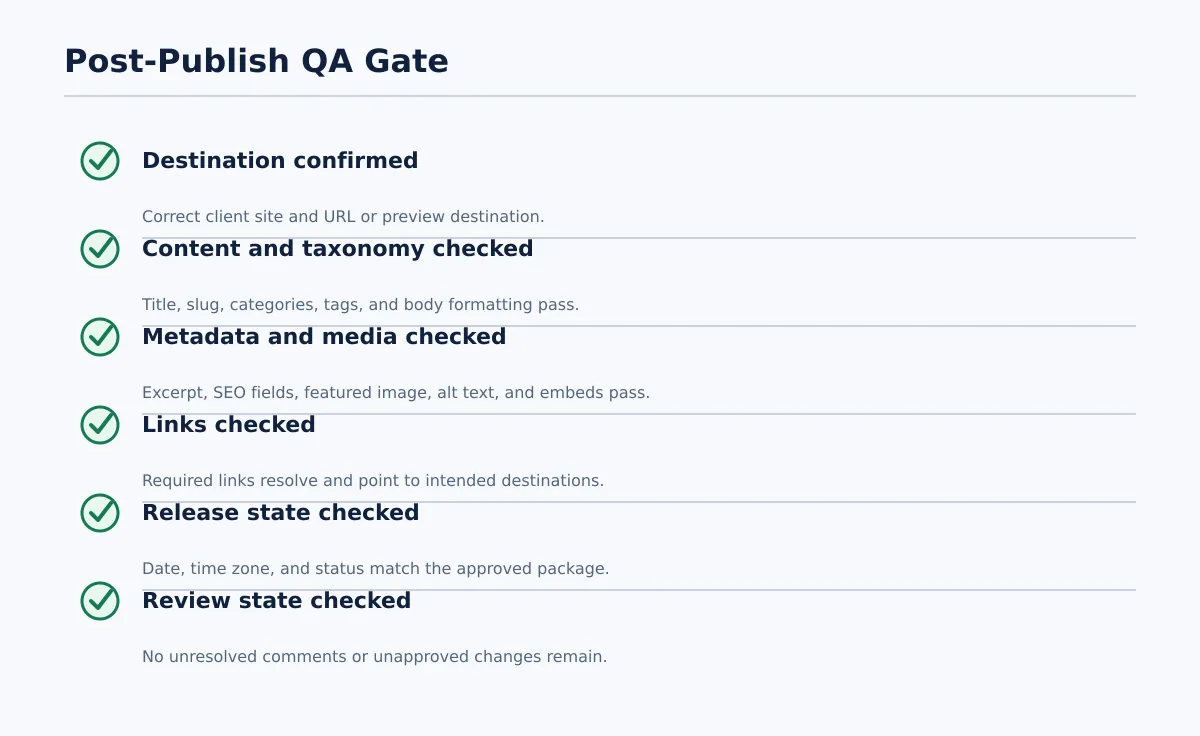 Close the task only after the destination, content, metadata, media, timing, and review state pass.
Treat QA as a recorded pass/fail stage. Use Not required only when the client profile explicitly permits it.
| Check | Pass condition | Failure route |
|---|---|---|
| Client site and URL | Correct site and intended URL or preview destination | Publishing operator and content manager |
| Title and slug | Match the approved package or documented exception | Publisher or editor |
| Categories and tags | Match allowed client values | SEO or publishing owner |
| Excerpt and SEO metadata | Required values are present and correct | Metadata owner |
| Featured image and alt text | Required image displays correctly with approved alt text | Asset or publishing owner |
| Body formatting | Headings, lists, links, spacing, and media render as intended | Publishing or conversion owner |
| Links | Required links resolve and point to intended destinations | Editor or link owner |
| Embedded media | Required media appears in the expected location | Asset or publishing owner |
| Date and status | Date, time zone, and scheduled or public status are correct | Release owner |
| Review state | No unresolved comments or unapproved changes remain | Editor or client approver |
A failed technical or control check blocks closure. A stylistic preference may require revision, but it should not be recorded as the same type of failure as a post on the wrong client site or a missing required metadata field.
When a check fails, route the item to the named owner, record the correction, and repeat any approval or QA check affected by that correction. Do not silently fix a material issue and close the task without updating its evidence.
Pilot one workflow, measure exceptions, and scale safely
Start with one repeatable client workflow and a limited batch. Choose a client with a stable publishing profile, a named approval owner, and enough recurring work to reveal ordinary exceptions.
Use this rollout:
- Define the control record. Document the source, destination, fields, statuses, owners, approval gates, and QA checks.
- Run a limited batch. Include normal items and record every blocked or corrected item rather than bypassing the rules.
- Review the exception log. Group failures into missing metadata, incomplete assets, taxonomy conflicts, unclear approvals, destination errors, and formatting issues.
- Adjust the profile or workflow. Convert repeated questions into required fields, allowed values, or explicit ownership rules.
- Apply selectively to another client. Reuse the stages, but review every client-specific default before activating the process.
Maintain four documents:
- Field map: source field, CMS destination, requirement, owner, and validation rule.
- Approval policy: who can approve editorial work, scheduling, and final release.
- Exception log: failure, owner, correction, reapproval requirement, and closure evidence.
- QA checklist: pass conditions for scheduled and public posts.
Useful pilot measures are operational counts: items stopped before draft creation, field-validation failures, exceptions requiring interpretation, corrections requiring renewed approval, and QA failures after handoff. These measures help the team decide whether the process is defined well enough for another client; they do not promise a particular speed, cost, ranking, or quality result.
For a narrower implementation test, assess one Google Docs or Google Sheets-to-CMS route from approved source to verified WordPress result. Keep the draft-first stage, client rules, approval evidence, and QA record visible before expanding the workflow to more sites.