
A Google Docs file can be ready for editorial handoff without being ready for WordPress release. The transfer creates another work item: a WordPress draft whose fields, structure, assets, and rendered page must be checked against the approved document.
This Google Docs to WordPress post workflow is designed as an execution runbook for that handoff. It focuses on the records and acceptance checks that prevent a publisher from treating a successful transfer as a successful release.
Use it when a content manager, editor, SEO reviewer, and WordPress publisher share responsibility for one post. The central rule is simple: the Google Doc supplies the approved content; WordPress supplies the publishable destination; QA connects the two.
Clarify what it means to publish a Google Doc to WordPress
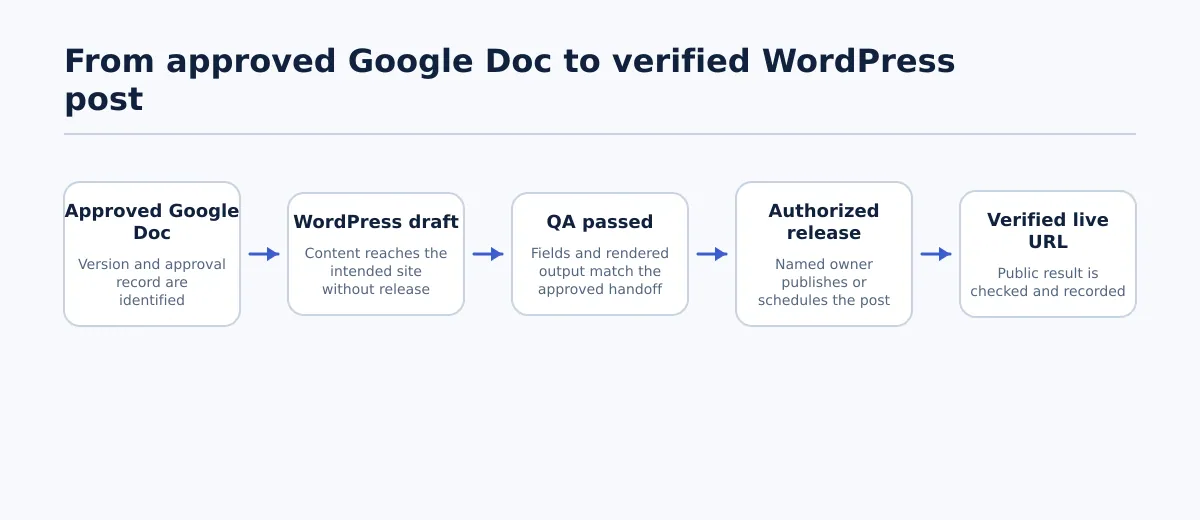 A Google Doc becomes a verified WordPress post through separate source, draft, QA, release, and live-verification stages.
Several actions are commonly described as “publishing a Google Doc,” but they create different results.
Google Docs sharing makes the document available to selected collaborators or viewers according to its sharing settings. Google’s Publish to the web option creates a web-accessible version of the document itself. The document remains a Google-hosted document rather than becoming a native WordPress post. See the supplied overview of making a Google Docs document public for the distinction between sharing and web publication.
A WordPress post is a record inside a WordPress site. It has a status and destination fields that the team must manage separately, such as the title, permalink, author, taxonomy, featured image, excerpt, and any SEO fields configured on that site.
| Action | Destination | Responsible owner | Completion condition |
|---|---|---|---|
| Share the Google Doc | Google Docs | Document owner | The intended people can access the document at the required permission level |
| Publish the document to the web | Google-hosted web destination | Document owner | The document is available through its Google-controlled web result |
| Create a WordPress draft | WordPress site | Publisher | The intended post record exists with draft status and its draft URL is recorded |
| Release the WordPress post | Public WordPress URL | Authorized release owner | The post is published or scheduled according to the release instruction |
| Verify the released result | Public WordPress URL and rendered page | QA or release owner | The intended page resolves and the required post-release checks pass |
A document does not need to be public for a publisher to use it as the source of a WordPress draft. The publisher or connected process needs the access required by the selected route; changing the document to public should not be used as a substitute for that permission.
For broader ownership and approval patterns, see the CMS approval workflow for agency content teams. This article narrows the problem to the handoff record and the field-level acceptance run after the transfer.
Choose the right Google Docs-to-WordPress route
Select a route by asking what the team must inspect afterward. The relevant question is not whether a method can move text, but whether it leaves a draft that the team can compare with the approved document and correct before release.
| Route | Best fit | Access to arrange | Checks to budget for | Draft-ready condition |
|---|---|---|---|---|
| Manual copy and paste | One-off post or short article with an available publisher | Approved-document access and permission to create a WordPress draft | Headings, lists, links, pasted styles, images, and destination fields | Publisher records the draft URL and marks every known cleanup item |
| WordPress-connected add-on or plugin | Repeated transfers to a known WordPress site | Google authorization and the required WordPress connection | Transfer behavior, image handling, blocks, metadata, and status | A test or production transfer produces the intended draft state without release |
| Conversion-based route | Content that already follows a DOCX, Markdown, or other intermediate process | Source access, conversion access, and WordPress editing access | Structural changes introduced by conversion | Converted content is in the correct draft and has been compared with the source |
| Dedicated publishing workflow | Recurring agency work with defined roles and handoff records | Approved connection, site permissions, and role-based release access | Site selection, field mapping, media, custom fields, SEO fields, and status | The workflow produces the permitted destination state and assigns QA to a named person |
Use manual transfer when the article is isolated and the publisher can spend time on inspection. Consider a connected or dedicated workflow when the same handoff happens regularly and the team can maintain a test case, access record, and exception process. A conversion route is useful only if the intermediate format is already part of the team’s process and its structural losses are understood.
Before adopting any route, run one representative transfer containing the elements your site actually uses: at least one heading, link, list, image, and any table or custom block that matters. Treat the route as accepted only when the resulting draft passes the same checks used for production content. The Google Docs-to-WordPress route guide provides broader method context; this runbook supplies the handoff controls.
Prepare the approved Google Doc for handoff
The document owner should complete the source review before anyone creates the WordPress draft. This creates a stable comparison point and prevents the publisher from deciding unresolved editorial questions during import.
Create a handoff record with these fields:
Approved Google Doc URL:
Source version, approval date, or document history reference:
Document owner:
Approver:
Intended WordPress site and post type:
Title for WordPress:
Requested slug or permalink:
Category and tags:
Author:
Featured-image owner and file:
Inline image files and placement notes:
Caption and alt-text requirements:
Excerpt:
SEO title and description, if used:
Schedule, timezone, and visibility:
Known exceptions:
Then inspect the source in this order:
- Copy and approval state: Confirm that the accepted wording is current. Resolve comments, suggestions, placeholders, and superseded alternatives before transfer.
- Heading hierarchy: Check that the title and heading levels communicate the intended structure. A bold paragraph should not be treated as an H2 merely because it looks prominent.
- Links: Open or otherwise verify each required destination. Mark unresolved links instead of leaving the publisher to infer the correct URL.
- Lists and tables: Confirm item order, nesting, numbering, and table content. Note any element that needs reconstruction in WordPress.
- Images: Match every image to a file, position, caption requirement, and alt-text instruction. If an image will be uploaded separately, record that explicitly.
- Destination information: Complete the title, slug request, taxonomy, author, excerpt, featured image, SEO fields, and schedule where the team has already decided them.
Source pass condition: The version is identifiable, the copy is approved for transfer, all required assets have an owner, and unresolved items are documented with a decision-maker.
If the Google Doc changes after this check, issue a new version or return the handoff to the document owner. Do not silently mix the newly edited source with an older WordPress draft.
Create the WordPress draft and preserve review control
The publisher now follows the selected route and creates the content in the intended WordPress site and post type. The interface will differ by method, so use the destination record—not the number of transfer steps—as the proof that this stage is complete.
Immediately after creation, record:
- The WordPress site, post type, and draft URL.
- The current status, which should be draft or the site’s approved review state.
- The title and body received by WordPress.
- Whether images and other assets arrived or require separate handling.
- Any cleanup performed by the publisher.
- Any field the route did not populate.
Use this responsibility map:
| Stage | Owner | Required action | Completion condition |
|---|---|---|---|
| Source sign-off | Document owner or editor | Approve the recorded Google Doc version and assets | Version and approval record exist |
| Draft creation | WordPress publisher | Transfer content and populate known destination fields | Draft URL and status are recorded |
| Acceptance QA | Editor, SEO owner, or QA reviewer | Compare fields, structure, assets, and rendered output | Required checks are Pass or an approved exception |
| Release decision | Authorized release owner | Confirm timing, visibility, and release permission | Release action is authorized and recorded |
| Live verification | QA or release owner | Inspect the public result after release | Live URL and verification result are recorded |
Creating a draft is not approval. Approval is not authorization to publish. One person may hold several roles, but the status changes should remain visible in the record.
Validate content, assets, and metadata in WordPress
Run the acceptance check against two references: the approved Google Doc for article content and the handoff record for destination-only fields. Inspect the WordPress editor for structure, then use preview or another rendered view for the reader-facing result.
| WordPress field or output | Comparison source | Pass condition | Action on failure |
|---|---|---|---|
| Title | Handoff record | Text, punctuation, and capitalization match the approved destination title | Return to publisher or source owner, depending on where the discrepancy began |
| Slug or permalink | Requested slug and site rules | The slug is intentional and points to the expected draft or preview location | Hold release until publisher or SEO owner resolves it |
| Headings and blocks | Google Docs hierarchy | Heading levels and block types preserve the intended meaning | Repair unambiguous structure; return unclear structure to the editor |
| Links | Source link list | Anchor text and target URL match, and required links work in preview | Correct and retest each affected link |
| Lists | Source list order and nesting | Items, order, numbering, and nesting are correct | Rebuild the list, then compare again |
| Inline images | Image list and placement notes | Required files appear in the intended positions with acceptable display | Replace or reposition, then rerun preview QA |
| Captions and alt text | Handoff requirements | Required captions and alt text are present and appropriate | Assign the publisher or media owner; keep the item out of release |
| Featured image | Featured-image instruction | Correct asset is assigned and appears as expected in the theme output | Resolve the asset choice before approval |
| Categories and tags | Handoff record | Required terms are selected and unrelated terms are absent | Return for a taxonomy decision |
| Excerpt | Approved excerpt or site requirement | Required excerpt is present and correct | Add or correct it, then record the result |
| SEO fields | SEO instructions and configured fields | Required title, description, canonical, or other fields are complete | Send to the SEO owner; do not assume the route populated them |
| Author, visibility, and schedule | Handoff record | Values match the approved release instruction | Hold the draft until the release owner confirms the correction |
| Rendered page | Approved content and expected reader experience | Text, headings, links, images, spacing, and visible metadata render as intended | Repair the draft and repeat the rendered check |
Record each row as Pass, Revise, or Blocked. The draft can move to release only when required rows are Pass or an explicitly named owner accepts the exception. If a repair changes approved wording, a heading, a link, or an asset, send that change back through the applicable approval step.
The rendered check matters because editor structure alone does not confirm what readers will see. Preview the complete post, not only the section that was easiest to transfer. Check the top, middle, and bottom of a long article, along with every required asset and link.
Approve, schedule, and verify the live post
After the acceptance run passes, the release owner confirms that the draft, destination, and timing refer to the same content item. Use a release record rather than relying on a status change in the editor:
Approved source version:
WordPress draft URL:
QA owner:
QA completion time:
QA result:
Accepted exceptions and approver:
Release owner:
Release action: published / scheduled / held
Release time and timezone:
Canonical live URL:
Post-release verification time:
Post-release result:
For an immediate release, open the public URL after publication. For a scheduled item, perform the check after the scheduled time. Confirm that:
- The URL resolves to the intended post, not a preview, login page, error, or unintended redirect.
- The public title and headings match the approved draft.
- Required links open their intended destinations.
- Images load in the expected positions and retain required captions or accessible text.
- Visible author, category, excerpt, and publication details are correct where the theme displays them.
- Required metadata remains present according to the site’s normal SEO inspection process.
Live pass condition: The public URL is recorded, the rendered page matches the released draft, and a named person has completed the verification. If a check fails, the release owner records the issue and assigns the correction before considering the item complete.
Troubleshoot common source-to-draft mismatches
Use the mismatch to locate the failed handoff stage. Preserve the approved Google Doc while the WordPress correction is investigated.
| Mismatch | First action | Owner | Return-to-QA condition |
|---|---|---|---|
| Heading levels are flattened | Compare the draft with the source hierarchy and rebuild affected blocks | Publisher; editor if intent is unclear | Every required heading has the intended level |
| Lists become paragraphs | Compare item count, order, and nesting, then recreate the list | Publisher or editor | The WordPress list communicates the same structure |
| Images are missing or misplaced | Check the handoff asset list and placement notes before uploading replacements | Publisher or media owner | Every required image appears in the intended position |
| Links change or fail | Compare anchor text and target URLs with the source link list | Publisher or editor | Each required link is tested and passes |
| Pasted styling appears | Remove unintended formatting and inspect the rendered result | Publisher | No visible transfer artifacts remain |
| Metadata is absent | Use the handoff record to populate destination fields | Publisher and SEO owner | Required fields are complete and accepted |
| Wrong site, author, status, or schedule | Hold release and compare destination settings with the record | Publisher and release owner | All release settings match the approved instruction |
| Post was released accidentally | Record the URL and time, notify the release owner, and follow the site’s correction procedure | Release owner | Intended status is restored or expedited live QA is complete |
If the cause cannot be identified, do not overwrite the source to make the draft appear consistent. Record the discrepancy, preserve both versions, and return the item to the owner who can determine whether the fix belongs in Google Docs, the transfer step, or WordPress.
Apply the handoff record to the next post
For the next approved document, use this sequence:
- Record the source version, destination, and required fields.
- Select a route that matches the post’s volume and review requirements.
- Create a draft and record its URL and status.
- Run the field-level acceptance matrix.
- Repair or escalate every Revise and Blocked item.
- Release only after an authorized owner accepts the QA result.
- Verify and record the public URL.
Document the route your team chooses, then apply this checklist to one representative Google Doc before changing the wider publishing process. A controlled test exposes site-specific issues with structure, media, access, metadata, and status without turning the next production post into the test case.