
A CMS approval workflow answers a practical question: what must be true before a piece of content can move from an approved source to a live post?
For agency teams, that question has two parts. The first concerns the article itself: its copy, structure, links, assets, and client requirements. The second concerns the post as configured in a particular CMS: its destination site, fields, rendered output, URL, author, status, and release time.
Treating those as separate decisions gives the team a clear final review point. An approved Google Doc can authorize CMS preparation without authorizing scheduling or publication. The CMS draft then gets its own verification before a release owner chooses the permitted outcome.
This guide presents a lightweight CMS approval workflow for agencies publishing client content to WordPress. It focuses on decisions and ownership rather than making WordPress roles or a plugin the entire system.
What a CMS approval workflow is—and the two approvals agencies should not combine
A CMS approval workflow is a defined sequence of states, owners, checks, and release decisions for content moving through a content management system. It describes not only who reviews the article, but also which version may be prepared, which destination it belongs to, and what action is authorized next.
The two central approvals concern different artifacts:
| Decision | Source approval | CMS-draft approval |
|---|---|---|
| Question answered | Is this source version editorially and client-ready for publishing preparation? | Is the post correctly configured for this destination and release instruction? |
| Artifact reviewed | Approved Google Doc and its accompanying requirements | WordPress draft, fields, preview, status, and schedule |
| Typical owner | Editor, SEO lead, or named client approver | QA editor, publisher, or release owner |
| Checks included | Copy, structure, links, assets, metadata proposal, and client requirements | Rendered content, links, media, taxonomy, SEO fields, author, URL, destination, and timing |
| Result | Permission to prepare the CMS draft | Permission to apply the specified release action, subject to release authorization |
Content review is the activity of examining work and requesting changes. Source approval accepts one identified document version for the next step. CMS-draft approval confirms that the source has been represented correctly in the destination system. Publication authorization is the decision to save, schedule, or publish that particular post.
The same person may perform all four activities on a small team. The decisions should still be recorded separately because each one can fail for a different reason. A client may approve the article while the agency still needs to correct the category, replace a featured image, or confirm the time zone on the WordPress draft.
The resulting sequence is:
approved source → CMS preparation → CMS draft ready → release authorization → scheduled or published post
The broader WordPress publishing automation workflow covers the systems and repeatable actions around this sequence. Here, the focus is the decision between source approval and release readiness.
The minimum states and owners for an agency publishing workflow
A useful workflow should show both the current condition of the work and the person accountable for the next decision. The following model is small enough for routine agency publishing but distinguishes preparation from a draft that has passed CMS checks.
| State | Accountable owner | Enter when | Advance when |
|---|---|---|---|
| In review | Editor or assigned reviewer | The source is being evaluated or revised | Required editorial changes are complete and the source approver can review it |
| Source approved | Named source approver | One Google Doc version and its required inputs are accepted | The approved version is identified and the publisher can create the destination draft |
| CMS preparation | Publisher | The WordPress draft is being created or is being corrected | The draft exists at the correct destination and every required CMS check passes |
| CMS draft ready | QA editor or publisher, according to team policy | The draft has passed the CMS verification list | A release owner authorizes the specified release outcome |
| Release approved | Release owner | The destination, timing, and release action are confirmed | The publisher applies the authorized action |
| Scheduled/Published | Publisher or release owner | The post has been scheduled or published | Any required post-release verification is recorded |
In this model, CMS preparation means work is still in progress or rework is required. CMS draft ready means the destination draft has passed its checks; it does not merely mean that a WordPress draft exists. That distinction prevents a team from treating draft creation as completion.
A small team may assign the editor, publisher, SEO lead, and release owner to one person. Larger teams can separate them. What matters is that each transition has an accountable owner and a pass condition.
WordPress features such as draft and review statuses, user permissions, comments, and revisions can help a team represent parts of this model. They do not, by themselves, record every source decision or destination-specific requirement. Keep the workflow record—or the equivalent fields in your operating system—tied to the source version, site, approver, checks, and final action.
What to approve in the source document before CMS handoff
Source approval should settle the editorial package before CMS preparation begins. The document does not need to imitate the final web page, but it should make the publishing requirements explicit enough that the publisher is not guessing.
Approve these inputs before moving the item to Source approved:
- Final copy: The article body, headings, lists, tables, conclusion, and call to action are in the intended version.
- Structure: Heading levels and section order are clear to the person preparing the CMS draft.
- Links: Required links have approved anchor text and destinations.
- Assets: The featured image and in-body assets are identified, supplied, or assigned to a named owner. Captions and alternative text requirements are included where applicable.
- Destination: The client, WordPress site, environment, and post type are named.
- Taxonomy: Proposed category and tags use the destination’s actual terms.
- SEO fields: The SEO title, meta description, focus keyword if used by the team, and proposed slug are supplied or assigned.
- Author: The author account or approved byline treatment is clear.
- Timing: The requested date, time zone, and outcome—save as draft, schedule, or publish—are stated.
- Editorial-only notes: Instructions for the publisher are separated from text intended for site visitors.
A source passes when the approver can identify the exact version, confirm that the editorial requirements are settled, and see an owner for every remaining publishing input. Unresolved comments and placeholders must be removed or explicitly assigned. For example, “add image later” is incomplete; “Publisher to add winter-boiler.webp, supplied by client owner, before CMS draft review” is actionable.
Record the source link, version marker or last-updated value, approver, decision, and timestamp. A clear filename such as Client-topic - approved source helps, but the record should not depend on the filename alone.
If the article needs structural conversion or HTML cleanup before publishing, handle that work before source approval when it affects the approved package. The DOC to HTML guide explains the separate preparation and inspection concerns.
What to verify in the CMS draft before final release
After the publisher creates the WordPress post, move it to CMS preparation until the destination review is complete. Review the rendered draft, not only the editor screen. The CMS may represent headings, lists, embeds, images, and spacing differently from the source document.
Rendered content
Open the preview or the closest available rendered view and confirm that:
- The title, introduction, headings, paragraphs, lists, and tables follow the approved order.
- No comments, placeholders, conversion artifacts, or publisher instructions appear in the reader-facing content.
- Heading levels and block types are appropriate for the destination template.
- The post uses the intended post type and layout.
The check passes when the page reads as the approved article without requiring the reviewer to interpret missing instructions from the Google Doc.
Links and media
Test representative links and every high-risk asset. Confirm that:
- Internal and external links use the approved destinations.
- Buttons, embeds, and linked images behave as intended where they are used.
- The featured image belongs to this assignment and is attached to the correct post.
- In-body images appear beside the intended content and have the required caption or alternative text.
A missing or wrong asset is a failed CMS check. Keep the item in CMS preparation while the publisher corrects it. Return to In review if the correction changes the approved article or its meaning.
Taxonomy and SEO fields
Compare the post fields with the approved publishing inputs:
- Category and tags match the client site’s terminology.
- SEO title and meta description are present and match the approved values.
- The slug matches the URL instruction.
- An excerpt is present when the destination requires one.
- Any client-specific indexing or visibility setting has been checked by its owner.
A field passes only when it is both populated and correct for this destination. A category selected from a familiar dropdown is not evidence that it is the right category for the client.
Author and URL
Check the author account or byline, permalink, and applicable URL settings. If the title changed during preparation, compare the generated slug with the approved slug. Treat an unexpected URL as a failed check until the designated owner corrects it or explicitly accepts the change.
Schedule and destination
Before requesting Release approved, verify:
- The post is in the correct client site and environment.
- The intended outcome is clear: remain a draft, schedule, or publish.
- The date, time, and time zone are correct.
- The person applying the action is authorized to do so.
- The release owner has approved this specific outcome.
Tenwrite supports a review point where teams can review, revise, schedule, or save generated content as a CMS draft before it goes live. In this model, that draft remains in CMS preparation until the team’s checks pass; the capability does not replace the release decision.
Worked example: approving one client article from Google Doc to scheduled WordPress post
Consider a fictional assignment for Northstar Home Services, a client with a WordPress site for homeowner guidance. The article is “How to Prepare Your Boiler for Winter.” The brief specifies the Seasonal Maintenance category, the Northstar Editorial author, a client-supplied featured image, and a Thursday release at 9:00 a.m. Eastern Time.
The example is illustrative. It shows how the states behave when a draft check fails.
Source review and approval
The editor completes the Google Doc, including the article, heading structure, links, image reference, SEO title, meta description, category, slug, author, and release instruction. The editor resolves comments and replaces the placeholder “insert winter image” with the supplied filename and alternative text.
The item starts in In review. The SEO lead requests a shorter SEO title. The editor updates the document and identifies the revised version. The client owner then approves that specific Google Doc and the listed publishing inputs. The editor records the source link, version marker, approver, decision, and timestamp, then moves the item to Source approved.
This state authorizes CMS preparation. It does not authorize scheduling.
Draft creation and failed asset check
The publisher selects the Northstar site, creates the WordPress post, transfers the content, and enters the title, category, author, slug, SEO title, and meta description. The post remains a WordPress draft while the publisher works, so the workflow state is CMS preparation.
During preview, the publisher notices that the featured image is a summer maintenance image rather than the approved winter image. The publisher records featured image mismatch, leaves the post unscheduled, and keeps the item in CMS preparation.
The client owner supplies the correct image. The publisher replaces the asset, checks its alternative text, previews the article again, and repeats the affected media and rendered-content checks. The item stays in CMS preparation until all required checks pass.
CMS approval and scheduled release
The SEO lead checks the shortened SEO title, meta description, Seasonal Maintenance category, Northstar author, slug, links, preview, and absence of source comments. The checks pass, so the item moves from CMS preparation to CMS draft ready.
The release owner confirms the Thursday schedule and moves it to Release approved. The publisher schedules the post for 9:00 a.m. Eastern Time and records the schedule, site, post identifier or URL when available, approver, QA result, and image correction. The final state is Scheduled/Published.
If the image correction had required a new caption that changed the article’s claim, the item would have returned to In review for source revision and approval. A CMS-only correction stays in CMS preparation.
How to handle rejected drafts, changed client requirements, and urgent exceptions
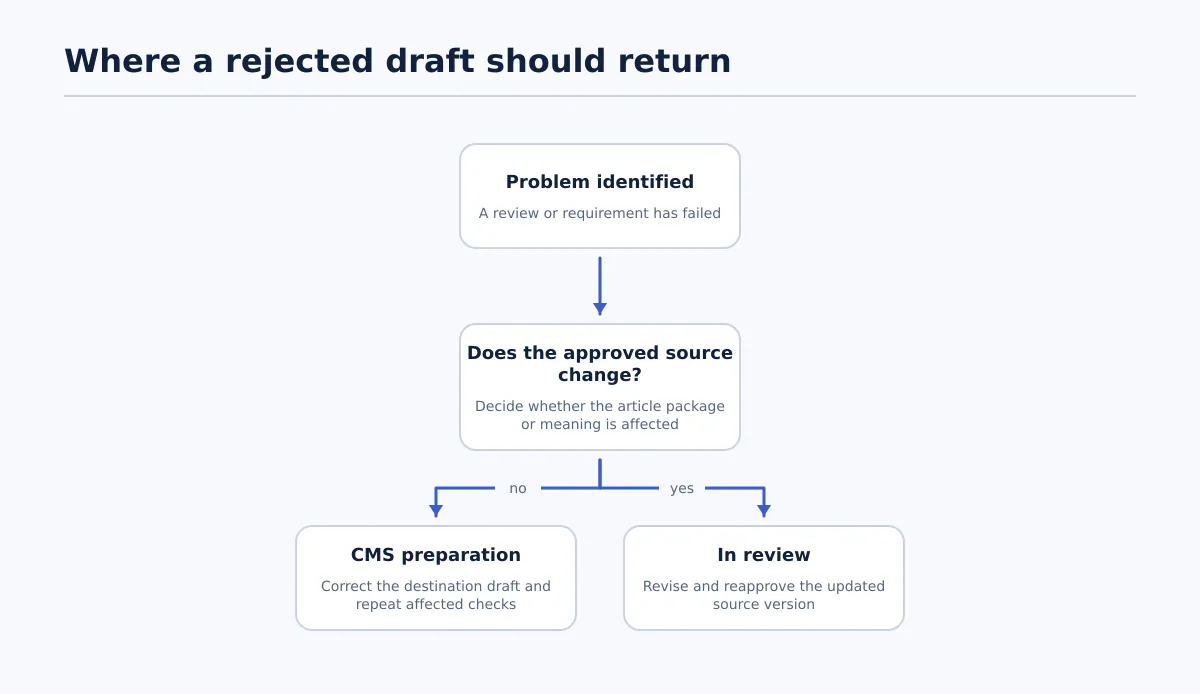 Return CMS-only problems to CMS preparation; return changes to the approved article to In review.
A rejection should change the state and include a reason. Leaving the item marked as ready while discussing a problem in chat makes the next action ambiguous.
Source changes after approval
If a client changes a section after the Google Doc was approved, move the item from Source approved back to In review. The editor updates and identifies the new source version. The source approver reviews it again. Once approved, the publisher begins or restarts CMS preparation and checks the full draft, including fields that may have been affected by the copy change.
CMS-only corrections
If the source remains valid but the WordPress draft has the wrong category, broken link, incorrect author, or missing image, keep or return the item to CMS preparation. The publisher corrects the draft and repeats the affected checks. Move it to CMS draft ready only after the complete required list passes.
If the correction changes the URL, article meaning, author commitment, or release timing, notify the relevant approver before requesting Release approved. If it changes the source package, return to In review instead.
Urgent release
An urgent release needs an explicit exception record rather than an informal bypass. The release owner is the only person who may authorize the shortened path, unless the client’s documented policy names a different authorized role.
Use this sequence:
- Keep the item in its current state and mark it Urgent release exception in the workflow record. Record the reason, requested release time, authorizer, source version, and checks being shortened.
- Before release, the publisher must still verify the destination site, source version, rendered content, links, required metadata, author, status, and timing. Any safety, legal, factual, or client-approval requirement that applies to the assignment remains mandatory.
- The release owner records the decision and moves the item to Release approved only for the stated urgent outcome.
- The publisher applies the action and records the resulting URL or post identifier, timestamp, and final status.
- The release owner assigns any deferred review, with a due time. After that review, record the result and any correction. If the post needs changes, move it to CMS preparation or In review, depending on whether the change affects only the CMS draft or the approved source.
If the required pre-release checks cannot be completed, the release owner should not authorize publication under this exception. The item remains in CMS preparation or another current state until an authorized decision is possible.
When native WordPress statuses are enough and when the workflow needs stronger controls
A team can start with native WordPress practices when its operating conditions are simple: one destination, few approvers, consistent fields, and a clearly known person who may apply the release action. Roles, draft or review statuses, comments, and revisions can support the work when the team also records source approval and uses the state definitions above.
Consider stronger workflow controls when the team has:
- Multiple client sites with different categories, authors, URL rules, or metadata requirements.
- Separate editorial, SEO, publishing, and client approvers.
- A recurring need to identify which source version reached WordPress.
- Publishers who prepare drafts but should not make the final release decision.
- Scheduled content across multiple time zones.
- Frequent rejections or urgent exceptions that need a visible trail.
| Native WordPress practices may be enough | Add workflow controls when… |
|---|---|
| One site has consistent fields and a short review path | Each client destination has different required values |
| The same person can coordinate preparation and release | Preparation and release authority must be separated |
| Source-to-draft comparison is manageable for every assignment | The team needs a repeatable verification record |
| Exceptions are rare and can be recorded easily | Exceptions must identify an authorizer, reason, and follow-up review |
| Draft and scheduled states are easy to interpret | The team needs the distinct states CMS preparation, CMS draft ready, and Release approved |
Additional controls might be a documented procedure, a structured record in the team’s existing system, configured permissions, or a workflow tool that represents the required states. The appropriate level depends on publishing volume, approver count, client-specific rules, and how much evidence the team needs after release.
Apply the model to the next client article without adding unnecessary bureaucracy: approve the exact Google Doc, keep CMS preparation separate from a checked CMS draft, and require a named release owner before scheduling or publishing. That final CMS-draft review gives the team a practical place to catch destination and timing mistakes before they become live-post problems.