
A request such as “publish the approved brief” can describe three different actions. The team may need a public Google Docs URL, a document that stakeholders can review, or a WordPress post on a specific client site.
Those outcomes have different audiences, owners, and approval requirements. Google’s publishing guidance covers making a document available on the web, including publishing a document and using the published result as a link or embed. A WordPress workflow adds a separate destination, structured fields, CMS status, and release decision.
For content operations teams, the important question is not only how to publish a Google Doc. It is which publication route is authorized, which version is approved, and who can move the work to the next state.
This guide gives agencies and multi-site teams a controlled way to resolve that ambiguity. You will choose the route, assign approval ownership, prepare the source, map it to WordPress fields, review the CMS draft, and record the release decision.
What “publish Google Docs” can mean for a content team
When someone asks you to “publish Google Docs,” resolve three decisions before anyone selects a publishing option:
- Destination: Should the content be available at a Google-hosted web address, remain in a review process, or become a post on WordPress?
- Audience: Is the intended audience a client, internal reviewers, a limited stakeholder group, or the public?
- Release authority: Who approves the source, who approves the CMS representation, and who authorizes the final release?
These questions are easy to collapse because the same Google Docs document editor may be used for drafting, review, and preparation for publication. The document is still the source record; it is not automatically the final destination.
Use the following terms consistently:
- Publish to the web: Use Google’s document-publishing route when a public document link or published document used for embedding is the requested output. Google’s support documentation describes publishing a document and sharing or embedding the published result.
- Share for review: Keep the source in the team’s review process while comments, suggestions, approvals, or audience decisions remain open.
- Publish to WordPress: Move the approved source into the named client site, populate its required fields, inspect the resulting CMS draft, and obtain release authorization.
A source approval should identify what was approved and what may happen next. For example, “approved for CMS draft creation” is narrower than “approved for publication on 15 September.” Record that distinction in the handoff rather than expecting the publisher to infer it.
A minimum handoff record should include the Google Doc URL, approved revision or approval timestamp, destination site, intended post type, permitted next state, named reviewers, release owner, and any exceptions.
Choose the route: publish to the web, share for review, or publish to WordPress
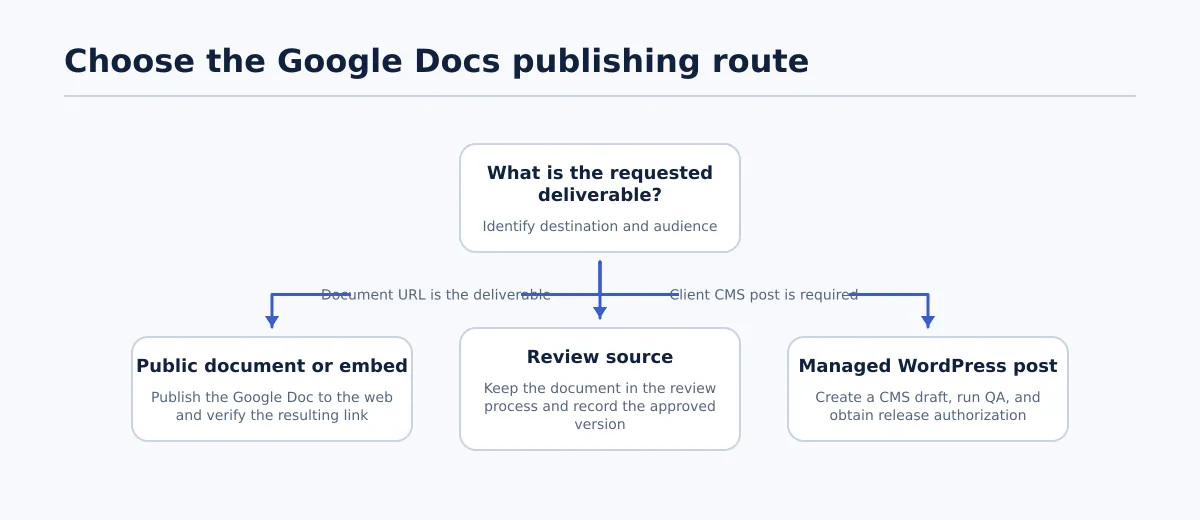 Choose the destination and approval state before publishing a Google Doc.
Choose the route from the requested deliverable, not from the menu option currently visible in Google Docs.
| Objective | Destination | Owner | Approval threshold | Required checks | Output |
|---|---|---|---|---|---|
| Provide a public reference document | Published Google document URL | Document owner | Content is approved for public access | Confirm the final source, public audience, published URL, and link behavior | Public document link |
| Embed a document in an existing resource | Published Google document consumed by another page | Document owner and page owner | Both the document and consuming page are approved | Test the published result, confirm the intended version, and check the consuming page | Published document or embed reference |
| Collect client or editor feedback | Google Doc in the team’s review process | Editor or client-review owner | Reviewers, deadline, and decision owner are named | Check version, unresolved comments, suggestions, and review status | Reviewable source document |
| Release an approved blog post | Specific WordPress site and post type | CMS owner and release owner | Source approval, CMS QA, and release authorization are complete | Validate fields, media, links, preview, timing, and destination | WordPress draft, scheduled post, or published post |
Use Publish to the web when the document URL itself is the product. This suits a public reference document or a document intended for embedding. Use the WordPress route when the deliverable must belong to a client site with a site-specific URL, taxonomy, author, SEO fields, status, and publishing record.
Keep the document in review when the audience has not been approved or when comments and suggestions still contain decisions. A review link is a workflow state, not evidence that the content is ready for a public document or a live CMS release.
If the request is unclear, return it with three questions: “Which destination?”, “Who is the audience?”, and “Who authorizes the final release?” Do not infer the answer from the document title or the person who shared it.
Define the controlled Google Docs-to-WordPress workflow
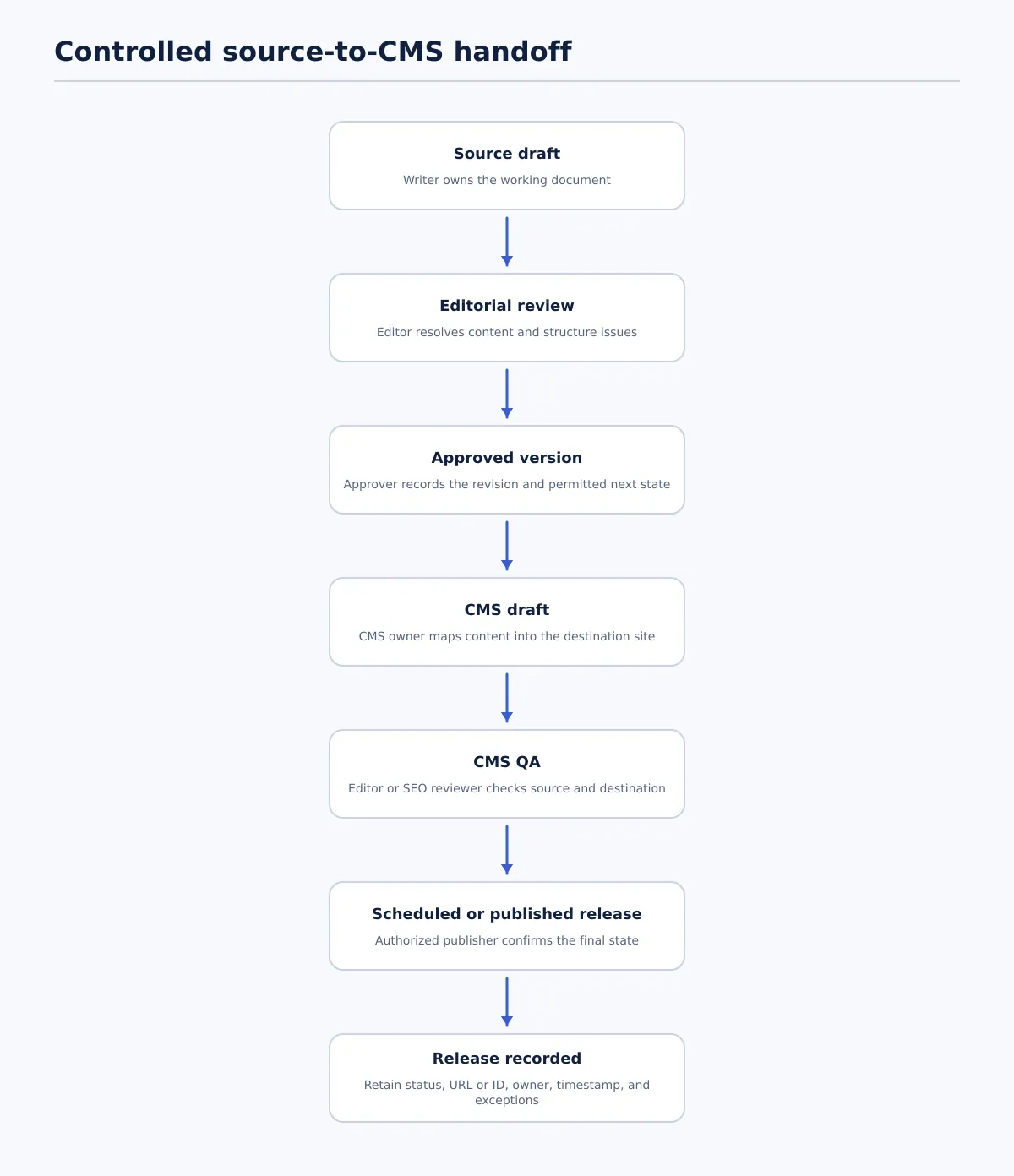 Move an approved Google Doc through a draft-first WordPress release workflow.
For WordPress publication, use separate completion states rather than treating approval and publication as one action. The following model is an operating recommendation for teams managing recurring client content.
| Stage | Primary owner | Completion condition | Record to retain |
|---|---|---|---|
| Source draft | Writer | Planned copy and source details are present | Google Doc URL and working version |
| Editorial review | Editor | Copy, structure, links, and requested changes are resolved | Review decision and open-item list |
| Approved for handoff | Designated approver | A specific revision is approved for a named site and permitted next state | Revision, approver, timestamp, and scope |
| CMS draft | CMS owner or publishing workflow | Content is represented in the intended WordPress environment as a draft | Site, environment, post type, and draft ID |
| CMS QA | Editor or SEO reviewer | Source comparison and destination checks pass, or an exception is approved | QA result, corrections, reviewer, and exception notes |
| Release decision | Authorized publisher | The permitted status and timing are confirmed | Status, URL or post ID, owner, and timestamp |
A useful status sequence is:
Source draft → In editorial review → Approved for handoff → CMS draft created → CMS QA passed → Ready to schedule or Ready to publish → Scheduled or Published → Release recorded
Assign one owner and one next action to every state. If a required value is missing, use Blocked or Needs revision; do not leave the item in a vague approved state.
For multi-site work, attach a destination profile before transfer. Record the client site, environment, post type, permitted author, taxonomy rules, required metadata, image requirements, time zone, CMS owner, and release owner. Treat those as site-specific configuration decisions, not assumptions carried over from another client.
The most important boundary is the permitted next state. A source may be approved for draft creation while publication still requires CMS QA and release-owner authorization.
Assign decision rights before the handoff
A controlled workflow needs more than a sequence. It needs a clear answer to “who can say yes?” Separate these responsibilities even when one person holds more than one role:
- Writer or source owner: Maintains the working document and resolves assigned content changes.
- Editor: Approves wording, structure, links, and the editorial state of a specific revision.
- SEO reviewer: Approves search-facing fields, internal links, URL wording, and destination-specific SEO requirements where assigned.
- CMS owner: Creates or updates the WordPress draft and records the mapped fields.
- Release owner: Authorizes scheduling or publication for the named site and timing.
For a small team, the same person may be writer, editor, and publisher. Still record the roles separately in the release record. This prevents a single “approved” label from hiding which checks were actually completed.
Use a simple rule: the person who transfers the content does not automatically gain authority to publish it. If the release owner has not authorized the final state, the item remains a draft or blocked.
Prepare the approved Google Doc as the publishing source
Before handoff, make the document complete enough that the CMS owner does not have to make hidden editorial decisions. The source does not need to contain every WordPress setting, but each required decision needs a value or an assigned owner.
Use this source-readiness checklist:
- Final working title and intended WordPress title are identified.
- Heading hierarchy is final and uses actual heading structure consistently.
- Link destinations are final; placeholders have been removed or assigned.
- Images have a confirmed file, placement, attribution note, and alt-text decision where required.
- The call to action is approved for the intended client and destination.
- Category and tags are supplied or assigned to the CMS owner.
- Excerpt or summary is supplied when required.
- SEO title and meta description are supplied when required by the destination.
- Source-version owner is named.
- Client site, environment, post type, and permitted next state are recorded.
Resolve comments and suggestions before handoff. Accept or reject each relevant suggestion, close completed comments, and record any approved exception that remains open. If a comment changes the article, update the source and identify the new revision before approval.
Flag tables, embeds, callouts, footnotes, custom layouts, and interactive elements for manual treatment. A visually complete document can still contain an element that needs a specific WordPress implementation.
For teams that need a separate conversion and markup review, see the Google Doc to HTML workflow. Keep that technical conversion check distinct from the decision about whether the source is authorized for CMS handoff.
Map document content to WordPress fields before handoff
A Google Doc primarily represents content and structure. A WordPress destination also has fields and release settings. Map them explicitly instead of inferring values from nearby text.
| Google Doc element | WordPress destination | Required owner | Validation criterion |
|---|---|---|---|
| Approved article title | Post title | Editor | Matches the approved title and intended content type |
| Main copy and headings | Post body | CMS owner, checked by editor | Order, headings, lists, links, and wording match the source |
| Agreed URL wording | URL slug | SEO reviewer or CMS owner | Slug is readable, unique, and approved for the site |
| Supplied summary | Excerpt | Editor or CMS owner | Present when required and reflects the approved article |
| Approved topic classification | Category | Editor or site owner | Category exists and is permitted on the selected site |
| Supporting classifications | Tags | Editor or site owner | Tags are valid and intentional for that site |
| Image file and placement note | Featured and inline media | Media or CMS owner | Asset, placement, attribution, and alt-text treatment are confirmed |
| Search result title | SEO title | SEO reviewer | Present when required and matches the approved SEO package |
| Search result summary | Meta description | SEO reviewer | Present when required and matches the approved SEO package |
| Named contributor | Author | Site owner or publisher | Author exists and is authorized on the destination site |
| Approved date and time | Publish date | Release owner | Date, time, time zone, and permitted status are explicit |
For example, a source might contain the title “Quarterly Website Maintenance Checklist,” proposed slug website-maintenance-checklist, category “WordPress,” tags “maintenance” and “content operations,” and a meta description. Those values still need destination validation. The category may not exist on the selected site, the author may not be permitted, or the slug may conflict with an existing URL.
Treat missing required values as a gate. Block the handoff or create an explicit exception with an owner, due date, and approval. Do not silently select a default author, copy the title into the SEO title, or choose the first available category unless the destination profile explicitly permits it.
Create and review the CMS draft
The WordPress draft is the inspection point where the approved source meets a particular site. Review it as a destination record, not simply as a copy of the Google Doc.
A draft-first workflow lets a team review, revise, schedule, or save content as a CMS draft before a live release. Tenwrite’s documented publishing workflow supports those draft-first states. The capability supports the handoff; it does not replace the team’s approval rules.
Run two passes.
Pass one: compare the draft with the approved source
Compare the CMS draft with the recorded Google Doc revision, not with whichever version happens to be open in Drive. Check the title, opening content, headings, paragraphs, lists, links, images, captions, call to action, omissions, duplicate sections, and placeholder text.
Mark the comparison Pass only when every meaningful discrepancy is corrected or explicitly re-approved. A discrepancy is meaningful if it changes wording, meaning, structure, destination, media, metadata, or release intent.
Pass two: inspect the WordPress representation
Check the destination-specific details:
- client site, domain, environment, and post type;
- title, slug, excerpt, category, tags, author, and date;
- SEO title and meta description where required;
- featured image, inline images, alt text, and captions;
- internal and external links;
- preview rendering, including mobile where required;
- visibility, template, and CMS status;
- schedule date, time, and time zone.
The item is blocked if the source comparison passes but the draft is on the wrong site, the author is invalid, the slug conflicts with an existing page, or a required field is missing. Source approval cannot resolve a destination error.
For a deeper destination-output check, use the Google Doc HTML export QA workflow.
Run CMS QA and approve the release
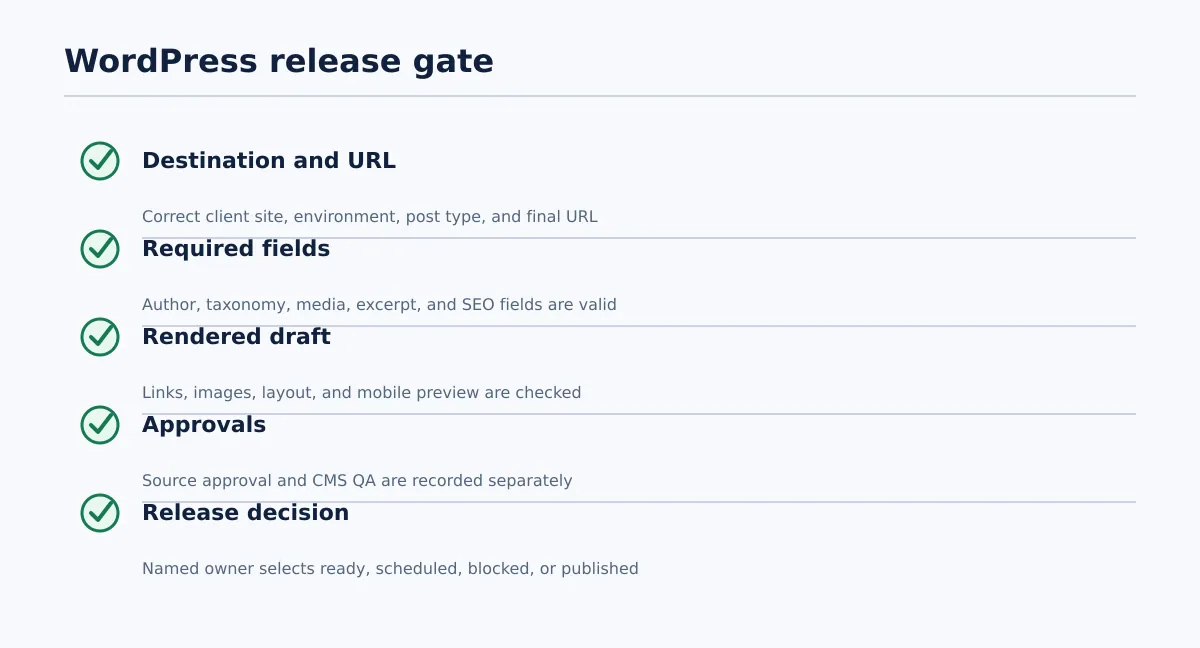 A WordPress release is ready only when required checks pass or an approved exception is recorded.
The final gate answers a specific question: Is this exact CMS item safe and authorized to schedule or publish on this destination?
Run these checks immediately before the release decision:
- [ ] Correct client site, domain, environment, and post type.
- [ ] Correct final URL or approved slug.
- [ ] Correct visibility and intended CMS status.
- [ ] Correct publish timing and time zone.
- [ ] Authorized author selected.
- [ ] Valid category and tags.
- [ ] Correct featured image and inline media.
- [ ] Approved SEO title and meta description where required.
- [ ] Links resolve to intended destinations and contain no placeholders.
- [ ] Required preview has been checked.
- [ ] Editorial approval and CMS QA are recorded separately.
- [ ] Named release owner has selected the next state.
Use explicit statuses:
- Ready to schedule: QA passed and timing is confirmed.
- Scheduled: The CMS contains the approved schedule and the details are recorded.
- Blocked: A required check, field, approval, or destination decision failed or is missing.
- Published: The post is live and the final URL or post ID and release result are recorded.
One failed required check blocks release until corrected or approved as an exception. The reviewer should record the failure, correction owner, affected field, and required re-QA scope.
A release record should retain the source URL and revision, destination site, CMS ID or URL, QA result, release owner, timestamps, final status, and exception notes. This is the evidence that connects the approved source to the released CMS item.
Handle revisions, exceptions, and release records
An unreviewed source edit should not automatically change an approved CMS draft. Use a defined exception path whenever the source or destination changes.
Source revision before release
- Assign the change to the editor or source owner.
- Record the new source revision and summarize the change.
- Identify affected fields, such as body copy, links, images, slug, excerpt, or SEO metadata.
- Compare the revised source with the existing draft.
- Update the draft and repeat the affected source and CMS checks.
- Record the new approval and permitted next state.
Do not release the old draft merely because it was previously approved. The release record must identify the source revision represented by the final CMS item.
Post-publication correction
- Name the correction owner and describe the issue.
- Record the affected URL, post ID, and fields.
- Decide whether a new source revision, editorial re-approval, or both are required.
- Make the authorized CMS change.
- Repeat QA for the changed fields and dependent elements.
- Record the final status, timestamp, reviewer, and change explanation.
A changed link may require link validation and preview review. A changed title may also require slug and SEO-field review. Match re-QA to the fields affected and record that scope.
A minimum exception record contains the source and CMS versions, change summary, affected fields, owner, approving reviewer, required re-QA, release status, final URL or CMS ID, and resolution time.
The practical operating rule is simple: choose the route, name the audience and release authority, identify the approved source version, map the required WordPress fields, create a draft, validate the destination, and record the final state.
Review your current Google Docs-to-WordPress handoff against those steps. If repetitive transfer work is creating unnecessary re-entry, explore Tenwrite’s publishing workflow as a way to prepare content for review, revision, scheduling, or CMS-draft storage before an authorized owner approves a live release.