
Approved content can still fail during publishing. The wrong client site may be selected, a category may not exist in the destination taxonomy, an image may be omitted, or a scheduled post may inherit the wrong time zone. These are not editorial failures. They are release-control failures that occur after the source document has been approved.
For agency teams, content publishing automation should therefore be treated as a destination-control system. Its job is to move a known content package and its publishing fields into the intended WordPress or Blogger account while preserving the records needed to approve, inspect, schedule, and verify the result.
This guide focuses on the operational specification behind that connection: the workflow map, release record, client-site profile, field map, QA gate, exception record, and pilot procedure. It is not a general introduction to editorial calendars or content generation. The goal is to help a team answer one practical question: Can this approved source be moved into this destination, under these rules, and released in this permitted state?
Content Publishing Automation Is More Than Auto-Posting
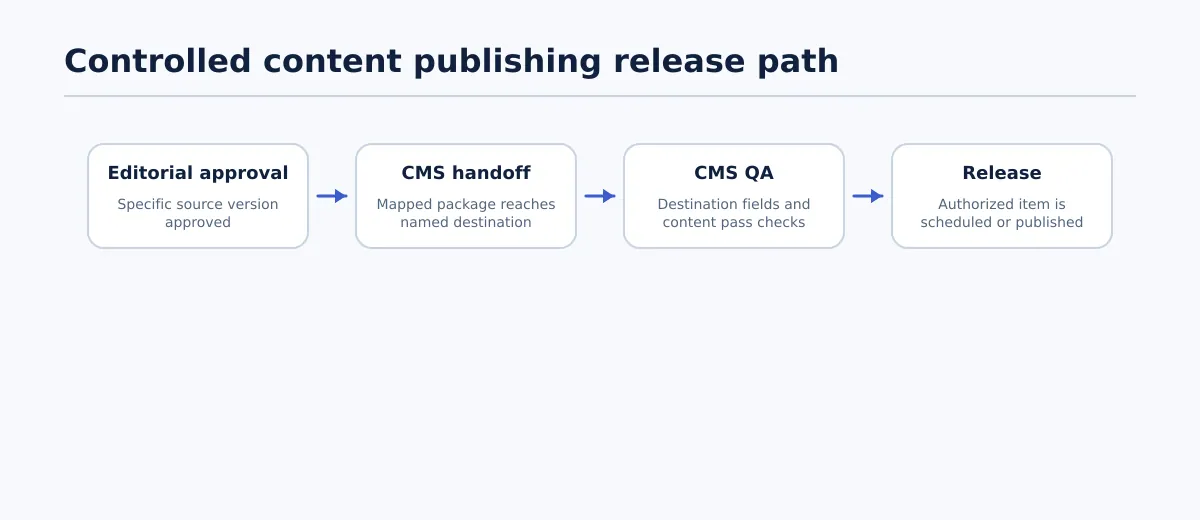 A controlled release moves approved content through CMS handoff, destination QA, and authorized release as separate states.
Content publishing automation uses a source, a destination connection, field mappings, and status rules to move approved content through a defined CMS process. In an agency workflow, the automation may create a draft, transfer supported fields, apply approved taxonomy values, or place a QA-passed item into an authorized scheduling queue.
Those actions do not replace the decisions around them. Editorial approval confirms that a particular source version is acceptable. CMS handoff moves that version to a named destination. CMS QA checks how the destination represents it. Scheduling or publication applies the client’s release instruction. Verification confirms the resulting CMS state.
Keep these states separate:
| State | Operational question | Owner | Completion condition |
|---|---|---|---|
| Editorial approval | Is this source version approved for handoff? | Editor or client approver | Version, approver, and approval time are recorded. |
| CMS handoff | Did the package reach the intended site and post type? | Publishing owner or automation process | CMS draft or transfer reference is linked to the release record. |
| CMS QA | Does the destination match the approved package and client profile? | QA owner | All required fields and destination checks pass. |
| Release | Is this item authorized for scheduling or publication now? | Release owner | Authorized status, time, CMS identifier, and result are recorded. |
A source can be approved for CMS draft creation without being approved for publication. Likewise, a completed transfer is evidence that data moved; it is not by itself evidence that the destination fields, permissions, taxonomy, or release status are correct.
This distinction gives a multi-client team a useful boundary: automate predictable movement, but retain accountable review wherever a person must interpret a conflict or authorize a client-facing release.
Map the Agency Publishing Workflow Before Automating It
Start with a workflow inventory rather than a connector configuration. The inventory should describe the handoff as a sequence of records and completion conditions. Someone reviewing the map should be able to identify the source version, destination, owner, required fields, and failure route without relying on tribal knowledge.
Use a row for each meaningful transition:
| Trigger | Owner | Input/source | Action | Destination | Required fields | Approval status | Failure path |
|---|---|---|---|---|---|---|---|
| Editor marks a revision ready | Editor | Approved Google Doc and release record | Confirm source version and permitted next state | Agency publishing queue | Source reference, client, site, post type | Approved for CMS handoff | Return to editor for missing approval or fields |
| Queue item passes completeness check | Publishing owner or automation | Approved package and client profile | Create a destination draft and map fields | Client A WordPress site | Title, slug, category, tags, excerpt, SEO fields, author | Handoff authorized | Set Exception and assign the failed check |
| Destination draft exists | QA owner | CMS draft and approved release record | Compare content and fields | Client A WordPress site | Body, links, images, taxonomy, status, schedule | Draft created | Set QA failed with field-level reason |
| QA and release approval complete | Release owner | QA-passed CMS draft | Schedule or publish within the permitted mode | Client A WordPress site | Release time, time zone, authorization | Ready to schedule | Hold release until permission is confirmed |
| CMS reports a result | Publishing or QA owner | CMS status, ID, and URL | Verify and close the record | Release log | Final status, timestamp, destination | Scheduled or published | Route an exception to the named owner |
Now compare two client profiles. Client A may require the existing WordPress category Research, a named author, an SEO title, and a weekly scheduled draft. Client B may use Blogger labels instead of WordPress categories and require a client release owner to confirm the date before publication. The agency can reuse the inventory structure, but it must not assume that the fields or permitted release modes are interchangeable.
Before automating a stage, document:
- the event that starts it;
- the exact source version;
- the client and destination identifier;
- the owner of the action or decision;
- required and optional fields;
- the status that proves completion;
- the failed step or field to record;
- the person who receives an exception.
If a team cannot define those items, it is not ready to automate that handoff. The missing definition should become a workflow task, not an inferred default.
Set Automation Boundaries: What Can Run Automatically and What Requires Approval
The useful dividing line is not “manual versus automated.” It is known transfer rule versus accountable decision.
| Suitable for automation when explicitly configured | Requires accountable review |
|---|---|
| Create a CMS draft after an approved handoff status. | Approve final copy, claims, links, or client-sensitive language. |
| Transfer supported formatting, links, and images. | Resolve an unsupported element or unexpected formatting result. |
| Apply an existing category, tag, or Blogger label from the client profile. | Choose or create a taxonomy value not covered by the profile. |
| Populate a supplied title, slug, excerpt, author, or SEO field. | Approve a material change to URL, metadata, or attribution. |
| Place a QA-passed item in an approved queue. | Authorize scheduling or publication for a named site and time. |
| Update a status after a confirmed CMS response. | Decide whether a failed transfer is safe to retry. |
Make approval and transfer separate statuses. For example, Approved for CMS draft can permit draft creation, while Ready to schedule requires destination QA and release authorization. A direct Approved to Published transition should be disallowed unless the client profile explicitly permits it and the required destination checks have already been completed.
Pause the workflow when any of these values changes or is unresolved:
- client site, domain, environment, or post type;
- author, category, tag, or label;
- approved source version;
- required excerpt or SEO field;
- image, link, table, embed, or other complex element;
- release mode, scheduled time, or time zone;
- permission used to create, schedule, or publish.
The automation boundary is valid only when its input, output, and permitted next state are explicit. Everything else should be routed to a person with authority to resolve it.
Create the Source-to-CMS Release Record and Field Map
The release record is the control document for one source version and one intended CMS result. Create it before the transfer so the QA owner has something precise to check against.
A practical record contains:
- client and unique site identifier;
- destination account, URL, environment, and CMS;
- source document URL and approved revision or timestamp;
- post type;
- title, slug, body, excerpt, and SEO metadata;
- author, category, tags, or Blogger labels;
- image and featured-image status;
- target date, time zone, and permitted release mode;
- editor or client approver;
- publishing owner, QA owner, and release owner;
- current release status;
- CMS post ID, scheduled timestamp, or live URL when available;
- exception notes and re-verification result.
A field map turns those requirements into testable rules:
| Release field | Source value | Client A: WordPress | Client B: Blogger | Pass condition |
|---|---|---|---|---|
| Title | Approved document title | Post title | Post title | Destination value matches the approved record. |
| Slug or permalink | Supplied separately | Approved WordPress slug | Approved Blogger permalink treatment | Value is present and authorized; no silent inference. |
| Category or label | Research | Existing WordPress category | Approved Blogger label | Value exists in the destination profile. |
| Tags | survey, planning | Existing WordPress tags | Approved Blogger labels if required | Each required value is available or an exception is assigned. |
| Excerpt or summary | Release record value | WordPress excerpt | Blogger summary treatment | Required value is present and not replaced by an unapproved default. |
| SEO metadata | SEO title and meta description | Configured destination fields | Supported client-approved equivalent | Required metadata is populated and checked. |
| Author | Named destination author | Authorized WordPress user | Authorized Blogger account | Correct account is selected. |
| Schedule | Tuesday, 09:00, client time | Scheduled WordPress status | Client-approved Blogger release mode | Status, time, and time zone match the record. |
| Image | Asset, placement, alt-text status | Featured image and body placement | Supported image treatment | Asset is present or a documented exception exists. |
For Client A, Research passes only if that category exists in the site’s taxonomy. For Client B, the same source value might need to become a Blogger label or be rejected if no approved equivalent exists. Selecting the first available destination value is a fail, even when the body content transferred correctly.
Tenwrite documents support for moving Google Docs content to WordPress and Blogger while preserving supported formatting, links, images, categories, tags, excerpts, and SEO metadata. Treat that as a transfer capability to test against the client field map, not as evidence that every destination rule has been satisfied automatically.
Configure Client-Site Routing, Permissions, and Release Conditions
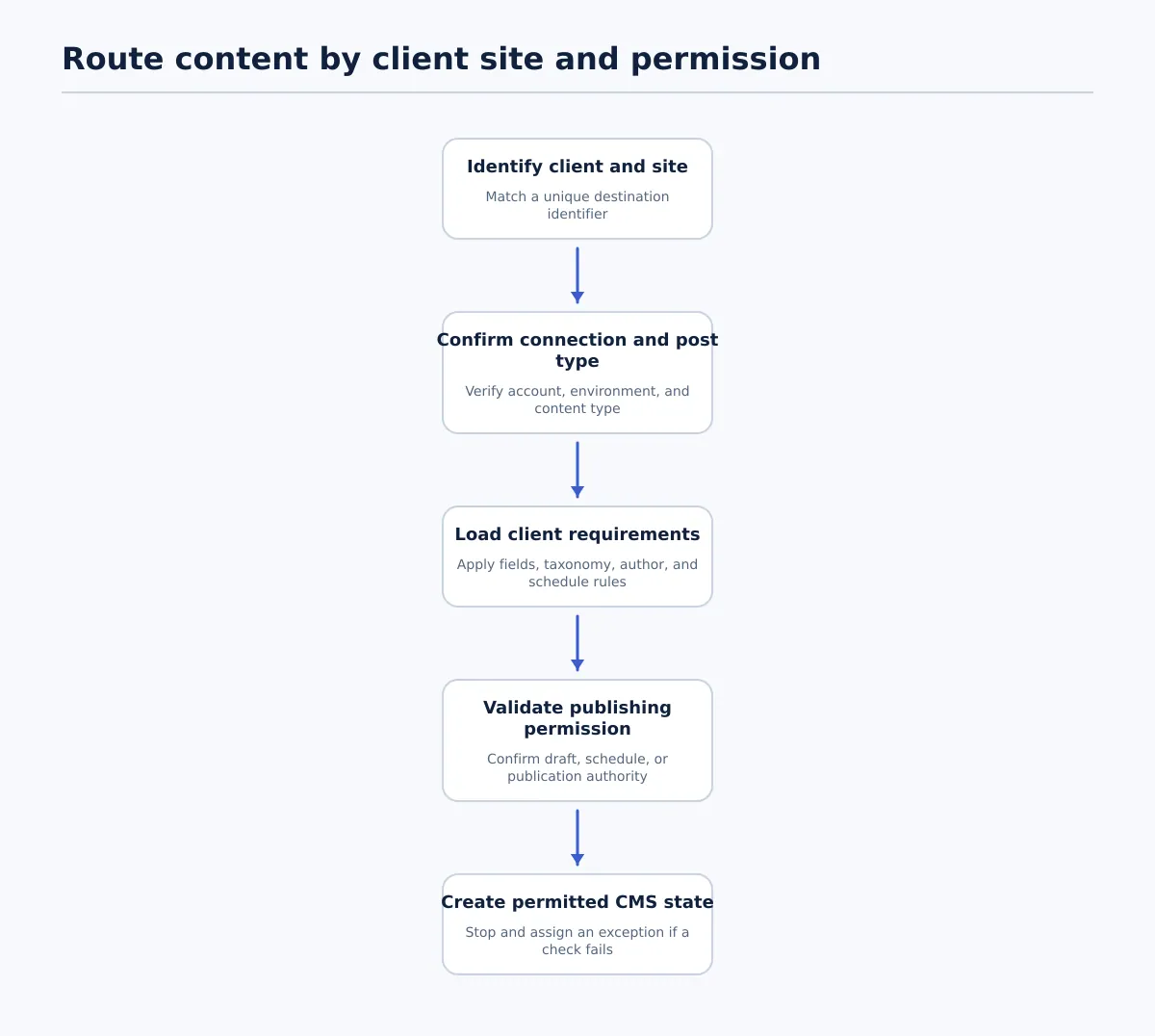 Route each item by explicit client, destination, field requirements, and permitted release mode.
Routing is where a shared agency queue meets account-specific rules. An approved source identifies content approval; it does not grant permission to send that content to every connected client site.
Create a destination profile for each site. Include its unique identifier, CMS, account or connection, post types, accepted taxonomy values, required fields, permitted authors, image rules, SEO requirements, schedule conventions, release modes, and responsible owners. Limit profile changes to the person responsible for workflow configuration.
Use this routing sequence:
- Identify the client and site. Match the release record to a unique destination identifier.
- Confirm the connection and post type. Check the account, environment, and content type before creating an item.
- Load client requirements. Apply required fields, taxonomy, author, image, metadata, and schedule rules.
- Validate permission. Confirm whether the record permits draft creation, scheduling, or publication.
- Create only the permitted state. Stop at a draft when publication authority is absent.
- Open an exception when a check fails. Do not substitute another site, author, taxonomy value, or release time.
Missing credentials, missing required fields, and unavailable taxonomy values should all produce an exception containing the affected site, failed check, owner, corrective action, and required re-QA. This keeps a failed route visible instead of allowing the queue to proceed with an unsafe assumption.
Run CMS QA Before Scheduling or Publishing
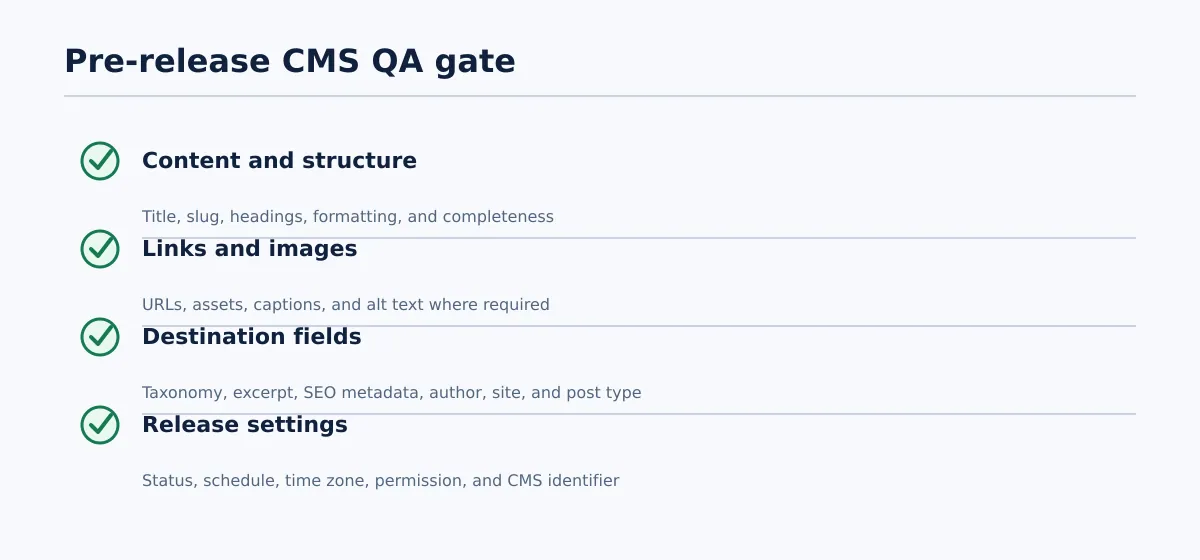 CMS QA passes only when required content, destination fields, and release settings match the approved release record.
CMS QA checks the destination representation. The QA owner should compare the CMS item with both the approved source version and the release record.
Content and structure
- Title and slug match the approved record.
- Headings retain the approved hierarchy.
- Paragraphs, lists, emphasis, and supported formatting appear correctly.
- No content is missing, duplicated, or replaced with placeholder text.
Links and images
- Internal and external links point to the intended destinations.
- Images are present and placed correctly where applicable.
- Captions, alt text, and featured-image settings meet the client profile.
- Unsupported tables, embeds, or custom elements have a documented manual treatment.
Destination fields
- Category, tags, or labels match approved destination values.
- Excerpt or summary is present when required.
- SEO title and meta description are present when required.
- Author, client site, environment, and post type are correct.
Release settings
- Status is the permitted next state.
- Schedule date, time, and time zone match the record.
- The release owner is authorized for the destination and release mode.
- CMS ID or draft reference is recorded.
Mark QA Pass only when every required field matches the release record and every destination-specific check succeeds. Mark it Fail when any required field is missing, unmapped, incorrect, or in conflict with the client profile. The failure record must name the field, owner, correction, and checks that must be repeated.
Verify the Live or Scheduled Result and Handle Exceptions
A CMS response closes the transfer step; it does not close the release record. After scheduling, verify the intended site, post ID, status, scheduled timestamp, time zone, and release mode. After publication, verify the intended domain, live URL, visible title, publication status, and any required metadata or image condition.
Use explicit statuses:
| Status | Definition | Required action |
|---|---|---|
Draft created | The intended CMS draft exists, but QA or release authorization is incomplete. | Link the CMS ID and assign QA. |
QA failed | One or more destination checks did not pass. | Correct the failed field and repeat affected checks. |
Ready to schedule | QA passed and release authorization is present. | Schedule or publish only within the approved mode. |
Scheduled | The CMS accepted the authorized date and time. | Retain the CMS timestamp and verify the scheduled state. |
Published | The item is confirmed live at the intended destination. | Record the live URL, time, and final status. |
Exception | A required input, field, permission, connection, or result is unresolved. | Assign an owner; do not retry blindly. |
Every exception should record the client site, source version, CMS identifier if available, failed field or step, responsible owner, corrective action, required re-QA, new status, and verification time. Common examples include a missing SEO field, unavailable taxonomy value, expired credential, source revision changed after approval, unexpected CMS status, or incorrect time-zone interpretation.
The resolution is not complete when someone edits a value. It is complete when the corrected item passes the required checks again and the release record shows the new verified state.
Evaluate Publishing Automation Tools Against the Actual Workflow
Evaluate a tool against a representative client workflow, not a feature list. The test should include the source format, destination profile, approval boundary, field map, QA gate, and exception path.
| Criterion | Test question | Pass condition |
|---|---|---|
| Source and CMS support | Can the workflow use the approved source and required WordPress or Blogger destination? | The test reaches the intended account and identifies the source version. |
| Draft versus publish control | Which states can the connection create? | Draft-only and controlled release modes work as required. |
| Field mapping | How are title, slug, taxonomy, images, excerpts, and SEO fields handled? | Required fields map explicitly; unresolved values stop the workflow. |
| Site separation | How is the destination selected? | A unique site identifier and permission control the route. |
| Scheduling | Can date, time, and time zone be preserved? | The CMS result matches the release record. |
| Permissions | Which connection can create, schedule, or publish? | Access matches the client’s release rules. |
| Status history | Can the team see transfer, QA, schedule, publication, and exception states? | Each state has an owner and recorded result. |
| Recovery | Can one failed field be corrected and re-verified? | Retry does not silently change the source or destination. |
A useful test document should contain headings, links, an image, taxonomy values, an excerpt, and SEO metadata when those fields are required. Run the connection in draft-only mode, perform CMS QA, introduce a controlled missing-field or taxonomy exception, and confirm that the workflow stops with a clear owner.
This evaluation method keeps the commercial decision tied to the work the agency actually needs to control: source identity, destination routing, field behavior, permission, status, and verification.
Use a Rollout Checklist for One Client Site Before Scaling
Pilot one recurring content type on one client site. The objective is not to prove that a connection can move content once. It is to prove that the team can operate the full release record repeatedly, including a failure.
- Select the pilot. Choose a recurring content type with a named CMS owner, QA owner, and release owner.
- Document the source. Define the approved source format, required fields, version convention, and handoff status.
- Create the destination profile. Record the site identifier, CMS, post type, taxonomy, author, image, SEO, schedule, time-zone, and permission rules.
- Build the release record. Include mapped fields, permitted next state, owners, and exception route.
- Run a draft-only test. Confirm that the item reaches the intended site without scheduling or publishing.
- Complete CMS QA. Check content, formatting, links, images, taxonomy, metadata, author, status, and schedule fields.
- Test one controlled exception. Use a missing required field or unavailable taxonomy value and verify that the workflow stops and assigns ownership.
- Test the authorized release. After QA passes, schedule or publish according to the client instruction and record the CMS result.
- Review the log. Note successful mappings, corrections, exception handling, and checks that should become standard.
- Standardize before expansion. Update the release-record template, field map, QA checklist, and client profile before adding another site or content type.
The pilot passes when the team can trace the approved source version to a verified CMS result, every required field has an owner, draft-only behavior works, and exceptions cannot bypass release control. Do not scale while staff still rely on memory to select a destination, infer taxonomy, identify the approved version, or confirm publication.
Content publishing automation is most valuable as a controlled handoff specification: one source version, one destination profile, one explicit field map, one QA result, and one recorded release state. Apply that release record and draft-only pilot to a recurring client workflow first. If repetitive Google Docs-to-CMS handoffs are the bottleneck, Tenwrite’s documented Google Docs-to-WordPress and Blogger workflow can be evaluated as one way to operationalize the transfer while keeping approval, QA, and release verification with accountable owners.