
An agency can automate the repetitive movement of approved content into WordPress without automating every editorial decision around it. The useful goal is not an unattended publishing queue. It is a controlled handoff in which the source, destination, fields, owners, QA state, release decision, and final outcome remain visible.
That distinction matters when one team manages several client sites. Each site may use different taxonomies, authors, SEO fields, permissions, schedules, and approval rules. A workflow that works for one account can create avoidable risk when copied across another without a site-specific contract.
This guide treats wordpress automation as an operating model for content publishing. It focuses on the boundary between an approved source—such as a Google Doc and its publishing record—and a verified WordPress result. The implementation pattern is simple: automate repeatable transfer and validation, then stop at a reviewable CMS state when a person still needs to interpret, approve, or release the change.
WordPress automation is a workflow decision, not just a tool decision
For a content agency, WordPress automation is the controlled movement of a known content package through defined publishing states. The package may contain an approved Google Doc, images, links, metadata, a target site, and release instructions. The workflow ends with a recorded CMS outcome, not merely a successful connection between two systems.
A useful publishing model has seven states:
- Source prepared: The editor completes the article and its publishing fields.
- Approval recorded: An authorized approver confirms the version that may proceed.
- Transfer authorized: The workflow confirms the destination and permitted next state.
- Draft created: The content and mapped fields exist in the intended WordPress site.
- QA decided: A named reviewer marks the item passed, requiring revision, or blocked.
- Release decided: An authorized owner schedules or publishes according to the client’s rules.
- Outcome recorded: The team stores the status, identifier or URL, timestamps, owners, and follow-up.
This model keeps the publishing problem distinct from other uses of automation. Marketing campaigns, theme configuration, plugin-triggered actions, and content generation may connect to WordPress, but they do not by themselves define which source version is approved, which fields are required, or who can authorize release.
A request such as “publish approved documents to WordPress” is therefore incomplete until the team answers:
- What makes a document approved, and which version is covered?
- How is the correct client site selected?
- Which fields must be present before transfer?
- Should the result be a draft, scheduled post, or live post?
- Who owns content QA, SEO QA, scheduling, and final release?
- What state should an item enter when a link, image, field, or approval is missing?
- What record proves that the intended item reached the intended CMS state?
Write those answers before selecting an integration. Otherwise, the automation may remove clicks while leaving the important decisions implicit.
Decide what to automate and what must retain an owner
Use this decision rule for each proposed automated step:
Automate the step when its input, output, mapping, and pass condition can be specified in advance. Retain human ownership when the step requires interpretation, approval, exception handling, or acceptance of a material change.
The boundary commonly looks like this:
| Suitable for automated transfer or validation | Requires a named human owner |
|---|---|
| Copy approved headings, body content, and supported formatting | Confirm the source version and approval status |
| Transfer links, images, captions, and alt text when the source is complete | Review whether assets, rights, credits, and destinations are acceptable |
| Map categories and tags from a defined client taxonomy | Decide whether a new or unusual taxonomy value is appropriate |
| Transfer excerpts and SEO fields from the approved record | Perform the final SEO review when judgment is required |
| Create a WordPress draft in the recorded site and post type | Confirm the destination, environment, and permitted release state |
| Apply a documented author or date rule | Approve scheduling changes and final publication |
| Record transfer results, IDs, and errors | Decide how to resolve exceptions and whether a release hold remains |
For every automated action, write both a pass condition and a stop condition. For example:
- Pass: The source record has an approved version, a valid target site, a title, body, post type, and all fields required by that site profile.
- Stop: A required value is missing, the site profile conflicts with the record, or the source changed after approval.
The stop condition should produce a visible status such as blocked, needs revision, or destination review. It should not leave the publisher to discover the problem later in a message thread.
Do not let a workflow’s technical capability determine the client’s decision rights. A system may be able to publish immediately, but the account may require a draft-first process. A field may be accepted by WordPress, but the client may still require an SEO owner to approve it. The automation boundary should follow the operating agreement.
Map the controlled source-to-WordPress workflow
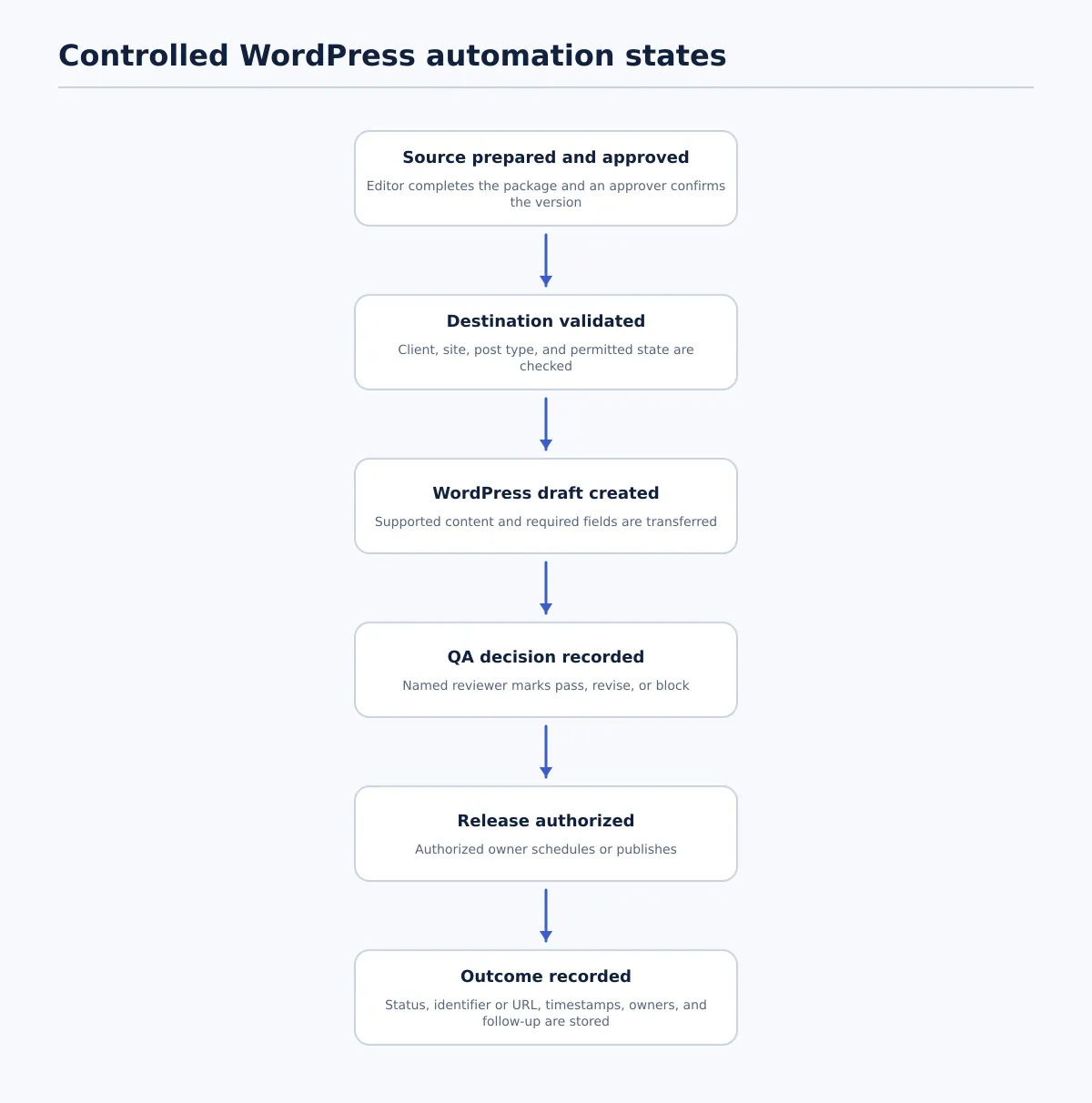 A controlled WordPress automation workflow moves an approved source through routing, draft creation, QA, authorized release, and recorded completion.
Instead of starting with a trigger list, map the publishing state changes and the owner responsible for each one. The following model works for a Google Docs-based workflow while leaving room for other approved sources.
1. Editor prepares the source package
The editor completes the article and its publishing record. The record identifies the client, target site, post type, source URL, intended status, required assets, and named owners.
Completion condition: The content is ready for approval, publication-affecting comments are resolved, and the source version can be identified.
2. Approver confirms the permitted next state
The client approver or authorized internal approver confirms a specific version or timestamp. The approval record should state what it permits: draft creation, scheduling after QA, or another documented state.
Completion condition: Approver, approval time, approved version, and permitted next state are recorded.
3. Publisher or automation validates routing
Before transferring content, check the client identifier, target domain, environment, post type, and site profile. This is a routing gate, not a formatting check. A correct article sent to the wrong site is still a failed run.
Completion condition: The destination matches the publishing record and the workflow is allowed to create the specified CMS state.
4. Transfer the package into a WordPress draft
Transfer the supported body content and mapped fields. Capture the draft ID or the transfer error. Keep the source record linked to the resulting CMS item so the reviewer can compare them without reconstructing the handoff.
Completion condition: A draft exists in the intended site, or the failure is recorded with a next owner.
5. QA the CMS representation
The QA owner checks source fidelity, field values, links, media, metadata, and rendered output. This is where the team confirms that the transfer produced an acceptable WordPress item rather than assuming that the action succeeded because a draft was created.
Completion condition: QA is marked passed, revise, or blocked, with failures assigned to owners.
6. Apply the release decision
The release owner confirms that approval is still valid, required fields are complete, QA has passed, and the schedule or publication instruction is correct. Only then should the item move to scheduled or published.
Completion condition: The authorized release action is completed and its CMS result is captured.
7. Record the outcome
Store the post ID or live URL, status, publication or scheduling time, release owner, QA result, and unresolved follow-up. The record should let another team member trace the item from source to destination without searching across multiple tools.
Completion condition: The final state and any remaining work are visible in the agreed operating record.
This workflow can be implemented with different transfer methods. The method matters less than whether it preserves the state changes and decision ownership. For adjacent guidance on validating Google Docs output before WordPress release, see How to Export a Google Doc as HTML for WordPress: A QA Workflow for Content Teams.
Set the required-field contract before export
A field contract is the site-specific agreement that says where each publishing value comes from, who owns it, when it is required, and what happens when it fails. Create this contract before configuring recurring transfer.
Use the following inventory as a starting point, then adjust it for each client site:
| Field | Source | Owner | Required status | Pass condition | Failure route |
|---|---|---|---|---|---|
| Title | Document heading or tracker | Editor | Required | Matches the approved title | Return to editor |
| Slug | Tracker or site rule | Publisher | Required when controlled | Follows the approved URL rule | Hold for publisher |
| Body formatting | Source document | Editor and QA owner | Required | Headings, lists, tables, and emphasis render correctly | Return for correction |
| Links | Source body or link list | Editor | Required | Approved URLs are present and usable | Return to editor or SEO owner |
| Body images | Asset list or source document | Editor | Conditional | Correct files and placement details are available | Hold for asset owner |
| Featured image | Asset record or client library | Publisher or editor | Conditional | Image, alt text, caption, and credit requirements are satisfied | Hold release |
| Categories | Client taxonomy | Editor or SEO lead | Required where used | Selected value exists on the target site | Route to taxonomy owner |
| Tags | Client taxonomy | Editor or SEO lead | Optional or conditional | Values follow the client’s tagging rule | Return to editor |
| Excerpt | Source field or brief | Editor | Conditional | Present when the site requires one | Return to editor |
| SEO title | Source field or tracker | SEO lead | Conditional | Present and meets the client’s documented rule | Return to SEO lead |
| Meta description | Source field or tracker | SEO lead | Conditional | Present and approved where required | Return to SEO lead |
| Author | Site profile or assignment | Publisher | Required | Valid author is selected | Hold for publisher |
| Publish date | Release record | Release owner | Conditional | Date, time, timezone, and state are confirmed | Hold release |
| Client-specific fields | Site profile | Named specialist | Conditional | Configured fields are mapped and populated | Route to field owner |
The key question is not whether every site uses every field. It is whether the workflow can distinguish “not required,” “missing,” “invalid,” and “awaiting human decision.” Those states should not be collapsed into a generic success response.
Keep reusable site rules in a site profile rather than embedding them in every article. The profile can hold permitted post types, authors, taxonomies, SEO fields, image requirements, and release permissions. The article record supplies the values for one item and identifies the profile that should be used.
Before expanding to multiple accounts, test the contract with representative content: a plain article, an article with links and images, a missing required field, and a value that does not exist on the destination site. Record whether each case transfers, stops, or routes to the correct owner.
Create the CMS draft and run focused QA
The draft is the boundary between automated transfer and editorial acceptance. It gives the team a CMS representation to inspect without requiring the publisher to recreate the source manually.
Run QA in four passes so failures can be routed precisely.
Pass 1: Source and destination identity
Confirm the draft is connected to the approved source version, client, domain, environment, post type, and intended URL. If any identity check fails, block the item before reviewing cosmetic formatting.
Pass 2: Content and structure
Compare the title, headings, body copy, lists, tables, quotes, calls to action, and approved presentation notes. Confirm that the heading hierarchy is intentional and that supported formatting has not changed the meaning or usability of the article.
Pass 3: Fields, links, and media
Check the slug, categories, tags, excerpt, author, SEO fields, images, captions, alt text, credits, and custom fields included in the contract. Open important links and verify that they point to the approved destinations. If the source contains an incomplete asset or a broken link, send it to the responsible source owner rather than silently substituting a value.
Pass 4: Rendered draft and decision
Preview the draft in the target WordPress context. Look for missing content, unexpected spacing, broken lists, unsupported tables, image problems, or other visible differences. Then assign one of three outcomes:
- Pass: Required fields are complete, the draft matches the approved source, and rendering is acceptable.
- Revise: A correctable issue is assigned to an owner and must be checked again after correction.
- Block release: Approval, destination, source identity, required assets, or release authority is unclear.
The person who finds an issue does not automatically own its correction. A source link usually returns to the editor or SEO owner; a missing taxonomy value may go to the site-profile owner; a wrong destination goes to the publisher or operations owner. Record the issue, owner, next action, and recheck requirement.
Set release conditions, exceptions, and proof of completion
Release conditions should be testable statements, not general confidence. A scheduled or published item should meet all of the following conditions relevant to its client account:
- The approved source version is identified.
- The client, domain, environment, and post type are correct.
- Required fields are complete and mapped to the correct site.
- Editorial, SEO, formatting, link, and media checks have passed.
- The release owner is named and authorized.
- The target status, date, time, and timezone are confirmed.
- No unresolved exception changes the article, destination, metadata, asset, or release instruction.
Typical exception routes include:
| Exception | Workflow response | Next owner |
|---|---|---|
| Approval is missing or belongs to an older version | Hold transfer or release and identify the current approved source | Approver or account owner |
| Source link is broken or unapproved | Return for correction and repeat the link check | Editor or SEO owner |
| Wrong client site or profile is selected | Block the run and verify routing before continuing | Publisher or operations owner |
| Category, tag, author, or SEO field is unavailable | Hold the draft and resolve the mapping | Site-profile owner or SEO lead |
| Required image is missing | Hold release and record the asset owner | Editor, client, or asset owner |
| Source changes after transfer | Compare versions and repeat approval or affected QA | Editor and approver |
| Transfer creates an incomplete draft | Preserve the error and retry only through the approved route | Publisher or workflow owner |
The completion record should contain the client and site, source identifier, approved version or timestamp, draft or post ID, QA status and reviewer, release owner, final status, live URL when available, timestamps, and unresolved follow-up.
Do not treat a generic “automation successful” message as the final record. The useful record connects one approved source to one destination and one accountable result. It also preserves enough status history to explain why an item was held, revised, scheduled, or published.
Example: recurring articles across several client sites
The following example is hypothetical. It shows how an agency can use one automation model while preserving different client rules.
An agency publishes a weekly article for three clients. Each client has a separate WordPress site, its own category structure, and a different release owner. The editorial source is a Google Doc, while a tracker row stores the destination and publishing fields.
The editor prepares the document and records the client, target site, title, slug instruction, taxonomy values, excerpt, SEO fields, image details, proposed schedule, and owners. The client approver confirms the document version and permitted next state.
Before transfer, the publisher selects the client’s site profile. The workflow checks that the tracker’s client, domain, post type, and profile agree. It then creates a WordPress draft and records the draft ID. If the tracker identifies Client A but the selected profile belongs to Client B, the item stops before draft creation.
The QA owner compares the draft with the approved document. In this run, the article body and links are correct, but the featured image is missing and the selected category does not exist on the destination site. The item is marked blocked, with the image assigned to the editor and the category mapping assigned to the site-profile owner.
After correction, the publisher updates the draft and QA repeats the affected checks. Client A’s rules allow scheduling after QA, Client B requires a second release confirmation, and Client C requires an internal account owner to publish. Those differences are applied at release; they are not inferred from the article itself.
The final record distinguishes each state:
Source approved → Draft created → QA blocked → Corrected → QA passed → Scheduled or published
That history prevents a failed transfer from appearing identical to a completed publication and gives the agency a usable explanation when a client asks about status.
Evaluate WordPress automation options by control, not feature count
Trigger-and-action models can be useful for connecting publishing steps, but feature count is a poor substitute for operational fit. Evaluate an approach against real content and failure cases.
| Evaluation question | What to test | Minimum acceptable result |
|---|---|---|
| Can it identify the correct client site? | Destination fields, site profiles, and mismatch behavior | A wrong destination stops the run |
| Can it map required fields? | Title, body, links, media, taxonomy, excerpt, SEO, and custom fields | Missing or unsupported values are visible before release |
| Can it preserve a draft state? | CMS status behavior and resulting post ID | Transfer can stop at a reviewable draft |
| Can teams assign approval and QA ownership? | Handoff fields, task records, or workflow statuses | Each decision has a named owner |
| Can exceptions stop release? | Validation rules and failed-run handling | Missing approval or fields creates a hold or block |
| Is completion traceable? | Logs, IDs, URLs, timestamps, reviewer, and release fields | Source and CMS outcome can be connected |
| Can it support site-specific rules? | Conditional fields, taxonomies, authors, and permissions | One client’s configuration does not silently apply to another |
| Can it retry safely? | Duplicate handling and retry behavior | A failed run does not create confusing duplicates |
Test with more than a clean sample. Use a normal article, an article with images and links, a missing required field, a wrong destination, a late source edit, and a draft that fails rendering QA. For each case, record the resulting state, error visibility, owner assignment, and whether the workflow can prevent release.
A simple scorecard can use meets, partly meets, and does not meet for each criterion. Review the failed cases separately from the feature score. An approach that transfers simple content correctly but cannot stop a wrong-site selection does not satisfy the same control requirement as one that exposes and blocks that condition.
For teams moving approved Google Docs into WordPress, Tenwrite is one workflow option to assess against these criteria. Its supported model lets teams review, revise, schedule, or save generated content as a CMS draft before it goes live. The relevant question is whether that draft-first capability, field handling, and workflow record fit the rules of each client site—not whether the tool can publish with the fewest clicks.
If your current Google Docs-to-WordPress handoff leaves approval, required fields, QA ownership, or completion status scattered across messages, assess it against the control questions in this guide. A suitable WordPress publishing automation approach should reduce repeatable transfer work while leaving the release decision explicit, reviewable, and accountable.