
Google Docs Publish to web and WordPress publishing solve different problems. The first makes a document available through a web URL. The second creates or updates a managed record on a specific site, with fields, ownership, approval, release status, and post-publication checks.
That difference matters when an agency receives a request to “publish a Google Doc to a blog.” Before choosing a transfer method, identify the intended deliverable. If the document link is the deliverable, Publish to web may be enough. If the content must become a client-owned WordPress post, treat the Google Doc as the approved source—not as the publication destination.
This guide gives teams a decision rule, a named handoff record, and a concise release gate for moving approved content into WordPress without confusing public document sharing with CMS publication.
What Google Docs Publish to web does—and what it does not do
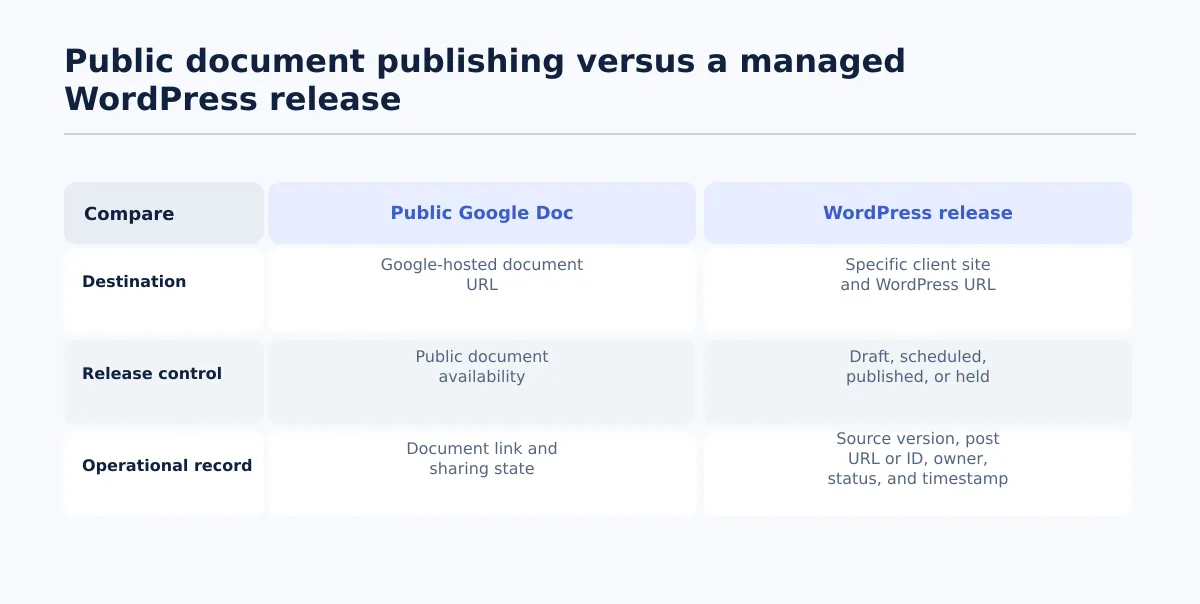 A public Google Doc and a managed WordPress post solve different publication problems.
Google Docs includes a publishing option that creates a web-accessible version of a document. The resulting content is available through a public-facing URL according to the document’s publishing and access settings. The Google Docs publishing overview describes this as a way to make document content available on the web.
The important operational boundary is the destination. Publish to web produces access to the document as a web document. It does not select a client’s WordPress site, create a WordPress post record, assign a post type, or set a CMS release state. Those decisions belong to the WordPress workflow.
| Requirement | Google Docs Publish to web | Managed WordPress release |
|---|---|---|
| Destination | Public document URL | Specific client site and post URL |
| Content container | Google-hosted document view | WordPress post, page, or configured post type |
| Required fields | Document content and publishing settings | Title, slug, taxonomy, excerpt, SEO fields, author, and client-specific fields where required |
| Release state | Document made available on the web | Draft, scheduled, published, or held |
| Approval control | Document sharing and source approval | Named approver and release owner tied to the CMS item |
| Completion record | Document URL and publishing state | Source version, post URL or ID, status, timestamp, owner, and exceptions |
So, can Google Docs Publish to web publish a post directly to WordPress? No. It can make the document available at a Google-hosted web address, but a WordPress post still has to be created or updated in the intended WordPress environment. A connector or export workflow may reduce re-entry, but that is a separate transfer step.
Choose the right destination: public document link or WordPress post
Start with the requested outcome rather than the tool available in the Google Docs menu. Ask four questions:
- Where must the content live? Is a Google document URL acceptable, or must the content appear on a client-owned domain?
- Who owns the destination? Can the project team control the public document, or does the client’s WordPress team own the release?
- Which fields and checks are required? Does the request include a slug, taxonomy, SEO title, canonical, author, preview, or schedule?
- What must be recorded afterward? Is a working public link enough, or must the team retain a post ID, release timestamp, and QA result?
Use this decision table for common agency requests:
| Scenario | Destination and control need | Recommended path |
|---|---|---|
| Temporary public reference document | The document URL is the deliverable; no client CMS record is required | Publish the Google Doc to the web and test access |
| Resource embedded in an existing knowledge area | The consuming page needs a public document or embed URL | Publish the document, then verify the URL or embed in its destination |
| Approved article for a client blog | The client site, post type, author, taxonomy, metadata, and release owner are defined | Transfer the approved source into a WordPress draft and run the site’s QA gate |
| Scheduled campaign or landing-page update | The content must reach a specific site at an approved date and time | Use the controlled WordPress publishing path |
| Internal review copy | No public destination is approved yet; source access and version control matter | Keep the Google Doc private and record its review status |
A useful rule is simple: if the document itself is the deliverable, Publish to web may fit. If the document is the approved source for a site record, use WordPress. If destination, approval, required fields, or release authority is unresolved, hold both actions until the owner resolves the uncertainty.
Define the approved source and release owner before export
The handoff begins with source selection, not import. Identify the exact Google Doc that has permission to enter the publishing queue and the person authorized to release the resulting WordPress item.
Create one handoff record with, at minimum:
- Client and site: account name, domain, and WordPress environment.
- Source document URL: the exact Google Doc being transferred.
- Approved version: a revision identifier, approval timestamp, or another agreed way to identify the accepted source state.
- Editor of record: the person accountable for the source content.
- Approver: the person or client representative whose decision permits the handoff.
- Release owner: the person authorized to create, schedule, publish, or hold the WordPress item.
- Intended post type: post, page, landing page, or another configured type.
- Destination: target site and approved slug or URL when known.
- Permitted state: draft, scheduled, published, or held.
- Exceptions: unresolved images, links, legal review, missing fields, or client-specific exclusions.
The editor and release owner can be the same person, but the record should still name the responsibility. Define what “approved” means for the account—for example, comments resolved, the accepted revision identified, and the approval decision timestamped.
If the document changes after approval, stop the transfer and identify the new version. Do not treat a filename such as Final_v3 as sufficient evidence of approval. The handoff record should point to the accepted state and make a later change distinguishable from the original release.
For the broader agency implementation pattern after this decision point, see the controlled WordPress Google Docs integration workflow.
Prepare the Google Doc and required publishing fields
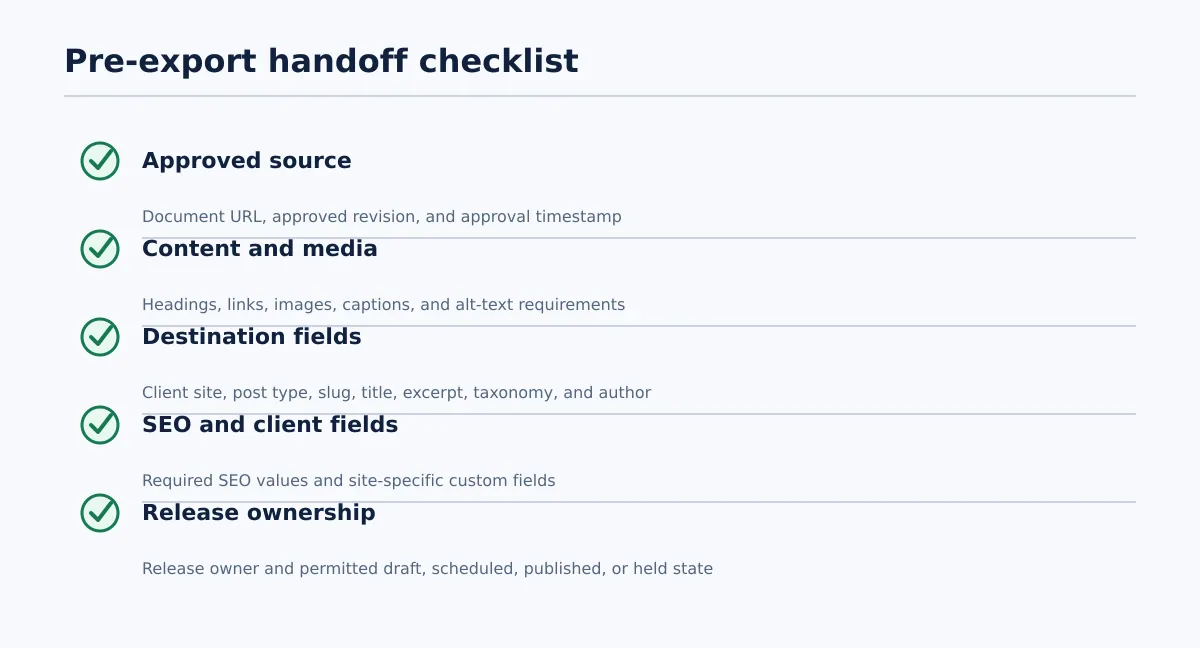 Confirm the approved source and required publishing fields before transfer.
A finished article is not necessarily a complete publishing handoff. Before transfer, separate what can be checked in the source from what must be confirmed in WordPress.
Source-document checks
Confirm that:
- The document is the approved source, not a draft, comment copy, or superseded revision.
- Heading levels express the intended structure.
- Links use the approved destinations and contain no unresolved editorial comments.
- Images are final or have a named source, placement, and ownership note.
- Required captions, alt-text instructions, and featured-image details are available.
- The title in the document is confirmed as the intended WordPress title rather than inferred from the filename.
- The target post type and destination site are recorded.
CMS handoff fields
Supply or assign an owner for:
- Target slug or URL.
- Excerpt, if required by the site or template.
- Categories and tags under the client’s taxonomy rules.
- SEO title, meta description, canonical, and indexability instructions where required.
- Author, publish date, timezone, and campaign details.
- Client-specific fields such as location, product, CTA, schema, or custom taxonomy values.
There is no single metadata set that applies to every client site. Use each site’s publishing specification. If a required field is missing, return the handoff to the responsible owner instead of allowing the publisher to make an unapproved decision inside the CMS.
Tenwrite’s documented Google Docs-to-WordPress workflow supports supported formatting, links, images, categories, tags, excerpts, and SEO metadata. That can reduce repeated entry when the client’s setup matches the supported fields. It does not remove the need to compare the resulting post with the site’s actual configuration. See SEO with Tenwrite: Publish Google Docs to WordPress for the field-mapping context.
Move approved content into WordPress without treating import as final QA
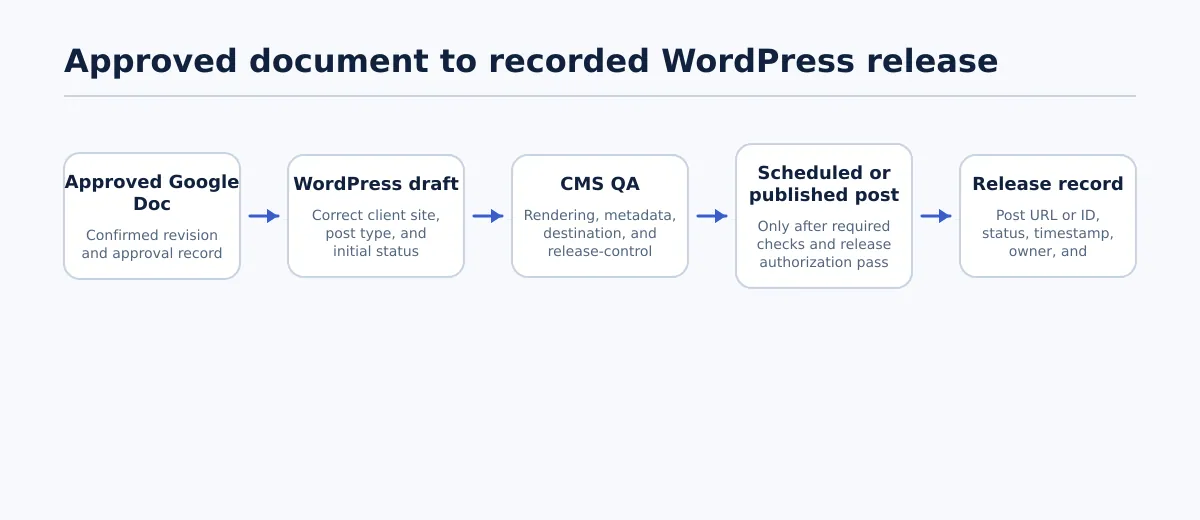 Use the import as a handoff step, then validate and record the WordPress outcome.
Once the handoff record and required fields are ready, use the transfer as a controlled boundary:
- Confirm the approved source, client, site, and intended post type from the handoff record.
- Select the correct connected WordPress environment.
- Create or update the intended WordPress record, avoiding duplicate or test content.
- Confirm the initial status is the permitted review state, normally draft.
- Compare the imported structure and fields with the approved source.
- Assign the item to the QA owner with the source URL and handoff record attached.
A supported Google Docs-to-WordPress workflow can transfer content and publishing fields, but it should not be interpreted as automatic release authority. The post remains a CMS item whose destination, status, metadata, and visible rendering need to be checked.
The first control is status. If the handoff requires a draft and the result is scheduled or published, stop and escalate it to the release owner—even if the body appears correct. A correct-looking import in the wrong state is still a release-control failure.
Validate the WordPress post before scheduling or publishing
Use a short, explicit gate rather than treating a successful import message as approval. Check three areas and assign one outcome: approved, return for fix, or blocked.
Content rendering
Open the editor and, where the client process permits it, a preview. Compare the post with the approved source.
Pass when:
- Headings, paragraphs, lists, tables, quotes, and links appear in the intended structure.
- Links resolve to the approved destinations.
- Images use the intended files and have the required captions or alt text.
- There are no duplicated paragraphs, empty blocks, broken embeds, or unexplained formatting changes.
Return for fix when: a heading, link, image, or content block differs from the approved source, or a conversion issue requires an editorial decision. Do not resolve an ambiguous change silently during publishing.
SEO and metadata
Check the fields required for that client site:
- WordPress title matches the approved title.
- Slug or target URL matches the agreed destination.
- Excerpt is present when required.
- Categories and tags follow the approved taxonomy.
- SEO title, meta description, canonical, and indexability settings are correct where applicable.
- Author and client-specific custom fields are correct.
This confirms that the intended values reached the correct destination fields. It does not establish a ranking, traffic, or search-result outcome.
Release controls
Before the final action, verify:
- The post belongs to the correct client site and environment.
- The post type and author are correct.
- The status matches the handoff record.
- The publish date, time, and timezone are correct if scheduling is allowed.
- Approval is traceable to the source version.
- Preview approval is complete when the client requires it.
- The release owner has authorized scheduling or publication.
Use this release rule: do not schedule or publish while a required field, destination, status, or approval record is unresolved. A failed check returns the item to its owner; an unknown destination or release authority blocks it entirely.
Record the release outcome and manage later changes
Close the handoff with a result that another team member can audit. Record:
- Source Google Doc URL and approved revision or approval timestamp.
- Client and destination site.
- WordPress post URL or ID and post type.
- Final status: draft, scheduled, published, or held.
- Release owner.
- Scheduled or published timestamp, including timezone where relevant.
- QA result, preview approval, and exception notes.
For example, a completed record might identify the approved source revision, the destination site, the WordPress post ID, the release owner, the scheduled timestamp, and the fact that rendering and required-field checks passed. That is a verifiable outcome; “published from Google Docs” is not.
Treat later Google Doc edits as new change requests. When the source changes after the WordPress post is live:
- Identify the new revision and summarize the change.
- Classify it as editorial, SEO-related, legal, factual, or cosmetic.
- Obtain the review or client approval required for that type of change.
- Compare the approved revision with the live post.
- Update the post through the client’s controlled editing state.
- Repeat the relevant rendering, metadata, and release checks.
- Append the new owner, timestamp, result, and exceptions to the record.
Do not assume that editing the Google Doc updates the live WordPress post. Conversely, do not allow a synchronization capability to overwrite a published post unless the client has an explicit review and change policy.
Standardize the decision, not every client’s fields
For recurring Google Docs-to-WordPress handoffs, standardize the boundary between public document sharing and CMS release:
- Identify whether the document URL or a WordPress record is the deliverable.
- Name the approved source, approver, and release owner.
- Confirm the destination, required fields, and permitted status before transfer.
- Keep the imported item in a reviewable state until the release gate passes.
- Record the final URL or ID, status, timestamp, owner, and exceptions.
Teams handling repeated handoffs can review Tenwrite’s SEO publishing workflow and test it with one representative approved post. The objective is not to make every transfer unattended. It is to make the decision, handoff, QA, and release record repeatable across client sites.