
WordPress publishing automation is most useful when it removes predictable CMS handling without turning publication into an unattended event. For an agency, the objective is not to make every content decision automatic. It is to create a repeatable release path in which approved inputs, known destinations, required fields, and permitted outcomes are checked before an automated action runs.
That distinction matters across client accounts. One site may allow a publisher to create drafts only; another may permit scheduling after client approval; a third may require a final manual release. A controlled workflow makes those rules explicit instead of relying on memory or a sequence of informal messages.
This guide treats WordPress publishing automation as release governance for agency content operations. It focuses on the automation boundary: what starts a run, which fields may be transferred, which gates must pass, who owns each decision, and what the team records afterward. It does not cover automated content generation, backups, plugin updates, ecommerce, email, translation, or social distribution.
Define WordPress publishing automation for an agency workflow
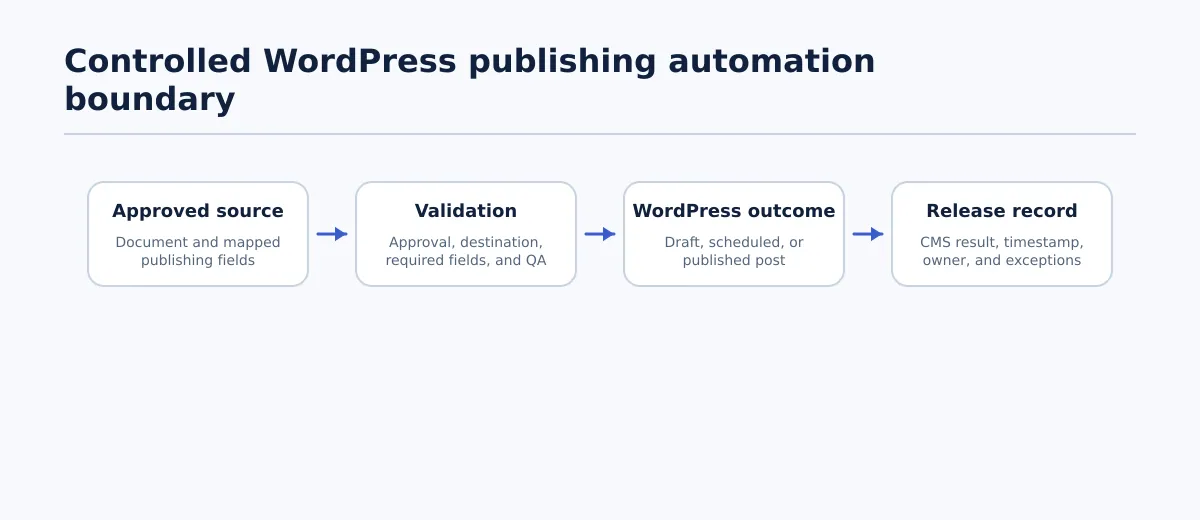 A governed publishing workflow moves approved content through validation before recording its WordPress outcome.
In a controlled agency workflow, WordPress publishing automation is the repeatable movement of an approved content item and its mapped publishing fields into an authorized WordPress state. The input might be an approved Google Doc plus a tracker row, a structured content record, or another documented source. The output is one of three things: a WordPress draft, a scheduled post, or an authorized live post.
The automation boundary has four stages:
- Trigger: a named status or release instruction identifies an item that may enter the publishing process.
- Validation: the workflow checks the source version, destination, required fields, approval state, and release permission.
- CMS action: the workflow creates a draft, prepares a schedule, or performs a permitted publication action.
- Run record: the team records the CMS result, timestamp, owner, and any exception.
This boundary separates publishing automation from two broader ideas:
- Automated content creation: generating or substantially changing the article itself. That is outside this workflow. The source content must still be reviewed by the responsible team.
- Unattended auto-publishing: allowing a trigger to send content live without a verified approval and release gate. That is not the default recommended here.
Suitable automation work includes transferring complete fields, creating a CMS draft, applying a confirmed schedule, and notifying the next owner when a defined event occurs. Editorial suitability, client approval, final destination confirmation, and exception resolution remain accountable decisions.
Tenwrite’s documented workflow differentiator fits this boundary: teams can review, revise, schedule, or save generated content as a CMS draft before it goes live. In an agency process, that capability is useful only when the surrounding approval and QA rules determine which outcome is permitted.
The operating question is therefore not “How do we publish everything automatically?” It is “Which repeatable CMS actions can run after the responsible person has made the required decisions?”
Map the current publishing path before automating it
Before selecting a tool or building a trigger, document one real publishing path for each recurring client workflow. The purpose is to identify which handoffs are stable enough to automate and which ones contain judgment that must remain visible.
Use this audit table for at least one recent content item per client or content type:
| Task | Owner | Source artifact | Destination | Frequency | Required fields | Approval needed | Common error | Desired completion record |
|---|---|---|---|---|---|---|---|---|
| Prepare content | Writer or editor | Approved working document | Agency review queue | Weekly | Body, title, client, version | Editorial review | Old version remains linked | Reviewed version and reviewer |
| Check search fields | SEO lead | Source fields and client profile | Publishing tracker | Per item | Slug, excerpt, metadata, taxonomy | SEO review where required | Values from another site | QA result and date |
| Confirm release permission | Account owner or approver | Approval record | Release queue | Per item | Approver, version, permitted outcome | Client approval if required | Approval applies to an earlier version | Approval evidence and date |
| Create CMS item | Publisher or automation owner | Validated source record | Client WordPress site | Per release | Site, post type, mapped content fields | Draft permission | Wrong destination or post type | CMS draft URL or post ID |
| Schedule or publish | Release owner | QA-passed CMS item | Scheduled or public status | Per release | Date, time, timezone, status permission | Final release approval | Incorrect timing or status | Final CMS status and timestamp |
For a worked multi-client example, assume an agency is handling two weekly articles:
- Client North: An editor marks the approved Google Doc as ready. The SEO lead checks the title, slug, excerpt, and metadata against North’s site profile. The account owner records client approval for the dated document revision. The publisher confirms the exact North WordPress site and permits automation to create a draft. A later reviewer compares the draft with the source before scheduling.
- Client South: The content is approved and the site profile permits scheduling. The publisher confirms the South site, post type, author, date, time, and timezone. The automation creates the item with a scheduled status only after the QA result is recorded.
The same agency queue serves both clients, but the permitted outcome differs. That difference is precisely what an automation design must capture.
A task is not ready for automation until the audit answers five questions:
- What exact status or event starts it?
- Which named owner is accountable before and after the action?
- Which fields are transferred or changed?
- What pass condition allows the action to complete?
- Where is the result or failure recorded?
If the answer depends on a person remembering an exception, document the exception in the client profile or keep that step human-controlled.
Choose what to automate and what must remain controlled
Use three tests for every proposed automated step:
- Repeatability: comparable items follow the same procedure.
- Defined inputs: the values exist in named fields rather than scattered comments or messages.
- Clear completion condition: another team member can verify pass or fail without reconstructing the entire history.
The following decision table applies those tests to common publishing tasks:
| Task | Automate when | Keep controlled by a person when |
|---|---|---|
| Field transfer | Each source field maps to one known CMS field and required values are complete | A value is ambiguous, missing, or subject to a site-specific exception |
| Formatting transfer | The content follows the agency’s supported structure | The item contains unusual embeds, layouts, or elements requiring interpretation |
| Draft creation | Approval state, destination, post type, and draft permission are verified | Approval is pending or multiple destinations could match |
| Schedule setup | Date, time, timezone, and scheduling permission are explicit | Timing is disputed, incomplete, or changed late |
| Status notification | The event, recipient, and message are defined | A notification would imply success despite a failed or partial run |
| Editorial approval | Not an automation action | An editor must judge quality, accuracy, structure, or suitability |
| Client approval | Not an automation action | The client or account owner must authorize the current version |
| Destination confirmation | A person verifies the exact site before release | Site selection would rely only on a name match or default |
| Exception resolution | The workflow routes the issue to an owner | A person must decide the correction or whether release remains appropriate |
For example, copying an approved excerpt into the mapped WordPress excerpt field may pass all three tests. Deciding whether a client’s late change requires a fresh approval does not. The first step can be automated after the gate passes; the second requires a named reviewer and a new release decision.
Do not measure readiness by the number of steps a tool can perform. Measure it by whether the team can define the input, permission, pass condition, and record for each step.
Set the source-of-truth document and required publishing fields
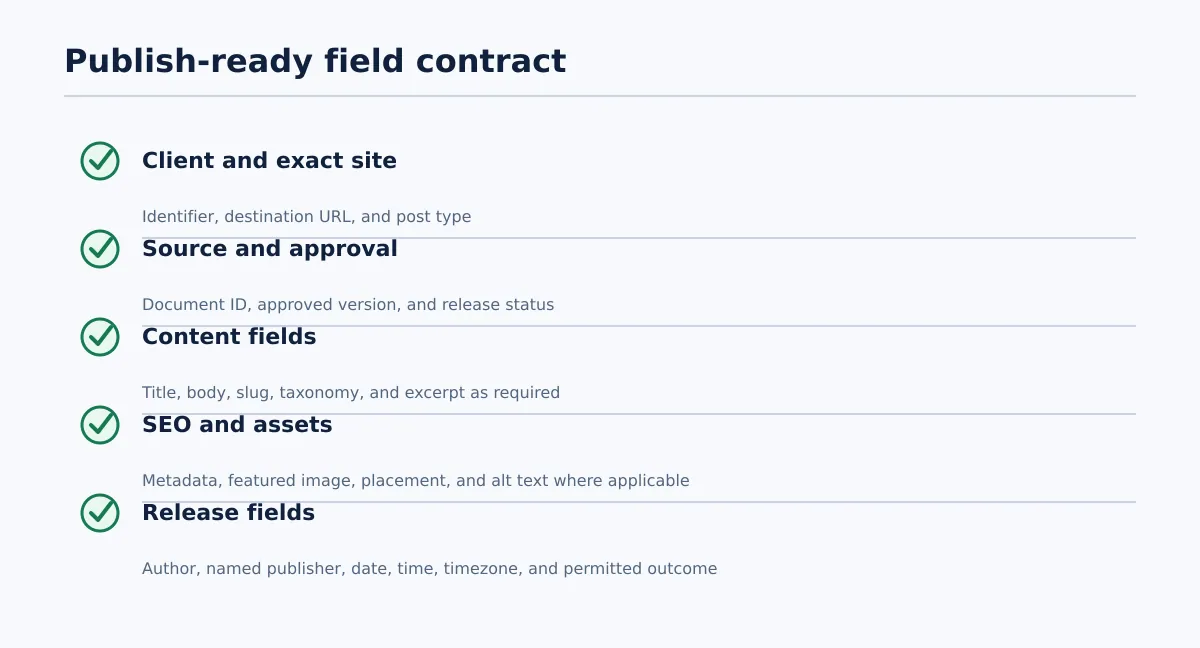 Required publishing fields should be explicit, mapped, and owned before automation proceeds.
Automation needs a field contract, not merely a link to an article. The source document may contain the body copy, while a tracker or structured record holds workflow values. The important requirement is that the automation has one unambiguous value for every field needed by the selected WordPress outcome.
Treat this as a recommended agency baseline, not a universal WordPress requirement.
Required for every publishing item
- Client or brand identifier
- Exact WordPress site and destination URL
- Source document URL or content ID
- Approved source version or revision date
- Post type
- Final title
- Body content
- Named publisher or automation owner
- Current approval or release status
Required when the client profile uses the field
- Slug or permalink decision
- Category
- Tags
- Excerpt
- SEO title and meta description
- Author
- Featured image status and asset location
- Image placement notes and alt text where applicable
Required for a scheduled outcome
- Scheduled date
- Scheduled time
- Timezone
- Person authorized to schedule or release the item
A field containing vague instructions is not complete. “Publish Friday,” “use the usual category,” and “image coming” each require another decision. Replace them with an explicit date and timezone, a mapped taxonomy value, or an allowed “not required” state.
Use this stop condition: a blank, ambiguous, outdated, or wrong-site required field sends the item back to its named owner. The workflow should not silently substitute a default unless that default is documented in the client’s publishing profile and can be checked.
For each client, store site-specific rules separately from the shared workflow. The shared process can use the same field names, while the client profile defines permitted authors, taxonomy, metadata requirements, post types, and release outcomes. This keeps the automation model reusable without pretending that every site has identical settings.
Build approval states, owners, and destination rules
A state should authorize a specific next action, not merely describe where an item appears in a queue. Use the following control table as the workflow’s operating artifact. Every row identifies the owner, permitted action, exit criterion, and evidence to retain.
| State | Owner | Permitted action | Exit criterion | Record to retain |
|---|---|---|---|---|
| In preparation | Writer or editor | Complete or revise the source and publishing fields | Required source fields are populated and the item is submitted for review | Source URL, version, assigned editor, submission date |
| Editorial review | Editor | Review copy, structure, links, assets, and client requirements; return or approve | Editor records a pass against the current source version | Reviewer, review date, version checked, issues or approval |
| SEO/metadata review | SEO lead | Check title, slug, excerpt, metadata, taxonomy, and other client-required fields | Required search-facing fields pass or are explicitly waived | QA result, checked fields, reviewer, date, corrections |
| Client approval if required | Account owner or named client approver | Request, record, or reject approval for the current version | Approval names the version and permitted release outcome | Approval evidence, approver, date, source version, restrictions |
| Ready to publish | Release owner | Confirm destination, post type, owner, permission, and selected outcome | All required fields and approvals are complete; destination is verified | Handoff record, exact site URL, post type, outcome permission |
| Draft created or scheduled | Publisher | Create the authorized CMS state and perform destination QA | CMS result matches the source and permitted state | CMS URL or ID, QA result, reviewer, status, timestamp |
| Published | Release owner | Confirm the public result and close the run | Public URL or CMS ID and final status are recorded | Publish timestamp, URL or ID, owner, QA result |
| Exception | Assigned exception owner | Correct, return, cancel, or investigate the blocked item | Failed condition is corrected and retested, or the item is formally closed | Trigger, owner, next action, retest result, final disposition |
The workflow must block transitions when the source version changes after approval, the destination is missing, or the requested CMS outcome exceeds the recorded permission. An item approved only for draft creation must not jump directly to publication.
Before any release action, require a destination confirmation containing the client identifier, exact site URL, post type, and permitted status. A similar site name is not enough when an agency manages staging sites, regional sites, or multiple brands.
Run pre-release QA before creating, scheduling, or publishing posts
Pre-release QA is a release gate with explicit pass conditions. It should check both the source record and, when a CMS item already exists, the WordPress result.
Use this checklist before the automation proceeds:
- Destination: Pass when the client, exact site, and post type match the approved record. Fail by stopping the run and assigning it to the publisher or account owner.
- Approved version: Pass when the transferred source matches the recorded approved revision. Fail by returning it to the editor or approver.
- Title and slug: Pass when the title is final and the slug follows the documented rule. Fail by assigning it to the SEO lead or editor.
- Heading hierarchy: Pass when the structure meets the agreed content requirements. Fail by returning it to the editor.
- Links: Pass when required links are present, correctly placed, and not obviously broken in the source or CMS preview. Fail by recording the issue for the editor.
- Images and alt text: Pass when required assets have an approved status, correct placement, and alt-text input where applicable. Fail by blocking the item until the editor or asset owner resolves it.
- Categories and tags: Pass when values exist on the selected site and match the client profile. Fail by returning the item rather than inventing taxonomy.
- Excerpt and metadata: Pass when required values are present or explicitly marked not required. Fail by returning the item to the SEO or metadata owner.
- Author: Pass when the author is permitted for the selected site and post type. Fail by stopping for confirmation.
- Schedule: Pass when date, time, and timezone match the approved release instruction. Fail by returning the item to the publisher.
- Post status: Pass when draft, scheduled, or published matches the permitted outcome. Fail by preventing completion.
A pass allows the selected WordPress action to proceed. A fail creates an exception containing the failed check, owner, next action, and retest condition. A correction is not a passing QA result until the affected check is run again.
For draft creation, compare the source and CMS fields before permitting a schedule or live release. Record the draft URL or post ID, reviewer, date, and result. That comparison is the point at which a transfer becomes a verified CMS handoff rather than an assumed success.
Choose between draft, scheduled, and immediate-release outcomes
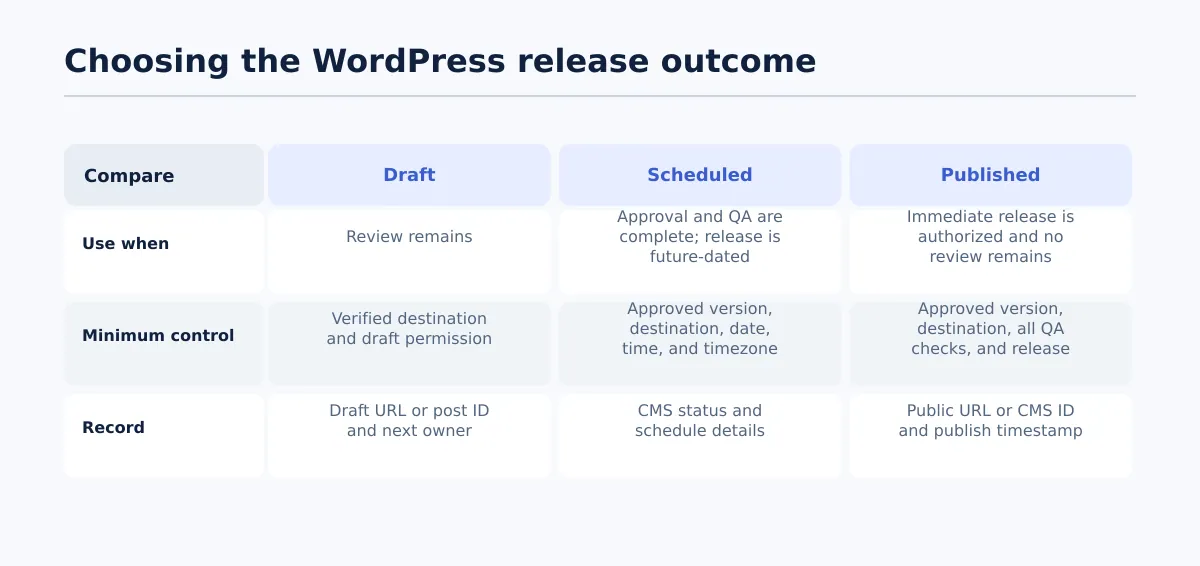 The selected WordPress status should match approval certainty, QA completion, and release timing.
The selected outcome should match approval certainty, timing, and release permission. Use this decision table:
| Outcome | Use it when | Required conditions | Completion record |
|---|---|---|---|
| Draft | Editorial, visual, client, or final CMS review remains | Source and destination are identified, and draft creation is permitted | Draft URL or post ID, reviewer, open issues, next owner |
| Scheduled | Approval and QA are complete, but publication is future-dated | Approved version, verified destination, confirmed date/time/timezone, and schedule permission | CMS status, schedule details, approver, timestamp |
| Published | No further review is required and immediate release is authorized | Approved version, verified destination, all QA checks passed, and release authority recorded | Public URL or CMS ID, publish timestamp, owner, QA result |
The default rule is simple: uncertain approval means draft; complete approval with future timing means scheduled; immediate publication requires explicit release authority plus a passing QA gate.
Tenwrite’s review, revise, schedule, and save-as-draft workflow supports these distinct CMS outcomes for teams moving approved content into WordPress. It should be evaluated as one action layer inside the agency’s field, approval, destination, QA, and release-record controls.
Handle exceptions, updates, and failed publishing runs
A controlled automation run needs a defined stop path. Use an exception record rather than allowing the item to remain in a vague “processing” state.
| Trigger | Owner | Corrective action | Release status until resolved | Completion condition |
|---|---|---|---|---|
| Missing metadata | SEO lead | Add the value or record an allowed waiver | Blocked | Metadata is checked again and passes |
| Invalid schedule | Publisher | Confirm date, time, and timezone against the release instruction | Draft or blocked | Schedule matches the approved record |
| Unclear client approval | Account owner | Confirm the current approved version and retain evidence | Draft or blocked | Named approval and permitted outcome are recorded |
| Wrong destination | Publisher and account owner | Stop the run, investigate the CMS item, and restart against the verified site under site procedure | Exception | Correct destination and final CMS result are recorded |
| Failed transfer | Publisher | Log source version, attempted destination, error, and next action before retrying | Blocked | CMS result is verified field by field |
| Late content change | Editor and approver | Create a new reviewed version and repeat affected QA checks | Draft or blocked | New version is approved and release permission renewed |
| Missing image or alt text | Editor or asset owner | Supply the asset or record that it is not required | Draft or blocked | Asset status and required text pass |
Do not overwrite the earlier release history when correcting an item. Record the requester, changed fields, new source version, approver, and resulting CMS state. For scheduled or live posts, identify whether the change occurred before scheduling, after scheduling, or after publication.
A failed transfer should not be retried blindly. First confirm the site, post type, source version, and intended status. Then record whether the retry created a new item, updated an existing draft, or produced no CMS result. This makes duplicate and partial outcomes discoverable.
Monitor release records and improve the workflow over time
Keep a release log that lets another team member reconstruct each run without searching through disconnected messages. Recommended columns are:
- Source document URL or content ID
- Approved source version
- Client and exact WordPress site
- Post type and CMS post ID or public URL
- Selected outcome: draft, scheduled, or published
- Release or schedule timestamp
- Approver and approval date
- QA reviewer, QA date, and result
- Exceptions and corrective actions
- Final owner and status
Review the log monthly across clients. Look for recurring missing fields, repeated failures at one state, destination-selection errors, unclear site rules, and items that repeatedly return from the same gate. Turn each pattern into a specific workflow change: add a field, clarify an owner, update a client profile, change an item to draft-first, or remove an automation step that still requires interpretation.
The release log should measure control, not just speed. A faster run is not an improvement if it loses the approved version, destination confirmation, QA result, or release authority. The useful measure is whether the workflow makes the permitted action and its outcome easier to verify.
For teams evaluating the transfer layer, Google Docs to WordPress publishing tools and alternatives can help compare implementation options. Assess each option against the workflow requirements here rather than treating a one-click transfer as a complete publishing process.
Start with one client, one post type, and one outcome—preferably draft creation. Record every blocked field, destination mismatch, and failed QA check. Expand to scheduling only when the team can show that approval, destination, field mapping, and release records remain reliable across representative runs.
Then review your current publishing handoffs against the publish-ready field checklist. Any step with an unnamed owner, an ambiguous input, or no recorded completion condition should be improved before it is automated.