
A shared Google Docs content template becomes a workflow control when writers, editors, SEO managers, approvers, and publishers use it for the same client work. Changing that template can therefore affect more than spacing or typography. A renamed field, removed approval checkpoint, or changed heading rule may alter what information is collected and how the next person interprets it.
For an agency, Google Docs change template work should be handled as workflow versioning. The goal is not simply to make a cleaner document. It is to preserve the fields, ownership, approval evidence, and CMS handoff requirements that active production depends on.
This guide covers how to decide between an in-place revision and a new version, audit the current fields, build a role-controlled replacement, migrate active work safely, and validate an approved document in a CMS draft before general rollout.
Why changing a Google Docs template can disrupt an agency publishing workflow
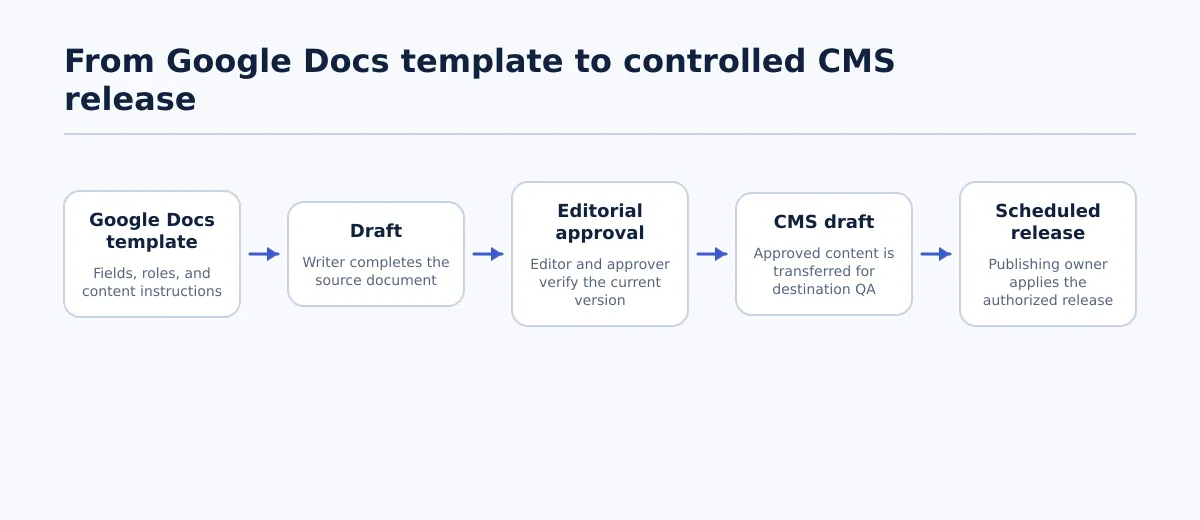 A template supports a sequence of drafting, editorial approval, CMS handoff, and controlled release.
A content template is used at several points in the production path. The team may use it to collect the brief, write the article, record SEO requirements, document review status, and prepare information for a CMS handoff. A change to one section can therefore create a gap at a later stage.
Document the intended sequence explicitly:
- A writer creates or updates a draft using the approved template version.
- An editor checks the article, metadata, links, images, and client requirements.
- An approver confirms the current version and records the decision.
- A publishing operator transfers the approved content to a CMS draft.
- The team checks the CMS draft before scheduling or releasing it.
Consider the operational effect of these changes:
- If the meta title field is removed, the team must identify where that value is now stored and who verifies it.
- If a clear featured-image instruction becomes a vague note, the asset owner or publisher may not know whether an image is approved, pending, or required.
- If the client approval status is deleted, the workflow needs another explicit way to distinguish editorial completion from client or account approval.
- If the template allows both manually bolded section titles and heading styles, the team should define which convention controls the final hierarchy.
These are not automatic failures in every agency. They are breakpoints to test before rollout. If the replacement makes a required decision harder to find, changes who completes it, or removes the condition that blocks an incomplete handoff, editors and publishers will have to resolve that ambiguity elsewhere.
The practical boundary is to treat Google Docs as the collaborative source and the CMS as the destination record. The template should identify what the source contains, which version was approved, and what the publishing operator must verify in the destination. For broader source-to-CMS workflow guidance, see the site’s Google Docs writer workflow for agencies.
Decide whether to revise the existing template or create a new version
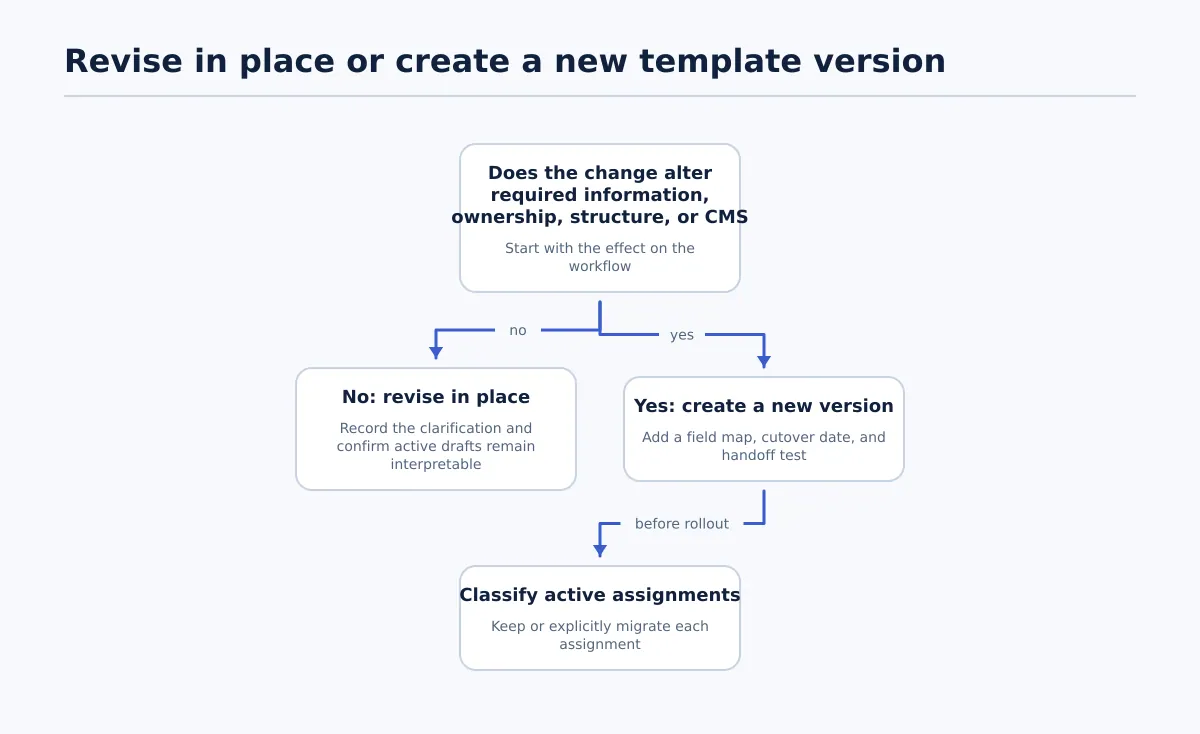 Use an in-place revision for unchanged workflow meaning; version structural or mapping changes.
Before changing a shared master, determine whether the change affects only presentation or changes the meaning of the workflow. This decision matters because existing documents do not automatically acquire new fields or instructions when a master template changes.
| Change | Recommended action | Reason | Completion condition |
|---|---|---|---|
| Correct a spelling error or clarify wording without changing the requirement | Revise in place | The field and decision rule remain the same | The owner records the change and confirms active documents remain interpretable |
| Add examples to an existing instruction | Usually revise in place | The example explains an existing requirement | An editor confirms it does not introduce a new obligation |
| Add, remove, or rename a required field | Create a new version | Active documents may lack information needed later | The new version has a field map and cutover date |
| Change the heading structure or required content sections | Create a new version | Writers and editors may otherwise use incompatible structures | A representative article passes editorial and CMS checks |
| Add a client-specific requirement | Create a scoped or client-specific version | The requirement may not apply to other accounts | Scope, owner, and affected assignments are documented |
| Change how a field maps to the CMS | Create a new version and run a handoff test | The destination may require a different value or location | Each affected field has a destination and validation rule |
Use this decision rule: revise in place when the document still means the same thing; create a new version when required information, ownership, structure, or destination mapping changes.
If the team cannot confidently determine whether active documents still mean the same thing, use a new version. A practical name might be Client Blog Article — v2 — Effective 2026-09-01. The name is useful only if the team also records the changes, scope, and effective date.
Audit the current template’s required content and publishing fields
Before building a replacement, inventory the fields production actually uses. Review the document body, header, instructions, comments, status labels, and any linked brief or publishing record. The purpose is to identify what must remain available for editorial QA and CMS handoff.
Create a field inventory with four decisions: keep, remove, rename, or add. Include the owner, destination, and completion rule for every retained or new field.
| Field or section | Current state | Decision | Owner | Completion rule |
|---|---|---|---|---|
| Document title | Article title appears at the top | Keep | Writer | Matches the approved working or CMS title |
| Client and site identifier | Present in the header | Keep | Writer or account lead | Names the client, site, and relevant post type |
| Content type | Not always consistent | Add or standardize | Editor | Identifies the approved post, page, or other type |
| Target URL or slug | Included in some briefs | Keep | SEO manager or editor | Has no unresolved placeholder and follows the client rule |
| Primary topic or keyword | Present | Keep | SEO manager or writer | Identifies the intended search topic |
| Meta title | Free-text note | Rename and clarify | SEO manager or editor | Is written, reviewed, and ready for the destination field |
| Meta description | Present | Keep | SEO manager or editor | Is written and checked before approval |
| Categories and tags | Mixed into article notes | Move to CMS field block | Editor or publisher | Uses approved terms for the target site |
| Featured-image brief | Unclear | Rename and clarify | Writer, editor, or asset owner | States asset status and required caption or alt-text information |
| Internal-link requirements | Present in comments | Move to checklist | Writer and editor | Required links are present and checked |
| Writer status | Inconsistent labels | Standardize | Writer | Shows in progress, ready for edit, or returned |
| Editor status | Present | Keep and define | Editor | Cannot be approved while required checks are incomplete |
| Approver | Sometimes recorded elsewhere | Add | Account lead or client owner | Names the decision-maker and approval date or timestamp |
| Target publish date | Present in a calendar only | Add or link clearly | Publisher or account lead | Includes date, time, time zone, and authorization |
For every field marked remove or rename, answer three questions:
- Where does the information go now?
- Who completes or verifies it?
- What stops the handoff if it is missing?
For example, changing SEO notes into separate Meta title and Meta description fields is incomplete if the editor does not know both are required or the publisher does not know where they belong. A label alone is not a control; the owner and pass condition make it operational.
Build the replacement template with clear writer and editor controls
Build the replacement around decisions and handoffs rather than decoration. A person opening the document should be able to identify the client, article, current status, content requirements, and release decision without searching through unrelated comments.
Use three broad sections.
Header block: shared project and publishing metadata
Place these fields before the article body:
- Client or brand
- Destination site
- Content type
- Working title
- Primary topic or keyword
- Target URL or slug
- Assigned writer
- Assigned editor
- Current template version
The writer can complete the working title, topic, and draft details. The account or operations owner should confirm the destination site and content type. Include the template version in the master copy or document name so the team can identify which rules governed the draft.
Content body: writing and editorial requirements
Define the required article structure, introduction, body sections, links, and image notes. Use the document’s heading styles consistently instead of treating bold text or font size as a substitute for a heading instruction. The exact hierarchy should follow the client’s content rules; the template’s job is to state which hierarchy writers must use.
Keep instructions separate from final copy. A labeled note such as Writer instruction: explain the reader’s next action is less ambiguous than an instruction embedded in a paragraph where a publisher could mistake it for article text.
Assign responsibilities explicitly:
- Writer-owned: first draft, working title, primary topic, proposed slug, source links, internal-link opportunities, and image brief.
- Editor-owned: factual and structural review, heading hierarchy, link checks, metadata review, taxonomy confirmation, and editor status.
- Approver-owned: client or internal approval decision, approved version, approval date, and exceptions.
- Publisher-owned: CMS destination, post type, final field mapping, draft creation, schedule, and release status.
Release block: approval and CMS handoff
Place the release block after the article or in a clearly labeled document section. Include:
- Meta title
- Meta description
- Category and tags
- Excerpt, when required by the destination
- Featured-image status and alt-text requirement
- Final internal-link check
- Writer status
- Editor status
- Approver and approval date
- Target publish date, time, and time zone
- CMS handoff status
- Exception notes
Define completion conditions in the template. For example, Editor status: Approved should be available only after the article body, headings, links, image requirements, taxonomy, excerpt, and SEO fields have been checked. CMS handoff: Draft created should mean only that the destination draft exists; it should not authorize public release.
Use this before-and-after field map when replacing an existing template:
| Old template field | New template field | Owner | CMS or workflow destination | Required check |
|---|---|---|---|---|
| SEO notes | Meta title and Meta description | SEO manager or editor | SEO fields | Both values are present and reviewed |
| Publishing notes | Category, tags, excerpt, and target post type | Editor or publisher | CMS taxonomy and post settings | Values match the client site |
| Image note | Featured-image brief and asset status | Writer, editor, or asset owner | Featured image and media review | Asset is approved or explicitly marked pending |
| Review complete | Editor status and approval record | Editor and approver | Workflow state | Current version and decision-maker are recorded |
| Publish date | Target date, time, and time zone | Publisher or account lead | Schedule settings | Release timing is authorized and unambiguous |
This map forces the team to decide what each new label controls. Every field should have an owner, destination, and pass condition.
Roll out the new version without mixing versions in active production
Assign an owner and effective date before sharing the replacement. Do not rely on writers noticing an unexplained change to a shared document or assuming that an existing draft has been updated.
Use this rollout sequence:
- Name the replacement clearly. Include the client or scope, version number, and effective date.
- Record the change. List each added, removed, renamed, or relocated field and the reason.
- Set a cutover date. State when new assignments must use the replacement.
- Classify active assignments. List which drafts remain on the old version and which may move to the new one.
- Handle in-progress drafts explicitly. Keep them on the old version unless the editor or operations owner approves a migration. If migrating, duplicate the source, preserve the original, and record the new document version.
- Update assignment links. New briefs and writer instructions should point to the correct version.
- Name the question owner. Identify who resolves disputes about fields, status labels, or exceptions.
- Archive the old master as read-only. Keep it available for active assignments and history, but remove it from the default path for new work after cutover.
Use two production lanes:
- In-progress assignments: remain on the old version unless an explicit migration decision is recorded.
- New assignments: use the replacement from the effective date onward.
Rollout passes when every active assignment has a known template version, every new assignment points to the replacement, and the retired master cannot be mistaken for the current one.
Validate the template through an approved-document-to-CMS handoff test
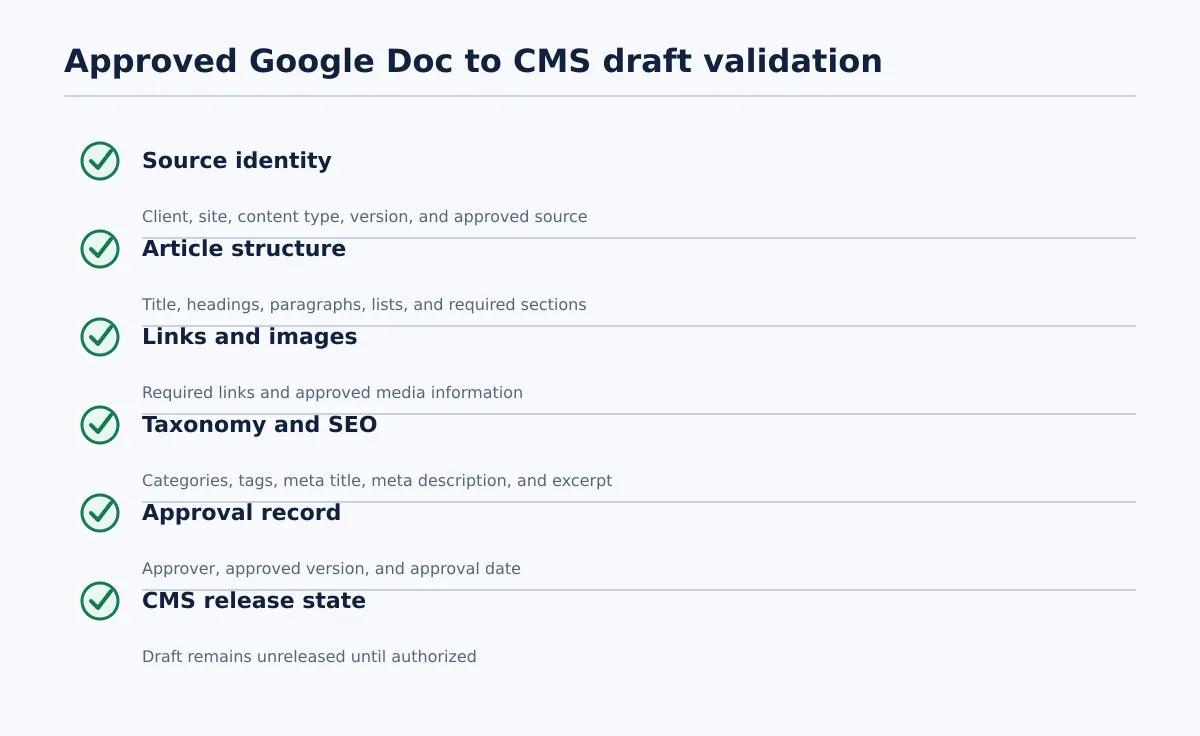 Validate identity, structure, links, media, taxonomy, SEO fields, approval, and release state before rollout.
Do not approve a replacement based only on the blank document’s appearance. Test a completed document using the new structure. Choose at least one representative article for each relevant content type or client configuration. Where practical, include both a normal article and a variation containing links, an image, taxonomy values, an excerpt, and SEO fields.
Run the test in this order:
- Create a document from the new template.
- Populate every required field with representative content.
- Move the document through the intended writer and editor statuses.
- Record a named approval for the tested version.
- Send the approved document to the CMS as a draft, not directly to public release.
- Compare the source with the CMS draft field by field.
- Record defects, return the document to the responsible owner, and retest after correction.
- Approve the template for general use only after the required checks pass.
Use this pass/fail checklist:
- [ ] Source identity — Pass: client, destination site, content type, document version, and approved source are recorded. Fail: the operator cannot identify which site or template rules apply.
- [ ] Article structure — Pass: title, headings, paragraphs, lists, and required sections appear in the CMS draft as intended. Fail: headings are flattened, skipped, or replaced by formatting that changes their meaning.
- [ ] Links — Pass: required internal and external links are present, relevant, and usable in the destination draft. Fail: a link is missing, points to the wrong destination, or remains an unresolved placeholder.
- [ ] Images — Pass: the featured image or image instruction reaches the correct media review step, with required caption or alt-text information. Fail: the asset is missing, unapproved, or assigned to the wrong content item.
- [ ] Taxonomy — Pass: category and tag values match the target site’s approved terms. Fail: values are absent, ambiguous, or copied from another client profile.
- [ ] SEO fields — Pass: meta title and meta description are present in the intended destination fields and have been reviewed. Fail: either value is missing, unexpectedly truncated, or left in body copy instead of the CMS field.
- [ ] Excerpt — Pass: the approved excerpt is present when required by the content type. Fail: the CMS generates an unintended excerpt or the field is blank without an approved exception.
- [ ] Approval state — Pass: the approver, approved version, and approval date are recorded. Fail: the document is treated as ready because an editor marked it complete without a final approval decision.
- [ ] Release state — Pass: the CMS item remains a draft until scheduling or release is authorized. Fail: the test changes public content or creates an unexplained schedule.
This test checks more than formatting. It checks whether the revised template still carries the editorial and publishing decisions required at the destination. For the markup and conversion portion of the process, use the Google Docs to HTML export and QA workflow when that matches your handoff route.
Tenwrite can fit after this approval boundary when the team needs to move approved Google Docs content into a CMS draft for review, scheduling, or release. Keep the CMS draft review and final release decision with the designated editorial or publishing owner.
Maintain template ownership and review it when workflow requirements change
Assign one accountable owner to the master template. Writers and editors should be able to suggest improvements, but suggestions should be reviewed before the master changes.
Keep a lightweight change log with these columns:
| Version | Date | Change | Reason | Approver |
|---|---|---|---|---|
| v1 | Initial release date | Initial field structure | Define the article handoff | Operations owner |
| v2 | Effective date | Split SEO notes into two fields | Make metadata checks explicit | Editorial and SEO owner |
Review the template when any of these triggers occurs:
- A client adds or removes a publishing requirement.
- The CMS field structure or post type changes.
- The same QA defect appears repeatedly.
- A new content type enters production.
- Writers or editors create workarounds outside the template.
- A handoff test exposes missing or incorrectly mapped information.
The owner should assess whether a proposed change affects active work, update the field map, and decide whether the change is a revision or a new version. After approval, record the effective date and communicate the change to everyone using the template.
The goal is not to prevent improvement. It is to prevent undocumented drift. A governed template lets the team identify which rules applied to a draft, who owned each decision, and whether the approved source was checked before the CMS release step.
Changing a Google Docs template safely means changing the workflow around it at the same time: audit the fields, assign ownership, version structural changes, protect active assignments, and test the approved document in a CMS draft. Apply the validated replacement to one controlled content handoff first. When you need to move approved Google Docs content into a CMS draft for review, scheduling, or release, evaluate Tenwrite within that process rather than treating automation as a substitute for editorial approval.