
A shared Google Doc can make agency writing easier to coordinate, but it does not make a content item ready for WordPress. Without clear ownership, required fields, an approval record, and a CMS verification step, publishers are forced to reconstruct decisions from comments, email threads, and client messages.
A reliable Google Docs writer workflow treats the document as the upstream workspace in a controlled publishing system. The document holds the approved editorial source and its publishing instructions. WordPress holds the destination draft and release state. The handoff between them is a process with named owners and pass/fail conditions.
This guide covers the path from brief to release:
Brief → Draft → Editorial review → Client approval → CMS draft → Final QA → Scheduled or live post
The important boundary is that approval is not publication. A client can approve the document while the publisher still needs to verify the WordPress draft, metadata, links, images, and intended release state.
Define the Google Docs writer workflow boundary for agency teams
For an agency, the workflow begins before a writer opens a document and ends after the destination CMS has been checked. Google Docs is the collaborative writing environment, not the complete publishing system.
The document should answer editorial questions such as:
- What is this article about, and who is it for?
- Which version is the approved source?
- Which client and site receive it?
- Who approved the copy and metadata?
- What should the publisher create in WordPress?
- What must be checked before scheduling or publication?
The workflow should also define what Google Docs does not decide. It does not, by itself, establish the correct WordPress category, confirm that an image is approved for use, authorize a publishing date, or prove that the CMS draft matches the source.
That distinction prevents two common errors. First, a reviewed document is treated as a release instruction even though fields are missing. Second, a successful transfer is treated as proof that the destination is correct. A document-to-HTML process can help with markup and formatting, but the operating model still needs ownership and destination QA. For that conversion boundary, see Google Doc to HTML: A Practical Conversion Workflow for Content Teams.
A practical workflow has four control points:
- Source control: one document link and one approved version are recorded.
- Editorial control: the article meets the brief and has no unresolved content decisions.
- Release control: the approver authorizes the item for a CMS draft, schedule, or other permitted state.
- Destination control: the publisher verifies the WordPress draft and records the result.
The final control point matters because the CMS draft is a verification stage, not an automatic endpoint.
Assign roles and the single source of truth for each content item
A content item can have several contributors, but each decision needs one accountable owner. Assigning a person to “help with” a task is not the same as assigning ownership for its completion.
Use a responsibility matrix like this for each client account:
| Workflow responsibility | Accountable owner | Required outcome |
|---|---|---|
| Draft completeness and source content | Writer | The article follows the brief, uses the required structure, and contains all agreed sections. |
| Structure, clarity, and editorial quality | Editor | The draft is internally consistent and editorial comments are resolved or dispositioned. |
| SEO and CMS metadata requirements | SEO lead | Slug, SEO title, meta description, taxonomy, and other required fields are checked. |
| Client approval | Named client contact | The client approves the defined version and the stated publishing scope. |
| CMS entry, destination verification, and release | Publisher | The WordPress draft matches the approved source and the authorized status or schedule. |
The document remains the source of truth for the approved article body. A content tracker or project record should remain the source of truth for workflow status, ownership, timestamps, and the final CMS result. WordPress becomes the source of truth for the destination post after the publisher creates the draft.
Do not let comments become the only approval record. Record these values in the document’s control block or linked tracker:
- Content ID and client/site identifier
- Current status
- Approved Google Doc URL
- Approver name or role
- Approval date and time
- Approved scope, including copy, metadata, assets, and intended release state
- Named publisher
- CMS draft URL or post ID after handoff
- Final QA result and date
If the document link in the tracker differs from the link in the handoff message, stop and resolve the conflict before publishing. A publisher should never choose between two apparently final sources.
Build a WordPress-ready Google Docs template
A reusable template reduces the number of publishing decisions that writers and publishers have to rediscover. Google Docs supports collaborative documents and controlled access, but the agency must define the fields that its own client sites require. The Google Docs workspace is the writing environment; the template is the agency’s operating layer.
Separate body-content fields from CMS fields so an editor can review the article without overlooking the information needed for WordPress.
Document control block
Place this at the top of every document:
| Field | What to enter |
|---|---|
| Content ID | The agency’s unique item identifier. |
| Client/site identifier | Exact client name and destination site URL. |
| Working title | The editorial title before final CMS entry. |
| Target URL or slug note | Proposed slug, or a note that the publisher must confirm it in the client profile. |
| Owner | Writer responsible for draft completeness. |
| Editor | Person responsible for editorial review. |
| SEO lead | Person responsible for metadata requirements, where applicable. |
| Client approver | Authorized approval contact. |
| Status | One controlled value from the workflow below. |
| Source version | Revision date, version label, or other identifier used by the team. |
Article body
Use Google Docs heading styles rather than simulated headings made with bold text or larger font sizes. The body should contain the working title, introduction, H2/H3 structure, paragraphs, lists, links, tables where genuinely needed, and image placement notes.
For every image, include a placement note, source location, intended caption if required, and alt-text input. If the client requires a featured image, identify whether the asset is supplied, pending, or not required. Do not leave a colored placeholder or a comment that says only “add image.”
CMS field block
Add a separate block after the article body or in a clearly labeled document tab:
- Excerpt: final text, or “not required” according to the client profile
- Category: approved existing category
- Tags: approved tags, or “none” when permitted
- SEO title: final value
- Meta description: final value
- Author/byline: exact permitted author value
- Target slug: final proposed slug
- Featured image: asset location, status, and usage note
- Desired post type: post, page, or another allowed type
- Desired publish state: draft, scheduled, or publish now if authorized
- Publish date and time zone: required for scheduled content
- Named publisher: person authorized to perform the CMS handoff
Every placeholder must be resolved before client approval. “TBD,” “choose later,” and “use the usual category” are not completed fields. If a field is not required for a particular site, write “not required” and rely on the documented client profile rather than leaving the field ambiguous.
This structure also makes the document easier to map into WordPress. It keeps editorial content separate from destination instructions without requiring the publisher to infer where a value belongs.
Manage drafting, review, and client approval without losing the release decision
Comments and suggested edits are useful during review, but they do not define the approved version unless the team records the decision. Use a small set of status labels with entry and exit conditions.
| Status | Entry condition | Exit condition |
|---|---|---|
| Draft | The brief, client/site, and writer are assigned. | Required body sections and CMS fields are populated for editorial review. |
| Editorial Review | The writer submits a complete working version. | The editor resolves or explicitly dispositions comments and confirms structure and quality. |
| Client Review | The editor has completed the internal review. | The named client approver responds on the defined version. |
| Approved for CMS Draft | Client approval covers the recorded copy, metadata, and assets. | The approved link, version, approver, date, and handoff fields are frozen and assigned to a publisher. |
| Ready to Schedule | The WordPress draft has passed destination QA. | The authorized publisher schedules or releases it under the client’s rules. |
The editor owns editorial completion. The client contact owns client approval. Neither status should be used as a substitute for the other.
Use this review sequence:
- The writer changes the status to Editorial Review and checks that the document control block and CMS fields are complete.
- The editor reviews the brief, heading structure, links, image notes, metadata, and client-specific requirements.
- The editor resolves each comment or records why it remains open. An open comment that changes meaning, scope, metadata, or asset use blocks approval. A non-blocking comment must have an explicit disposition.
- The editor moves the document to Client Review and identifies the exact version under review.
- The client approver confirms approval in the agreed record, not only in an untracked message.
- The account or content operations owner records the approver and date, freezes the approved source link, and changes the status to Approved for CMS Draft.
A client’s “looks good” message is insufficient if nobody can tell which version it refers to or whether it covers the SEO fields and images. If approval is partial, keep the item in Client Review and record the missing decision.
Package the approved document for WordPress handoff
The handoff packet should let a publisher create the CMS draft without searching across the document, email, project tool, and asset folder. It should contain:
- Approved source: Google Doc URL, content ID, and approved version or revision date.
- Destination: client, exact site URL, post type, and any site-specific publishing profile.
- Ownership: named publisher, client approver, and escalation contact.
- Content fields: title, article body, excerpt, author/byline, slug, category, tags, SEO title, and meta description.
- Assets: featured-image decision, in-body image locations, alt-text inputs, captions, and any asset exceptions.
- Release instruction: draft, schedule, or publish now; include date, time, time zone, and authorization when scheduling or publishing.
- Approval record: approver, approval date, approved scope, and any permitted changes during CMS entry.
- Verification record: location where the CMS draft URL, QA result, exceptions, and final release outcome will be stored.
The packet should distinguish approved for CMS draft from authorized to publish. In many agency workflows, the publisher is authorized to create a private CMS draft but must not schedule or publish until the destination checks pass.
Use a hard return rule: if a required field is missing or contradictory, return the packet to the assigned owner. The publisher should not guess a category, author, slug, image, or release date. A missing metadata value belongs with the SEO lead; an unclear approval belongs with the client contact or account owner; a broken asset reference belongs with the writer or asset owner.
For teams that need a more detailed clean-export or markup inspection procedure, see Google Docs to HTML Converter: A Clean Export and QA Workflow for Content Teams.
Validate the WordPress draft before scheduling or publishing
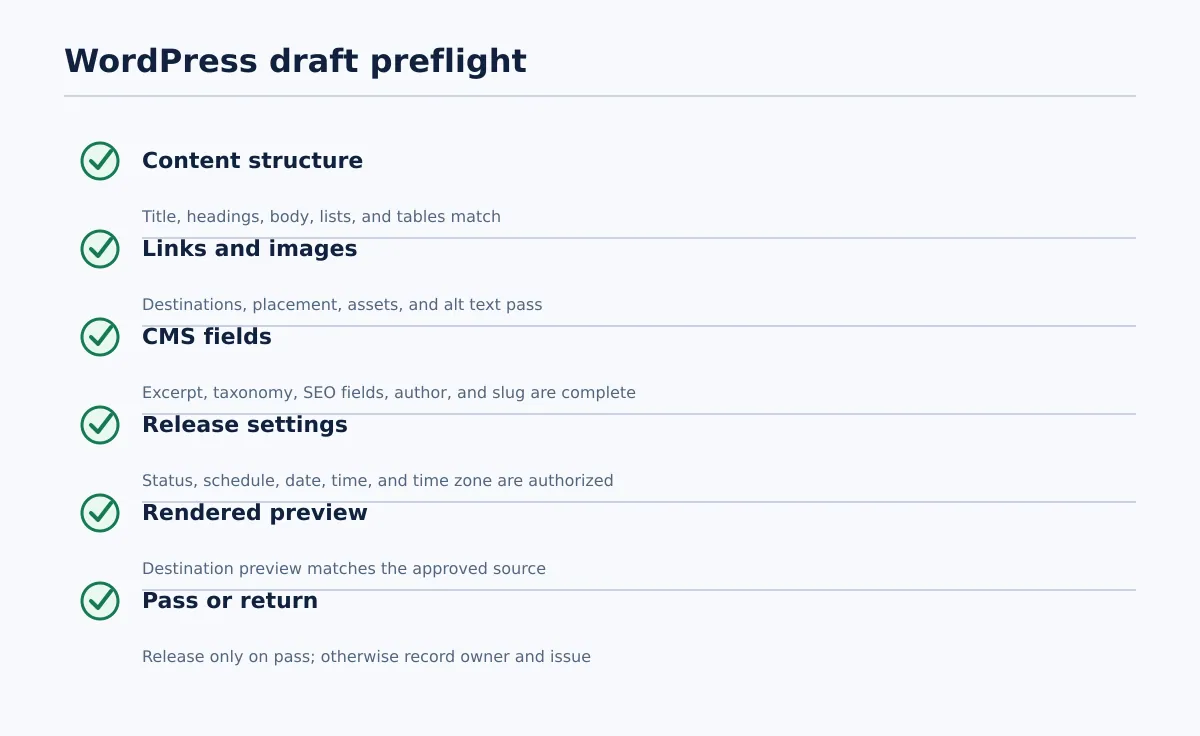 A WordPress draft passes preflight only when the preview matches the approved source and all required destination fields are complete.
After entry or import, the publisher should review the draft in WordPress and its rendered preview. Do not assume that a transfer route preserves every formatting element or destination field in every site configuration.
| Check | Pass condition | If it fails |
|---|---|---|
| Title | WordPress title matches the approved title. | Return to the publisher or editor if the change was accidental. |
| Heading hierarchy | H2 and H3 structure matches the approved document and does not skip levels without a documented reason. | Publisher corrects simple entry errors; editor resolves structural changes. |
| Body copy | Paragraphs, emphasis, lists, and tables match the approved source. | Compare against the frozen document and record the discrepancy. |
| Links | Internal and external links point to the intended destinations and display correctly. | Publisher repairs a clear transfer error; writer or editor resolves an uncertain destination. |
| Images and alt text | Each required image is present, placed correctly, and has approved alt text or a recorded exception. | Return to the asset owner or editor; do not invent alt text for an unclear image. |
| Excerpt | Required excerpt is present and matches the handoff packet. | SEO lead or editor supplies the correction. |
| Category and tags | Values match the client’s allowed taxonomy. | Publisher pauses and returns an unapproved value to the account or SEO owner. |
| SEO fields | Required SEO title, meta description, and slug are complete and match the approved values. | SEO lead resolves the discrepancy. |
| Author/byline | The selected author is permitted for that site and article. | Return to the account owner or client contact. |
| Publish state and timing | Draft, schedule, date, time, and time zone match the release instruction. | Publisher pauses release until authorization is clarified. |
| Rendered preview | The preview matches the approved content and is usable in the destination template. | Record the issue, assign an owner, and keep the item out of Ready to Schedule. |
The draft passes only when the preview matches the approved content and all required destination fields are complete. A single blocking failure keeps the status below Ready to Schedule.
Record the CMS draft URL or post ID, QA reviewer, QA date, result, and any exceptions. If the draft is returned, record the exact issue rather than changing the status to a generic “needs work.” This gives the next person a clear retest condition.
Work through one realistic agency example
Suppose an agency is preparing “A Seasonal Maintenance Guide” for Client North. Maya, the writer, creates the Google Doc with the client identifier, proposed slug, body copy, excerpt, category, SEO fields, and image notes. She owns completeness and changes the status to Editorial Review.
Jon, the editor, finds one heading that does not match the brief and an image note without alt text. He updates the heading, assigns the alt-text question to the asset owner, and leaves the document in Editorial Review until the image decision is recorded. Once the issue is resolved, he dispositions the remaining comments and moves the document to Client Review.
The client marketing lead approves the copy, metadata, and supplied image in the defined approval record. The account owner records the approver, date, and frozen document link, then changes the status to Approved for CMS Draft. The handoff names Priya as the publisher and specifies that the post must be created as a draft for a later client release.
Priya creates the WordPress draft. She discovers that the proposed category is not available on Client North’s site. She does not choose a similar category. She records the mismatch and returns it to the SEO lead or account owner. After the approved category is supplied, she updates the draft, checks the preview, confirms the links, image, alt text, excerpt, author, slug, and SEO fields, and records a pass.
Only then does the item become Ready to Schedule. If the client’s release policy requires another WordPress review, that review remains a separate authorization step. The original client approval does not erase the CMS QA gate.
Use a repeatable checklist across multiple client sites
Standardize the workflow stages, but keep destination rules in a client-specific publishing profile. A useful profile should record:
- Site URL and client identifier
- Allowed post types
- Required categories and tags
- Required SEO fields and character or format rules, if documented by the client
- Author and byline rules
- Excerpt requirements
- Featured-image and in-body image requirements
- Alt-text and asset approval rules
- Client approval contact
- Posting cadence and time zone
- Release permissions: draft, scheduled, or direct publication
- Location of the approval, handoff, and QA records
- Exception and escalation route
Keep these parts standard across clients:
- Document control block
- Role assignment
- Status names and entry/exit conditions
- Approval record
- Handoff packet structure
- CMS preflight checklist
- Exception logging and retest process
Let these parts vary by client:
- Required taxonomy values
- Author rules
- Metadata requirements
- Asset and image rules
- Post types and custom fields
- Schedule and release permissions
Before expanding the process, test it on one ordinary article and one variation, such as an article with a table, an in-body image, or a client-specific field. Confirm that a different team member can identify the source, destination, owner, approval state, release instruction, and QA result without asking for background information.
The minimum repeatable model
For every Google Docs writer workflow, require this sequence:
- Identify the client, site, content owner, and source document.
- Complete the article and named CMS fields.
- Review the copy, structure, links, assets, and metadata.
- Approve a specific version with a named client approver and date.
- Handoff the frozen source with release instructions and a named publisher.
- Draft in WordPress without treating transfer success as QA.
- Verify the destination preview and required fields.
- Release only when the authorized status and schedule pass their conditions.
- Record the CMS result and any exceptions.
Review your current handoff against this checklist. If publishers routinely reconstruct metadata, approval status, or release instructions, the problem is usually not the writing tool; it is the missing operating layer around it.
For teams moving approved Google Docs content into WordPress, Tenwrite can be evaluated as part of that layer: it supports a workflow in which content can be reviewed, revised, scheduled, or saved as a CMS draft before it goes live. Keep the approval record, destination QA, and final release decision with the agency team, and start with a small representative workflow before expanding across client sites.