
Client review is often where an agency’s publishing process becomes unclear. Several people may comment on a Google Doc, an editor may apply the requested changes, and a publisher may be waiting for a release date—all without a recorded answer to one basic question: who approved which version, and what decision is still outstanding?
A dependable client content approval workflow treats approval as a governed decision rather than a message in a comment thread. The workflow should identify one accountable client approver, define the requirements for acceptance, give reviewers a deadline, consolidate feedback, and record the response against a specific source version.
Only after that decision is clear should the agency prepare the WordPress handoff. The handoff has its own questions: Is this the right client site? Are the required fields complete? Should the post remain a draft, be scheduled, or be published? Who owns the final release decision?
This guide focuses on that client-approval boundary. It includes a practical operating model, exception rules, and a worked example for one blog post moving from a Google Doc to a scheduled WordPress post.
The approval bottleneck: why client sign-off becomes a publishing risk
Client approval becomes risky when the workflow records movement but not decision rights. A document can have comments, revisions, and positive reactions without having an unambiguous approval record.
Consider this failure chain:
- An agency editor sends a Google Doc to three client stakeholders.
- The marketing lead requests a title change by email while a subject-matter reviewer adds comments in the document.
- The editor makes a reasonable set of changes but does not create one consolidated revision record.
- One stakeholder replies, “Looks good, but check the final details.”
- The publishing operator creates a WordPress post and queues it for Friday.
- The team then discovers that the caveat was unresolved, the SEO description is missing, and the category or release time is uncertain.
The operational issue is not merely that feedback took time. The issue is that nobody can confidently answer whether the revised version was approved, whether the remaining comment is a blocker, or whether the person who approved the copy can authorize publication.
For each approval stage, use four fields:
- Owner: The person accountable for the next action or decision.
- Entry condition: What must be true before the stage begins.
- Exit condition: The evidence required to move forward.
- Exception path: The status, owner, and action used when the normal condition is not met.
This makes the client decision visible without turning the article into a second copy of the agency’s broader controlled publishing workflow. The focus here is the policy that determines whether client feedback becomes approval, revision, escalation, or a hold.
Define the workflow boundary: content approval versus CMS release
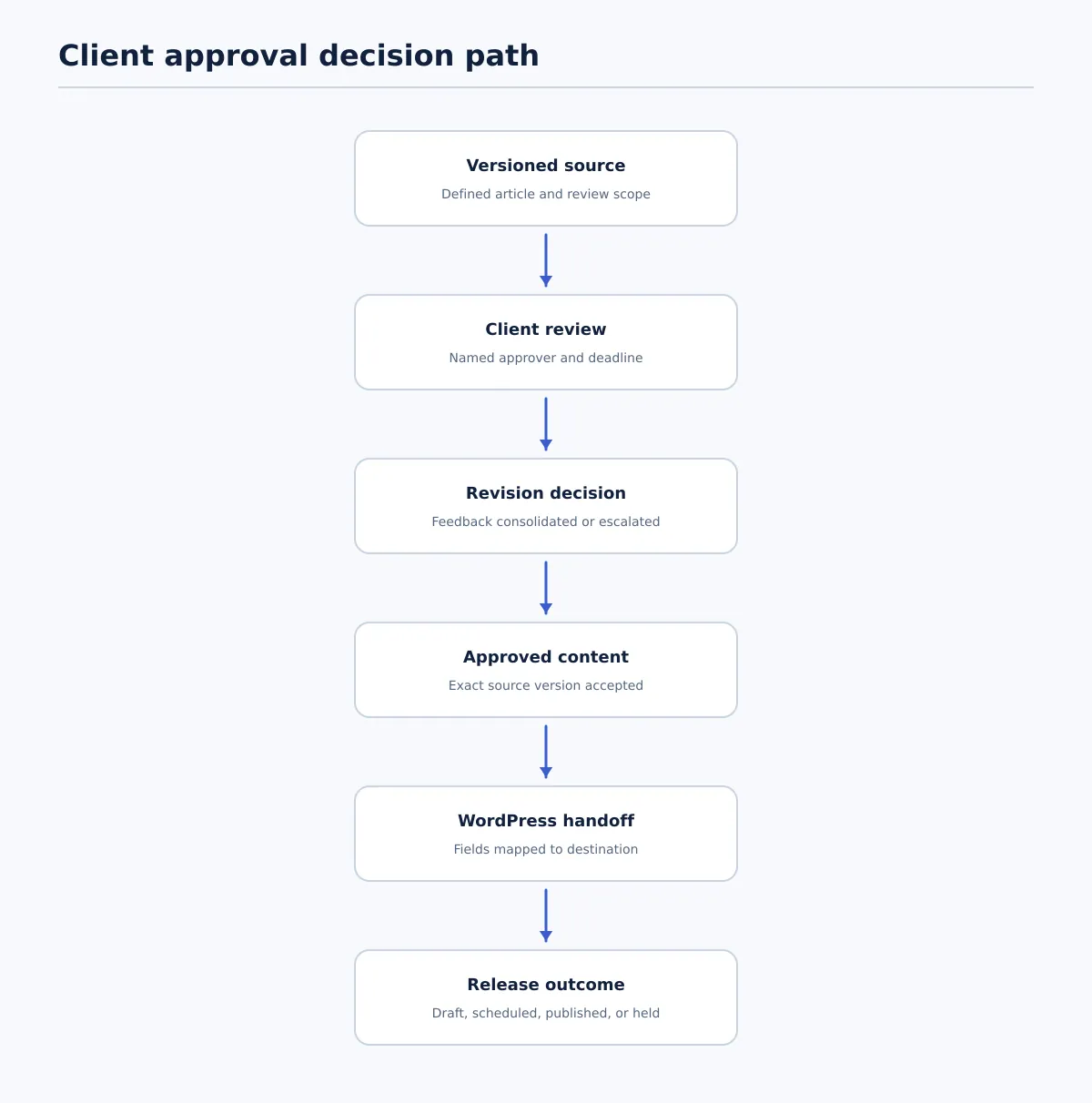 Client feedback becomes a recorded source decision before the agency performs the separate WordPress handoff and release checks.
Use two separate decision records. They may be handled in the same system, but they should not be represented by one vague status such as Ready.
| Decision | Content approval | CMS release authorization |
|---|---|---|
| What it answers | Does the identified source version meet the client’s editorial, factual, brand, and scope requirements? | Is the approved version correctly prepared for this WordPress destination and release instruction? |
| Decision owner | Named final client approver | Publishing or release owner named in the client policy |
| Evidence | Source link, version, approver, timestamp, and resolved feedback record | Destination, field validation, status, schedule, URL or slug, QA result, and release decision |
| Pass condition | The approver gives an unambiguous decision for the identified version | Required fields pass and the CMS state matches the authorized instruction |
| Fail condition | Response is missing, conditional, contradictory, or tied to an older version | Site, field, timing, URL, or QA requirement is missing or incorrect |
A client may approve article copy while leaving scheduling to the agency. Another client may require confirmation of the date and time as part of final approval. Record that distinction in the client profile.
A useful status sequence for the approval portion is:
In preparation → In client review → Changes requested → Approved content
The CMS portion can then use its own states, such as CMS validation, Scheduled, Published, On hold, and Verified. A blank or unconfirmed state is not evidence of approval. For additional context on the broader approved-content and CMS relationship, see how agencies build a multi-client content workflow.
Choose an approval model for the client account
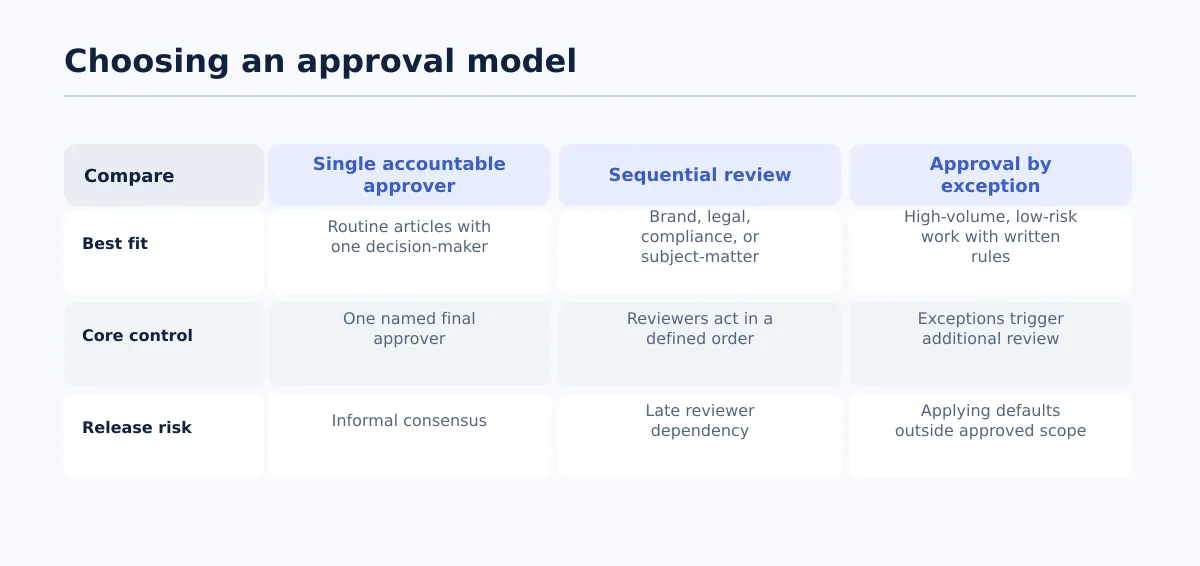 Select the approval model based on reviewer complexity, risk, and publishing cadence.
Select the model from the client’s reviewer structure, content risk, revision pattern, and publishing cadence. The model should be documented before the article enters review.
| Approval model | Suitable conditions | Operating rule | Exception to route |
|---|---|---|---|
| Single accountable approver | Routine blog posts, one client decision-maker, stable requirements | Stakeholders may comment, but one named person issues the final decision | If a required specialist review appears, pause for a revised model |
| Sequential review | Brand, legal, compliance, or subject-matter review must occur in a known order | Each reviewer passes or returns the item before the next stage begins | A late or conflicting reviewer goes to the account lead and client decision-maker |
| Approval by exception | High-volume, lower-risk articles covered by written default rules | Routine items follow the rules; defined exceptions trigger additional review | Content outside the agreed scope remains in review rather than using the default |
Use this decision rule:
- Choose single approval when one person has authority to accept the article and no specialist gate is required.
- Choose sequential approval when a missing review could affect factual accuracy, legal exposure, compliance, or brand requirements.
- Choose approval by exception only when the client has documented the default criteria, release owner, covered content types, and escalation conditions.
Approval-by-deadline is a client-specific policy choice, not a universal agency default. If the contract explicitly permits it, record the deadline, covered content, authorized release owner, and action required after the deadline. If no such policy exists, the account lead should place the item on hold and request a decision.
Owner: Account lead.
Entry condition: Client risk, reviewer structure, and publishing cadence are known.
Exit condition: The client profile names the model, reviewers, final approver, deadline, and escalation rule.
Exception path: If any of those details are unclear, set Model needed and assign the account lead to resolve the policy before review.
Assign roles, decision rights, and response deadlines
A practical client approval process distinguishes people who provide input from people who can make decisions.
| Role | Accountable action | Decision boundary |
|---|---|---|
| Agency editor | Prepares the source and applies agreed revisions | Does not approve on the client’s behalf unless explicitly authorized |
| Account lead | Confirms client rules, consolidates feedback, and escalates delays | Does not convert silence into approval without a written client policy |
| Client reviewers | Check assigned facts, brand details, or subject matter | Provide input within their assigned scope |
| Final client approver | Accepts or rejects the identified source version | Must re-confirm after material changes to that version |
| Publishing owner | Maps the approved source into WordPress and performs field checks | Does not guess unresolved client requirements |
| Release owner | Confirms whether the item may be scheduled or published | Acts only within the client’s documented release policy |
Set the response deadline when sending the approval packet. Include the time zone, review surface, version identifier, expected response format, and escalation date. The account lead owns the escalation if the deadline passes; the publishing owner keeps the item in Awaiting client response or On hold until the policy-based decision is available.
Entry condition: The source is ready and the named approver can access the review packet.
Exit condition: A recorded approval, rejection, or actionable change request is attached to the identified version.
Exception path: Missing access, an unavailable approver, or a missed deadline creates an escalation task for the account lead and blocks release activity.
Set the approval packet and acceptance criteria before review starts
Send one defined packet rather than a document link with an open-ended request for feedback. The packet should make clear what the client is approving and what remains an agency-owned publishing task.
Include:
- Client name and target WordPress site.
- Source document link and version identifier, such as
v3 — 2026-08-14 15:00 UTC. - Proposed title, intended audience, and article goal.
- Review scope: copy, factual claims, brand treatment, SEO fields, images, or all of these.
- Required factual, legal, compliance, or subject-matter checks.
- Proposed category and tags.
- SEO title and meta description, when those fields are in scope.
- Featured-image responsibility and asset status.
- Destination URL or slug rule.
- Proposed publish date, time, and time zone.
- Named final approver, deadline, and escalation route.
Use a response format that makes ambiguity visible:
Decision: Approve / Approve with listed changes / Do not approve
Version reviewed:
Required changes or conditions:
Approver:
Decision date and time:
Treat “approve with listed changes” as a revision instruction when the condition affects meaning, facts, required fields, or timing. The account lead converts it into a revision record and obtains confirmation on the resulting version.
Owner: Agency editor prepares the packet; account lead confirms client-specific requirements.
Entry condition: Internal editorial review is complete and required source fields have owners.
Exit condition: One versioned packet with acceptance criteria and a deadline has been sent to the named approver.
Exception path: If a requirement or owner is missing, mark it Owner needed and resolve it before treating the article as ready for client review.
Run the review and revision loop without fragmented feedback
Choose one review surface. Comments in the source document, email requests, chat messages, and meeting notes should be brought into one revision record before the editor starts work.
The account lead consolidates feedback and resolves conflicts before assigning the next revision. If one stakeholder wants a shorter introduction while another says the context is insufficient, the editor should not silently choose a compromise. The account lead asks the final client approver to decide which requirement controls.
Use a revision log such as:
| Field | Example |
|---|---|
| Comment owner | Client marketing lead |
| Requested change | Replace the opening example with the approved service description |
| Priority | Required before approval |
| Disposition | Accepted, rejected with reason, or clarification needed |
| Editor action | Paragraph 2 rewritten in source version 4 |
| Confirmation | Final approver confirmed in review reply |
| State | Resolved or unresolved |
A revision round is complete only when each required comment is resolved, rejected with a reason, or escalated for a decision. The editor marking a comment “done” records work performed; it does not by itself record client acceptance.
Owner: Account lead consolidates; editor applies; final approver confirms material changes.
Entry condition: Feedback has arrived through the agreed route.
Exit condition: A new source version and revision record are ready for a final decision.
Exception path: Contradictory or scope-expanding feedback moves to Decision needed or Scope change, owned by the account lead.
Convert approval into a WordPress-ready publishing handoff
Once the source decision is recorded, create a separate handoff record. Its purpose is to map the approved article to the destination without reopening settled editorial questions or guessing at missing fields.
| Approved source element | WordPress field | Pass question | Field owner |
|---|---|---|---|
| Article title | Post title | Does it match the approved version? | Publishing owner |
| Headings, paragraphs, lists, and links | Post body | Is structure preserved and are required links present? | Editor or publishing owner |
| Excerpt guidance | Excerpt | Is an excerpt required and supplied? | Editor or SEO lead |
| SEO title and meta description | SEO plugin fields | Are the approved values in the intended fields? | SEO lead or publishing owner |
| Category and tags | Taxonomy | Do they match the client site profile? | Publishing owner |
| Image, caption, and alt text | Media and featured image fields | Is the approved asset correctly assigned? | Asset owner |
| Slug or URL rule | Post slug or URL setting | Does the URL follow the agreed rule? | Publishing owner |
| Release instruction | Status and schedule | Is the intended state draft, scheduled, or held? | Release owner |
| Byline requirement | Author field | Is the correct author selected? | Publishing owner |
The minimum handoff record identifies the approved source version, connected client site, post type, title, body, links, images, category, tags, excerpt, SEO metadata, author, status, schedule, and URL or slug.
Tenwrite supports reviewing, revising, scheduling, or saving generated content as a CMS draft before it goes live. In an agency process, that capability can be used as a reviewable handoff while the client approval record and release decision remain explicit. Test the route against one representative article and validate each destination field rather than treating draft creation as a completed release.
Owner: Publishing owner.
Entry condition: Final client approval is recorded against a specific source version.
Exit condition: Every required source element has a destination field, value, and owner.
Exception path: A missing field, unsupported element, or unclear destination returns the item to the relevant editor, SEO lead, asset owner, or account lead.
Validate, schedule, publish, and record the outcome
The publishing owner should run field-level QA in the connected client site. A created draft or accepted calendar date is not sufficient evidence that the handoff passed.
| Check | Pass condition | Failure action |
|---|---|---|
| Destination | Correct client site and post type are selected | Remove the item from the release path and notify the publishing owner |
| Source match | Title and body match the approved version, allowing documented formatting conversion | Correct the item and seek re-approval if meaning changed |
| Links and media | Links, images, captions, and alt text meet the packet requirements | Hold scheduling until the responsible owner resolves the issue |
| Metadata and taxonomy | Required excerpt, SEO fields, category, tags, author, and slug are present | Assign each failed field to its owner |
| Timing and status | Status, date, time, and time zone match the release instruction | Keep as draft or place on hold |
| Rendered result | Preview or public page shows the expected structure and media | Record the defect and return it to the CMS owner or editor |
Retain a release record containing the client, destination site, approved source version, final approver and approval timestamp, CMS owner, post ID or URL, status, scheduled or published time zone, QA reviewer, QA timestamp, and exceptions.
Owner: Publishing owner performs field QA; release owner confirms the CMS status; QA reviewer confirms the result.
Entry condition: The WordPress item exists in the intended destination.
Exit condition: All required checks pass and the outcome record identifies the final state.
Exception path: Failed QA creates a hold with a correction owner; after correction, repeat the affected check and re-confirm approval when the change is material.
Worked example: Google Doc version 4 to a scheduled WordPress post
An agency is preparing “How to Choose a Security Review Schedule” for Client North’s WordPress site. The following record shows both the successful path and the decision points that would stop it.
1. Client review setup
- Source: Google Doc
Client North — Security Review Schedule — v3. - Final approver: Maya Chen, Client North marketing director.
- Deadline: August 15, 2026, 17:00 America/New_York.
- Acceptance criteria: approved body copy, factual review complete, category
Security, tagsWordPressandmaintenance, supplied excerpt, SEO title and description, approved featured image, and a September 1 release at 09:00 America/New_York.
Owner: Account lead.
Entry condition: Internal editorial review is complete and the source version is uniquely identified.
Exit condition: The packet is sent to Maya with the criteria, version, response format, and deadline; status is In client review.
Exception path: If Maya lacks access or another person is proposed as approver, the account lead sets Approval owner needed and resolves access or authority before review continues.
2. Feedback consolidation and revision
The subject-matter reviewer requests a clarification in paragraph four. Maya requests a shorter title. The account lead records both as required changes, asks the editor to apply them in version 4, and records the editor’s actions. The subject-matter reviewer confirms the factual clarification; Maya reviews version 4.
Owner: Account lead consolidates; editor revises; Maya confirms material changes.
Entry condition: Feedback has arrived through the agreed review route.
Exit condition: Version 4 has a revision log with every required comment resolved and is ready for a final decision.
Exception path: If the two reviewers disagree, status becomes Decision needed and the account lead asks Maya to choose the controlling requirement. If a new topic is requested, status becomes Scope change rather than silently expanding version 4.
3. Final content approval
Maya replies using the required format and approves version 4. The record stores the document link, version identifier, approval timestamp, approver, and resolved feedback log. The status changes to Approved content.
Owner: Maya is the final client decision-maker; the account lead records the evidence.
Entry condition: All required feedback is resolved or explicitly rejected with a reason.
Exit condition: Maya gives an unambiguous approval for version 4.
Exception path: “Looks good, subject to checking the final details” becomes Conditional approval; the account lead lists the condition and keeps the item out of the release path until it is resolved.
4. WordPress field mapping
The publishing owner selects Client North’s connected WordPress site and creates the post as Draft. The approved title maps to the post title; the article structure maps to the body; the excerpt and SEO values map to their designated fields; Security maps to Category; WordPress and maintenance map to Tags; the approved image maps to Featured Image; and the requested date maps to the schedule fields.
The publisher finds that the imported slug uses an outdated working title. The publisher corrects it to Client North’s URL rule and records the change. Under this client’s policy, the slug correction does not alter article meaning, so it does not require new copy approval; the account lead is notified.
Owner: Publishing owner.
Entry condition: Version 4 approval is recorded and the destination site is confirmed.
Exit condition: Each required field has the correct value and the handoff record identifies any permitted transformation.
Exception path: If the SEO description or featured image is missing, status becomes CMS validation failed; the relevant SEO or asset owner resolves it before scheduling.
5. QA and scheduled outcome
The QA reviewer checks the destination site, title, body, links, image, taxonomy, excerpt, SEO fields, author, slug, preview, and time zone. All checks pass. The release owner changes the post from Draft to Scheduled for September 1 at 09:00 America/New_York.
Owner: QA reviewer checks; release owner schedules; publishing owner records the result.
Entry condition: The draft contains all required mapped fields.
Exit condition: QA passes and the record contains the approver, approval timestamp, CMS owner, scheduled status, schedule, post ID or preview URL, and QA result.
Exception path: A failed preview, wrong taxonomy, or incorrect time zone leaves the item as On hold; the owner corrects the specific failure and repeats the affected check.
After the scheduled time, the publishing owner checks the public URL and updates the record to Published and then Verified. If the client had not responded by the deadline, the record would instead remain Awaiting client response or On hold; no scheduling decision would be inferred from the calendar date.
Handle late, conditional, or missing approvals
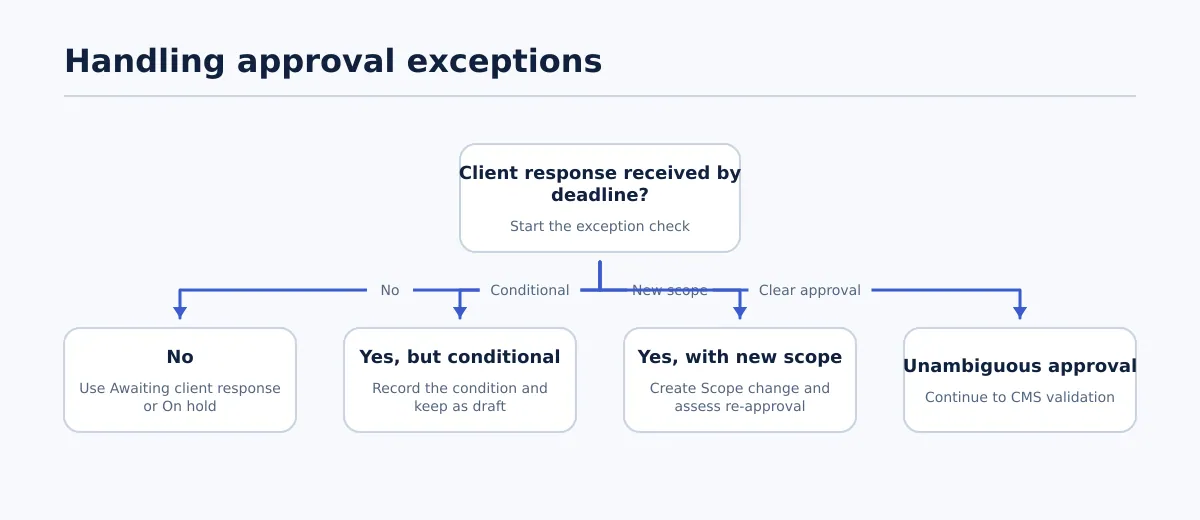 Ambiguous approval responses should route to a documented hold, clarification, or scope-change decision.
Use a defined response for each exception rather than asking the publisher to interpret an ambiguous message.
| Scenario | Status | Owner | Communication | Release action |
|---|---|---|---|---|
| No response by deadline | Awaiting client response or On hold | Account lead | Identify the version, missed deadline, and escalation date | Hold unless an explicit approval-by-deadline policy applies and its conditions are met |
| “Looks good” with a caveat | Conditional approval or Changes requested | Account lead and final approver | List the caveat, action owner, and whether re-approval is required | Keep as draft while the condition affects content, fields, or timing |
| New scope after final review | Scope change | Account lead | Explain the impact on scope, timing, and approval version | Hold or return to revision; obtain approval for material changes |
| Conflicting stakeholder feedback | Decision needed | Account lead and final approver | Present the conflict and ask which requirement controls | Do not revise or release based on an editor’s unrecorded choice |
If the client’s contract defines escalation or approval by deadline, apply that policy exactly and retain the supporting communication. Otherwise, keep the article as a draft or on hold and ask the account lead to resolve the missing decision.
Client content approval workflow checklist
Adapt these steps to each client profile, but keep the completion condition visible:
- Define the client rule. Record the approval model, reviewers, final approver, release owner, deadline, time zone, and escalation policy. Complete when: the profile is current.
- Identify the source. Record the Google Doc link, version, audience, goal, and review scope. Complete when: the source is internally ready and uniquely identified.
- Send the approval packet. Include acceptance criteria, destination, fields in scope, timing, response format, and deadline. Complete when: the named approver has received it.
- Consolidate feedback. Bring comments into one revision record and resolve conflicts before editing. Complete when: the editor has one actionable change list.
- Apply and log revisions. Record each request, disposition, editor action, and unresolved condition. Complete when: required feedback is resolved or escalated.
- Capture content approval. Store the approved version, named approver, decision, and timestamp. Complete when: the decision is unambiguous and non-conditional.
- Build the WordPress handoff. Map the source to the site, post type, title, body, links, images, taxonomy, excerpt, metadata, author, slug, status, and schedule. Complete when: every required field has a value and owner.
- Run field QA. Check destination, source match, links, media, metadata, taxonomy, URL, status, timing, and preview. Complete when: all required checks pass.
- Apply the release decision. Leave as draft, schedule, or publish according to the documented policy. Complete when: the CMS status matches the authorized decision.
- Verify and record. Retain the approver, timestamps, CMS owner, URL or post ID, status, QA result, and exceptions. Complete when: another team member can reconstruct the outcome without guessing.
The minimum repeatable process is versioned source → consolidated review → named approval → field-level handoff → policy-based release → recorded outcome. Document the client rules before production begins, then standardize the move from approved Google Doc content to a reviewed CMS draft. Agencies evaluating a publishing-connected route can test Tenwrite’s agency publishing workflow with one representative client article before expanding it across sites.