

A google tag manager plugin for WordPress is useful only when it gives an agency a clear, maintainable way to implement an approved container on a specific site. It is not a substitute for deciding what the container should do, who may change it, or how the implementation will be tested.
That distinction matters when one team supports several WordPress installations. A dedicated plugin may be the right choice for one client and unnecessary for another. The decision depends on the existing placement method, access constraints, consent requirements, maintenance model, and ability to reverse the change.
This guide presents a practical selection and rollout process for agencies. It distinguishes GTM placement from analytics dashboards, advertising pixels, and WordPress post tags; compares three implementation paths; assigns named responsibilities; and defines the checks and records required before a production release. It does not rank individual plugins or promise measurement accuracy or consent compliance.
Define the job a WordPress GTM plugin should perform—and when not to use one
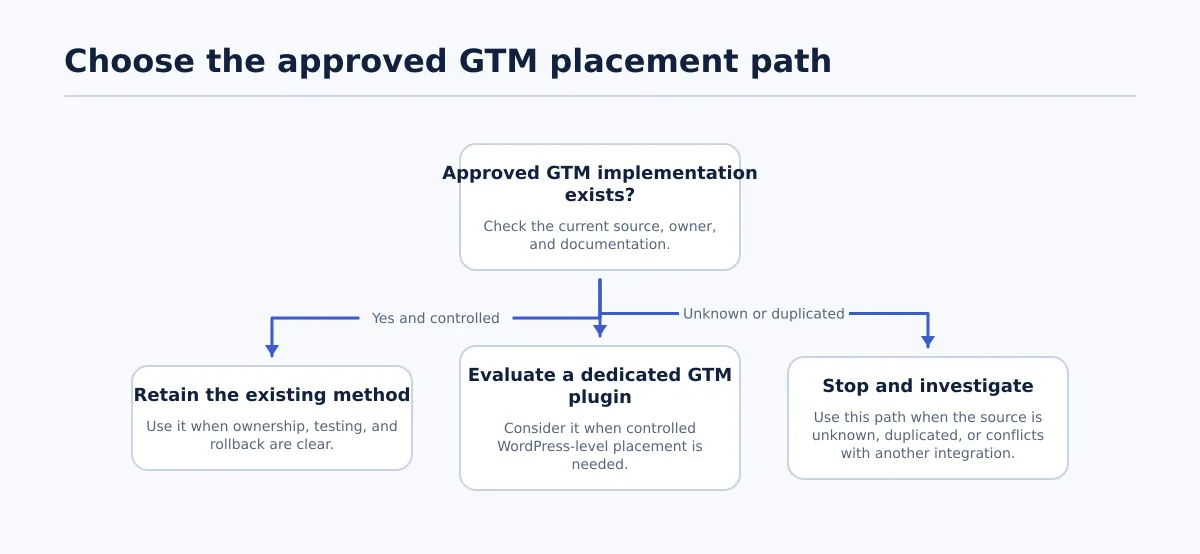 Choose one documented GTM placement method for each client site and environment.
Google Tag Manager organizes tags and their related configuration in a container. On a WordPress site, a plugin may be used to configure an approved container identifier and add the implementation through the plugin’s supported WordPress settings. The exact result must be confirmed against the selected plugin’s documentation and the client site’s tested setup.
The plugin handles the site-level implementation decision. It does not replace the GTM owner’s responsibility for the container’s tags, triggers, variables, or publishing process. It also does not determine the client’s approved consent behavior.
Keep these tools separate:
- GTM implementation: Places the approved container on the site so its configured behavior can be evaluated.
- Analytics dashboard: Displays reporting data or connects WordPress to an analytics property. That function alone does not establish the site’s GTM placement.
- Pixel or advertising tool: Adds tracking for a particular advertising or marketing platform. Its owner, configuration, and consent dependencies may differ from the GTM setup.
- WordPress post tags: Taxonomy terms used to organize content. They are unrelated to GTM containers.
A dedicated plugin is worth evaluating when the site needs a WordPress-level placement method and the team cannot, or should not, manage the implementation through versioned theme or custom code. It may also be suitable when the client’s existing platform integration does not meet the agency’s requirements for access, testing, or rollback.
Use this decision path before installing anything:
- Is an approved implementation already active? Identify its source, owner, container ID, environments, and rollback method. Retain it when those controls are clear.
- Is the current method maintainable? If a technical owner can test and revert the existing theme or custom-code implementation, replacing it may create unnecessary change risk.
- Does the site need a WordPress-level implementation? If yes, compare a dedicated plugin with the other available paths before choosing one.
- Is the current source unknown, duplicated, or contradictory? Stop and investigate. Do not add another snippet to compensate for incomplete information.
- Does an approved platform integration already provide the implementation? Confirm its behavior and ownership before introducing a separate plugin.
The result should be one documented implementation path for each client site and environment. An uncertain source is an investigation task, not a reason to activate a second method.
For the broader publishing context, see Content Workflow Automation for Agencies: A Controlled Path from Approved Draft to Published Post. The GTM decision remains a technical site decision, even if the agency stores it alongside other WordPress operating records.
Choose one approved GTM placement method per client site
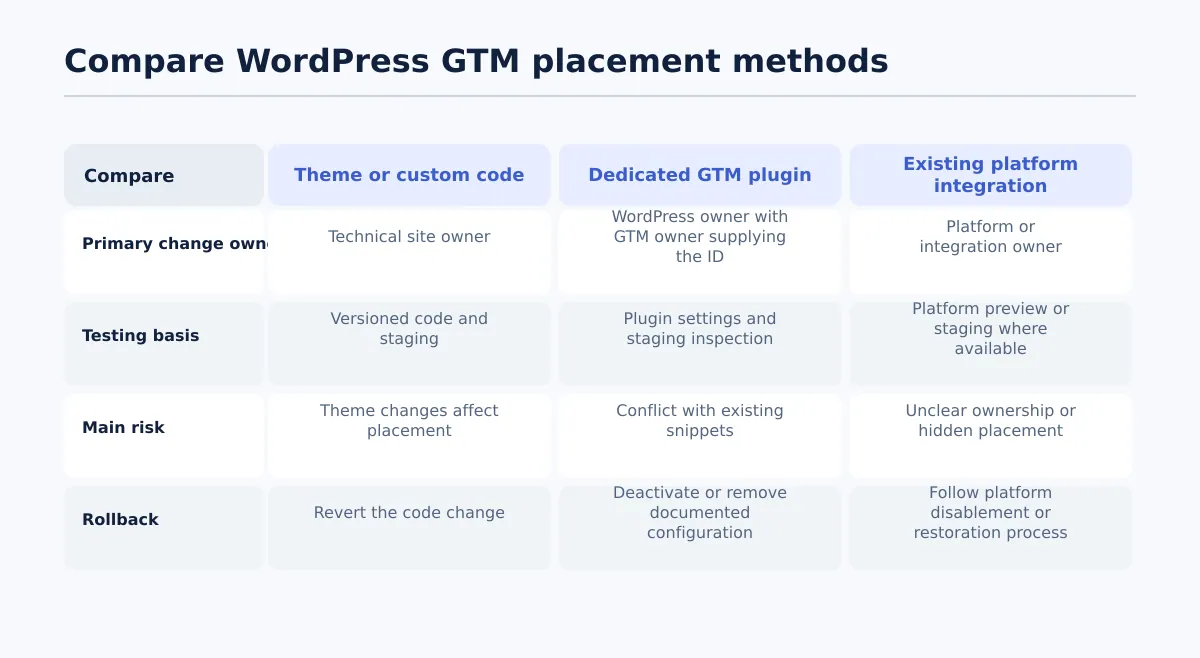 Compare the three common placement paths before recording one approved method per site.
Compare implementation paths before comparing plugin features. Record the selected method, its owner, and its reversal procedure for every client site. The same agency may use different methods across its portfolio, but each site should have one approved production path.
| Placement method | Change ownership | Update resilience | Testing and rollback | Main operational risk | Suitable when |
|---|---|---|---|---|---|
| Theme or custom-code placement | WordPress developer or technical site owner | Depends on code ownership, deployment controls, and theme structure | Strong when code is versioned and staging is available; revert the code change | A theme or deployment change can affect the placement, and access may be restricted | The team controls code deployment and the current implementation is documented |
| Dedicated GTM plugin | WordPress owner, with the GTM owner supplying the approved ID | Depends on plugin maintenance, compatibility review, and site update practices | Configure and inspect it in staging; deactivate or remove it using the documented process | Existing snippets or integrations may create a second placement | The site needs a manageable WordPress-level method and the plugin’s behavior is understood |
| Existing platform integration | Platform or integration owner, coordinated with the GTM owner | Depends on the platform’s release and update model | Use the platform’s staging or preview process where available; follow its restoration procedure | The implementation may be difficult for the agency to inspect or own | The client already uses an approved integration that meets the required controls |
Evaluate each path against the same questions:
- Can the team identify where the container is added and which pages it covers?
- Is one named person responsible for changing that placement?
- Can the method be tested before production?
- Can it be disabled or reverted without deleting unrelated tracking work?
- Could a theme, plugin, migration, or platform update change the result?
- Does the method fit the client’s approved consent configuration and access rules?
A placement path passes selection when the answers are recorded and a second operator can follow them. A note such as “the developer added it somewhere” is not sufficient documentation.
Use a compact site decision record:
Client/site: Client North / north.example.com
Environment: Staging and production
Approved method: Dedicated WordPress GTM plugin
Placement owner: WordPress owner
Container owner: Analytics lead
Container ID: GTM-XXXXXXX
Existing source checked: Theme, snippets, integrations, tracking plugins
Rollback: Deactivate the plugin configuration; restore the prior method if release fails
This technical decision can sit beside the agency’s publishing records without being confused with them. For the related WordPress SEO and publishing process, see SEO with Tenwrite: Publish Google Docs to WordPress.
Evaluate a Google Tag Manager plugin for agency use
A plugin page can help the team understand installation, configuration, and maintenance details. Approval should depend on whether the agency can control and verify the implementation on the client site, not on the length of a feature list or the number of alternatives displayed in a directory.
Use this approval checklist before adding a Google Tag Manager plugin for WordPress to the agency’s approved options.
| Criterion | Evidence to collect | Pass condition |
|---|---|---|
| Container ID configuration | Settings path and documented field | The team can enter and verify the approved ID without guessing where it is stored |
| Placement behavior | Documentation plus staging inspection | The team can explain where the container is added and the expected page coverage |
| Conflict handling | Inventory of theme code, snippets, integrations, and tracking plugins | The team knows what remains active, what must be disabled, and what requires escalation |
| Access implications | Required WordPress role and permitted operators | The WordPress owner can make the placement change while the GTM owner controls the approved container process |
| Maintenance ownership | Update owner, version record, and compatibility review | A named owner reviews relevant updates and repeats placement checks |
| Staging availability | Non-production site or equivalent test environment | The configuration can be inspected before production |
| Removal and rollback | Deactivation, removal, and prior-method restoration steps | A second operator can reverse the placement without removing unrelated GTM work |
| Documentation | Site record and approval reference | The implementation, owner, status, and validation date are recorded |
The approval decision is pass only when the team can answer both questions precisely:
- Where exactly is the container added?
- How exactly will the team disable or remove that placement if the release fails?
If either answer is based on an assumption, do not add the plugin to the client’s production method. Confirm the behavior in staging or escalate to the technical owner.
Also confirm that the candidate solves the right problem. A dashboard, advertising pixel manager, or ecommerce tracking tool should not be classified as the site’s GTM placement method unless its documented behavior and the client’s approved architecture support that conclusion.
Set ownership, access, and consent prerequisites before installation
Assign responsibilities before anyone changes the WordPress site. The container, WordPress implementation, consent configuration, QA, and release decision are connected, but they should not be treated as one undifferentiated task.
| Named role | Responsibility | Required output |
|---|---|---|
| GTM owner | Supplies the approved container ID and manages authorized container publishing | Container ID, approved change or version reference, and relevant configuration assumptions |
| WordPress owner | Installs, configures, updates, or removes the placement method | Environment, settings record, placement confirmation, and rollback procedure |
| Privacy or client approver | Confirms the client’s approved consent requirements and tracking behavior | Approved requirements or an escalation when they are undefined |
| QA owner | Runs staging and production checks | Test environments, URLs or templates, timestamps, results, and issue references |
| Release approver | Authorizes the production change after review | Release decision, planned time, and assigned rollback owner |
The privacy or client approver does not need to edit the container. Their responsibility is to confirm the requirements the implementation must follow. Do not present a plugin as a guarantee of consent compliance; test the configuration against the client’s approved requirements.
Require these handoff fields:
- Client and exact site URL
- Environment: staging, production, or both
- Approved container ID
- Selected placement method and reason
- Existing implementation source, if any
- GTM owner and WordPress owner
- Privacy or client approver
- QA owner and release approver
- Planned release time and time zone
- Rollback owner and rollback method
- Change ticket, approval reference, or equivalent record
“Add GTM to the site” is not a complete request. It does not identify the approved container, current source, target environment, or person authorized to release the change.
Install and configure without creating duplicate GTM placement
Use the selected plugin’s current documentation for its specific settings. The agency’s inventory, staging, inspection, and rollback controls should remain consistent even when the screens differ between plugins.
Inventory the existing implementation before installation
Check the theme and child theme files, code-snippet tools, header or footer settings, hosting-level integrations, consent tools, analytics plugins, and other tracking plugins. Compare staging with production when their configurations can differ.
Record:
- Whether a GTM container ID or related container code is present
- Where the code or identifier appears
- Which owner controls that source
- Whether it is active in each environment
- Whether another tool adds analytics or marketing tags independently
- Which source can be disabled safely and which requires technical review
Do not use a visible analytics dashboard as proof of the GTM source. Confirm the implementation location through configuration records and an approved inspection method.
Capture the current state and test in staging
Save the current placement method, relevant settings, plugin names and versions, and representative page URLs. Then install or activate the proposed method in staging only.
Enter only the approved container ID and the minimum settings required by the selected plugin. Do not paste a second container snippet into theme files while the plugin is active. Do not use this installation as an opportunity to publish unrelated changes inside GTM.
Inspect representative pages using page-source review and the agency’s approved debugging tools. Confirm that the observed container ID matches the record and that the expected placement appears across the approved page types.
The baseline is one expected container placement. If the container appears twice, or if the old and new methods are active together, stop the release. Disable the test configuration or restore the prior approved method, then identify the source of the duplication.
Use a clear stop condition
Stop and escalate when the team cannot explain where the container came from, why it appears more than once, or which owner should change it. Do not add another snippet to hide the problem. Follow the recorded rollback procedure and document the unresolved source.
For adjacent guidance on validating WordPress output during a content workflow, see Google Doc to HTML Converter: How Agency Teams Create Clean, Publishable HTML. That process does not replace the separate technical checks required for GTM placement.
Validate the release in staging and production
Treat installation as an input to testing, not as the completion event. Run the checks in staging first, repeat the relevant checks after production release, and record the result for the client site.
| Check | Pass condition | Fail action |
|---|---|---|
| Container identity | Observed ID matches the approved record | Stop and correct the configuration |
| Container count | One expected container placement appears on representative pages | Disable the new method or restore the prior method and investigate |
| Page coverage | Placement appears on the approved page types and templates | Hold release and identify the missing scope or template |
| Duplicate firing risk | The new placement does not introduce an obvious duplicate page-view or tag firing attributable to the change | Compare with the prior state and ask the GTM owner to investigate |
| Consent behavior | Tested states behave according to the client’s approved consent configuration | Hold release and escalate to the responsible owner |
| WordPress health | No relevant WordPress errors, broken output, or administrative problems appear after activation | Disable or roll back the test configuration |
| Production confirmation | Approved method and ID are active after release | Correct the environment mismatch and record it |
| Rollback test | The team can perform the documented disablement or restoration in the test environment | Do not release until reversal is understood and assigned |
Define the test set in advance. A practical set might include the homepage, a standard article, a page using a different template, and any client-specific path included in the approved scope. Test representative templates rather than relying on one convenient URL.
For each check, record the environment, URL or template, timestamp, operator, result, and issue reference when needed. Add screenshots or timestamps to the client record only when the agency’s evidence policy requires them.
The rollback condition is explicit: if the wrong ID appears, the container is duplicated, approved pages are missing, consent behavior is not as specified, WordPress errors appear, or the team cannot reverse the change, do not release the configuration. Restore the prior approved method where possible, assign the unresolved issue, and record the outcome.
Record the configuration and handle later changes
Save the implementation record after the release decision, whether the result is active, held, rolled back, or removed. The record should allow a future operator to understand the setup without searching through old messages or guessing which tool is responsible.
Use one record per client site and environment:
| Field | Required value |
|---|---|
| Site URL | Exact client domain and environment |
| WordPress environment | Staging, production, or both |
| Container ID | Approved GTM container identifier |
| Placement method | Theme or custom code, dedicated plugin, or platform integration |
| Plugin name and version | Complete when a plugin is used |
| Active status | Active, inactive, removed, or under review |
| Placement owner | Person or technical role responsible for the WordPress method |
| GTM owner | Person or role responsible for the container process |
| Consent dependency | Reference to the client’s approved consent configuration or requirement |
| Existing or legacy source | Theme file, snippet tool, integration, or other origin |
| Last validation date | Date, environment, operator, and result |
| Rollback steps | Disablement or restoration procedure and rollback owner |
| Approval reference | Change ticket, client approval, or release record |
| Known exclusions | Templates, environments, or paths outside the tested scope |
Revalidate after a theme change, plugin replacement or update, migration, consent-tool change, hosting or deployment change, ownership change, or unexplained measurement change. Treat a move from one placement method to another as a new implementation release, not as a routine settings edit.
Keep later responsibilities separate. The GTM owner manages container changes; the WordPress owner changes the site-level placement; the consent or client approver confirms the required behavior; and the QA owner records the result. A production release needs an accountable approver and rollback owner.
A completion note might look like this:
Site: north.example.com / production
Container: GTM-XXXXXXX
Method: Dedicated WordPress GTM plugin
Release: Approved configuration activated 2026-08-20 14:30 UTC
Checks: Identity PASS; single placement PASS; representative templates PASS; consent behavior PASS against approved configuration; WordPress health PASS; staging rollback PASS
Owners: GTM — analytics lead; WordPress — technical lead; QA — publishing QA
Next review trigger: theme, plugin, consent, migration, or unexplained measurement change
The right Google Tag Manager plugin for WordPress agencies is the one that fits a documented site-level implementation. Select it only when the team can identify its placement, assign its owner, test its behavior, prevent duplicate code, and reverse the change.
Standardize the source inventory, approval fields, staging checks, production decision, and recorded outcome for every client site. If your agency uses Tenwrite for WordPress publishing, keep this technical implementation record alongside the broader publishing workflow while leaving GTM approval and container management with the designated owners.