Publishing workflows give each article a repeatable path from an approved source to a checked, live post—and back into revision when it needs an update. For document-based publishing, the essential sequence is: approved source → CMS draft → preview → publication → live check → later update.
Each stage needs an owner and a visible completion condition. A solo blogger can own every stage; a small team can divide them. Either way, the workflow should answer two questions: “Which document was approved?” and “Which post should I update?”
This guide gives you a record and a stage table you can copy, followed by an illustrative publication and revision. You can adapt them to a manual process or a publishing tool for WordPress or Blogger.
What publishing workflows need to accomplish
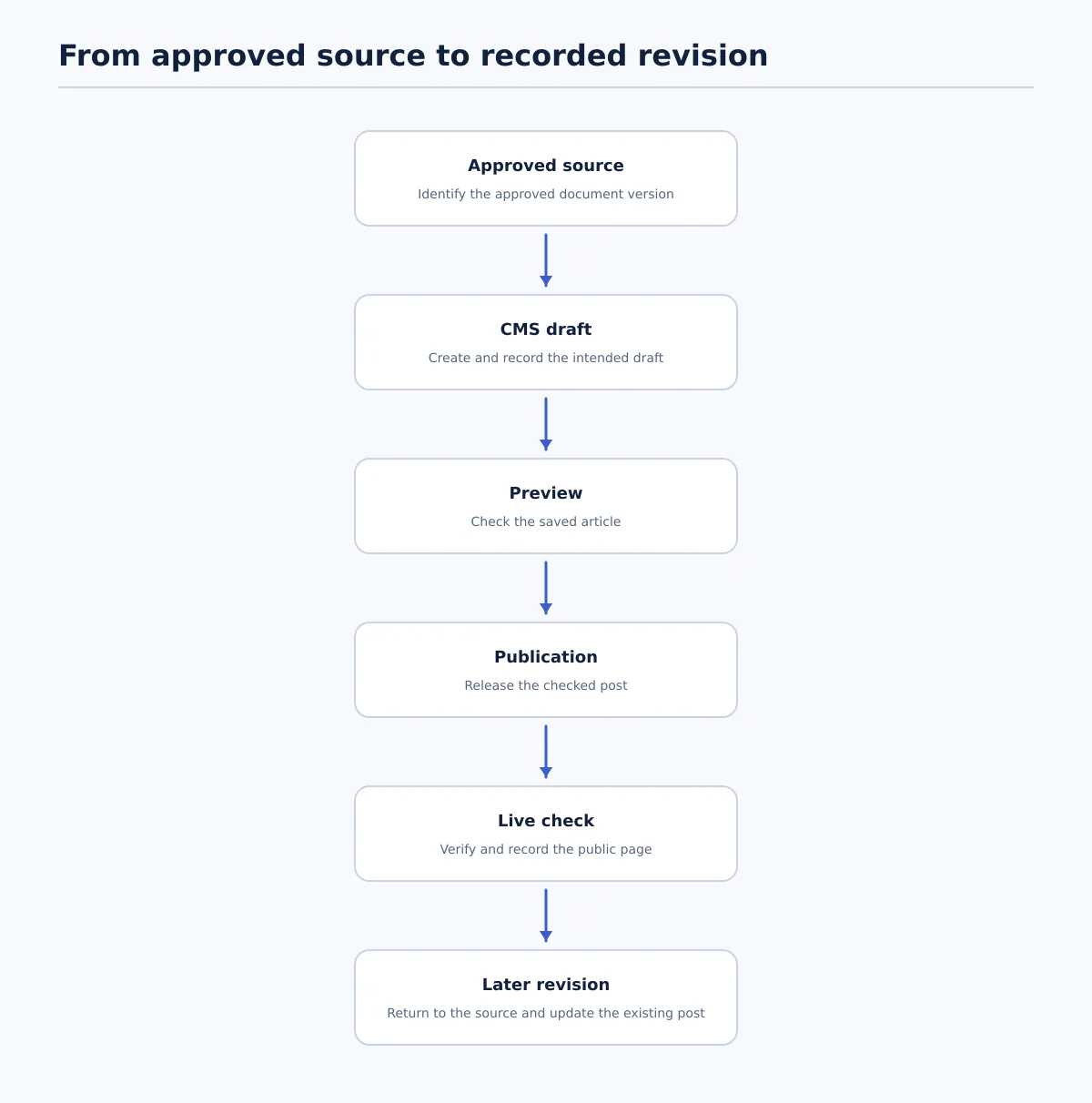 The workflow continues after publication when the source and existing post need a revision.
The wider editorial lifecycle can include choosing an idea, writing, reviewing, publishing, maintaining, and eventually retiring content. This guide starts when the article is finished and approved. For the broader process, see the editorial workflow from draft to published post.
From that starting point, the workflow needs to accomplish four things:
- Identify the approved source and intended destination. Anyone responsible for the post should be able to find both without guessing.
- Produce a reviewable CMS draft. The article must be in the right site and state, with its structure and settings checked.
- Confirm the public result. A saved draft or successful transfer is not evidence that the intended page is live and correct.
- Make later changes traceable. The source, existing post, and revision record should point to the same article.
These are practical checks, not a requirement to buy software or create a separate role for every step. The important distinction is between a task being attempted and its result being verified.
Choose the source, destination, and owner
Before transferring anything, create a small source-to-post record. A row in a spreadsheet or a section in an editorial document is enough. Keep it somewhere the people responsible for publication can find it.
The following example is illustrative. The names and identifiers stand in for links or values you would use in your own record; they are not actual documents or pages.
| Field | Example value |
|---|---|
| Article | A Small Balcony Garden Checklist |
| Approved source | Balcony checklist — v1, approved document link in the team’s record |
| Destination | The Garden Notes site, WordPress |
| Intended item | New blog post |
| Publishing owner | Maya |
| Approval status | Approved by Maya; v1 |
| CMS draft | Not created yet |
| Live URL | Not published yet |
| Next action | Create a draft on The Garden Notes site |
Use a link to the exact document when possible. For a local file, record its location and version or another identifier that distinguishes it from older copies. “Final article” is a weak identifier if several files have similar names. If the document changes after approval, record which version is now approved before transferring it.
The destination is more than the platform name. If you manage two WordPress sites or several Blogger blogs, name the intended site. Also record whether you intend to create a new post or update an existing one. A new post needs an empty draft field initially; an update needs a reference to the existing post.
For a solo writer, the owner can simply be the writer. For a writer-editor pair, identify the person responsible for each handoff—for example, “Leah approves the source; Sam creates and checks the draft.” The owner field is a reminder of who takes the next action, not a claim about access permissions or built-in approval controls.
Keep a revision history alongside the record. When either the document or the post is edited, compare the two before the next update and note which version contains the agreed wording.
Copy the workflow from approval through maintenance
Use this table as a starting point. Replace the example owners with names, including your own if you work alone. The completion conditions are observable: you can point to a document, a saved state, or a checked result.
| Stage | Owner | Required input | Completion condition | Recovery action |
|---|---|---|---|---|
| Approved source | Writer or editor | Finished document and approval decision | Exact source version and approval are recorded | Resolve competing versions; approve and record one source before transfer |
| Prepared CMS draft | Publisher | Approved source, destination, intended post type | Draft exists on the intended site; its draft reference is recorded | Check destination and draft list before creating another; correct or replace the wrong draft |
| Checked preview | Reviewer | Saved draft and source | Preview has been checked against the source; issues are fixed or recorded for resolution | Save corrections, reopen the preview, and repeat the affected checks |
| Publication | Publisher | Checked draft and release decision | Post is published, or its intended schedule and status are recorded | Check post status and schedule before retrying; resolve any mismatch |
| Verified live page | Publisher | Public URL and approved article | Intended public page opens and its title, content, images, and links have been checked; live URL is recorded | Check the site, status, and URL; correct the post and verify again |
| Recorded update | Update owner | Recorded source, existing post, and approved change | Source and existing post reflect the agreed change; affected live content is checked and revision is logged | Pause if versions conflict; reconcile them and identify the existing post before trying again |
A stage can return to an earlier one. If the preview exposes an unresolved editorial question, the reviewer may need a revised source or renewed approval. If a post is scheduled, publication and live verification remain separate: recording a future release is not the same as confirming the page is public.
You can add columns for due dates or notes, but keep the table usable. Its job is to show what happens next, who does it, and what evidence completes the step.
Walk through one article and its later revision
Here is the whole process for the illustrative balcony checklist. It is a worked scenario, not a report of a tested publication.
Maya writes “A Small Balcony Garden Checklist” in a document and approves version 1. She records that version, selects The Garden Notes WordPress site as the destination, and names herself as publishing owner. Because the article is new, the intended action is create a draft, not update a post.
She checks the source for unfinished notes, confirms the heading order, and opens the links. She then transfers the article using her chosen method and opens the saved draft. The title is in the expected field, the checklist remains a list, and the image and caption appear in the intended section. She records the draft reference.
In preview, Maya checks the layout at a narrow width and opens the article’s links. If a list were flattened or an image missing, she would correct the draft and review that part again. In this scenario, she completes the preview check, publishes the post, opens its public page, and records the verified URL as example.com/balcony-checklist. That address is an illustrative placeholder, not a real destination for this workflow.
Revise the source and the existing post
Later, Maya decides that one checklist item needs a correction. The published item currently says “Check the balcony’s sunlight in the morning.” She wants it to say “Check the balcony’s sunlight at different times of day.”
She opens the record and uses it to locate both the approved source and the existing post. Before making the change, she compares the relevant source passage with the live page. If an editor previously changed the CMS copy without updating the document, Maya first reconciles the difference: she identifies the intended current wording, brings the source up to date, and gets any necessary approval. This protects the agreed CMS edit when she prepares the next revision.
She revises the source, records the new approved version, and updates the existing post through her chosen method. If the method cannot clearly target that post for an update, she can edit the existing post directly instead of running a create-draft action. She then opens the public article, checks the changed item and nearby formatting, and confirms that the rest of the affected section still reads correctly.
Her record now contains the same live URL and a short revision note:
| Field | After initial publication | After the illustrative revision |
|---|---|---|
| Approved source | Balcony checklist — v1 | Balcony checklist — v2 |
| Existing post | Draft reference recorded | Same existing post |
| Live URL | example.com/balcony-checklist | example.com/balcony-checklist |
| Last checked | Title, content, images, and links | Revised checklist item and affected section |
| Revision note | Initial publication | Changed sunlight check; source and live post checked |
In a real record, add the date and responsible person. Use the recorded URL to find the article, then confirm that your chosen method can update that specific post. Otherwise, edit the existing post directly.
Prepare the approved article for a CMS draft
Preparation has two parts: make the source clear, then check what the CMS saved. Document formatting and publishing settings are separate checks. Compare the article’s title and headings with the corresponding draft fields and structure, then review the settings that apply to your site.
Start with the source
Open the version recorded as approved. Read through it once with transfer in mind:
- Headings: Confirm that section headings have a logical hierarchy. A subsection should sit under the section it explains, rather than looking like an unrelated top-level section.
- Links: Open important links and confirm that the linked text points to the intended destination. Replace temporary or internal-review links that readers should not receive.
- Images and captions: Confirm which images belong in the article, where they should appear, and which captions are final. Keep any needed image files or references available to the publisher.
- Editorial notes: Resolve comments, suggested wording, bracketed reminders, and placeholders. If a note needs a decision, return it to the person who can approve the change.
- Unusual elements: Flag tables, nested lists, quotations, and other elements that deserve a close comparison after transfer.
The source passes this check when the publisher can identify the final content and its intended structure without interpreting unfinished notes. If an image is missing or a link destination is undecided, record the issue and resolve it before treating the article as ready for publication.
If your source is a Google Doc and you are still choosing the destination, compare the options for publishing a Google Doc, including a web page, an embed, and a WordPress post. Choose the outcome that fits where you want readers to find the article and how you intend to maintain it.
Complete the CMS draft
Use your chosen manual or document-to-CMS method to create the draft on the recorded site. Then open the saved draft and compare it with the source. Check the title field separately from the body and confirm that both contain the intended text.
Confirm the heading structure, paragraphs, lists, links, images, and captions. Add or check meaningful image descriptions where they apply. For an informative image, describe the detail the reader needs in that context. For a purely decorative image, consider whether an empty alternative is appropriate.
Review the applicable post settings, such as category, labels, or scheduling choices, without assuming that WordPress and Blogger present the same fields. Leave a setting unset if it is not needed for your site. If you intend to schedule the post, record the selected date, time, and relevant timezone and check them in the saved state.
Finally, record the draft link or another reliable draft reference. The passing result is one identifiable draft on the intended site, in the intended state, ready for preview. If you cannot find it, check the site and draft list before repeating the transfer. Confirm what a repeat action is expected to do before running it.
Check the preview and the published page separately
A draft can contain the right text and still need work before release. Checking the public page separately confirms which article readers can actually open.
Before release: compare the saved preview
Open the preview of the saved draft and keep the approved source nearby. Read the article in order rather than checking only the top and bottom.
- Compare headings and lists with the source. A heading should appear at the intended level, and list items should remain in the right order.
- Open important links and check their destinations. Pay particular attention to links that were edited during transfer.
- Check that each intended image appears near the right passage, with its caption and appropriate description where applicable.
- Inspect the page at a narrow screen width as well as your normal view. Look for clipped tables, unreadable text, or images that obscure content.
- Search for remaining placeholders and editorial notes. Confirm that the title and relevant post settings match the record.
A pass means the preview represents the approved article well enough to release, with no unresolved publication-blocking issue. If something differs, fix it in the appropriate place, save, and reopen the preview. If the correction changes the article’s meaning, check whether the source also needs an approved revision.
After release: inspect the public result
Open the intended public URL after publishing. Confirm that it shows the expected title and article, not a different post, an unpublished state, or an error. Check that images load, open representative links—including any important action link—and verify that the visible publication state is what you intended.
Only then add the checked live URL to the record. If the page is not public yet, record the observed status and investigate rather than marking the live check complete. For scheduled posts, return at or after the intended release time and perform the same public check.
If the page looks wrong, first confirm that you opened the correct site and URL and that the post was saved in the intended state. Correct the identified issue, then reopen the public page. A transfer confirmation or a scheduled status is useful information, but neither replaces this check.
Decide what to automate—and what to keep checking
Automation is most useful after you can describe the manual action and its expected result. A repeatable transfer into a draft may be a candidate. A decision about whether an article is approved, suitable for readers, or ready to release still needs an accountable person.
Before enabling any automated step, write down:
- Input: Which exact document or approved version starts the action?
- Destination: Which site and post type should receive it?
- Create or update: Should the action make a new draft or change a specific existing post? How will it identify that post?
- Success signal: Where will you find the saved result, and what title, state, and content should it have?
- Recovery: Who pauses the process and what will they check if the result is missing, duplicated, or wrong?
If you cannot answer the create-or-update question, keep that step manual until you can. A source link or a recorded post URL helps a person locate the items; check the tool’s configuration separately to establish how it identifies an update target.
Try the process on one approved document and inspect the resulting draft against the source. Check its destination, status, structure, and images. Only expand the process after the result and the behavior of a repeat action are clear. Keep the preview and public-page checks even if transfer is automated.
Fix breakdowns and maintain the workflow
When something unexpected happens, pause before repeating the action. Check four things first: source identity, destination site, saved status, and recorded post reference or URL. Then choose a recovery action based on the symptom. The causes below are possibilities, not diagnoses.
| Symptom | What to check and do |
|---|---|
| Two documents both appear to be final | Compare their changes and approval history. Agree on one authoritative version, record it, and resolve any differences before transferring or updating. |
| Formatting is missing or changed | Compare the saved draft with the approved source at the affected heading, list, or table. Repair the draft, preview it again, and note the element if it repeatedly needs attention. |
| An image or link is broken | Confirm the intended image or destination in the source, then check the corresponding item in the draft or live post. Replace or correct it, save, and reopen the relevant page to test it. |
| An unexpected duplicate draft appears | Stop creating drafts. Check the site, titles, saved states, and draft references to identify the intended draft. Decide which draft to retain and handle the duplicate according to your site’s practice. Record the retained reference. |
| A scheduled post is not yet live | Check the saved schedule, timezone, site, and post status. If the intended time has passed and the page is still unavailable, investigate the status before attempting another publication action. Verify the public URL once it is live. |
| The source and live page disagree | Locate the recorded versions and compare the differing passages. Decide which wording is correct, reconcile the source and existing post, and log the approved revision. Avoid transferring the whole source over the post until the differences are understood. |
| An update appears to have reached the wrong place | Check the destination site and both post references. Assess and correct the unintended change, then update the intended existing post and verify both affected pages. Record the outcome. |
Keep a short note when a stage causes rework: the article, symptom, correction, and possible cause are enough. If the same issue recurs, change the relevant stage rather than adding checks everywhere. For example, repeated missing captions may call for a source-preparation check and a targeted draft comparison. A one-off typo may need only a correction and revision note.
Review the record when an article needs an update, when responsibility changes, or when a recurring problem suggests the process is not working. The goal is not a longer checklist; it is a reliable route from the right source to the right post.
For a small first trial, use Tenwrite to turn one finished document into a draft on your intended WordPress or Blogger site. Open the saved draft, inspect it against the source, and record the source and draft URL in your workflow table.