
A shared Google Doc can contain the latest wording without being the latest approved source. For an agency, the useful question is not simply how to edit document google files. It is whether the team can identify the client-approved revision, confirm the publishing package, and move that specific source into CMS draft QA without guessing.
That boundary matters when an editor, SEO reviewer, account contact, and publisher work on the same article. A saved text change may still need approval, metadata, destination checks, or a release decision. The workflow below treats Google Docs as the source workspace and the CMS as a separate QA and release environment.
The goal is a controlled handoff:
- Assign the document’s roles and status.
- Make and record the required revisions.
- Close or explicitly disposition review decisions.
- Identify one approved source version.
- Check the publishing package.
- Move the source into a CMS draft for QA.
- Reopen approval when a late change affects the release.
Why ordinary Google Docs editing creates publishing risk for agencies
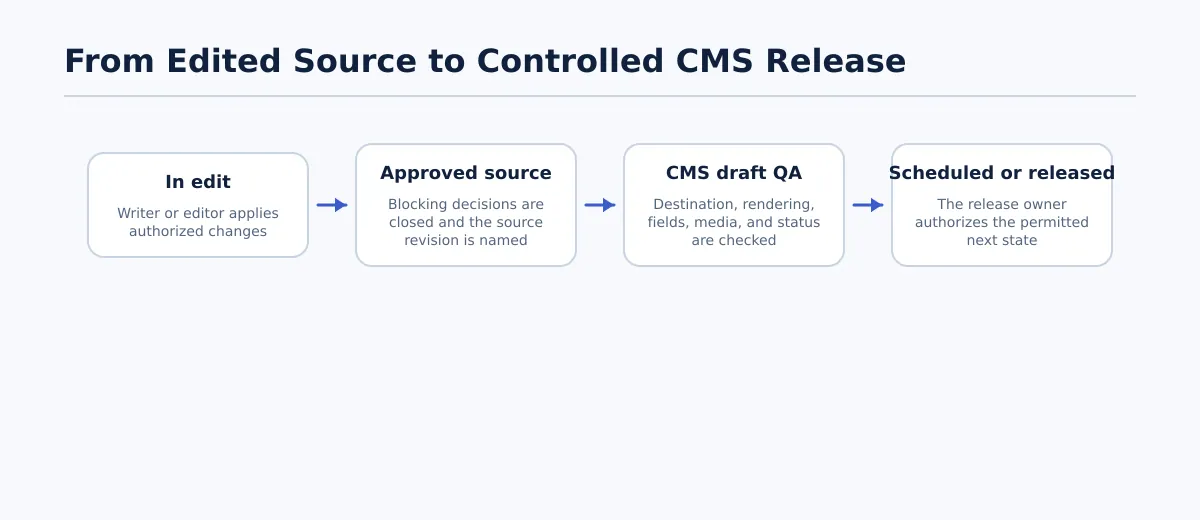 Client content moves from an edited source to CMS QA and an authorized release state through explicit handoffs.
A document can be textually complete while still being operationally incomplete. The editor may have corrected the article, but the SEO title could remain undecided. The account team may have received client feedback, but no one may have recorded whether that feedback was accepted. The publisher may have a CMS connection but no confirmed destination or release permission.
For multi-client teams, distinguish these two states:
| Saved text changes | Publish-ready source |
|---|---|
| Wording has been changed in the document | The approved source revision is identifiable |
| Review activity may still be open | Blocking decisions have a recorded outcome |
| Destination and publishing fields may be incomplete | Required fields and destination are confirmed |
| The next owner may be unclear | CMS QA and release owners are named |
| No release state is implied | The permitted next state is recorded |
A practical completion standard is:
Editing is complete when the team can identify the approved source, its decisions, and its next owner without reconstructing the answer from recent document activity.
This is the point where this workflow differs from a general guide to editing Google Docs files. The mechanics of changing text are only the input. The useful agency control is the handoff record that follows.
For the broader process after source approval, see Content Workflow Automation for Agencies.
Set the document roles and status before anyone edits
Before editing begins, add a control block to the document or its associated handoff record. At minimum, record:
- Client and destination site
- Working title or topic
- Source document owner
- Current status
- Editorial reviewer
- SEO reviewer, when applicable
- Client or account approver
- Publisher or CMS QA owner
- Release owner
- Target date and timezone, when applicable
- CMS item link or ID, once created
A person may hold more than one role on a small account, but the responsibility should still be named. “Content team” is not a sufficient owner for an approval or release decision.
Responsibility matrix
| Role | Main responsibility | May edit copy | Resolves assigned decisions | Approves source | Authorizes release |
|---|---|---|---|---|---|
| Writer | Applies brief-led production changes | Yes during In edit | Only when assigned | No | No |
| Editor | Owns editorial consistency and closeout | Yes | Yes for editorial decisions | When delegated | No |
| SEO reviewer | Reviews search fields and relevant structure | By team rule | Yes for SEO decisions | When delegated | No |
| Client or account contact | Supplies client decisions and approval | By agreement | Confirms client decisions | When required | Usually no |
| Publisher or CMS QA owner | Transfers and validates the CMS draft | Only for approved formatting fixes | No for editorial decisions | No | When assigned |
Status model
| Status | Owner | Input | Exit condition | Recorded outcome |
|---|---|---|---|---|
| In edit | Writer or editor | Brief and current source | Production edits are complete | Editor and edit date |
| Awaiting review | Editor | Working revision | Assigned review has started or been accepted | Reviewer and due date |
| Changes requested | Editor or account owner | Feedback, suggestions, or missing inputs | Each requested change is accepted, rejected, or deferred | Decision log and requester |
| Approved source | Client, account approver, or delegate | Closed review revision | Approver identifies the source version | Approver, date, and revision reference |
| CMS QA | Publisher or QA owner | Approved source and publishing package | Draft passes destination, rendering, field, and status checks | QA result and exceptions |
| Scheduled | Release owner | QA-approved CMS draft | Authorized schedule is recorded | Date, timezone, and owner |
| Released | Release owner | Authorized scheduled or immediate release | Destination is checked after release | URL or post ID, time, and result |
The owner is accountable for advancing the item or returning it. The owner does not have to perform every task. For example, the publisher may own CMS QA while the SEO reviewer supplies the approved SEO title and description.
Make changes using the right mode: direct edit, suggestion, or comment
Use the editing mode that matches the decision being made. This keeps the document’s review trail understandable without turning every correction into a formal approval event.
| Mode | Use it for | Agency example | Required outcome |
|---|---|---|---|
| Direct edit | An authorized production correction that does not change approved meaning | Fix a typo or correct an agreed formatting issue | Record the revision when it affects the handoff |
| Suggestion | Wording that needs acceptance or could change meaning | Replace a client-facing claim or revise an SEO title | Assigned reviewer accepts, rejects, or discusses it |
| Comment | A question, missing input, or approval request | Ask the client to confirm a product claim or link | Name the decision owner and resolve or explicitly defer it |
Use a direct edit for a pre-review correction within the editor’s authority. Use a suggestion when another person must accept the wording. Use a comment when the team lacks information or permission to decide safely.
A short decision rule works well:
- If the editor can correct the issue without changing approved meaning, make a direct edit.
- If the wording needs review, make a suggestion.
- If information or permission is missing, leave a comment and assign the question.
- If a required decision is unresolved, keep the document out of Approved source.
Once a document has been approved, treat a substantive direct edit as a new change request even if the editor has permission to make the change. The issue is not whether the edit is technically possible; it is whether the approved source remains the same.
Resolve comments and create one approved source version
Closeout should produce a clear source record, not merely a document that appears finished. Use this sequence:
- Review every comment, suggestion, and assigned question.
- Accept or reject each blocking suggestion through the responsible reviewer.
- Resolve comments with a recorded answer.
- For a non-blocking suggestion, either accept or reject it, or explicitly defer it.
- Record deferred suggestions in the release note or decision log with the owner, reason, and follow-up date or next review point.
- Confirm the document status and publishing package.
- Add the approver, approval date, and approved source version to the release note.
- Change the status to Approved source only when the required checks pass.
An open suggestion is not automatically harmless. The closeout record must make its disposition clear:
- Accepted: incorporated into the approved source.
- Rejected: not part of the approved source, with the decision owner recorded.
- Deferred, non-blocking: intentionally left for a later update, with an owner and follow-up recorded.
- Unresolved and blocking: the document remains in Changes requested or Awaiting review.
When available in the team’s document setup, version history can help locate what the document contained at a particular point. Use that information to verify the named revision, not as a substitute for an approval record.
Sample approval and release note
Release note
Client: Northstar Dental
Topic: Preventive dental care for children
Destination: Northstar Dental WordPress site
Approved source version: 2026-08-19, 14:20 UTC
Editorial owner: Maya Chen
SEO review: Leon Ortiz — complete
Client approver: Priya Shah
Approval date: 2026-08-19
Status: Approved source; move to CMS QA
Deferred suggestion: Add an internal-link variation during the next content refresh; owner: Maya Chen; review by 2026-09-15
Exceptions: Confirm image license during CMS QA
Pass when every blocking decision has an outcome, every deferred non-blocking suggestion has an owner and follow-up, the approver is named, the approval date is present, and the source version is identifiable. Fail when a blocking decision remains open, a deferred suggestion has no owner, the approver is unnamed, or two people could reasonably select different final revisions.
Check publishing fields and content elements before CMS handoff
An approved source still needs a publishing package. Separate checks into required, conditional, and optional items because client sites do not all use the same fields.
Required for the handoff
Confirm these items unless the client’s documented workflow says otherwise:
- Final title
- Final body copy
- Heading structure
- Destination site and content type
- Links and intended destinations
- Approval state and source version
- Handoff owner and CMS QA owner
Check headings as structure rather than visual styling. Confirm that the article title and section hierarchy are intentional, and that editorial notes are outside the publishable body.
Run a link pass by checking each important URL against its intended destination. If a link is pending, record the owner and keep the item in Changes requested or CMS QA rather than silently replacing it.
Run an image pass by recording the asset source or owner, placement, caption requirement, and alt-text instruction when the client workflow requires them. A placeholder without an owner is an incomplete handoff.
Conditional fields
Add these when required by the destination, post type, campaign, or client template:
- Slug or target URL
- Excerpt
- SEO title
- Meta description
- Canonical URL
- Categories and tags
- Author
- Featured image
- Alt text or caption
- Publish date and timezone
- Custom fields, schema inputs, or campaign values
Mark a field not applicable only when the workflow owner has confirmed that decision. Otherwise, a blank field is incomplete.
Handoff outcomes
- Ready for CMS QA: required items are complete, conditional fields are handled, and source approval is recorded.
- Return for completion: a known field or asset is missing and has an assigned owner.
- Blocked: the destination, approval authority, or source version is uncertain.
For the technical preparation that may follow this step, see Google Doc to HTML Converter: How Agency Teams Create Clean, Publishable HTML. Conversion should follow source approval rather than determine it.
Move the approved document into CMS draft QA and release control
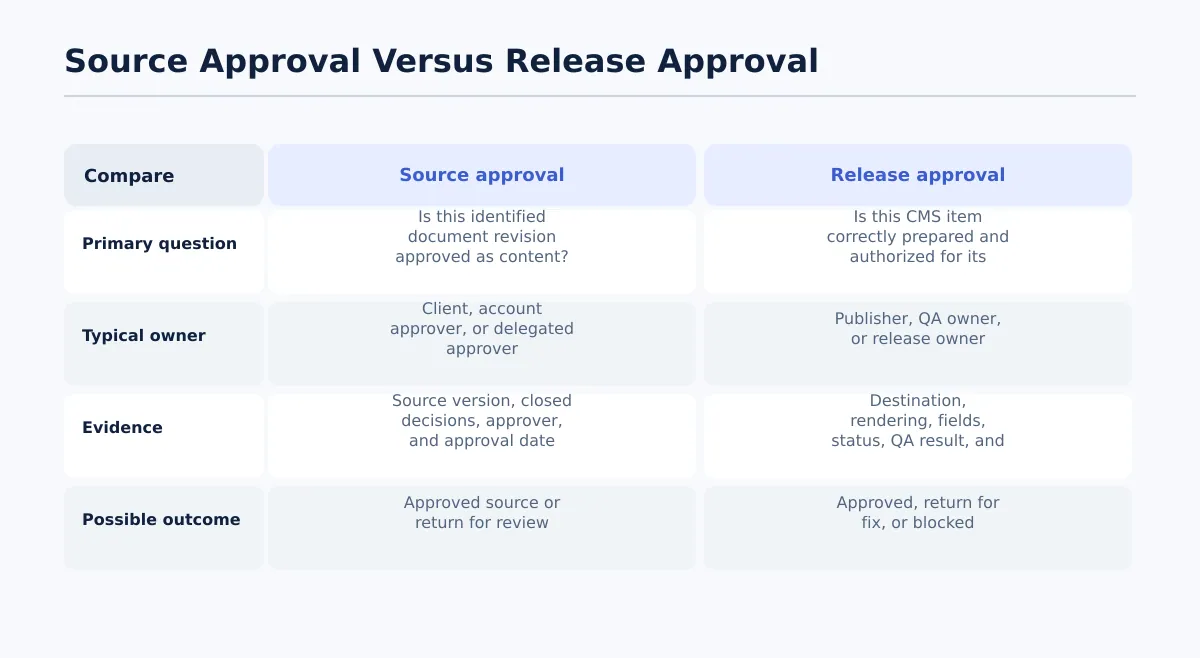 Source approval validates the document revision; release approval validates the CMS destination and permitted release state.
Source approval answers whether the identified document revision is approved as content. Release approval answers whether the CMS item is correctly prepared and authorized for its next release state. Keep those decisions separate in the record.
Use this handoff sequence:
- Confirm the document status is Approved source.
- Confirm the source version, approver, destination, and post type.
- Create or transfer the content into a CMS draft.
- Assign the draft to the publisher or CMS QA owner.
- Keep the item in a reviewable state while QA is incomplete.
- Record one result: approved, return for fix, or blocked.
- Schedule or release only when the release owner authorizes that state.
CMS draft QA checks
Destination and identity: Confirm the client site, environment, post type, and intended item. Pass when they match the handoff record. Fail when the site, environment, or content type is uncertain.
Content rendering: Compare the CMS draft with the approved source. Check the title, headings, paragraphs, lists, tables, links, embeds, and images. Pass when required content is present and renders as intended. Fail for missing sections, duplicated text, broken links, unexplained formatting, empty blocks, or editorial notes appearing in the page.
Fields and media: Check the required CMS fields and the conditional fields listed in the handoff. Pass when each required value is present and matches the approved package. Fail when a required value is blank, contradictory, or mapped incorrectly.
Status and release: Confirm draft, held, scheduled, or released status, including date and timezone when scheduled. Pass when the permitted state and release owner are recorded. Fail when the status, schedule, or authorization is unclear.
Tenwrite’s documented capability supports this controlled boundary by allowing teams to review, revise, schedule, or save generated content as a CMS draft before it goes live. Teams should still verify the destination, fields, rendering, and authorization for each client site.
Worked example: one article from edit to scheduled release
Use one named article to make the handoff concrete. In this example, Northstar Dental’s article begins in In edit and is scheduled only after source and CMS checks pass.
| Transition | Owner and input | Action and decision | Status after transition | Recorded outcome |
|---|---|---|---|---|
| In edit → Awaiting review | Maya, editor; current article and brief | Completes copy corrections and flags the client claim for review | Awaiting review | Maya’s name, revision date, and Leon’s review assignment |
| Awaiting review → Changes requested | Leon, SEO reviewer; article and review questions | Suggests a new SEO title; Priya, account contact, confirms the client claim needs qualification | Changes requested | Suggestion, client question, owners, and deadline |
| Changes requested → Approved source | Priya, client approver; revised article | Accepts the qualified claim and SEO title; Maya closes blocking decisions and records the approved source revision | Approved source | Approval note with approver, date, revision reference, and one deferred non-blocking suggestion |
| Approved source → CMS QA | Sam, publisher; approved source and handoff package | Creates the post in the correct WordPress draft and checks title, headings, links, image, metadata, and destination | CMS QA | QA result: approved; image-license exception assigned for resolution before scheduling |
| CMS QA → Scheduled | Sam and release owner; corrected draft | License is confirmed; release owner verifies date and timezone | Scheduled | Schedule time, timezone, owner, and CMS item ID |
Late revision after scheduling
After scheduling, Priya requests that “clinically proven” be replaced with a more qualified statement. Sam does not silently edit the scheduled item.
- Priya records the request and deadline.
- The release owner changes the status to Changes requested.
- Maya makes a suggestion for the new wording.
- Priya accepts the wording as client approver.
- Maya records the new approved source revision.
- Leon rechecks the SEO title and description because the claim appears in the description.
- Sam rechecks the changed paragraph, preview, metadata, schedule, and CMS status.
- The release owner records the outcome as Pass — return to Scheduled.
If the change were only a typo in an unaffected paragraph, the team’s documented rule might require only editor approval and a content-rendering check. The record should still state Pass or Fail for each affected check and explain why unchanged checks were carried forward. A legal or factual change should not use the minor-typo path.
Handle late client revisions after approval
A late revision is a change-control event whether the item is in CMS QA, scheduled, or awaiting release. Use this sequence:
- Move Approved source or Scheduled to Changes requested.
- Name the requester, requested change, owner, and deadline.
- Classify the change as editorial, SEO, factual, legal, media, or release-related.
- Choose a direct edit, suggestion, or comment according to the authority rule.
- Identify the new source revision after the change is accepted.
- Re-run each affected approval check and record Pass or Fail.
- Re-run each affected CMS QA check and record Pass or Fail.
- Record the new approver, approval date, release decision, and changed schedule if applicable.
For a legal wording change, repeat client approval, relevant SEO review, source-version confirmation, changed-content rendering, preview, metadata, and schedule checks. The outcome should list each result, such as Pass — client approval, Pass — SEO description, Pass — CMS rendering, and Fail — schedule requires reauthorization.
For a minor typo, repeat the editor decision and the content-rendering check. Destination, unchanged metadata, and schedule may remain valid only if the release owner’s documented rule permits carrying them forward; record that they were reviewed and marked Pass — unchanged.
Do not release when a required affected check has no owner or recorded outcome.
Use the final edit-to-release checklist
Source version
- [ ] Correct client, destination, and content type are recorded.
- [ ] Approved Google Doc location is recorded.
- [ ] Approved source version is identifiable.
- [ ] Current status matches the handoff state.
- [ ] No later unreviewed edit exists after approval.
Editorial decisions
- [ ] Every blocking suggestion is accepted or rejected.
- [ ] Every decision comment is resolved.
- [ ] Every deferred non-blocking suggestion has an owner, reason, and follow-up.
- [ ] Late revisions have a new decision record and affected-check results.
Ownership and approval
- [ ] Required client or delegated approver is named.
- [ ] Approval date and outcome are recorded.
- [ ] Publisher or CMS QA owner is assigned.
- [ ] Release owner is assigned.
- [ ] Exceptions have an owner and permitted next state.
SEO and metadata
- [ ] Slug or target URL is confirmed when required.
- [ ] Excerpt is present when required.
- [ ] SEO title and meta description are handled when required.
- [ ] Categories, tags, author, canonical, and custom fields follow destination rules.
- [ ] Featured image, alt text, caption, and media ownership are handled when required.
CMS QA
- [ ] Draft is in the correct client site and environment.
- [ ] Post type is correct.
- [ ] Headings, lists, tables, links, embeds, and images render as intended.
- [ ] No content is missing, duplicated, or unintentionally editorial.
- [ ] CMS fields match the approved source and handoff record.
- [ ] QA result is recorded as approved, return for fix, or blocked.
Schedule and release
- [ ] Permitted status is recorded: draft, held, scheduled, or released.
- [ ] Date, time, and timezone are confirmed when applicable.
- [ ] Release owner authorizes the next state.
- [ ] CMS URL or post ID is recorded after scheduling or release.
Stop condition: do not schedule or release when any required item has no owner, no recorded outcome, an unresolved blocking decision, an uncertain destination, or an unidentifiable source version.
Evaluate your current process with one recently handled client article. Can the team identify the approved source, the decisions that were deferred, the person who authorized CMS release, and the outcome of any late revision? If not, improve the handoff record before trying to accelerate document editing.
When the controls are defined, Tenwrite can help move reviewed content into a CMS draft workflow where teams can continue to review, revise, schedule, or hold the item before it goes live. Use the final checklist to decide what your team should verify before adopting any publishing workflow.