
A Google Doc can be approved for publication and still be missing the decisions needed for a safe Blogger release. The source may be ready while the destination blog, content type, post details, timing, or final reviewer remains unclear.
For an agency, google docs to blogger publishing should therefore be treated as a controlled release process. The team identifies the approved document, records the destination and release settings, transfers the content into a reviewable state, checks the Blogger result, and records what happened. This process can sit around a manual handoff or a documented export workflow; it is not a substitute for editorial or release approval.
Why an approved Google Doc can still be unsafe to publish
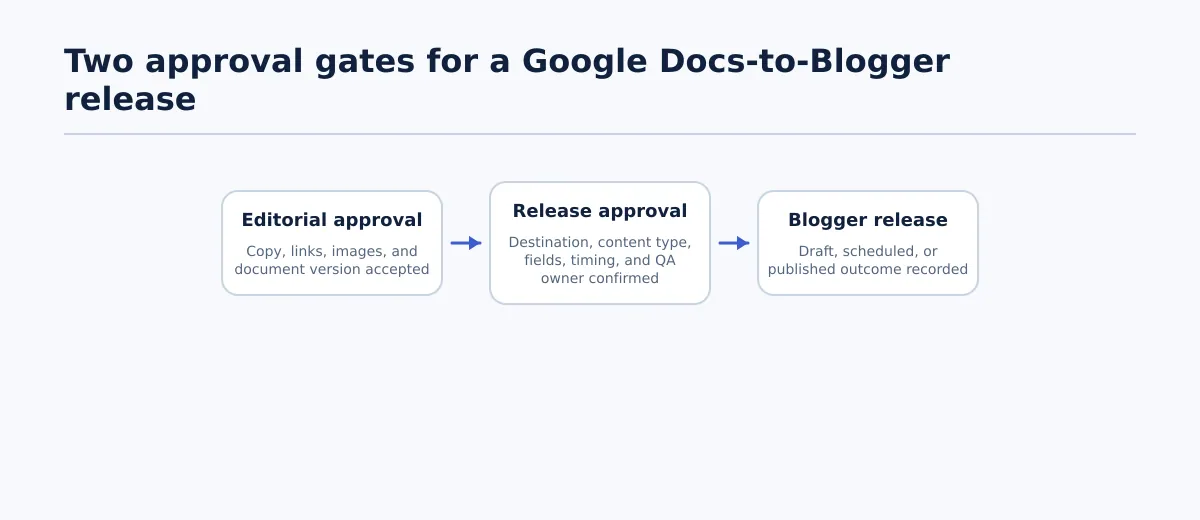 A Google Docs-to-Blogger transfer should pass editorial approval and release approval before publication.
Editorial approval and release approval answer different questions.
Editorial approval means the reviewer accepts the content in a specific document version. The wording, links, images, and required editorial changes have been reviewed. Release approval means the publishing owner has confirmed the destination Blogger blog, post or page decision, required details, timing, release mode, and final QA responsibility.
A document can pass the first gate and fail the second. For example, a client may approve an article while the agency is still confirming which of two Blogger blogs should receive it. The copy is acceptable, but the release decision is incomplete.
Use this gate before transfer:
- Pass editorial approval: the source URL, approved revision or approval timestamp, and approver are recorded; required suggestions and comments are resolved.
- Pass release approval: the destination blog, content type, required post details, release mode, release owner, and QA responsibility are recorded.
- Fail: return the item to its owner when any required decision is blank, conflicting, or based on an assumption.
The latest edit is not automatically the approved version. If the document changes after approval, the editor should decide whether it needs review again. The handoff record should identify the version being released instead of relying on the publisher to infer it from recent Drive activity.
Create a Google Docs-to-Blogger handoff record
Create one handoff record for each intended release. A row in an operations sheet, a project-management task, or a structured intake form can work. This is a repeatable agency control, not a claim that every Blogger site requires the same fields.
Require the following information before the item enters the release queue:
| Handoff field | What to record | Pass condition |
|---|---|---|
| Client or site name | Account and site associated with the content | It matches the approved brief |
| Destination Blogger blog | Exact blog selected for release | One destination is confirmed; no placeholder remains |
| Google Doc URL | Source document link | It opens the intended source for the release owner |
| Approved version | Revision reference, approval note, or timestamp | The publisher can identify the accepted version |
| Content owner | Person responsible for source content | One named person can resolve content questions |
| Reviewer or approver | Person who accepted the content | Approval is attributable and dated |
| Content type | Blogger post or page | It matches the brief |
| Title | Approved title | It is final and unambiguous |
| URL decision, where applicable | Approved slug or URL instruction | The publisher knows whether to set or review it |
| Labels or categories, where used | Approved taxonomy values | Values follow the client’s naming rules |
| Excerpt or description, where used | Supporting text or an explicit “not used” decision | The field is complete when required by the workflow |
| Featured image decision | Image, placement, or explicit no-image instruction | The source and responsibility are clear |
| Release mode | Draft, scheduled post, or immediate publication | The mode is permitted by the approval record |
| Schedule, where used | Date, time, and timezone | A scheduling owner confirms the timing |
| Release owner | Person authorized to complete the action | One person owns the release decision |
| Approval timestamp | Time of content and release approval | It predates the transfer |
A blank required field should route the item back to its owner. Do not guess the destination, content type, taxonomy, or timing. If a field is intentionally not used for a client, record that decision explicitly rather than leaving it visually empty.
A practical status model is:
Drafting → Editorial approved → Release ready → Blogger QA → Scheduled or published
Use Blocked when a missing decision or technical exception prevents progress. Keep the source URL, approved version, owner, next action, and latest decision with the record so another editor can continue the handoff without reconstructing the client conversation.
For a broader view of the controls around agency publishing systems, see Content Agency Software: How to Build a Controlled Publishing Stack. The Blogger-specific destination and release checks below should remain separate from any WordPress field assumptions.
Prepare the approved Google Doc for transfer
Document preflight is not a guide to writing in Google Docs. It is a check that the specific source named in the handoff record is complete, identifiable, and ready for transfer.
Run these checks before opening the export workflow:
- Confirm one final title. Remove alternate headline options from the release version or identify the approved CMS title separately.
- Check heading structure. Confirm that headings represent the intended content hierarchy. Treat unexpected heading changes after transfer as a QA issue.
- Resolve suggestions and required comments. Open decisions mean the document is not yet release-ready unless the approver has explicitly accepted them.
- Test final links. Open required links, compare them with the approved destinations, and replace placeholders or unresolved client URLs.
- Verify image placement. Confirm that each image is final or has a named source and placement instruction. Record featured-image instructions separately when needed.
- Remove placeholder copy. Search for brackets, “TBD,” temporary links, writer instructions, and internal notes.
- Record the checked version. Add the approval timestamp or revision reference to the handoff record. Do not assume later edits are included merely because they are in the same file.
Mark the document pass only when the publisher can transfer it without making an editorial choice. Mark it revise when a known correction is needed. Mark it blocked when the owner, approval, destination information, or required asset is missing.
If a team needs an intermediate clean-HTML handoff, the Google Doc to HTML Converter guide covers that adjacent decision. It should not replace the approved-source and destination checks in this workflow.
Select the correct Blogger destination and release mode
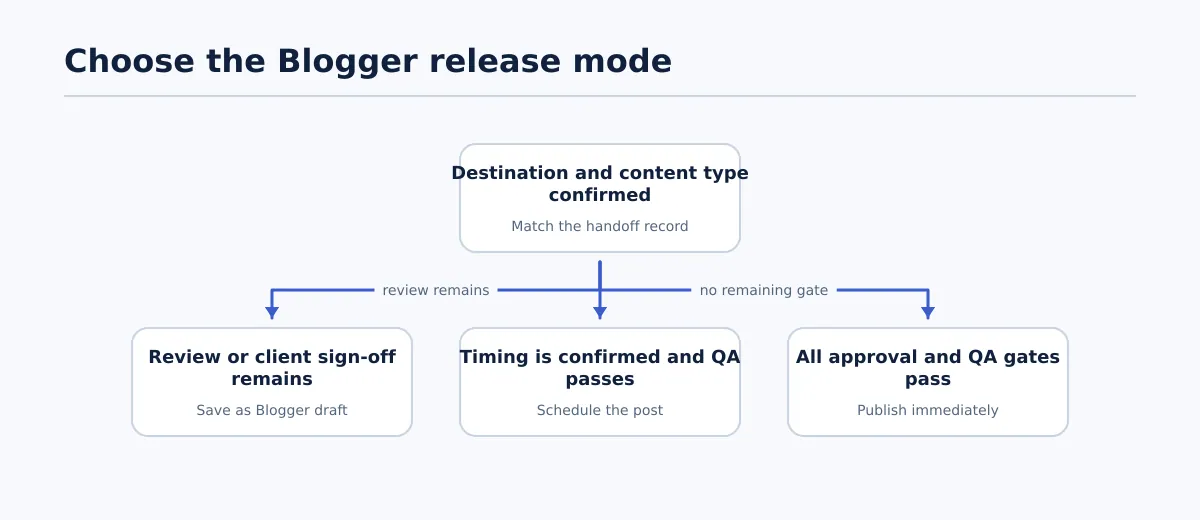 Choose the Blogger state only after confirming the destination and the remaining approval work.
Confirm the destination before adding content. In a multi-client queue, the last blog used by a publisher is not evidence that it is the right blog for the current item.
Use this sequence:
- Match the client and selected Blogger blog with the handoff record.
- Choose post or page according to the approved brief.
- Select only an eligible source. The supplied Tenwrite export documentation states that its documented flow supports Google Docs and does not describe other file types as equivalent sources.
- Enter the approved post details and optional settings that apply to the client workflow.
- Select the permitted release mode: draft, scheduled post, or immediate publication.
The Tenwrite Google Docs-to-Blogger export guide documents the product’s export steps, destination selection, post or page choice, post details, optional settings, and listed troubleshooting topics. Use it for the interface sequence; use the handoff record for the agency’s approval decisions.
When to save a Blogger draft
Save a draft when the Blogger version needs inspection or a required review remains. Examples include pending client sign-off, an unresolved image decision, or a formatting check that must happen in the destination.
Pass condition: the item is associated with the confirmed destination, the release owner is named, and the next review action is recorded. A saved draft is not a completed release.
When to schedule a post
Schedule only when the date, time, timezone, destination, content type, and scheduling owner are confirmed in the handoff record. Scheduling should occur after the required content and rendered-view checks, not as a way to bypass them.
Pass condition: the scheduled state and timing match the record, and a named person owns the later status check.
When to publish immediately
Publish immediately only when editorial approval, release approval, and final Blogger QA have passed. If a client decision, destination confirmation, or required field remains open, use a reviewable state instead.
Pass condition: the release owner has inspected the transferred item and is authorized to complete the action.
Run final QA in Blogger before the release is complete
The transferred item is a new representation of the approved source. A transfer result alone does not establish that the destination, visible content, or approved settings are correct.
Open the Blogger draft, scheduled item, or post and inspect the following:
| Check | Pass condition | If it fails |
|---|---|---|
| Destination | The item is in the confirmed client Blogger blog | Stop and route it to the correct destination workflow |
| Content type | It is a post or page as recorded | Return it to the release owner |
| Title | It matches the approved title | Compare with the identified source version and revise |
| Body content | The approved content is present and in the expected order | Compare the destination with the source |
| Headings | The hierarchy remains clear and readable | Correct the item and repeat content QA |
| Links | Required links point to approved destinations | Repair or escalate the link decision |
| Images | Images appear in intended locations and are available as required | Hold release until the issue has an owner |
| Labels or categories, where used | Values match the handoff record | Correct taxonomy before release |
| Excerpt or description, where used | The required field is present and accurate | Add or revise it, then recheck the record |
| Publication state | Draft, scheduled, or live matches the approved mode | Do not mark complete until corrected |
| Scheduled date, where used | Date, time, and timezone match the record | Correct the schedule and assign a timing check |
| Rendered view | Formatting is readable with no unexplained gaps or duplicate sections | Return for revision and inspect again |
Use three outcomes: approved, return for fix, or blocked. If a correction changes an approved title, label, image, or schedule, record who authorized it and whether the source needs re-approval.
The release is complete when the release owner records the resulting Blogger URL or status, the timestamp, and any exception notes. For scheduled content, record the scheduled state first and append the observed publication result after the timing check. The Google Docs publishing QA reference provides adjacent guidance on clean source handoffs; apply only the checks relevant to the approved Blogger record.
Handle common exceptions without losing the release record
An exception changes the next action, not the need for traceability. Pause the release, preserve the original handoff record, assign an owner, correct the issue, and repeat the relevant preflight or Blogger QA check.
No destination blogs appear
Do not choose an unverified account or continue with a guessed destination. Mark the item blocked, retain the client and source details, and assign the release owner to resolve the destination or access issue. When a destination becomes available, match it against the handoff record before continuing.
Google reauthorization is required
Pause the release and follow the reauthorization path described in the Tenwrite export documentation. Record the affected item, owner, and interruption. After access is restored, recheck the destination and source document before restarting the transfer.
The selected file is not a Google Doc
Keep the record intact and return the item to its owner for an eligible source. Do not substitute a similarly named file without confirming its approval. Once the correct Google Doc is supplied, repeat the approved-version and document-preflight checks.
A document fails during export
For a batch, separate transferred items from failed items and record the result against each source document. Do not mark the batch complete because some items succeeded. Assign the failed documents, rerun the relevant export after correction, and complete Blogger QA on the resulting items.
A scheduled post does not publish
Record the expected schedule, observed state, affected destination, and owner. Keep the item open while the documented troubleshooting path is followed. Verify the actual Blogger state and URL afterward. If the content or timing changes, repeat release approval before rescheduling or publishing.
Example: one agency release queue across multiple Blogger clients
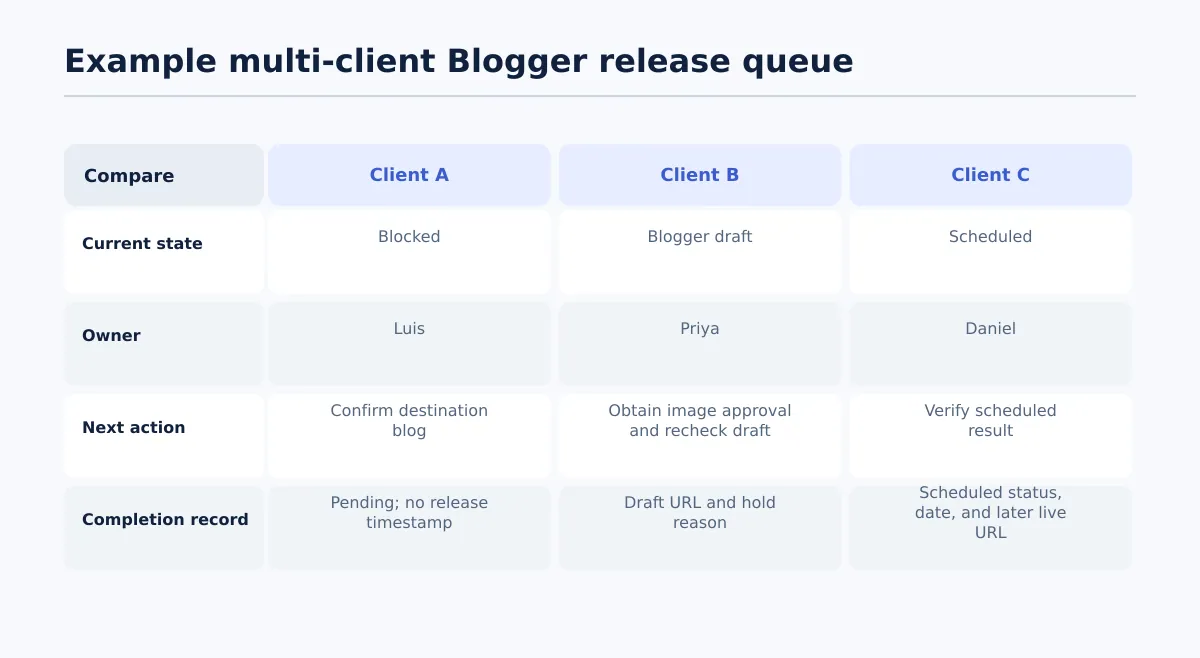 A release queue should show the owner, current state, next action, and evidence of completion for every client item.
Consider a fictional agency queue managed by Maya, the release manager. The agency publishes approved content for three clients, each with a separate Blogger destination.
| Client | Owner | Current state | Issue or decision | Next action | Completion record |
|---|---|---|---|---|---|
| Client A | Luis, account editor | Blocked | Destination blog is not confirmed | Luis confirms the exact blog with the account lead; Maya does not transfer the document | Pending; no release timestamp |
| Client B | Priya, content editor | Blogger draft | Client approval of the final image remains | Priya obtains approval; Maya rechecks the draft before release | Draft URL and hold reason recorded |
| Client C | Daniel, publisher | Scheduled | Destination, content type, required details, and QA passed | Daniel verifies the scheduled result after the planned time | Scheduled status, date, and later live URL recorded |
Each item has a state, owner, next action, and completion evidence. Client A is blocked for a named reason. Client B is intentionally non-public while one decision remains. Client C has reached a permitted scheduled state but is not complete until the timing check is recorded.
Maya should remove Client A from the active transfer queue, keep Client B in draft, and require Daniel to append Client C’s live URL or failure state after the scheduled time. If Client B’s image is approved, Maya compares the instruction with the Blogger draft, repeats the image and rendered-view checks, and then applies the permitted release mode. If Client C does not publish, Daniel preserves the original record and moves it into the documented exception path rather than creating an untracked replacement.
For a related example of structured publishing controls at higher source volume, see Google Sheets to WordPress: A Safer Bulk Publishing Workflow for Agencies. The platform differs, but the queue fields—owner, state, next action, and outcome—remain useful for agency operations.
A reliable Google Docs-to-Blogger process is the control layer around the transfer: identify the approved source, confirm the exact Blogger destination, choose the permitted release state, inspect the result, and record the outcome. When your team needs the interface steps, use the Tenwrite Google Docs-to-Blogger guide after establishing those controls in the release record.