
An approved Google Doc is not automatically a complete WordPress publishing handoff. A publisher still needs to confirm the destination site, inspect the converted body, attach the correct media, complete client-specific fields, and record who approved the release.
For agency teams, exporting a Google Doc as HTML is therefore one controlled step between editorial approval and CMS publication. The useful question is not only “How do I convert Google Docs to HTML?” It is also “Can this output be accepted by this client’s publishing process?”
This guide treats HTML export as a release workflow. It shows how to choose a route, prepare the source document, produce usable HTML, validate the WordPress draft, check fields outside the body, and handle exceptions without publishing an unreviewed export.
Export Google Doc as HTML: define the publishing objective first
Before choosing a conversion method, decide what the next owner needs. “Export HTML” and “prepare an approved document for CMS publication” are related objectives, but they produce different handoffs.
- Export HTML: create markup that a person or system can inspect, store, clean, or insert into a destination that accepts HTML.
- Prepare a CMS package: move approved content into a specific client site and post type, complete the required fields, validate the draft, and record the permitted release outcome.
The HTML body is only one component of the publishing package. Create a minimum record containing:
| Package item | Required information |
|---|---|
| Approved source | Google Doc URL and approved version or revision date |
| Destination | Client, exact site, environment, and post type |
| Core content | Final title and body HTML or CMS body field |
| Media | Featured-image status, inline image locations, source files, and alt-text ownership |
| Taxonomy | Category and tag decisions according to the client profile |
| SEO | Slug, SEO title, meta description, canonical or other SEO fields where used |
| Release control | Publisher, reviewer, approval timestamp, status, and scheduled time zone |
Complete when: another team member can identify the source, destination, required fields, owner, and permitted outcome without searching through unrelated messages.
Fail by: stopping the handoff when a required value is missing, ambiguous, or based on an unapproved assumption.
HTML export is therefore a handoff stage, not a release decision. For the broader path from an approved draft to a published post, see Content Workflow Automation for Agencies: A Controlled Path from Approved Draft to Published Post.
Choose the export route based on volume, CMS requirements, and review needs
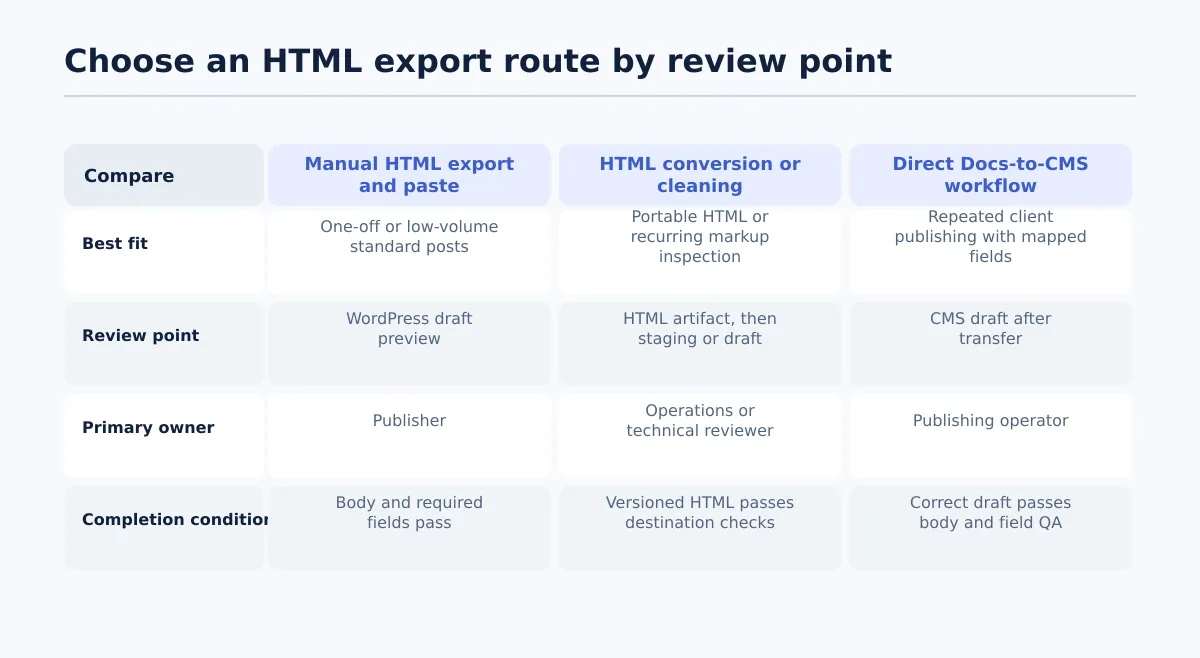 Select the export route according to volume, CMS requirements, ownership, and the location of review.
Manual export, converter-based workflows, and direct Google Docs-to-CMS publishing are all used for this type of handoff. They should not be treated as equivalent. Choose based on document complexity, publishing volume, metadata requirements, and where the output can be reviewed.
| Route | Best fit | Primary owner | Review point | Likely manual work | Completion condition |
|---|---|---|---|---|---|
| Manual HTML export and paste | One-off or low-volume posts with standard headings, links, lists, and images | Publisher | WordPress draft preview, reviewed against the Google Doc | Unzip or inspect the export, paste the body, attach media, and enter fields | Draft body and required CMS fields pass the checklist |
| HTML conversion or cleaning workflow | Teams that need a portable HTML artifact or recurring markup inspection | Content operations or technical reviewer | HTML artifact first, then destination staging or draft | Configure the route, inspect the output, resolve unsupported elements, and preserve assets | Versioned HTML is traceable to the source and passes destination checks |
| Direct Docs-to-CMS workflow | Repeated client publishing where supported content and publishing fields should move together | Publishing operator | CMS draft after transfer, with field-level review | Confirm site, mapping, permissions, exceptions, and release status | Correct draft is created and passes body and field QA |
The review point is a selection criterion, not an afterthought. A manual route is suitable only when a named publisher can review the WordPress draft. A converter route needs someone who can inspect both the generated artifact and its destination behavior. A direct CMS route still requires a draft review after transfer, even when supported fields move with the content.
Use this decision rule:
- Choose manual export for an occasional, simple handoff when a publisher can complete the review without delaying other work.
- Choose a conversion or cleaning workflow when a developer, technical editor, or downstream system needs portable HTML.
- Choose a direct CMS workflow when the agency publishes approved documents repeatedly and needs field mapping, draft review, and release records.
- Escalate custom embeds, layout-dependent tables, theme-specific behavior, or unsupported CMS elements to the CMS or technical owner.
For recurring WordPress work, a direct Docs-to-CMS workflow can reduce repeated re-entry when it supports the fields your client setup requires. Tenwrite supports Google Docs publishing workflows for WordPress and Blogger, including supported formatting, links, images, categories, tags, excerpts, and SEO metadata. Treat those capabilities as transfer support, not as a substitute for checking the actual destination draft.
If you need more detail on the conversion stage itself, see Google Doc to HTML: A Practical Conversion Workflow for Content Teams. This article focuses on the release controls that determine whether the output is accepted.
Prepare the approved Google Doc before exporting
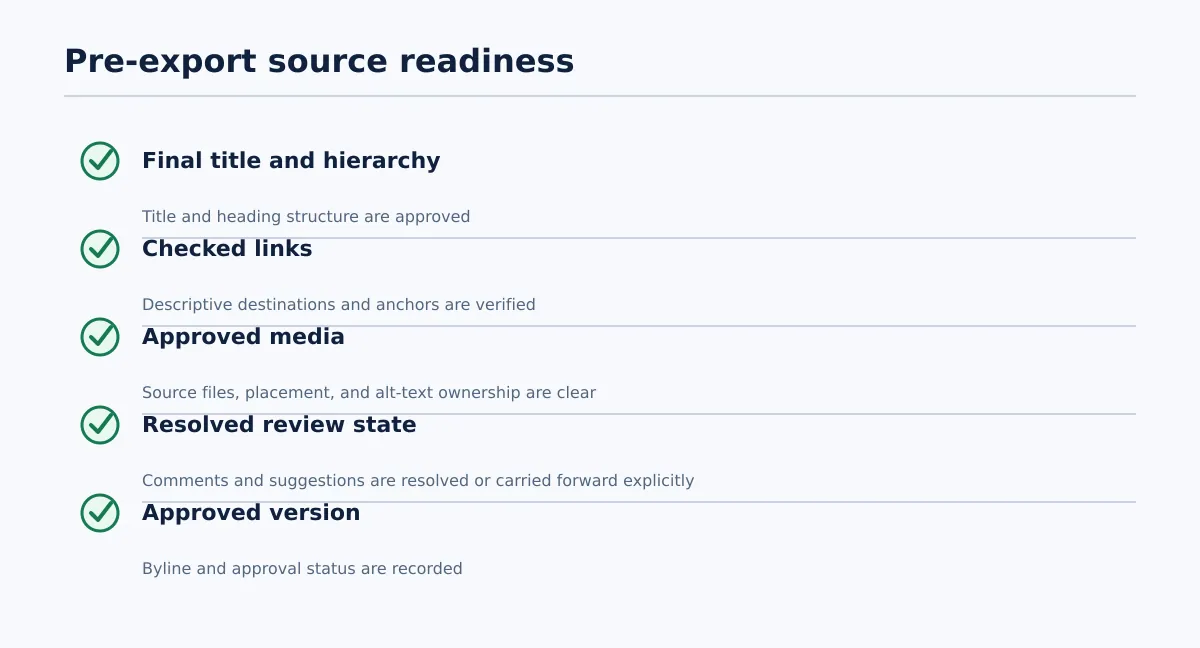 Confirm source structure, assets, links, and approval before exporting.
The source document should be complete enough to convert without editorial interpretation. The publisher may repair a presentation artifact, but should not silently rewrite approved copy while preparing HTML.
Run this checklist before conversion:
| Check | Pass condition | Owner |
|---|---|---|
| Title | The final title is present and matches the approved brief or CMS title decision | Editor |
| Heading hierarchy | The document uses one logical hierarchy and does not simulate headings with font size or boldness alone | Editor |
| Links | Link text is descriptive, destinations open correctly, and anchor links have been checked where used | Editor or SEO lead |
| Images | Approved source files, intended placement, and ownership are clear | Editor or design owner |
| Comments and suggestions | Relevant comments and suggested edits are resolved or explicitly included in the handoff | Editor |
| Tables and embeds | Each element is confirmed as supported, replaced, or routed for technical review | Editor or CMS owner |
| Byline | The final byline is supplied when the client’s post type requires one | Editor |
| Approval state | The document is marked approved with an identifiable version or revision date | Approver |
Use paragraph and heading styles consistently. Keep image instructions separate from body copy where possible. Record the intended filename, placement, alt-text owner, and whether each image is inline or featured.
A publisher can remove an extra empty paragraph. A publisher should not decide whether a visually styled line is a new section, whether a missing link should be added, or whether an unapproved sentence belongs in the post. Those decisions return to the editor or approver.
Pass when: the source can be converted without guessing about content meaning, structure, assets, or approval.
Fail by: returning the document with a specific request, such as “confirm whether this line is a heading” or “supply the approved featured-image asset.”
Export the document and isolate the usable HTML output
For a manual Google Doc to HTML handoff, use the following bounded procedure. The exact menu labels can change, so confirm the current interface for the selected route before standardizing it across the agency.
- Open the approved Google Doc and confirm the recorded revision or approval date.
- In Google Docs, use the document download option for a web page, where that option is available. The resulting download is commonly a compressed package containing an HTML file and an assets folder.
- Unzip the package into a temporary, versioned working folder. Do not edit the source Google Doc while inspecting the export.
- Open the HTML file in a browser and in a text or code editor. Confirm that the expected title, headings, paragraphs, lists, links, and images are present.
- Keep the HTML file and its related assets together until the WordPress draft has been created. Record the source URL, export date, and document version in the handoff record.
- Copy only the approved body content into the WordPress draft using the team’s agreed editor or HTML mode. Upload or attach images through the client’s approved media process rather than assuming local asset references will work in WordPress.
- Save the post as a draft and continue with destination QA. Do not schedule or publish directly from the first export.
This manual route is appropriate for a simple, occasional post only when the publisher can inspect the result in WordPress. If the route does not produce a usable HTML file, or if its image references cannot be carried into the destination, stop and use the team’s approved converter or direct publishing workflow instead.
A converter or script follows the same control pattern: start with the approved source, generate the HTML, preserve the source-to-output relationship, inspect the result, and send it to a draft or staging destination. A direct CMS workflow may skip the standalone HTML artifact, but it does not skip source, destination, field, and release checks.
Keep body HTML separate from page settings and metadata. The exported body should not be treated as proof that the slug, excerpt, taxonomy, featured image, author, SEO fields, status, or schedule have been completed.
Validate HTML structure, links, images, and formatting in a CMS draft
Inspect the content where it will be used: a WordPress draft, staging environment, or equivalent destination. Compare the draft with the approved Google Doc, not only with the exported file.
| Element | Pass test | Fail response |
|---|---|---|
| Headings | The intended hierarchy is present, with no missing, duplicated, or decorative headings | Log the section and return the structural decision to the editor |
| Paragraphs | Paragraph boundaries match the approved document without unexplained blank blocks | Remove presentation artifacts or return substantive differences |
| Lists | Ordered and unordered lists retain order, nesting, and complete items | Record the affected list and correct or route it for review |
| Inline formatting | Bold, italic, links, and other supported emphasis appear only where intended | Fix presentation artifacts; return meaning changes to the editor |
| Blockquotes | Quoted content remains distinct and complete | Ask the editor to confirm quote treatment if structure changed |
| Tables | Rows, columns, headers, and readability are preserved in the destination | Route unsupported or layout-dependent tables to the CMS owner |
| Links | Internal, external, and anchor links reach the checked destinations | SEO lead or editor corrects the destination and determines re-approval |
| Images | Images appear in the intended location, load correctly, and use approved assets | Replace or reattach the asset and record the issue |
| Alt text and captions | Ownership is clear and required destination values are present | Return to the media or SEO owner instead of guessing |
| Embeds | Each embed is supported and renders as intended in draft or staging | Route to the CMS or technical owner |
| Spacing | Duplicate breaks, unexpected indentation, and template conflicts are absent or understood | Clean presentation-only artifacts and log material changes |
Use a defect log for anything that fails:
| Element | Issue | Source document location | Owner | Status | Retest date |
|---|---|---|---|---|---|
| Heading 2 | Converted as body text | Section beginning “Choosing…” | Editor | Returned | 2026-08-14 |
| Inline image | Missing from draft | Paragraph 7 | Publisher | In progress | 2026-08-14 |
| External link | Destination returns an error | Reference paragraph | SEO lead | Open | 2026-08-15 |
Complete when: the draft matches the approved document in content and intended hierarchy, and every required exception is resolved or explicitly accepted by the authorized owner.
Fail by: recording the exact element, source location, owner, and next action, then keeping the item in a non-release status.
Map and verify CMS fields that HTML does not carry
The body conversion does not replace field-level publishing work. Confirm each value according to the client’s WordPress setup.
| Source of truth | CMS destination | Owner | Validation status | Exception |
|---|---|---|---|---|
| Approved brief or document | Title | Editor | Pass when it matches the approved title | Return to editor if different |
| Publishing profile | Slug | SEO lead or publisher | Pass when it follows the client’s URL rule | Hold if undecided |
| Approved summary | Excerpt | Editor or SEO lead | Pass when the intended excerpt is present | Do not create one without permission |
| Client taxonomy map | Category | Publisher | Pass when the selection is allowed | Hold if choices conflict |
| Client taxonomy map | Tags | Publisher or SEO lead | Pass when tags follow the approved convention | Remove unapproved additions |
| Media record | Featured image | Publisher or media owner | Pass when the correct asset is attached | Hold if asset ownership is unclear |
| Editorial record | Author | Publisher | Pass when the client-approved author is selected | Do not guess |
| SEO brief or client profile | SEO title, meta description, canonical, or related fields | SEO lead | Pass when required fields are present and reviewed | Return missing required fields |
| Release record | Status and schedule | Publishing lead | Pass when the outcome matches permission | Block unauthorized release |
For example, the approved document may provide the title, body, and suggested meta description, while the client profile supplies the permitted category, author, URL format, and scheduling time zone. Map each value, mark its status, and escalate blanks rather than filling them with assumptions.
A missing required field blocks release. A cosmetic spacing difference may be correctable by the publisher; a missing SEO decision or wrong destination site requires the relevant owner’s decision.
Run the approval and release record before scheduling or publishing
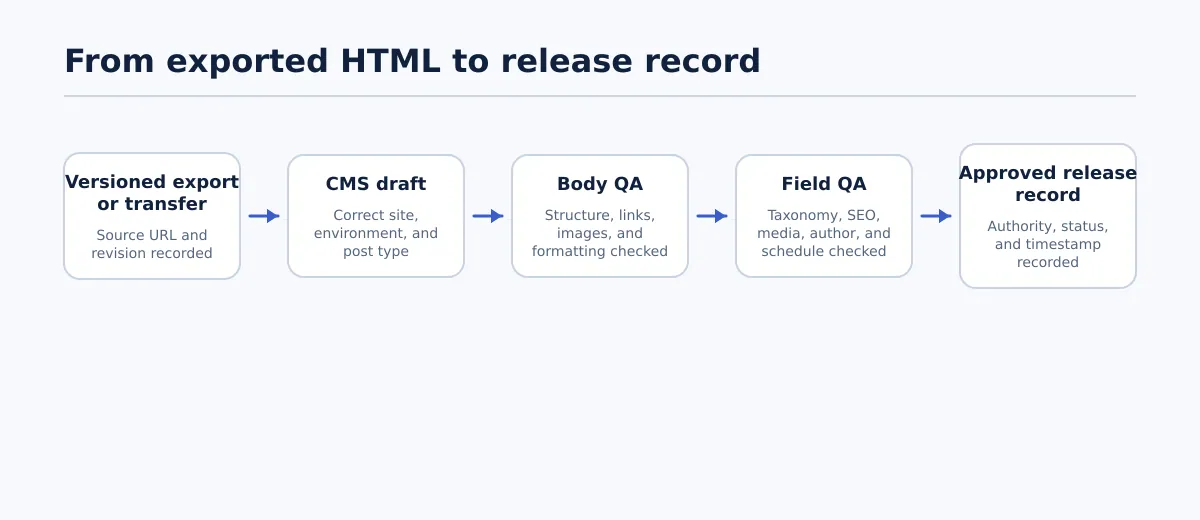 A CMS release follows source verification, body QA, field QA, and explicit approval.
The final gate should connect the approved source to the exact CMS result. A short message such as “looks good” is difficult to audit across several clients unless it identifies what was reviewed.
Use this release record template:
Client/site: ______________________________
Destination environment and post type: ______________________________
Source Google Doc URL: ______________________________
Approved source version or revision date: ______________________________
CMS draft URL or post ID: ______________________________
Body HTML QA reviewer: ______________________________
Body QA timestamp and result: ______________________________
CMS field QA reviewer: ______________________________
Field QA timestamp and result: ______________________________
Scheduled time and time zone: ______________________________
Final release authority: ______________________________
Status: Draft prepared / QA failed / QA passed / Approved / Scheduled / Published
Exception notes and re-approval requirement: ______________________________
Final publication timestamp or outcome: ______________________________
Use a visible status sequence:
- Draft prepared: the export or direct transfer created a reviewable CMS item.
- QA failed / revision: one or more checks failed, so the item remains out of release.
- QA passed: body and required-field checks passed.
- Approved: the authorized reviewer accepted the specific draft and source version.
- Scheduled or published: the permitted action occurred and its timestamp was recorded.
Publish only after body QA and required-field QA pass. If a late edit changes approved copy, a heading, link, image, or metadata decision, mark the record as requiring re-approval unless the client’s process explicitly permits that correction.
For multi-site operations, record the exact destination URL or site identifier. Similar client or staging names are not sufficient. Another team member should be able to determine what was approved, where it went, who checked it, and what happened afterward.
Resolve common export failures and decide when to return the document for revision
Route failures to an owner instead of turning them into invisible publisher edits.
| Failure | Likely owner | Corrective action | Re-approval required? | Release status |
|---|---|---|---|---|
| Inconsistent heading levels | Editor | Confirm the intended hierarchy and revise the source or draft | Yes if meaning or structure changes | Hold |
| Broken or changed link | Editor or SEO lead | Check the destination, update the source or mapped field, and retest | Yes when the approved destination changes | Hold |
| Misplaced or missing image | Publisher or media owner | Reattach the approved asset and verify placement, alt text, and caption | Usually if the asset or meaning changes | Hold |
| Unsupported embed | CMS or technical owner | Replace it with a supported element or document the exception | Yes if presentation changes | Hold |
| Excessive spacing or empty blocks | Publisher | Clean presentation-only artifacts and compare with the source | No unless content or hierarchy changes | Retest |
| Missing category, tag, excerpt, or SEO field | Named field owner | Supply and verify the required value | Yes when editorial approval is required | Hold |
| Wrong site, post type, or author | Publishing lead | Stop the run, correct the destination, and check for duplicates | Follow the client’s release rule | Hold and investigate |
| Unapproved last-minute edit | Editor or approver | Compare versions, restore approved content, or request approval | Yes | Return for revision |
Return the document for revision when the problem changes meaning, hierarchy, factual content, link intent, image choice, or a required metadata decision. Correct the draft directly only when the change is an agreed presentation repair and the release record permits the publisher to make it.
When the same failure appears repeatedly, update the client profile or pre-export checklist. Do not rely on a more careful individual to compensate for a missing rule. Repeated missing fields point to a handoff-design problem; repeated spacing artifacts are a signal to reassess the selected route for that document type.
The practical answer to “How do I know whether exported HTML is clean enough for a CMS draft?” is destination-specific: the approved content, hierarchy, links, media, and required fields match, and every remaining exception has an owner and an authorized outcome.
If your team publishes recurring approved Google Docs across client sites, evaluate a controlled Docs-to-CMS workflow that supports draft review and field-level publishing checks before content goes live. The goal is not to eliminate HTML review; it is to make the source, destination, ownership, approval gate, and release outcome easier to verify.