
A multi-client agency may already have tools for research, writing, project management, approvals, and WordPress. That does not necessarily make those tools a content agency software system.
The distinction is operational: a collection of tools helps people perform tasks, while a controlled publishing stack helps the agency decide what work is ready, who owns the next decision, which destination applies, and what capability is missing when delivery stalls.
This guide focuses on that evaluation problem. It is not a list of the best writing, AI, design, or SEO platforms. Instead, it gives agency owners and content operations leads a way to map the minimum software capabilities required from planning through release reporting, identify gaps, and test whether a stack can support several client sites without creating unnecessary manual handoffs.
Define the operational problem: why a collection of tools is not yet a controlled content delivery system
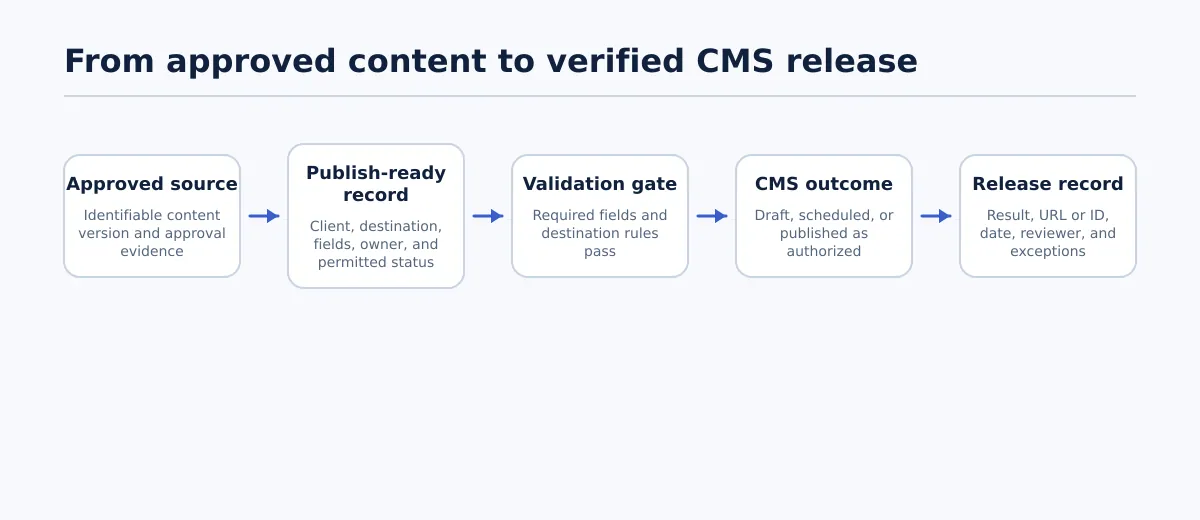 A controlled publishing path preserves the approved source, validates release fields, confirms the permitted CMS outcome, and records the result.
Content agency software becomes an operations problem when the team evaluates tools by isolated features rather than by the outputs required between stages.
A project manager may show that an article is complete. A document may contain approved copy. A CMS may accept pasted content. Those facts answer different questions, however. They do not necessarily show that the agency has a clear destination model, consistent client rules, an owner for publish preparation, or a way to identify which software capability should handle the next step.
Consider a common delivery situation:
- The strategist assigns an article for Client A.
- The writer and editor complete the content in a shared document.
- The client approves the article.
- The publishing team discovers that Client A uses a particular category structure, excerpt rule, image requirement, and scheduling process.
- The publisher leaves the agency’s normal workflow to find those details in a profile, message, spreadsheet, or CMS.
- The item is delayed, manually reworked, or sent through a process intended for a different client.
The useful question is not “Which tool can do more?” It is “Which stage lacks a reliable operational output?” For example:
- If briefs are inconsistent, the planning layer needs a structured intake and assignment model.
- If editors cannot identify the current approved version, the review layer needs clearer version and status handling.
- If client-specific fields are scattered across messages, the agency needs a client configuration record.
- If publishers repeatedly re-enter approved information into WordPress, the publish-preparation or CMS-delivery layer may need better field mapping.
- If nobody can explain what happened after a transfer, the reporting layer needs a release history.
This framing keeps software selection tied to a known process problem. It also prevents the agency from buying a new writing or project tool when the actual gap is configuration, ownership, or CMS handoff design.
Use the agency’s current workflow as the baseline. For deeper implementation guidance on moving an approved draft toward a CMS outcome, see Content Workflow Automation for Agencies: A Controlled Path from Approved Draft to Published Post.
Map the minimum content agency software stack by workflow stage
Evaluate the content agency tech stack by delivery stage. The categories below describe the function the agency needs, the output that function should produce, and the control that makes the output usable by the next owner. One platform may cover several stages; the table is a capability map, not a requirement to purchase one product per row.
| Workflow stage | Software function to evaluate | Required operational output | Control to look for |
|---|---|---|---|
| Planning | Briefing, intake, and capacity planning | Client-specific assignment with audience, objective, content type, destination, and due date | Assigned owner and visible readiness status |
| Production | Collaborative drafting and structured content management | Working article linked to the assignment and client requirements | Current version and writer ownership are visible |
| Review | Editorial review, comments, and approvals | Reviewed content with an identifiable approval state | Review status distinguishes changes requested from approved |
| Asset management | Media storage and asset coordination | Usable image or asset reference with its status and instructions | Asset ownership and approval state are explicit |
| Publish preparation | Metadata, taxonomy, and CMS-field management | CMS-ready information associated with the approved content | Required fields and client-specific rules are visible |
| CMS delivery | Integration, import, or publishing operation | Content arrives at the intended site and permitted status | Destination, status, scheduling, and result can be checked |
| Release reporting | History and operational reporting | Record of planned work, actual outcome, exceptions, and ownership | Successful and failed attempts remain discoverable |
The most important buying distinction is between task completion and stage readiness. “Article complete” may be sufficient for an editorial team, but a publisher may also need a confirmed post type, taxonomy, excerpt, featured-image status, and destination environment. Your stack should make those dependencies visible rather than forcing the next person to reconstruct them.
Score each capability against the next handoff
For every stage, document four answers:
- What object leaves this stage: a brief, document, approval, asset, field set, CMS item, or report?
- Who is accountable for accepting it?
- What information must travel with it?
- What does the software do when that information is missing or contradictory?
Score the capability as covered, partially covered, or uncovered. “Partially covered” means the team can complete the work, but only through a manual workaround or a separate source of truth. That distinction is useful when comparing an editorial workflow software option with a CMS-delivery option.
For agencies already using structured rows for recurring work, a Google Sheets-to-WordPress workflow provides a concrete model for connecting content records with publishing information.
Give every client a clear source of truth and named owners
A source of truth is the agreed authority for a particular type of information. It does not have to be one system for everything.
For example, the approved article body and revision history may live in Google Docs, while a client publishing profile contains allowed categories, author rules, and timezone settings. A release inventory may track the destination, target date, and current operational status. This model is workable if the team documents which record wins when values disagree.
Create a source map for each client:
| Information | Possible authoritative record | Accountable owner |
|---|---|---|
| Brief and content objective | Assignment or planning system | Strategist or account lead |
| Article body and editorial version | Approved source document | Editor |
| Client approval | Approval record tied to the source version | Client approver or account lead |
| Taxonomy and SEO requirements | Client publishing profile | SEO lead or operations lead |
| Destination, status, and schedule | Publishing record | Publisher |
| CMS result and exception | Release history | Publisher or operations lead |
Then assign roles. The goal is not to make one person responsible for every action; it is to remove uncertainty about who accepts each output.
| Role | Primary responsibility | Completion condition |
|---|---|---|
| Strategist | Brief, audience, objective, and destination context | Assignment identifies the client and intended content outcome |
| Writer | Draft and source-document updates | Draft is complete in the assigned source |
| Editor | Editorial quality and version readiness | Reviewed version is identifiable and ready for approval |
| Client approver | Client-specific approval or requested changes | Decision is recorded against a known version |
| Publisher | CMS preparation and delivery | CMS item matches the approved publishing information |
| Operations lead | Workflow design, configuration, and exceptions | Rules, ownership, and recurring issues are maintained |
Before evaluating software, create a client setup checklist containing the destination site, environment, post type, editor and approver, style requirements, allowed taxonomy, SEO fields, image rules, scheduling rules, timezone, release authority, and exception contact. These details are configuration inputs for the stack, not background knowledge that publishers should have to remember.
Define the publish-ready record: required editorial and CMS fields
A publish-ready record is the handoff object used to evaluate whether the stack carries enough information from approved content to CMS delivery. It can be a structured row, project record, form, or integration payload.
Use this field template as a starting point. Mark fields according to the client and CMS rather than assuming every destination uses the same schema.
| Field | Classification | Why it belongs in the record |
|---|---|---|
| Client or brand | Required | Separates work across accounts |
| Exact destination site and environment | Required | Identifies where delivery is permitted |
| Source document URL or content ID | Required | Connects the CMS item to its source |
| Approved source version or revision date | Required | Identifies the version authorized for handoff |
| Final title | Required | Provides the approved display title |
| Body content | Required | Supplies the content being delivered |
| URL slug | Conditional | Needed when the client or CMS controls the permalink |
| Category | Conditional | Needed when the destination uses required taxonomy |
| Tags | Conditional | Needed when the client’s publishing model uses tags |
| Excerpt | Conditional | Needed when the site template or editorial process requires one |
| SEO title | Conditional | Needed when SEO metadata is managed in the workflow |
| Meta description | Conditional | Needed when the client requires a controlled description |
| Featured-image status and asset | Conditional | Needed when the post template requires an image |
| Target date, time, and timezone | Conditional | Needed for scheduled delivery |
| Approver and approval date | Required for client-approved work | Shows who approved which version |
| Intended CMS status | Required | Distinguishes draft, scheduled, and live outcomes |
| Exception notes | Conditional | Preserves non-standard decisions |
A field is required when every item needs it to proceed. It is conditional when a client profile or CMS configuration activates the requirement. The software should make that distinction visible. A blank conditional field may be acceptable for one destination and a blocker for another.
When comparing systems, ask whether this record can be assembled, reviewed, updated, and passed to the next stage without duplicating information in several unconnected places. The question is about data continuity, not merely whether a platform has a field called “category.”
Evaluate publishing and approval controls with pass/fail criteria
Turn the software search into demonstrations. Give each candidate capability a representative client scenario and record whether the team can complete the test without an undocumented workaround.
| Criterion | Pass | Fail | Risk if it fails |
|---|---|---|---|
| Client separation | Client, site, and profile remain visible throughout the workflow | Similar destinations are selected by memory or ambiguous labels | Cross-client or wrong-site work |
| Status visibility | Planning, review, approval, preparation, delivery, and release states are distinct | A single “complete” status covers several decisions | Work advances without the right owner |
| Field handling | Client-specific required and conditional fields are supported | The publisher must discover missing values in the CMS | Rework and inconsistent metadata |
| Approval capture | Approval is linked to a source version, approver, and date | Approval exists only in chat or email | Version disputes and unclear authorization |
| Draft-versus-live behavior | The workflow supports the client’s permitted CMS outcome | Every transfer is treated as publication | Review or release authority is bypassed |
| Scheduling | Date, time, timezone, and scheduling permission are explicit | Scheduling depends on an informal note | Incorrect or unauthorized timing |
| Destination confirmation | Site, environment, post type, and intended status are displayed before delivery | The operator confirms only a short site name | Wrong-environment delivery |
| History | Changes, outcomes, URLs or IDs, and exceptions are retained | A transfer leaves little usable history | Difficult troubleshooting and duplicate work |
| Exception handling | Failed items stop and receive an owner | Errors are silently retried or overwritten | Unresolved blockers and hidden failures |
A pass means the team can demonstrate the behavior using its own client rules. A product description or a checkbox in a feature list is not evidence that the workflow will work for the agency.
Keep editorial approval separate from release authorization. Editorial approval answers, “Is this content approved for this client and source version?” Release authorization answers, “May this item now be delivered to this destination with these fields, timing, and CMS status?” Some clients may permit a CMS draft after editorial approval; others may permit scheduling only after a further check.
For a deeper implementation treatment of the CMS handoff and QA sequence, use Bulk WordPress Publishing: A Controlled Workflow for Agency Content Teams as a companion guide.
Implement the workflow for one client before scaling it across sites
Treat implementation as a validation exercise for the stack, not as an agency-wide migration. Select one client whose workflow includes the kinds of variation the agency expects to manage: client approval, conditional metadata, scheduled delivery, or more than one content type.
Use this pilot sequence:
- Map the current system. Record the tools, handoffs, statuses, owners, and manual workarounds for a small set of items.
- Configure the client profile. Enter the destination, content types, taxonomy, required fields, approval rules, and scheduling conventions.
- Connect the source and delivery records. Make the relationship between the approved document, publishing record, and CMS destination explicit.
- Run representative items. Include ordinary work and at least one known exception, such as a missing image or changed publish date.
- Compare the planned capability with the observed behavior. Note which steps were covered, partially covered, or still manual.
- Decide what is standard and what is client-specific. Preserve genuine variation in configuration instead of creating hidden workarounds.
Advance the workflow when the team can identify the source, destination, owner, applicable fields, permitted CMS outcome, and result for each pilot item. Pause and revise the design when a tester has to rely on memory, when two records disagree without a resolution rule, or when the software cannot show whether a capability is covered.
This approach lets the agency compare the stack against real operating conditions without treating one client’s configuration as universal. After the pilot, document which capabilities are mandatory for every account, which are conditional, and which remain manual by design.
Use a release record to find bottlenecks and improve the stack
After implementation, review the stack by examining recurring work patterns rather than collecting more features. A useful release record can include client, destination, content type, source link, workflow stage, owner, planned date, actual outcome, CMS URL or ID, exception type, and next action.
Review those records for questions such as:
- Which workflow stage most often waits for another owner?
- Which client rules require repeated manual interpretation?
- Which fields are frequently added late?
- Which capabilities remain partially covered by workarounds?
- Which failures are caused by software limitations, and which are caused by unclear process design?
- Does the stack preserve enough context for an operations lead to explain a delayed or failed item?
Use the answers to change the smallest relevant part of the system. A recurring taxonomy issue may require a better client profile. A recurring approval-status issue may require clearer workflow states. Repeated CMS re-entry may justify testing a delivery integration. A problem that occurs only because two teams use different definitions of “ready” needs a process decision before it needs another tool.
For agency operators, the value of a publishing stack is therefore its fit across stages: planning, production, review, preparation, CMS delivery, and reporting. Evaluate each capability against the next handoff, then test the complete path with one client before expanding it.
Start by mapping one client’s content and publishing requirements. Then assess whether your current Google Docs-to-CMS workflow supports the fields, statuses, review options, scheduling rules, and outcome records that client requires. Tenwrite can be evaluated in that context because its supported workflow lets users review, revise, schedule, or save generated content as a CMS draft before it goes live. The operational question remains whether the capability fits your defined stack and release responsibilities.