
SEO Data Management
Tenwrite can manage SEO data while it publishes or updates WordPress posts and pages.
Use SEO fields when you want the Google Doc, the Tenwrite app, and WordPress to carry the same search metadata: SEO title, meta description, focus keyword, canonical URL, noindex, and nofollow.
Manual SEO controls and the Tenwrite WordPress plugin are available on all plans. Metadata AI can suggest supported publishing fields when your account has AI credits. Recommendations is a separate early-access tool for planning content and reviewing article drafts.
Where SEO Data Lives
Section titled “Where SEO Data Lives”SEO data can come from two places:
- Tenwrite fields — values you enter in the export or edit form.
- Google Docs frontmatter — values stored inside the document itself.
Frontmatter is best when the document should be the source of truth. Tenwrite fields are best when you want to set SEO data during export or while editing an existing post.
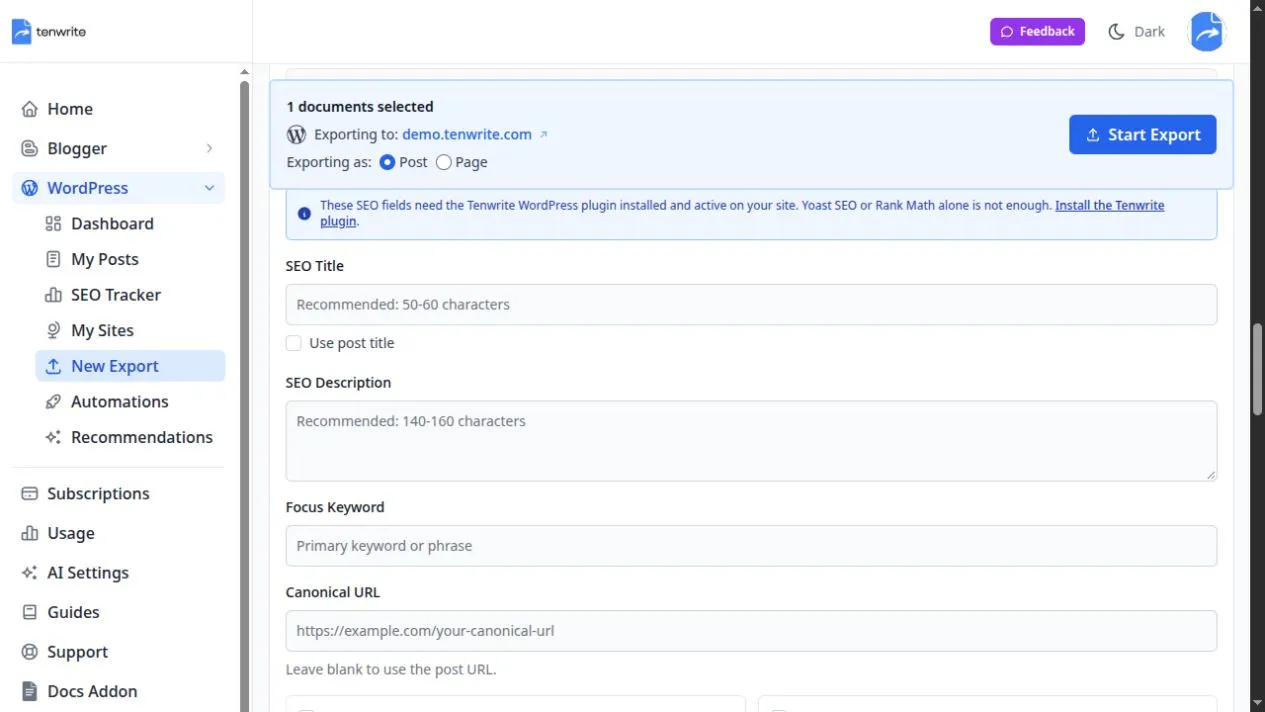
These fields can be filled manually. The plugin reminder explains the requirement; use Tools > Tenwrite in WordPress to check the installed plugin and supported adapter.
How Tenwrite Uses SEO Data
Section titled “How Tenwrite Uses SEO Data”When you export or sync a WordPress post, Tenwrite reads the available SEO values and sends them with the post update.
If a supported SEO field exists in frontmatter, that value wins for the same field. This keeps document-controlled metadata from being accidentally overwritten in the app.
If a field is not present in frontmatter, you can manage it in Tenwrite.
What the WordPress Plugin Adds
Section titled “What the WordPress Plugin Adds”WordPress does not let external tools update every Yoast SEO or Rank Math field through its normal publishing API.
The Tenwrite WordPress plugin gives self-hosted WordPress sites a direct way to accept those SEO fields from Tenwrite. It saves the values on the WordPress post or page and fills the matching fields in:
- Yoast SEO
- Rank Math
Without the plugin, Tenwrite can still publish WordPress content. The plugin is needed when you want supported SEO fields to appear inside Yoast SEO or Rank Math.
Supported Fields
Section titled “Supported Fields”The plugin-supported SEO fields are:
| Field | Use it for |
|---|---|
| SEO title | The search title for the post or page |
| Meta description | The search result description |
| Focus keyword | The primary keyword used by Yoast SEO or Rank Math |
| Canonical URL | The preferred URL for duplicate or syndicated content |
| Noindex | Ask search engines not to index the page |
| Nofollow | Ask search engines not to follow links on the page |
Recommended Setup
Section titled “Recommended Setup”For self-hosted WordPress sites:
- Install and activate the Tenwrite WordPress plugin.
- Keep Yoast SEO or Rank Math active if you want Tenwrite to fill those plugin fields.
- Add SEO values in Tenwrite or in WordPress frontmatter.
- Export the post, update it, or run Sync Post.
Check the saved fields in WordPress
Section titled “Check the saved fields in WordPress”Open the same post or page in WordPress and inspect its active Yoast SEO or Rank Math fields. Compare the saved title and description with the values you sent from Tenwrite. Also check the focus keyword, canonical URL, and indexing controls when you supplied them.

Yoast example. The title and description belong to that sample article. The generation buttons shown inside Yoast are Yoast’s controls; Tenwrite’s Generate with AI is in the Tenwrite publishing form.
If the values are missing, check Tools > Tenwrite diagnostics. Stored only with no detected adapter means the plugin received SEO data but did not copy it into a supported SEO plugin.
Related Guides
Section titled “Related Guides”Tenwrite is an independent product not affiliated with or endorsed by Google LLC, Blogger, or WordPress Foundation. Google Docs, Gmail, Google Workspace are trademarks of Google LLC. WordPress is a trademark of the WordPress Foundation.