Document Frontmatter Overview
Frontmatter is a small settings table at the top of your Google Doc. It travels with your document, so Tenwrite can use the same title, labels or tags, and publishing settings each time you export or sync.
Open the Frontmatter Editor
Section titled “Open the Frontmatter Editor”In Google Docs, choose Extensions > Tenwrite > Frontmatter > Insert Blogger Frontmatter or Insert WordPress Frontmatter. Tenwrite opens an editor in the sidebar and creates the table if one is missing. If your document already has frontmatter, the editor opens that table without replacing it.
In the web dashboard, select your document on New Export. If it already contains frontmatter, Tenwrite shows a notice and Edit existing frontmatter. Fields already filled in the document are read-only in the export form, with an Already set in frontmatter message. This includes an explicitly set publication status. To change one, edit it in frontmatter—or clear it there to use the export form instead. Tenwrite never silently copies form edits into your document. Otherwise, use the export form—there is no need to add a table. To deliberately create frontmatter, use the Google Docs add-on menu above. You can also open the editor from the Sync confirmation.
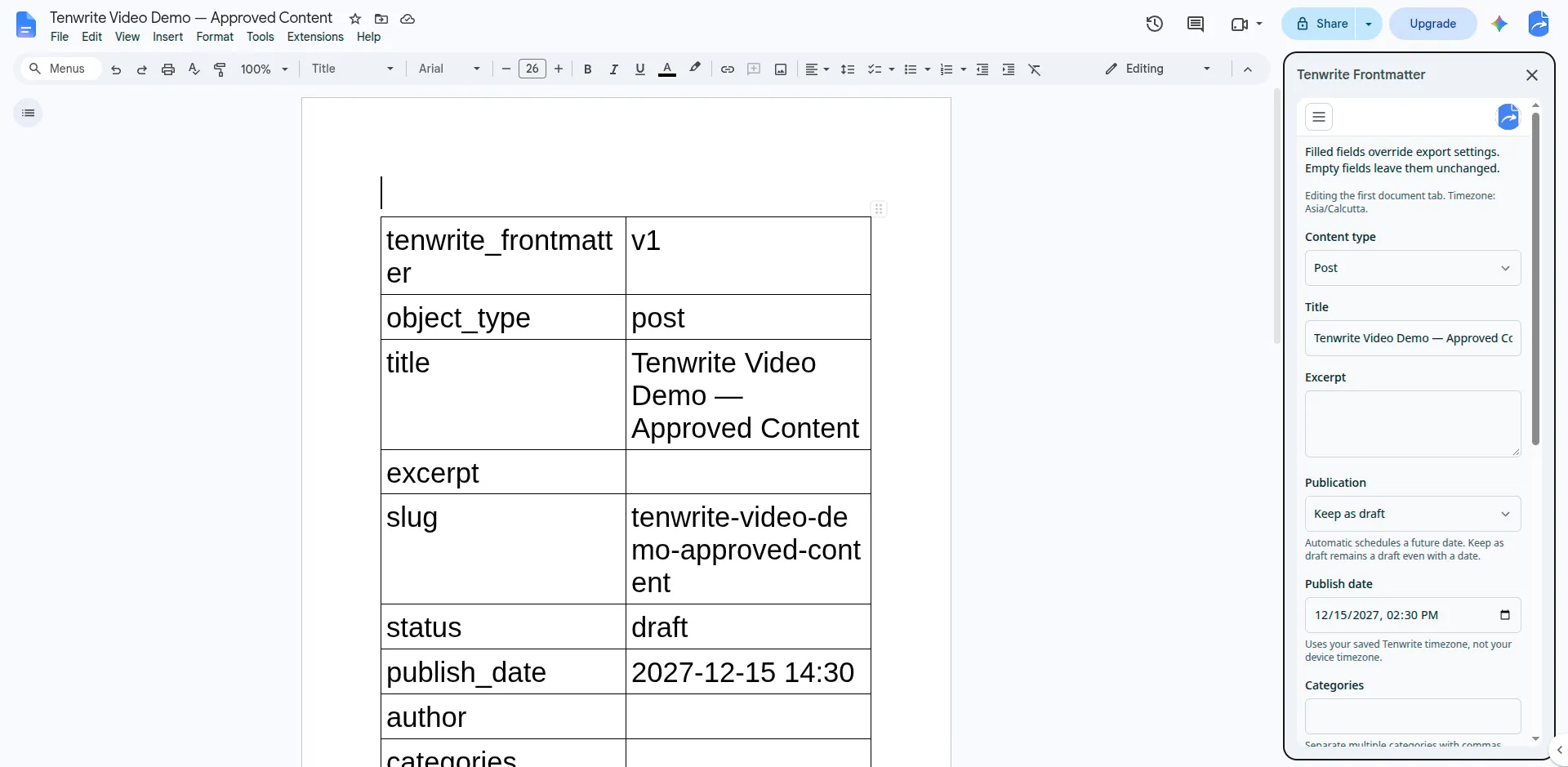
This example keeps the post as a draft even though a future publish date is filled in. The table and sidebar show the same saved settings.
- Fill in the settings you need. Use Advanced fields for more options.
- Click Save frontmatter. Changes are saved to the Google Doc, not just the current export.
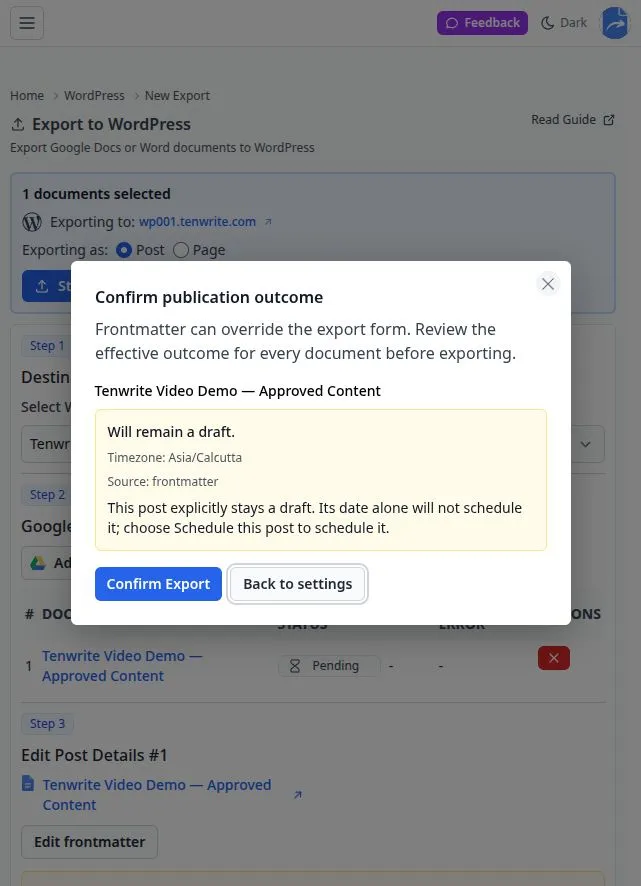
- Check the outcome shown below the fields. Review the final outcome again before confirming Export or Sync.
You can still edit the table directly. Keep it at the very top of the first document tab, with nothing above it, and leave the tenwrite_frontmatter / v1 marker unchanged. Tenwrite leaves the table out of the published article; your readers never see it.
Schedule a Post or Keep It as a Draft
Section titled “Schedule a Post or Keep It as a Draft”To schedule, enter a future Publish date. The editor selects Scheduled unless you have chosen Keep as draft. Save, then check the scheduled time in the preview.
To keep working without publishing, choose Keep as draft in Publication, even if you have entered a date. A date does not override an explicit draft choice. For an existing draft with a date, choose Scheduled in Publication when you are ready to schedule it, then save.
Which Settings Win?
Section titled “Which Settings Win?”- Filled frontmatter fields override the matching export settings. Empty fields mean “no override”; they do not clear existing values on your site.
- Automatic publication with no date uses your export-form choice. A new post defaults to Draft. With a valid future date, Automatic schedules the post even if the export form still says Draft.
- Before a manual export, Confirm publication outcome shows what Tenwrite will actually do for each document. Sync also shows the outcome before updating an existing post.
- On Sync, leaving publication settings blank preserves the site’s current publication state. To cancel a schedule, explicitly choose Keep as draft, save, and confirm Sync.
Frontmatter also works with Drive and Sheet automation. Save your changes before an automation processes the document.
If You Cannot Save
Section titled “If You Cannot Save”Make sure your Google account can edit the document and that Tenwrite has access to it. If another person changed the document while you were editing, Tenwrite keeps your unsaved fields rather than overwriting their work. Copy any changes you want to keep before choosing Reload current document, which discards unsaved fields.
If the editor reports an invalid table or a partially completed insertion, inspect the table in Google Docs before trying again. Do not keep inserting tables to fix the problem.
What You Can Control
Section titled “What You Can Control”Both Platforms
Section titled “Both Platforms”- Post title
- Publication status (draft/published/scheduled)
- Publish date and scheduling
- Tags/Labels
WordPress-Specific
Section titled “WordPress-Specific”- Post type (post/page)
- Categories and custom slug
- Excerpt
- Comment settings and content format
Blogger-Specific
Section titled “Blogger-Specific”- Reader comment permissions
- Label organization
Platform-Specific Guides
Section titled “Platform-Specific Guides”Tenwrite is an independent product not affiliated with or endorsed by Google LLC, Blogger, or WordPress Foundation. Google Docs, Gmail, Google Workspace are trademarks of Google LLC. WordPress is a trademark of the WordPress Foundation.