
Blogger - Document Frontmatter
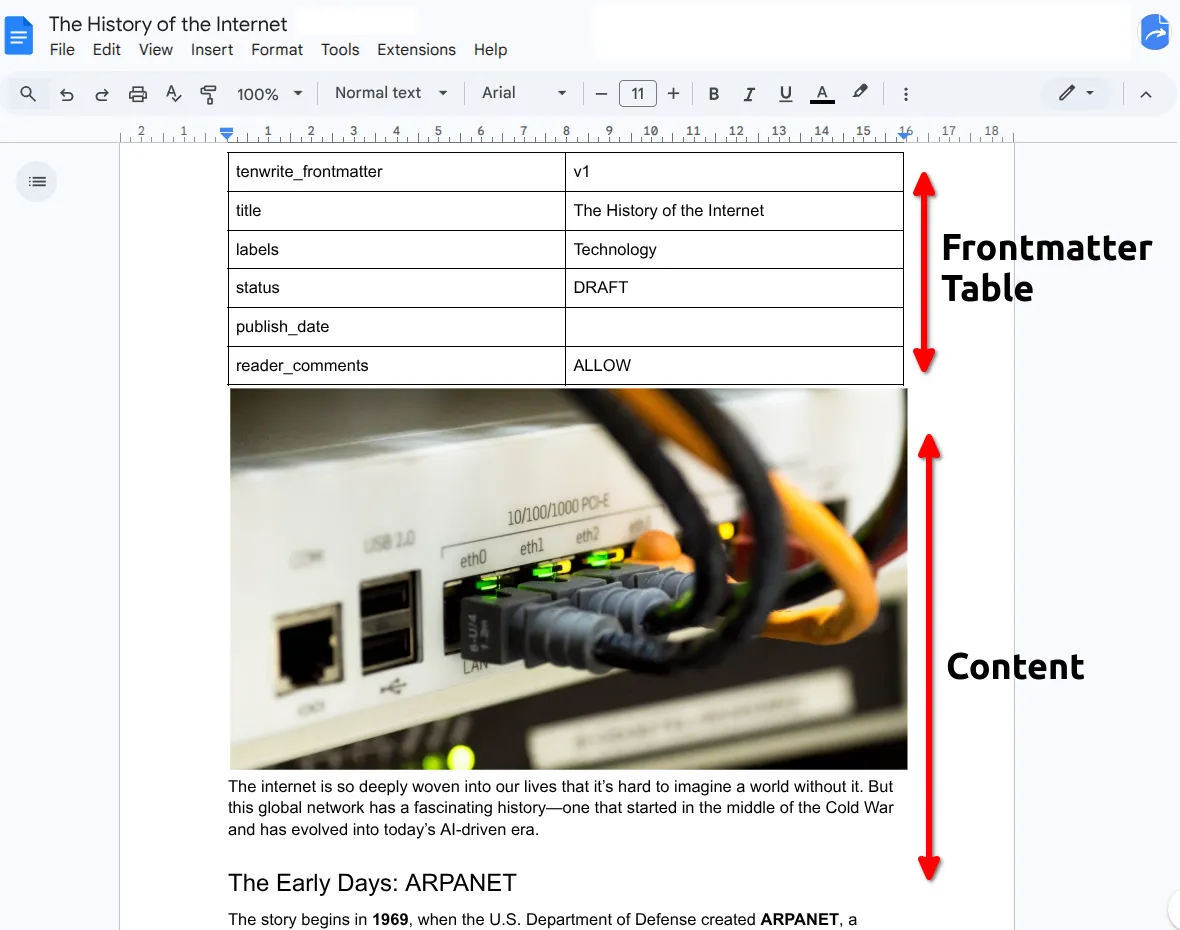
Frontmatter keeps your Blogger post settings in a small table at the top of your Google Doc. Use Tenwrite’s editor to set the title, labels, publication choice, and date without having to remember table values.
This is especially useful with Drive Automation and Sheet Automation, where there’s no export form at all. Frontmatter is how you control individual posts when publishing is fully automated.
Open the Editor
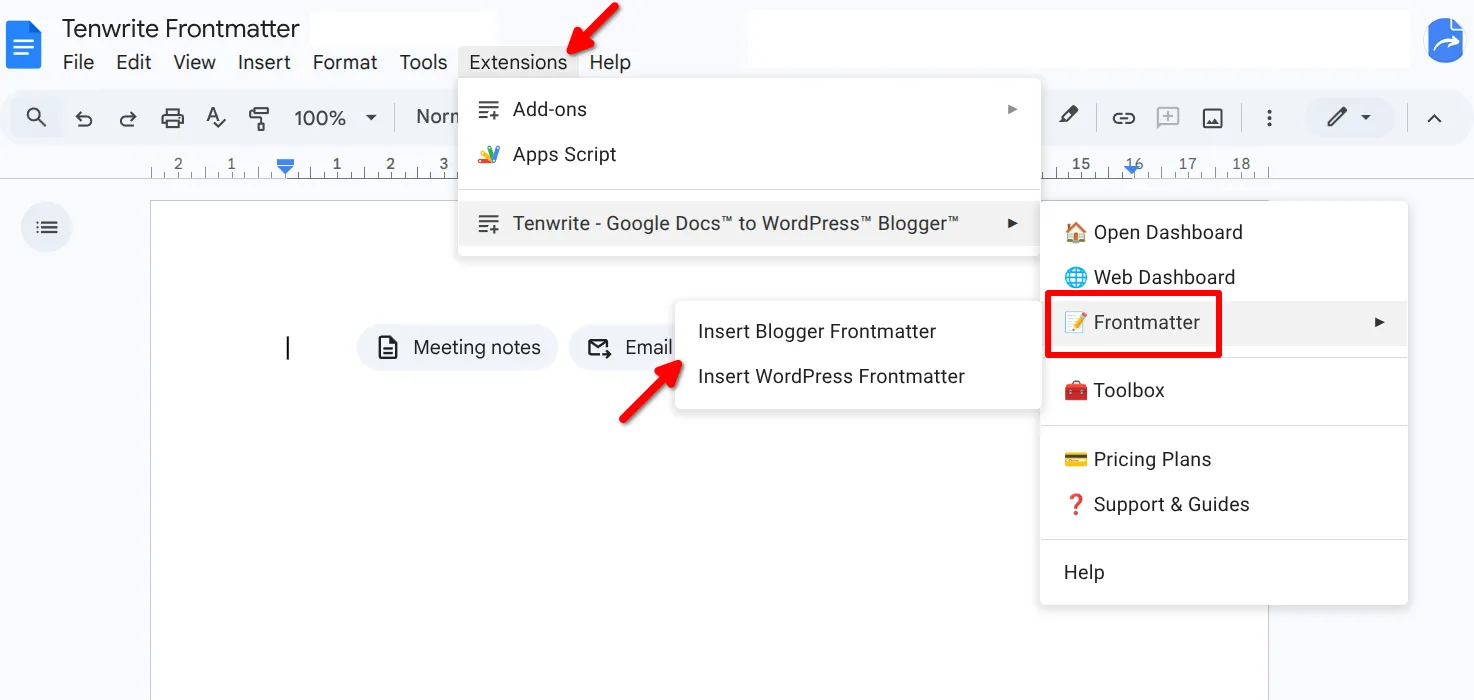
Section titled “Open the Editor”Open your Google Doc and choose Extensions > Tenwrite > Frontmatter > Insert Blogger Frontmatter. Tenwrite opens the frontmatter editor in the sidebar. It inserts a starter table if one is missing, or opens your existing table without replacing it.
In the web dashboard, select the document on Blogger > New Export. If frontmatter is already present, click Edit existing frontmatter. Filled fields—including labels, reader comments, and an explicit publication status—are read-only in the export form and marked Already set in frontmatter. Change or remove the value in frontmatter; clearing it lets the form control that setting again. Without frontmatter, use the export form; Tenwrite will not ask you to add a table. Shared formatting controls stay available for the batch, while each document’s overrides are shown under Other settings from this document. The same editor is available from the Sync confirmation.
When the export form shows Checking publication outcome…, wait for the check to finish before editing the document’s export fields. This also applies when you refresh document settings. Tenwrite then locks fields filled in frontmatter and leaves the other fields editable. If the check fails, fix the problem and choose Check again.
Fill in what you need, open Advanced fields for additional settings, then click Save frontmatter. Changes are saved to your Google Doc. Empty fields leave the export settings or existing Blogger values unchanged; they do not clear those values.
The table still has two columns: field name on the left, value on the right. You can edit it directly if you prefer. Custom rows are preserved and appear read-only in the editor.
When Tenwrite processes the document, it reads the table, applies the values to the post, and removes the table from the published content. Your readers never see it.
Post Settings
Section titled “Post Settings”Status
Section titled “Status”Choose Publication in the editor, or use these values when editing the table directly:
| Value | What it does |
|---|---|
| Blank / Automatic | Uses the export choice without a date; schedules with a valid future date |
publish | Publishes now without a future date; schedules with a valid future date |
draft | Saves as a draft |
schedule | Schedules for the date in publish_date |
To schedule a post, enter a future Publish date. The editor selects Scheduled unless you chose Keep as draft. Click Save frontmatter, then check the time in the outcome preview. The table stores status: schedule and the date together.
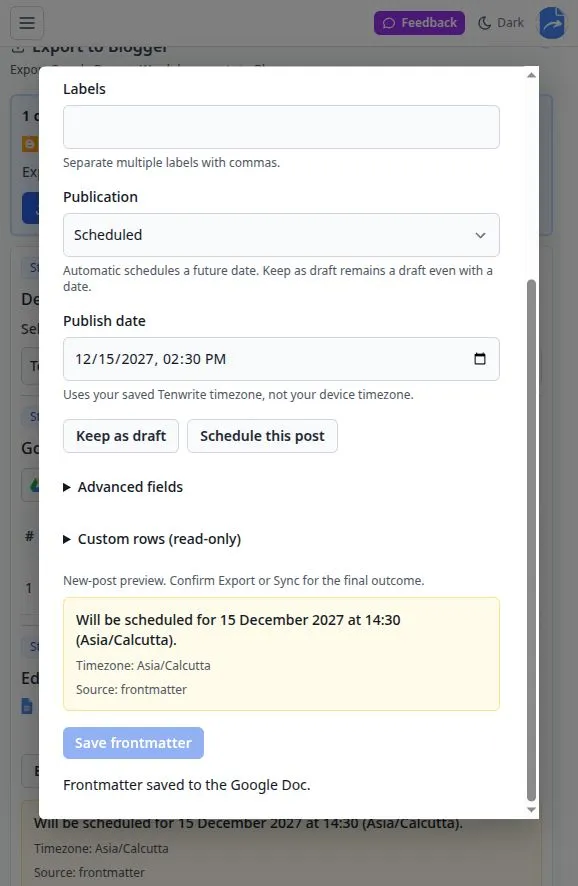
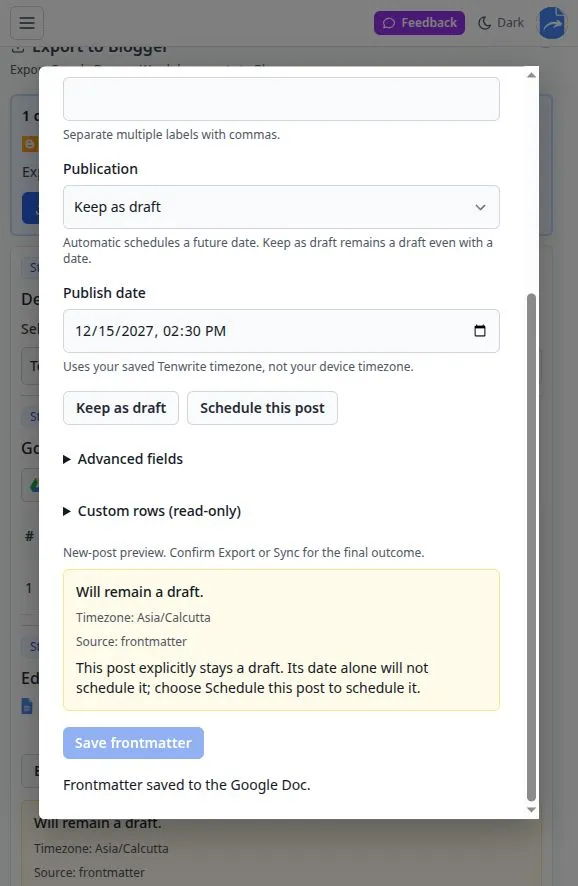
To save a draft, choose Keep as draft in Publication and save. A draft stays a draft even with a future date. Opening an older document with draft and a date does not change that choice. Choose Scheduled in Publication and save if you want to schedule it instead.
Blogger pages cannot be scheduled. These scheduling options apply to posts only.
Check Before Export or Sync
Section titled “Check Before Export or Sync”Filled frontmatter settings take priority over the export form. Automatic plus a future date schedules the post even when the form still has its default Draft choice. Before starting, review Confirm publication outcome and click Confirm Export only when the result is right.
Sync also asks you to confirm the outcome. Blank publication settings preserve the existing post’s state. To cancel scheduling, choose Keep as draft, save, and confirm Sync. An unchanged schedule that has already published is preserved when Blogger’s publication date matches the document; if Tenwrite reports a mismatch, correct the settings before syncing.
All Available Fields
Section titled “All Available Fields”| Field | Description | Example |
|---|---|---|
tenwrite_frontmatter | Version marker — do not change this | v1 |
title | Post title | My Amazing Blog Post |
labels | Comma-separated labels | technology, tutorial |
status | Publish state (see above) | draft |
publish_date | Scheduled publish time | 2027-12-15 14:30 |
reader_comments | Comment visibility | Allow |
For Reader comments, use one of these table values:
AllowDo not allow; show existingDo not allow; hide existing
Formatting Fields
Section titled “Formatting Fields”You can optionally control how Tenwrite processes the document’s HTML on export. For most users, setting preset to balanced is all you need — it applies a sensible set of cleanup rules automatically.
| Field | Values | What it does |
|---|---|---|
preset | balanced, or a saved preset name | Applies a preset group of formatting rules |
demote_headings | true / false | Shifts H1→H2, H2→H3, etc. |
responsive_images | true / false | Adds max-width: 100% to images |
strip_empty_elements | true / false | Removes empty paragraphs and spans |
embed_youtube | true / false | Converts YouTube links to embeds |
embed_twitter | true / false | Converts Twitter/X links to embeds |
add_rel_nofollow_to_links | true / false | Adds rel="nofollow" to all links |
add_target_blank_to_links | true / false | Opens all links in a new tab |
increase_line_height | true / false | Increases line spacing for readability |
convert_pt_to_px | true / false | Converts pt font sizes to px |
CSS cleanup fields (all accept true / false):
remove_inline_styles, remove_font_family, remove_font_size, remove_color, remove_text_decoration, remove_background, remove_padding, remove_margin, remove_width, remove_height, remove_line_height, remove_border, remove_letter_spacing, remove_text_transform, remove_max_width, remove_max_height
Troubleshooting
Section titled “Troubleshooting”Frontmatter isn’t being applied
Section titled “Frontmatter isn’t being applied”- The table must be the very first element in the document. Even a blank paragraph above it will cause the table to be ignored.
- Don’t rename or change the first row (
tenwrite_frontmatter/v1) — it’s how Tenwrite identifies the table. - If Tenwrite reports duplicate fields, multiple markers, or an unsupported table structure, repair the existing table in Google Docs. Do not keep inserting new tables.
Someone else edited the document while I was saving
Section titled “Someone else edited the document while I was saving”Tenwrite keeps your unsaved fields and does not overwrite the newer document. Copy any changes you want to keep before choosing Reload current document, which discards your unsaved fields. Reopen the editor and apply your changes to the current version.
Post isn’t publishing at the scheduled time
Section titled “Post isn’t publishing at the scheduled time”- Check that Publication is Scheduled, not Keep as draft. In the table, use
schedule(notscheduled); older uppercaseSCHEDULEDvalues are still supported. publish_datemust be a valid future date inYYYY-MM-DD HH:MMformat, in the saved Tenwrite timezone.- If the date passed while an export was waiting, correct it and review the outcome again. Tenwrite will not silently publish a missed schedule.
Labels or reader comments aren’t applying
Section titled “Labels or reader comments aren’t applying”- Labels are comma-separated:
label1, label2, label3. - Reader comments values must match exactly — spacing and semicolons included.
Related Guides
Section titled “Related Guides”Need help? Contact support@tenwrite.com.
Tenwrite is an independent product not affiliated with or endorsed by Google LLC, Blogger, or WordPress Foundation. Google Docs, Gmail, Google Workspace are trademarks of Google LLC. WordPress is a trademark of the WordPress Foundation.