Copying drafts into each site
Moving approved Google Docs into WordPress or Blogger takes time when you have to rebuild formatting and upload images for every post.
For agencies
Publish approved Google Docs to client WordPress and Blogger sites. Find and update posts in the Content Index, then check Google Search performance in SEO Tracker. Handle all three from the Tenwrite web dashboard.
Keep writing and review in Google Docs. Use Tenwrite for publishing, post management, and search performance.

Client content
Your team already writes and reviews in Google Docs. Tenwrite handles the next steps: publishing to client sites, keeping posts easy to find, and showing how published content performs in search.
Moving approved Google Docs into WordPress or Blogger takes time when you have to rebuild formatting and upload images for every post.
Finding a published article or checking its status means opening another client dashboard.
Your team needs to see which posts appear in Google Search, get clicks, or need another look after publication.
How it works
Use the same process for each client. Publish the article, manage later updates, and check the results before deciding what to work on next.
Connect a client site, choose the document, and set the post details. Publish now, save a draft, or schedule the post. Use Drive or Sheets automation for repeat work.
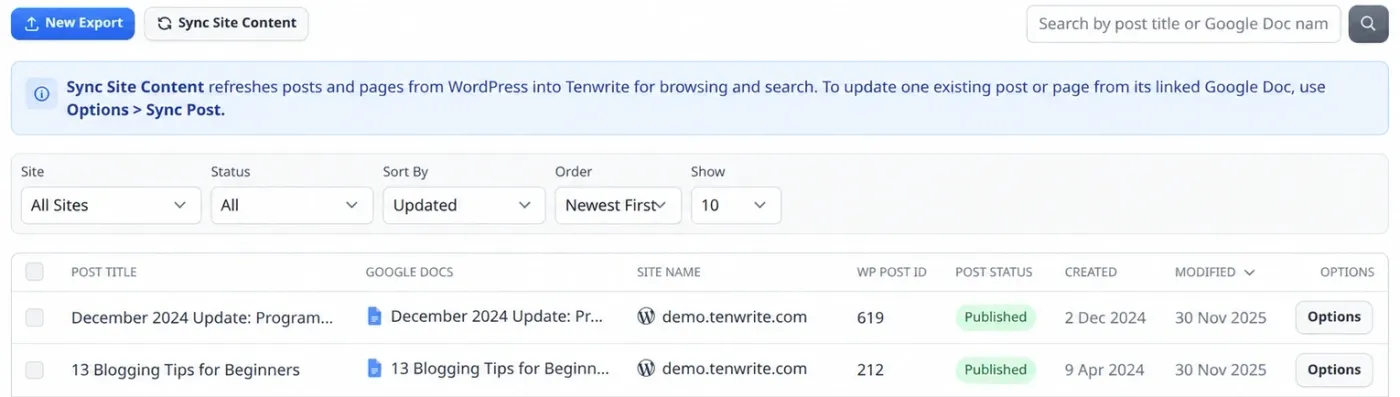
Search posts and pages across connected sites. Check their status, edit post details, or send changes from a linked Google Doc to the existing post.
Connect the client's Google Search Console, select a site in SEO Tracker, and compare impressions, clicks, CTR, and average position for published posts and pages.
Publishing options
Export articles yourself when you want to review each one. Use Drive or Sheets automation for recurring work. Automation is included on Pro and Agency, with limits listed on the pricing page.
Use this when your team wants to check each approved article before sending it to a client site.
Use this when writers deliver approved Google Docs to a folder for a client site.
Use this when your team plans many posts in a spreadsheet, with a destination and post details for each row.
Content Index
The Content Index keeps a searchable list of posts and pages from your connected WordPress sites and Blogger blogs, including content published outside Tenwrite. Find an article, check its status, and manage updates from the dashboard.
SEO Tracker
Connect a client's Google Search Console and select their site in SEO Tracker. Review the published posts and pages Tenwrite has loaded, including articles published outside Tenwrite.
Included in every paid plan. The site owner connects Search Console; invited site members can view the tracker. Finalized search data updates daily with a three-day delay. It is not live traffic data.
Learn how to connect Search Console and use SEO Tracker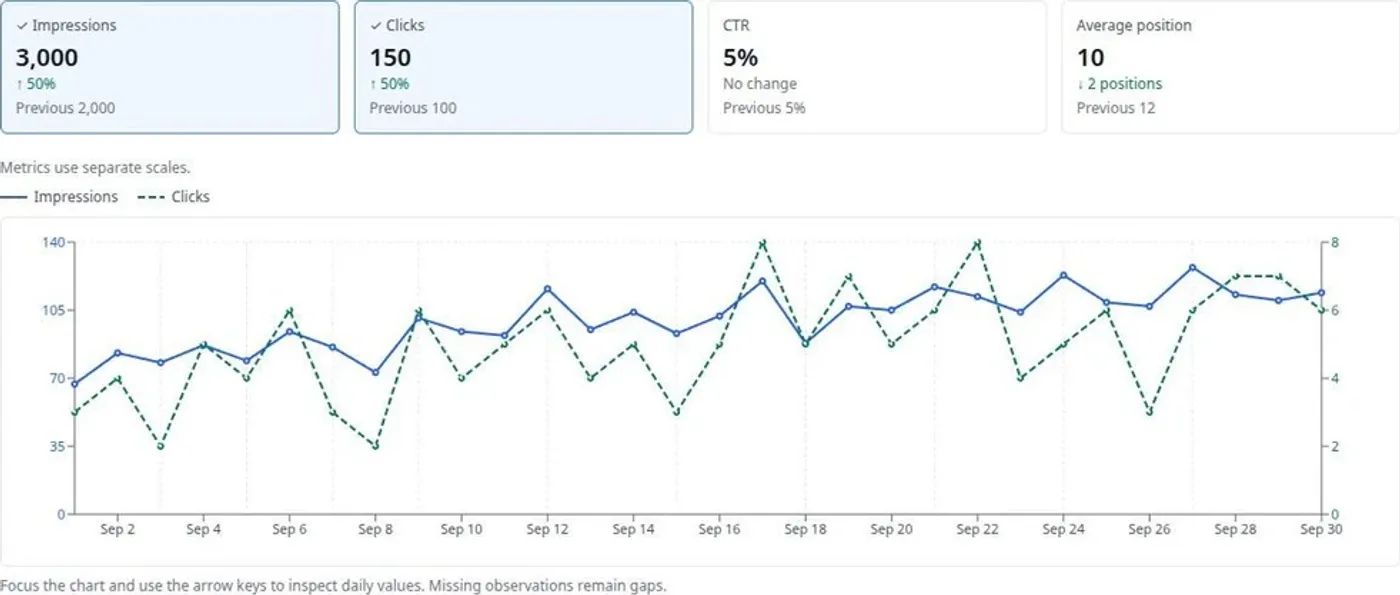
Agency features
Agency includes unlimited connected sites and exports, publishing automation, the Content Index, SEO Tracker, and five total team seats.
Connect as many client WordPress and Blogger sites as your agency needs on the Agency plan.
Publish higher volumes of client content without worrying about monthly export caps on the Agency plan.
Agency includes one owner and four teammates. Each person signs in with their own Tenwrite account.
Team members use their own Tenwrite accounts instead of passing around one shared login.
Publish new content and updates from client folders or spreadsheets on a regular schedule.
When clients revise source documents, update the existing CMS post from the linked Google Doc instead of creating duplicates.
Agency includes unlimited exports, unlimited connected sites, Drive automation, Sheets automation, and 5 total team seats (one owner and four teammates). Subscription seats provide plan access; site sharing is managed separately. Check pricing and plan limits for automation and content sync allowances.
Who uses Tenwrite
Tenwrite fits agencies where content is drafted, reviewed, approved, or handed off through Google Docs before being published to WordPress or Blogger.
Publish client articles, send supported WordPress SEO metadata, and check search performance in Tenwrite.
Move approved drafts from Google Docs into client sites with consistent formatting and metadata.
Support client publishing across multiple WordPress sites without logging into every dashboard for every post.
Keep writing and review in Google Docs. Use Tenwrite to publish approved content and manage later updates.
Agency plan
agency
Publish across client sites, manage their content, and track search performance. Give teammates their own accounts with access to the Agency plan's limits.
Additional team members can be added when your team grows.
Agency questions
Tenwrite helps agencies publish Google Docs to client WordPress and Blogger sites, manage posts in the Content Index, and track Google Search performance in SEO Tracker. Drive and Sheets automation handle recurring publishing work.
Yes. The Agency plan includes unlimited connected sites, so you can connect multiple WordPress and Blogger destinations for client publishing.
No. Agency includes five total seats: one owner and four teammates. Each person signs in with their own Tenwrite account. Subscription seats provide plan access; they do not automatically share every connected site.
Yes. Teammates can connect sites and publish from their own Tenwrite accounts using the Agency subscription's plan limits. Site sharing is managed separately from subscription seats.
Yes. When a CMS post is linked to a Google Doc, Tenwrite can re-export the document to update the same existing post instead of creating a duplicate.
Yes. Agency includes Google Drive automation and Google Sheets automation for recurring or structured publishing workflows.
Yes. Tenwrite supports WordPress, WordPress.com, self-hosted WordPress, and Blogger.
Yes. Tenwrite is built around Google Docs as the writing source. Clients and writers can keep drafting in Docs while your team handles publishing through Tenwrite.
Yes. SEO Tracker is included in every paid plan, including Agency. The site owner connects a Google account with access to the client's Google Search Console. You can compare impressions, clicks, CTR, and average position over 7, 30, or 90 finalized days. Data updates daily with a three-day delay; it is not live traffic data.
Yes. Sync Site Content loads posts and pages from connected sites into the Content Index, including content published directly in WordPress or Blogger. SEO Tracker can measure those published items too when Search Console is connected. The Content Index is your content list in Tenwrite; it does not submit pages to Google's index.
Yes. Set supported SEO fields in your Google Doc using frontmatter or in Tenwrite's export form. On self-hosted WordPress, install the Tenwrite WordPress plugin to send the SEO title, meta description, focus keyword, canonical URL, and indexing settings to Yoast SEO or Rank Math. The plugin and SEO metadata controls are available on all Tenwrite plans.
Both Pro and Agency include Drive automation, Sheets automation, and SEO Tracker. Choose Agency when you need unlimited connected sites, unlimited exports, and five total team seats. See the pricing page for automation and content sync limits.
Start free to try publishing and the Content Index. Choose a paid plan for SEO Tracker, or Agency for unlimited sites and exports, automation, and five total team seats.
Free plan available. SEO Tracker requires a paid plan and Google Search Console access. Cancel your subscription anytime.